
1. Inleiding
Thank you for choosing the Junsun 4Core Car Radio Stereo. This unit is designed to enhance your driving experience with its advanced features, including Android 13, Wireless CarPlay, Android Auto, Bluetooth, WiFi connectivity, and a backup camera. This manual provides detailed instructions for installation, operation, and troubleshooting to ensure optimal performance and user satisfaction. Please read this manual thoroughly before installation and use.
2. Veiligheidsinformatie
- Zorg er altijd voor dat het voertuig geparkeerd staat en de motor is uitgeschakeld voordat u begint met installatie- of bedradingswerkzaamheden.
- Onjuiste bedrading kan schade veroorzaken aan het apparaat of het elektrische systeem van het voertuig. Raadpleeg bij twijfel een professional.
- Bedien het apparaat niet op een manier die u afleidt van het rijden. Geef altijd prioriteit aan verkeersveiligheid.
- Houd het apparaat uit de buurt van water en overmatige vochtigheid.
- Gebruik uitsluitend de voorgeschreven stroomkabels en accessoires.
3. Inhoud van het pakket
Controleer of alle hieronder vermelde artikelen in uw pakket zitten:
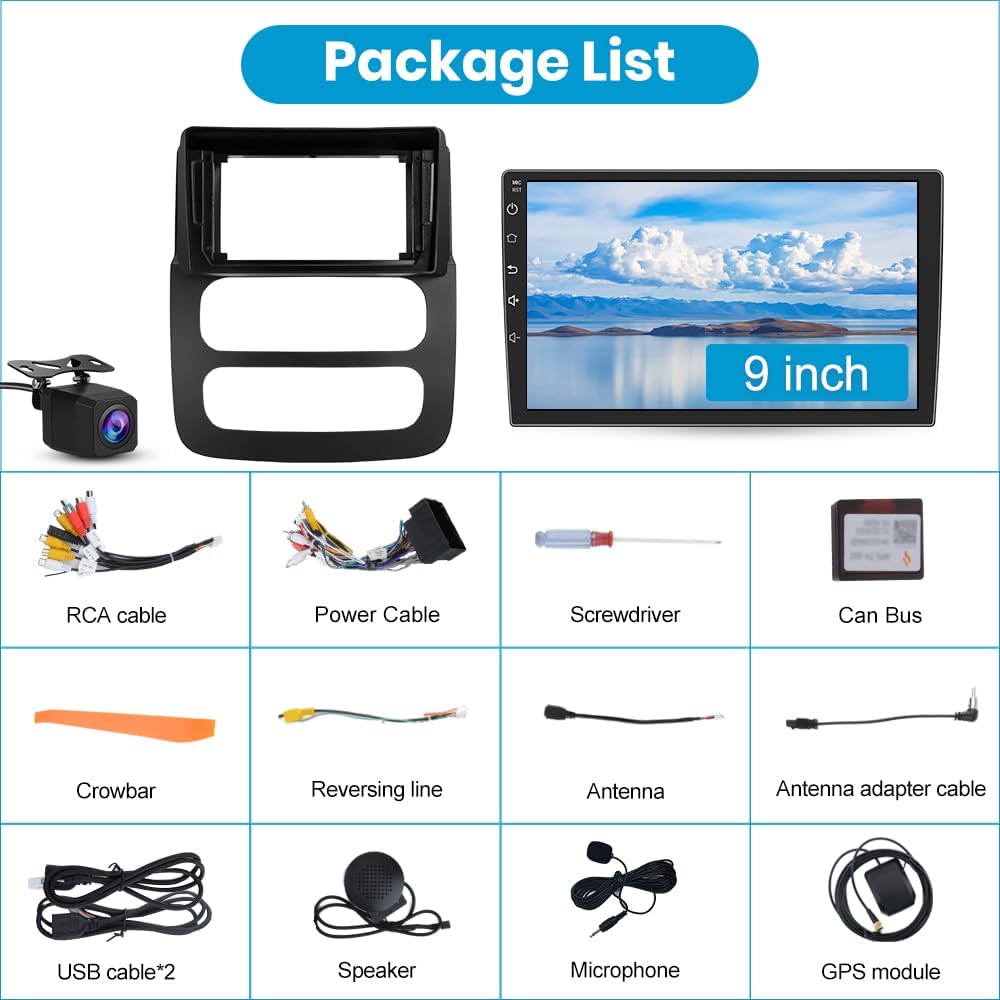
Afbeelding: Contents of the Junsun Car Radio Stereo package, including the main unit, wiring harnesses, tools, and accessories.
- Junsun autoradio (9-inch display)
- RCA-kabel
- Stroomkabel
- Schroevendraaier
- CAN-busmodule
- Koevoet (voor het verwijderen van bekleding)
- Omkerende lijn
- Antenne
- Antenne-adapterkabel
- USB-kabels (x2)
- Externe luidspreker
- Externe microfoon
- GPS-module
- Achteruitrijcamera
4. Installatie en installatie
4.1 Voertuigcompatibiliteit
This Junsun Car Radio Stereo is specifically designed for Dodge RAM models from 2002 to 2005.

Afbeelding: The Junsun Car Radio Stereo seamlessly integrated into the dashboard of a Dodge RAM 2002-2005.
4.2 Bedradingsschema
Raadpleeg onderstaand schema voor de juiste bedradingsaansluitingen. Zorg ervoor dat alle aansluitingen goed vastzitten voordat u het apparaat inschakelt.

Afbeelding: Comprehensive wiring diagram illustrating all necessary connections for the car radio stereo system.
- Stroomkabel: Connect to the vehicle's power harness. Ensure the ACC (accessory) wire receives power. Note: Some Dodge RAM 2002-2005 models may require custom splicing of the ACC wire (typically red) if the unit does not power on directly.
- RCA-kabel: For audio output, video input/output, and subwoofer connections.
- Canbus Cable: Connect for steering wheel controls and other vehicle data integration.
- USB-kabels: Connect for data transfer and charging.
- Radioantenne: Connect the included antenna for FM/AM reception.
- GPS-antenne: Monteer de GPS-module op een plek met vrij zicht. view van de hemel voor optimale signaalontvangst.
- Rear Camera Input (10Pin): Connect the backup camera. Important: The reverse trigger wire (often brown, pin three between radio and Canbus module) must be correctly connected to activate the camera when shifting into reverse.
4.3 Eerste inschakeling
After all connections are made, turn on your vehicle's ignition. The unit should power on automatically. If it does not, recheck all power connections, especially the ACC wire.

Afbeelding: Example of car radio plug and vehicle wiring harness. If your car plug matches this and there's no sound, a different power harness might be needed.
5. Gebruiksaanwijzing
5.1 Android 13-systeem
The unit runs on Android 13, providing a familiar smartphone-like interface. You can install and delete applications from the Application Store, similar to a smartphone.

Afbeelding: The main screen of the Android 13 operating system on the car stereo.
5.2 Draadloze CarPlay & Android Auto
Connect your iPhone or Android phone wirelessly or via USB to access navigation, music, messages, and more directly on the stereo display. This feature supports voice control for hands-free operation.
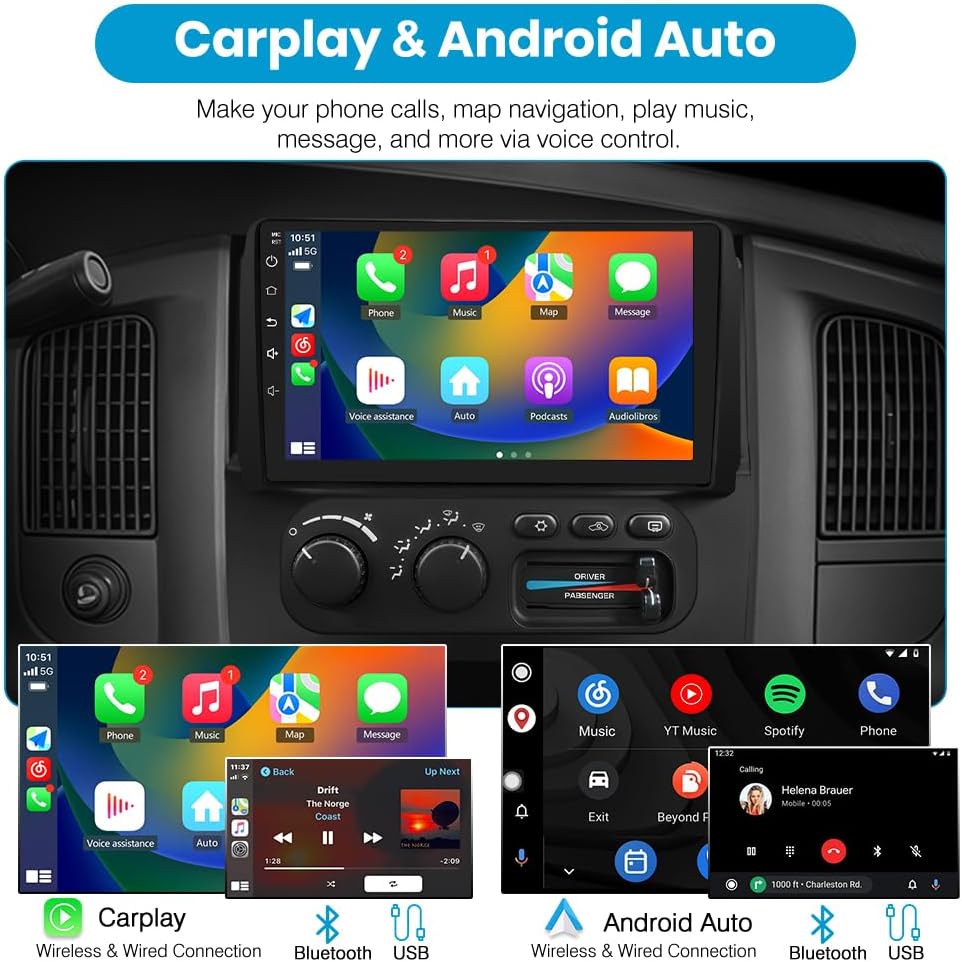
Afbeelding: Examples of CarPlay and Android Auto interfaces, demonstrating phone integration for navigation, music, and communication.
5.3 GPS-navigatie en wifi-verbinding
The unit supports online navigation applications. Connect to WiFi to download maps, receive real-time traffic updates, and access other online services. The 5GHz WiFi ensures faster data transmission.

Afbeelding: GPS navigation screen and a display of various applications accessible via WiFi connection.
5.4 Bluetooth-functionaliteit
Pair your phone via Bluetooth for hands-free calling and wireless music streaming. The external microphone ensures clear voice pickup during calls.
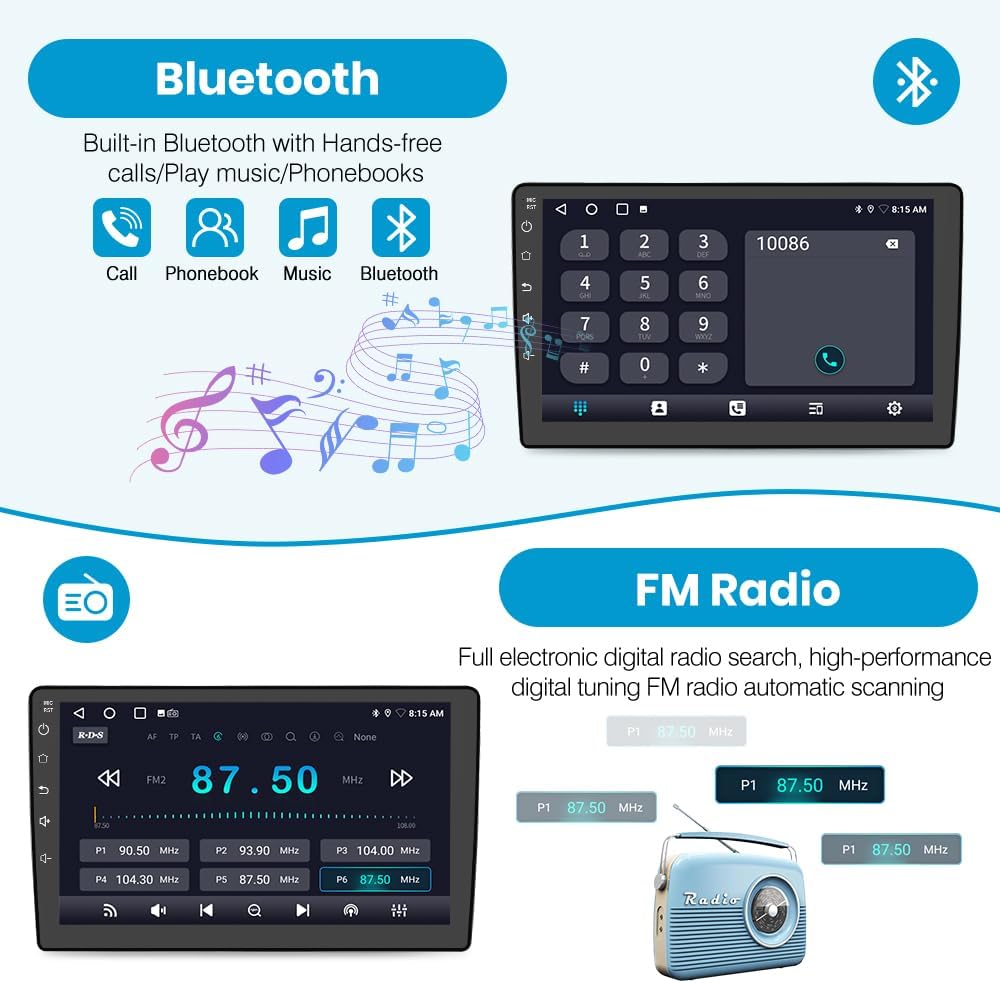
Afbeelding: Bluetooth interface showing phone call and music playback options.
5.5 FM/AM-radio
Access FM/AM radio stations with digital tuning. The unit supports automatic and manual station scanning, providing clear access to news, music, and weather broadcasts.

Afbeelding: FM radio interface showing frequency display and station presets.
5.6 Stuurwielbediening
Utilize your vehicle's existing steering wheel buttons to control the car radio, including volume adjustment, track changes, and call management. This enhances driving safety and convenience.

Afbeelding: Steering wheel control interface for programming and managing functions.
5.7 Achteruitrijcamera
The integrated backup camera provides real-time rear views on the display when the vehicle is in reverse, aiding in safer parking and maneuvering. The camera features a 170-degree wide-angle lens for full visibility.

Afbeelding: Achteruitrijcamera view displayed on the car radio screen, showing parking assist lines.
6. Onderhoud
- Schoonmaak: Gebruik een zachte, droge doek om het scherm en de buitenkant van het apparaat schoon te maken. Vermijd schurende reinigingsmiddelen of oplosmiddelen.
- Software-updates: Periodically check for software updates to ensure optimal performance and access to new features. Updates can typically be downloaded via WiFi.
- Omgevingsomstandigheden: Zorg ervoor dat het apparaat niet gedurende langere tijd wordt blootgesteld aan extreme temperaturen of direct zonlicht.
7. Probleemoplossing
| Probleem | Mogelijke oorzaak | Oplossing |
|---|---|---|
| Het apparaat wordt niet ingeschakeld. | Incorrect wiring, especially the ACC (accessory) wire. | Check all power connections. Ensure the ACC wire is receiving 12V when the ignition is on. For Dodge RAM 2002-2005, custom splicing of the ACC wire may be required. |
| Achteruitrijcamera wordt niet weergegeven. | Reverse trigger wire not connected or incorrectly connected. | Verify the reverse trigger wire (often brown, pin three) is correctly spliced and connected to the vehicle's reverse light signal. |
| No sound after installation. | Incompatible power harness or incorrect speaker wiring. | Ensure the power harness is compatible with your vehicle. Recheck all speaker connections. If the car plug matches the example in Section 4.3 and there's no sound, a different power harness might be needed. |
| Draadloos CarPlay/Android Auto maakt geen verbinding. | Bluetooth or WiFi issues, phone compatibility. | Ensure Bluetooth and WiFi are enabled on your phone and the stereo. Try restarting both devices. Check phone compatibility with CarPlay/Android Auto. |
8. Specificaties
- Model: 2+32GB
- Besturingssysteem: Androïde 13
- Weergavegrootte: 9 inch
- Oplossing: 1280*720
- Connectiviteit: Wireless CarPlay, Android Auto, Bluetooth, WiFi (5GHz supported)
- Navigatie: GPS (supports online maps)
- Radio: FM/AM with digital display
- Audio-uitgangsmodus: Stereo, DSP Sound System (36EQ)
- Speciale kenmerken: Steering Wheel Control, Backup Camera (170° wide-angle)
- Artikelgewicht: Ongeveer 4.66 pond (2.12 kilogram)
- Pakket afmetingen: 14.57 x 12.6 x 5.79 inch
9. Garantie-informatie
Deze Junsun autoradio wordt geleverd met een 1 jaar fabrieksgarantie from the date of purchase. This warranty covers defects in materials and workmanship under normal use. It does not cover damage caused by improper installation, accident, misuse, abuse, neglect, or unauthorized modification. Please retain your proof of purchase for warranty claims.
10. Klantenservice
For technical assistance, troubleshooting, or warranty inquiries, please contact Junsun Customer Support:
- E-mailadres: Junsun-US@outlook.com
- Please provide your product model and purchase details when contacting support.

Afbeelding: Junsun Customer Support contact information.