
1. Inleiding
The Auronic Electric Air Dehumidifier AU3270 is designed to effectively remove excess moisture from indoor environments, helping to prevent mold growth and maintain a healthy humidity level. This appliance is suitable for spaces up to 15 square meters and can extract up to 10 liters of moisture per day. This manual provides essential information for the safe and efficient use of your dehumidifier.

Image: The Auronic Electric Air Dehumidifier AU3270 positioned in a living room, illustrating its compact design and 10-liter daily capacity for optimal dehumidification.
2. Veiligheidsinstructies
Lees alle veiligheidsinstructies zorgvuldig door voordat u het apparaat gebruikt, om letsel of schade te voorkomen.
- Zorg ervoor dat de voeding voltage komt overeen met het classificatielabel op de luchtontvochtiger.
- Gebruik de luchtontvochtiger niet met een beschadigd netsnoer of een beschadigde stekker.
- Houd het apparaat uit de buurt van warmtebronnen, direct zonlicht en brandbare materialen.
- Blokkeer de luchtinlaat of -uitlaat niet. Houd minimaal 20 cm vrije ruimte rondom het apparaat.
- Plaats de luchtontvochtiger altijd op een stabiele, vlakke ondergrond om te voorkomen dat er water gemorst wordt.
- Haal de stekker uit het stopcontact voordat u het apparaat schoonmaakt, onderhoudt of wanneer u het gedurende langere tijd niet gebruikt.
- Dompel het apparaat, het netsnoer en de stekker niet onder in water of andere vloeistoffen.
- Dit apparaat is niet bedoeld voor gebruik door personen (inclusief kinderen) met beperkte fysieke, sensorische of mentale vermogens, of met een gebrek aan ervaring en kennis, tenzij zij onder toezicht staan of instructies hebben gekregen over het gebruik van het apparaat door een persoon die verantwoordelijk is voor hun veiligheid.
- Kinderen moeten onder toezicht staan om ervoor te zorgen dat ze niet met het apparaat spelen.
3. Instellen
3.1 Uitpakken en verpakkingsinhoud
Carefully remove the dehumidifier from its packaging. Check that all components are present and undamaged. The package typically includes the dehumidifier unit, a drainage hose, and this user manual.

Image: Contents of the Auronic Dehumidifier package, displaying the main unit, continuous drainage hose, and user manual, along with key product dimensions.
3.2 Plaatsing
Place the dehumidifier on a firm, level surface in the desired location. Ensure there is at least 20 cm of free space around the air inlet and outlet for optimal airflow. The unit is effective for rooms up to 15 square meters. Avoid placing it in direct sunlight or near heat-emitting appliances.
3.3 Stroomaansluiting
Plug the power cord into a grounded electrical outlet. Ensure the outlet meets the power requirements specified on the appliance's rating label.
3.4 Drainage-opties
De luchtontvochtiger biedt twee afvoermogelijkheden:
- Waterreservoir: The unit collects condensed water in its internal 2-liter water tank. The appliance will automatically stop operating when the tank is full, and an indicator will illuminate.
- Continue drainage: For uninterrupted operation, attach the included drainage hose to the continuous drainage port on the back of the unit. Route the hose to a suitable drain or larger container, ensuring it is sloped downwards to allow water to flow freely by gravity.
4. Gebruiksaanwijzing
4.1 Configuratiescherm voorbijview
The dehumidifier features an intuitive digital LED display and control buttons for easy operation.
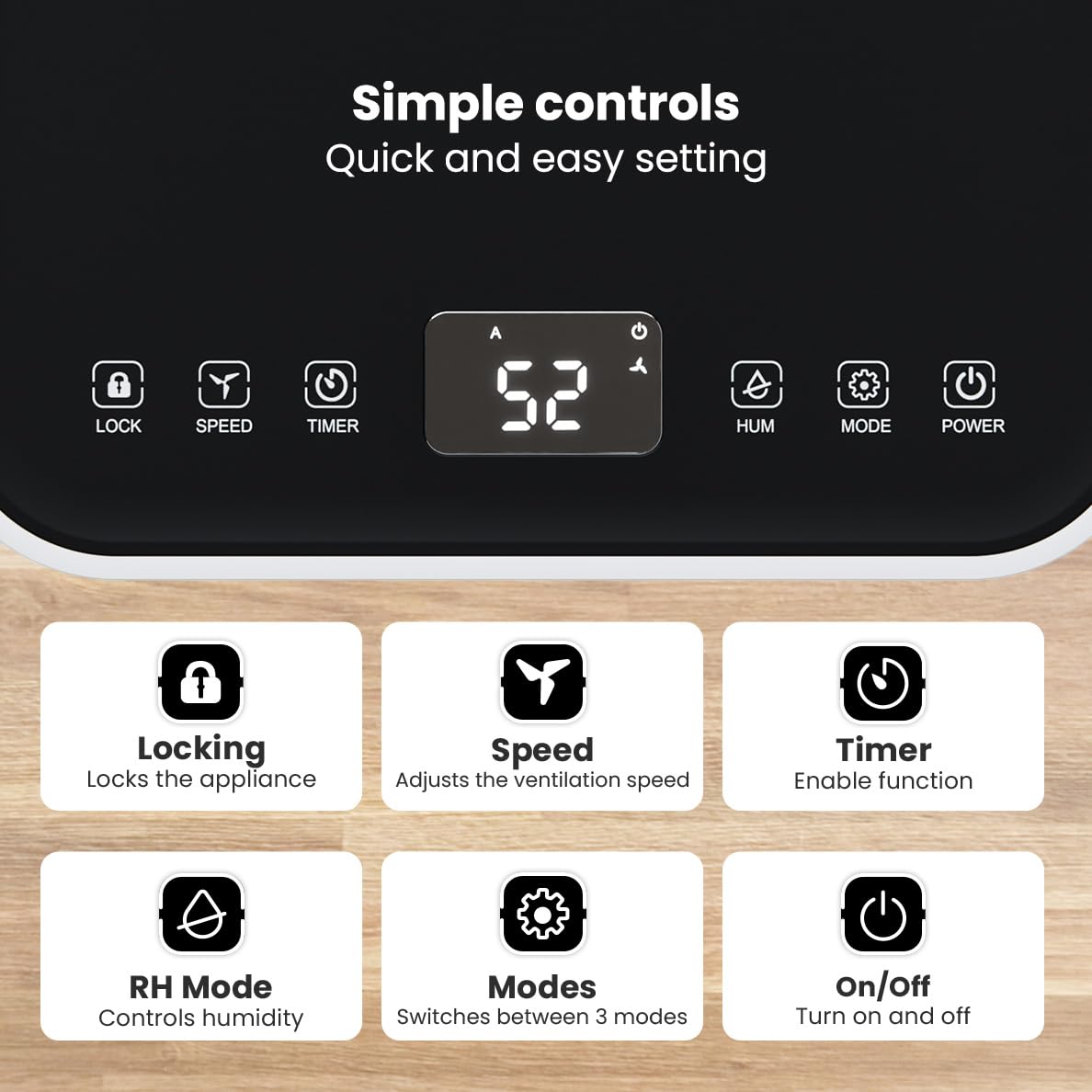
Afbeelding: Gedetailleerd view of the dehumidifier's control panel, highlighting each button's function for easy setting adjustments.
- Aanknop (⏻): Schakelt het apparaat in of uit.
- Modusknop (⚙): Switches between the three operating modes: Automatic, Continuous, and Quiet.
- RH Mode Button (💧): Controls the desired relative humidity level. Press to set the target humidity.
- Timerknop (⏱): Enables the timer function for scheduled operation.
- Snelheidsknop (⇋): Adjusts the ventilation speed (fan speed).
- Vergrendelknop (🔒): Vergrendelt het bedieningspaneel om onbedoelde wijzigingen te voorkomen.
4.2-bedrijfsmodi
Press the Mode button to cycle through the available operating modes:
- Automatische modus: The device automatically adjusts its operation based on the current room humidity to maintain a comfortable level.
- Continue modus: Ideaal voor zeer damp environments like wet basements. The dehumidifier operates continuously regardless of the humidity level until the water tank is full or continuous drainage is active.
- Stille modus: Designed for night-time use or in areas where low noise is preferred. The dehumidifier operates at a reduced fan speed, ensuring a peaceful environment with a noise level below 36dB.

Image: A chart comparing the noise level of the Auronic Dehumidifier (42dB) to common sounds like breathing, whispering, and loud conversation, highlighting its quiet operation.
4.3 Humidity Sensor and Display
The integrated humidity sensor monitors the room's humidity level, which is displayed on the digital screen. The color of the display indicates the current humidity status:
- Blauw: Humidity level is below 45%.
- Groente: Humidity level is between 45% and 64%.
- Rood: Humidity level is above 65%.
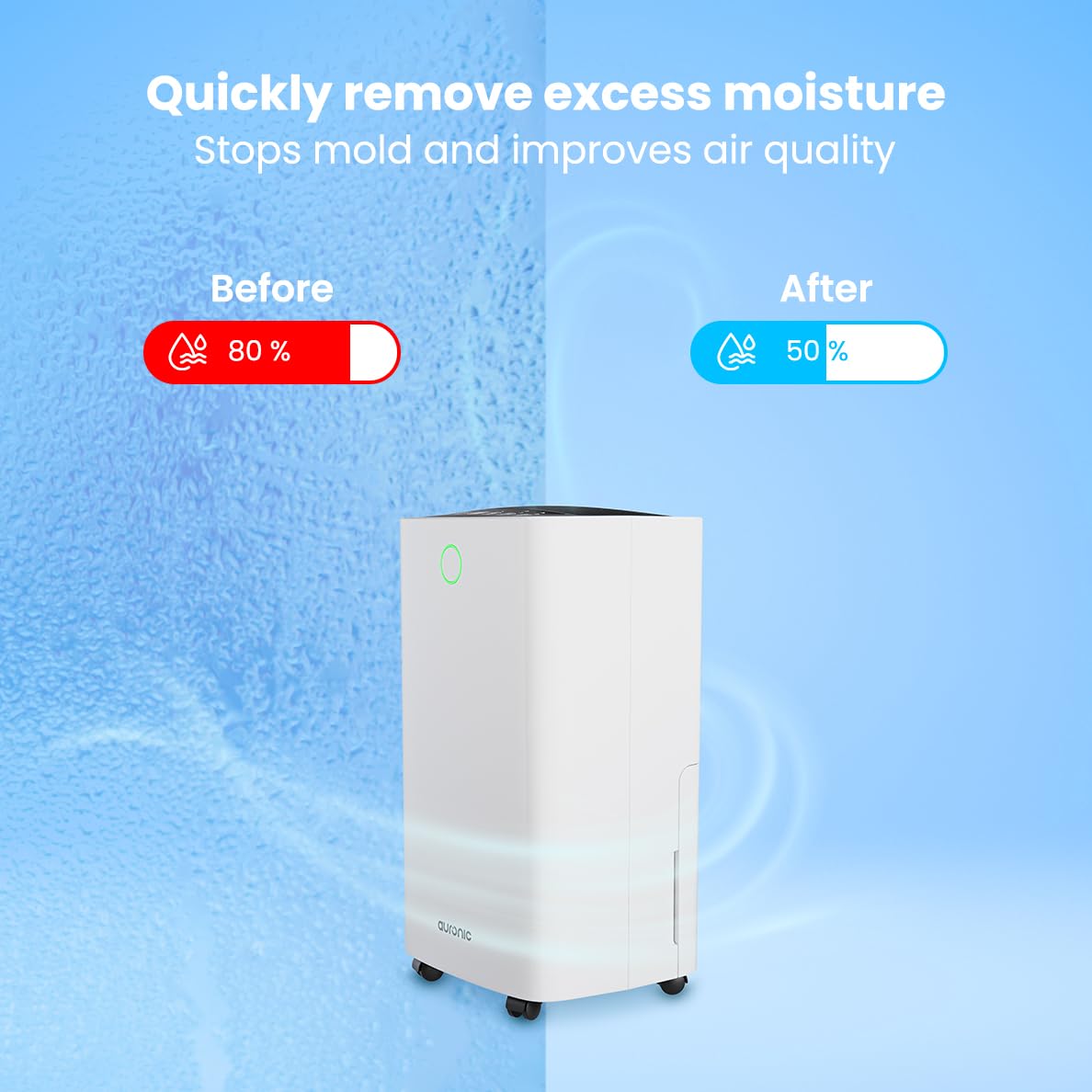
Image: A visual representation demonstrating the dehumidifier's effectiveness, showing a reduction in humidity from 80% to 50% in a room.
4.4 Laundry Drying Function
The Auronic dehumidifier includes a laundry drying function to assist in reducing the drying time of clothes, sheets, and towels. Place the appliance in your laundry room or near drying clothes to utilize this feature, which helps to remove moisture from the air and accelerate the drying process.

Image: The dehumidifier in a bathroom setting, demonstrating its ability to extract up to 10 liters of moisture and its suitability for rooms up to 15 square meters, alongside its intelligent humidity meter, wash-dry function, and silent operation.
5. Onderhoud
Regelmatig onderhoud zorgt ervoor dat uw luchtontvochtiger lang meegaat en efficiënt blijft werken.
5.1 Het waterreservoir legen
When the water tank is full, the dehumidifier will stop operating, and an indicator light will turn on. Carefully pull out the water tank from the unit, empty the collected water, and then reinsert the tank firmly until it clicks into place. Ensure the tank is properly seated to resume operation.
5.2 Het luchtfilter reinigen
The air filter should be cleaned regularly (e.g., every two weeks or as needed) to maintain optimal performance. A dirty filter can reduce efficiency and increase energy consumption.
- Haal de stekker van de luchtontvochtiger uit het stopcontact.
- Zoek het luchtfilter en verwijder het (meestal aan de achterkant of zijkant van het apparaat).
- Clean the filter using a vacuum cleaner to remove dust and debris. For heavily soiled filters, wash gently with lukewarm water and a mild detergent.
- Allow the filter to air dry completely before reinserting it into the dehumidifier.
5.3 Algemene reiniging en opslag
Veeg de buitenkant van de luchtontvochtiger schoon met een zachte, damp cloth. Do not use abrasive cleaners or solvents. For long-term storage, ensure the water tank is empty and clean, the filter is clean and dry, and the unit is unplugged. Store the dehumidifier in a cool, dry place, preferably in its original packaging.
6. Probleemoplossing
Als u problemen ondervindt met uw luchtontvochtiger, raadpleeg dan de volgende veelvoorkomende problemen en oplossingen:
| Probleem | Mogelijke oorzaak | Oplossing |
|---|---|---|
| Luchtontvochtiger gaat niet aan. | Geen stroomvoorziening; netsnoer niet aangesloten; aan/uit-knop niet ingedrukt. | Check power connection; Ensure outlet is functional; Press the Power button. |
| Geen wateropvang of lage ontvochtiging. | Room temperature too low; Humidity level already low; Air filter clogged; Air inlet/outlet blocked; Water tank not properly inserted. | Ensure room temperature is above 5°C; Check current humidity; Clean the air filter; Clear any obstructions; Reinsert water tank correctly. |
| Eenheid maakt lawaai. | Het apparaat staat niet op een vlakke ondergrond; het luchtfilter is verstopt; interne onderdelen trillen. | Place on a stable, level surface; Clean the air filter; If noise persists, contact customer support. |
| Indicator voor volle watertank brandt, maar de tank is niet vol. | Float switch malfunction; Water tank not properly seated. | Remove and reinsert the water tank; Check float switch for obstructions. |
| Er wordt een foutcode weergegeven op het display. | Internal sensor error or malfunction. | Haal de stekker van het apparaat 5 minuten uit het stopcontact en steek hem er vervolgens weer in. Als het probleem zich blijft voordoen, neem dan contact op met de klantenservice. |
7. Specificaties
Technical specifications for the Auronic Electric Air Dehumidifier AU3270:
| Functie | Detail |
|---|---|
| Merk | Auronisch |
| Modelnaam | AU3270 |
| Capaciteit | 10 liter/dag |
| Capaciteit watertank | 2 liter |
| Dekking van vloeroppervlak | Up to 15 m² (150000 Square Centimeters) |
| Wattage | 185 Watt |
| Productafmetingen (D x B x H) | 50D x 30.5B x 26.5H centimeter |
| Artikelgewicht | 10 kilogram |
| Kleur | Wit |
| Geluidsniveau | Below 36dB (in Quiet Mode) |
8. Garantie en ondersteuning
8.1 Garantie-informatie
Your Auronic Electric Air Dehumidifier AU3270 comes with a standard manufacturer's warranty. Please refer to the warranty card included in your package for specific terms, conditions, and duration. Keep your proof of purchase for warranty claims.
8.2 Klantenservice
For any questions, technical assistance, or warranty claims, please contact Auronic customer support. Contact details can typically be found on the product packaging, the official Auronic webwebsite of de garantiekaart.