
TechGlow L40
TechGlow Foldable Cellphone Stand with Bluetooth Speaker Power Bank L40 User Manual
Model: L40
Invoering
The TechGlow L40 is a versatile 3-in-1 device designed to enhance your mobile experience. It functions as a foldable cellphone stand, a Bluetooth speaker, and a portable power bank. This manual provides detailed instructions for setup, operation, and maintenance to ensure optimal performance of your device.

Image: The TechGlow L40 device highlighting its three core functions: cellphone stand, Bluetooth speaker, and power bank.
Wat zit er in de doos?
Controleer de inhoud van het pakket bij het uitpakken:
- Rotatable phone stand with speaker and power bank (TechGlow L40)
- Data charging cable (USB-A to USB-C)
- Gebruiksaanwijzing
Product voorbijview
Familiarize yourself with the components and controls of your TechGlow L40 device.
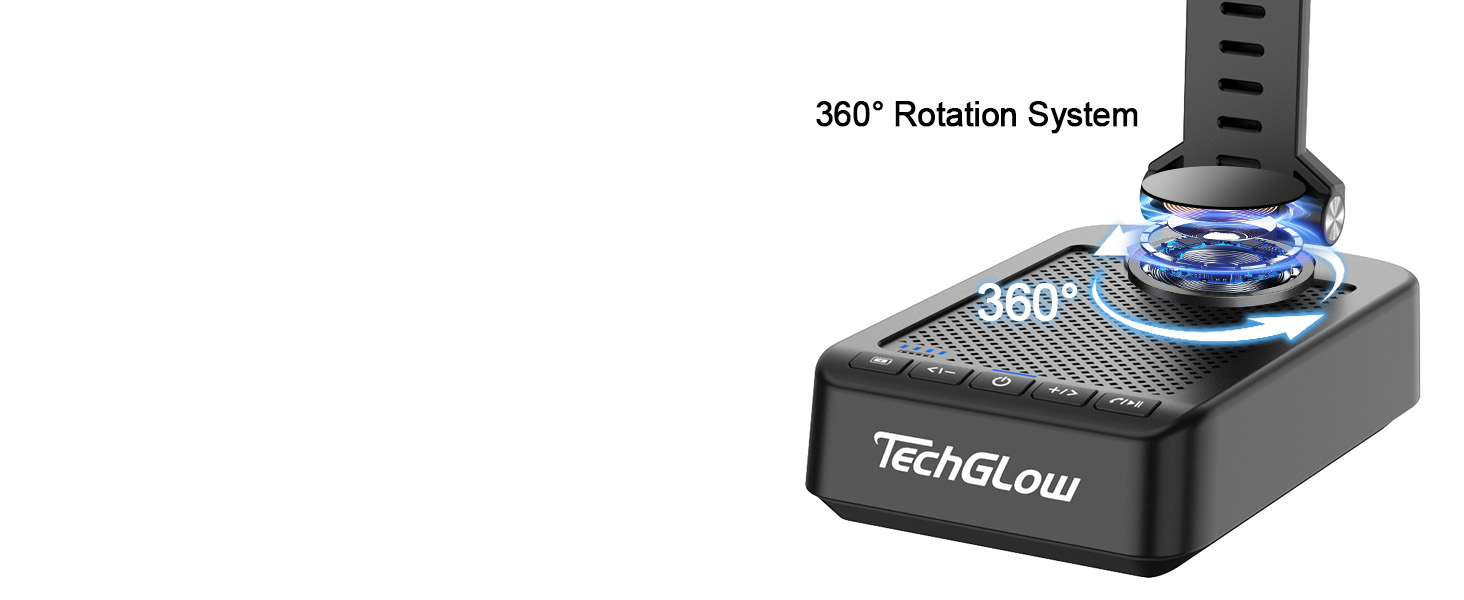
Image: Detailed diagram showing the control buttons and physical dimensions of the TechGlow L40.
- Weergave batterijcapaciteit: Indicates remaining power.
- Volume omhoog / Volgende nummer-knop: Kort indrukken om het volume te verhogen, lang indrukken om het volgende nummer te volgen.
- Aan / uit-knop: Houd ingedrukt om in of uit te schakelen.
- Knop Volume omlaag / Vorig nummer: Kort indrukken om het volume te verlagen, lang indrukken om het vorige nummer te halen.
- Play/Pause / Answer/Hang Off Button: Controls media playback and call functions.
- AUX-ingang: Voor bekabelde audioverbinding.
- USB-A-uitgang: Voor het opladen van externe apparaten (powerbankfunctie).
- USB-C-ingang: For charging the TechGlow L40 device.

Image: Illustration demonstrating the 360-degree rotation capability of the phone stand for flexible viewhoeken.
Instellen
1. Charging the TechGlow L40
Before first use, fully charge your device. Connect the provided USB-A to USB-C charging cable to the USB-C input port on the TechGlow L40 and the other end to a USB power adapter (not included).
- The battery capacity display will show charging progress.
- Het volledig opladen duurt meestal enkele uren.
2. Bluetooth-koppeling
To connect your smartphone or tablet to the TechGlow L40 via Bluetooth:
- Power on the TechGlow L40 by pressing and holding the Power On/Off button.
- The device will enter Bluetooth pairing mode, indicated by a flashing light or audio prompt.
- Ga op uw mobiele apparaat naar de Bluetooth-instellingen en zoek naar beschikbare apparaten.
- Select "TechGlow L40" from the list to pair.
- Zodra de apparaten gekoppeld zijn, hoort u een bevestigingsgeluid en gaat het indicatielampje continu branden.

Image: A smartphone displaying its Bluetooth settings, ready to connect to the "TechGlow L40" device.
3. De standaard afstellen
The stand offers multiple adjustment options for optimal viewind:
- Hoogteverstelling: Gently pull the extendable arm upwards to increase the height.
- Hoekverstelling: Tilt the phone holder up or down to achieve your desired viewhoek.
- 360° rotatie: The base of the phone holder can rotate 360 degrees, allowing for both portrait and landscape orientations.
- Opvouwbaar ontwerp: For portability, the stand can be folded compactly.

Image: The TechGlow L40 stand demonstrating its adjustable height, angle, and 360-degree rotation features.
Gebruiksaanwijzing
1. Using as a Phone/Tablet Stand
Place your smartphone or tablet (4-13 inches) securely onto the adjustable holder. Adjust the height and angle as needed for comfortable viewind.

Image: The TechGlow L40 stand supporting both a smartphone and a tablet, illustrating its broad compatibility.
2. Using the Bluetooth Speaker
Eenmaal gekoppeld met uw apparaat:
- Afspelen/Pauzeren: Press the Play/Pause button (5) to start or stop audio playback.
- Volumeregeling: Short press the Volume Up (2) or Volume Down (4) buttons to adjust the volume.
- Tracknavigatie: Long press the Volume Up (2) button for the next track, and long press the Volume Down (4) button for the previous track.
3. Handsfree bellen
When connected via Bluetooth, you can manage calls directly from the device:
- Beantwoord oproep: Press the Play/Pause/Answer/Hang Off button (5) once to answer an incoming call.
- Einde gesprek: Press the Play/Pause/Answer/Hang Off button (5) once to end an active call.
- Oproep afwijzen: Press and hold the Play/Pause/Answer/Hang Off button (5) to reject an incoming call.

Image: A user engaged in a hands-free video call, with their phone mounted on the TechGlow L40 stand, illustrating its convenience for communication.
4. De powerbankfunctie gebruiken
The TechGlow L40 features a built-in 5000mAh power bank to charge your external devices.
- Connect your device's charging cable to the USB-A output port (7) on the TechGlow L40.
- Connect the other end of the cable to your smartphone, tablet, or other compatible USB-powered device.
- Het opladen begint automatisch.
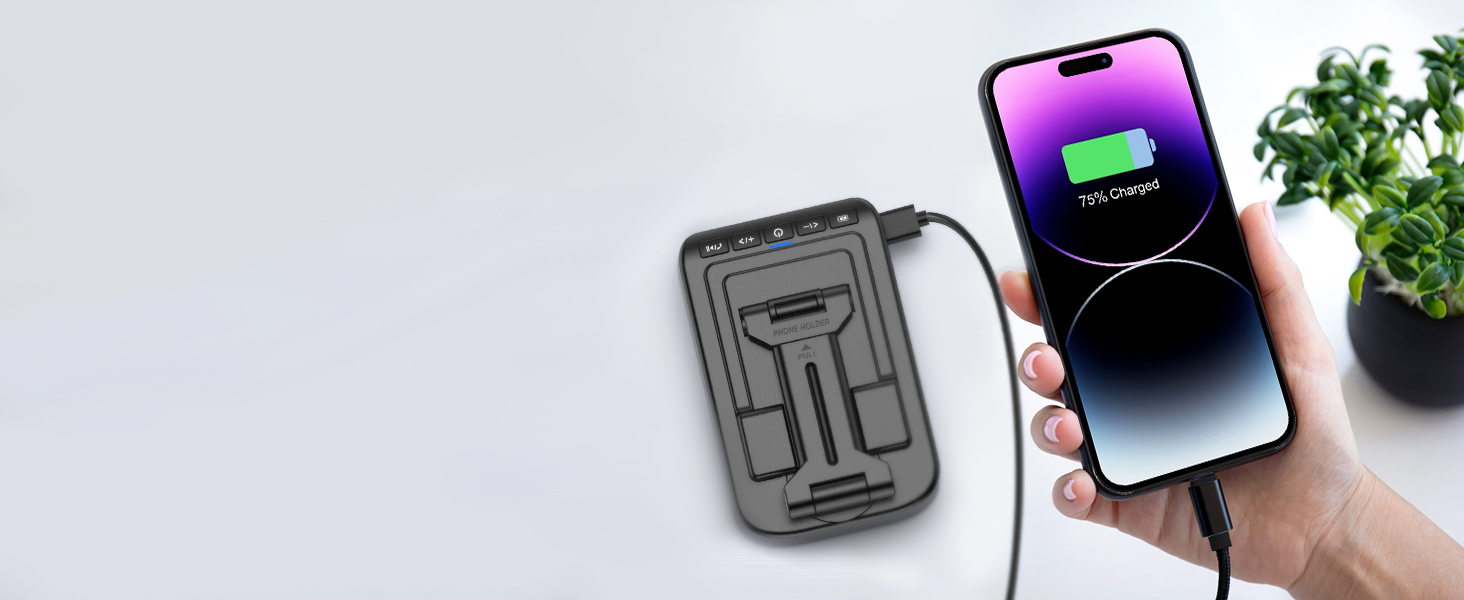
Image: A smartphone connected to the TechGlow L40, demonstrating its power bank functionality to charge external devices.

Image: The TechGlow L40 in an outdoor setting, charging a smartphone, emphasizing its utility as a portable power bank.
5. AUX-aansluiting
For devices without Bluetooth or for a wired audio connection, use the AUX input port (6).
- Connect a 3.5mm audio cable (not included) from your audio source to the AUX input port on the TechGlow L40.
- The device will automatically switch to AUX mode.
Onderhoud
To ensure the longevity and optimal performance of your TechGlow L40:
- Houd het apparaat droog en uit de buurt van vocht.
- Clean with a soft, dry cloth. Avoid abrasive cleaners or solvents.
- Niet blootstellen aan extreme temperaturen.
- Wanneer u het niet gebruikt, bewaar het dan op een koele, droge plaats.
- Zorg ervoor dat u het apparaat niet laat vallen en blootstelt aan sterke schokken.
Probleemoplossing
| Probleem | Mogelijke oorzaak | Oplossing |
|---|---|---|
| Apparaat gaat niet aan. | Batterij bijna leeg. | Laad het apparaat volledig op met de meegeleverde USB-C-kabel. |
| Koppelen via Bluetooth is niet mogelijk. | Bluetooth not enabled on mobile device; device too far; already paired to another device. | Ensure Bluetooth is on and the device is within range (approx. 10 meters). Disconnect from other devices. Restart both devices. |
| Er komt geen geluid uit de luidspreker. | Volume too low; device not paired; AUX cable not connected properly. | Increase volume on both the TechGlow L40 and your connected device. Ensure successful Bluetooth pairing or proper AUX connection. |
| De powerbank laadt het externe apparaat niet op. | Low battery on TechGlow L40; incorrect cable/port. | Ensure the TechGlow L40 is sufficiently charged. Use the correct USB-A output port and a functional charging cable for your external device. |
Specificaties
| Functie | Detail |
|---|---|
| Modelnummer | L40 |
| Productafmetingen | 6.1 x 3.86 x 2.17 inch |
| Artikelgewicht | 14 ons |
| Batterijtype | 1 lithium-ionbatterij (meegeleverd) |
| Powerbank-capaciteit | 5000mAh |
| Bluetooth-bereik | Tot 10 meter (33 voet) |
| Afspeeltijd | Tot 40 uur (bij 50% volume) |
| Compatibele apparaten | Smartphones (4-13"), Tablets, Laptops, Desktops (via AUX) |
| Connectiviteit | Bluetooth, AUX |
Garantie en ondersteuning
TechGlow products are designed and manufactured to the highest quality standards. For warranty information, technical support, or customer service inquiries, please refer to the contact information provided on the product packaging or visit the official TechGlow webplaats.
Bewaar uw aankoopbewijs voor garantieclaims.
Ask a question about this manual
Ask about setup, troubleshooting, compatibility, parts, safety, or missing instructions. Manuals+ will review the question and use this page’s manual context to help answer it.