1. Product voorbijview
The farexon Electric Standing Desk is an adjustable height workstation designed for home and office environments. It features an electric lifting system, allowing seamless transitions between sitting and standing positions. The desk includes memory presets for convenient height adjustments and is equipped with features to enhance user experience and safety.

Image 1.1: The farexon Electric Standing Desk in a typical office setup, showcasing its spacious black tabletop, dual monitor support, and integrated cable management features. The desk is shown with its included caster wheels and non-slip foot pads.
2. Veiligheidsinformatie
Lees alle veiligheidsinstructies zorgvuldig door vóór montage en gebruik om letsel of schade aan het product te voorkomen.
- Antibotsingstechnologie: The desk is equipped with an anti-collision system. If the desk encounters an obstacle during height adjustment, it will automatically reverse direction to prevent damage or injury.
- Materiaalveiligheid: The desk materials meet U.S. federal and state safe air standards, with significant reductions in formaldehyde and other VOC emissions.
- Oververhittingsbeveiliging: The motor includes overheating protection to ensure safe operation.
- Kinderslot: The control panel may feature a child lock function to prevent unintended adjustments. Refer to the operating section for details.
- Keep hands and objects clear of the lifting mechanism during operation.
- Do not overload the desk beyond its specified weight capacity.
- Zorg ervoor dat alle kabels goed georganiseerd zijn om te voorkomen dat ze in de knoop raken tijdens het verstellen van de hoogte.
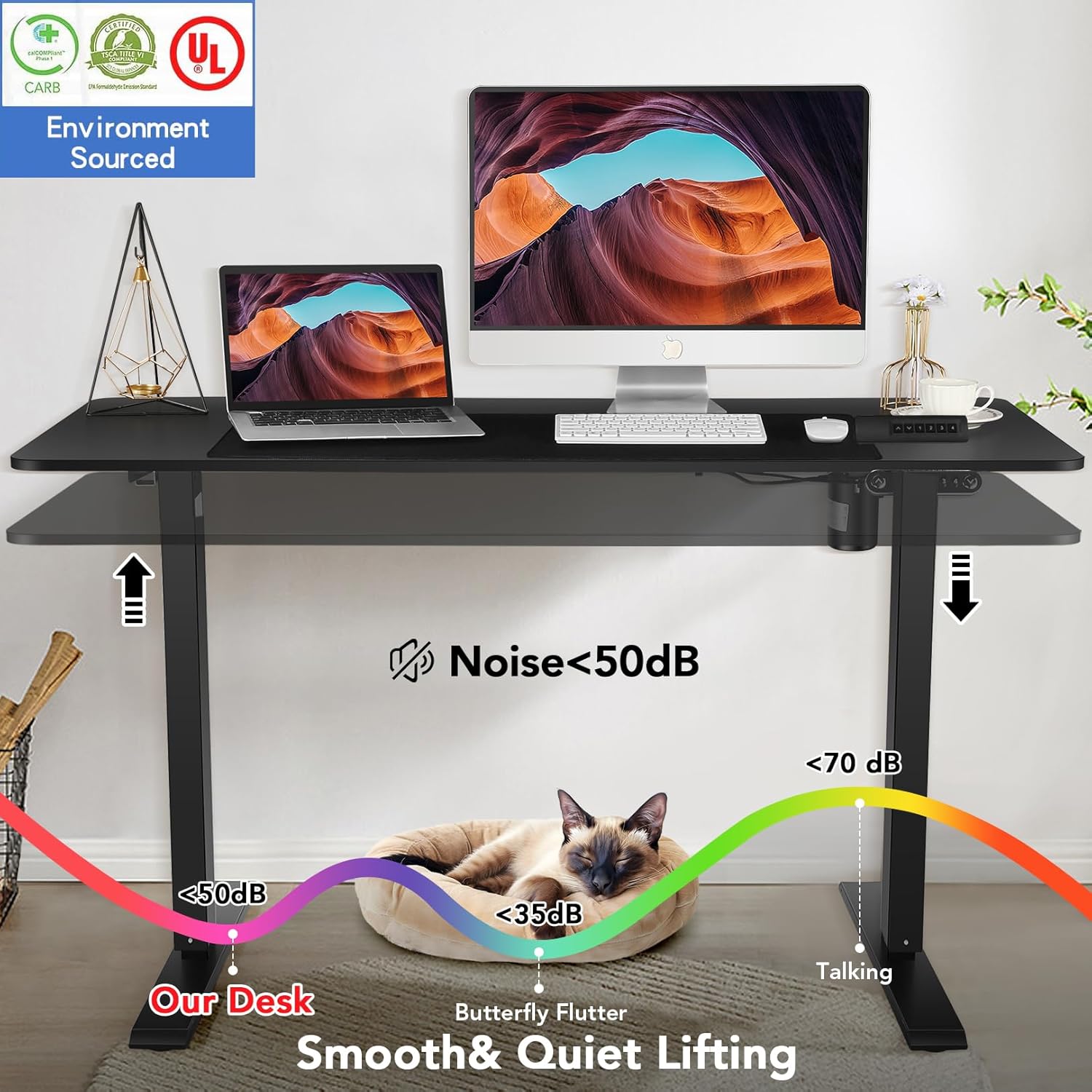
Image 2.1: Illustration demonstrating the low noise level (below 50dB) of the desk's lifting mechanism, ensuring a quiet working environment.
3. Kenmerken
The farexon Electric Standing Desk is designed with several key features for optimal functionality and user comfort:
- In hoogte verstelbaar: Electric lifting range from 27 inches to 46 inches.
- Geheugenpresets: Four programmable memory buttons to save preferred sitting and standing heights.
- Ruim bureaublad: Large 48" x 24" tabletop provides ampde werkruimte.
- Duurzame constructie: Supported by a sturdy metal frame and a thickened desktop board.
- Mobility Options: Includes 4 caster wheels for easy movement and 4 non-slip heightening foot pads for stationary use.
- Kabelbeheer: Two cord retraction holes to keep cables organized.
- Accessoirehaken: Two metal hooks for hanging headphones or other items.
- Waterproof Tabletop: The desktop surface is water and wear-resistant.
- Protective Edge: Designed with a protective edge for durability and safety.
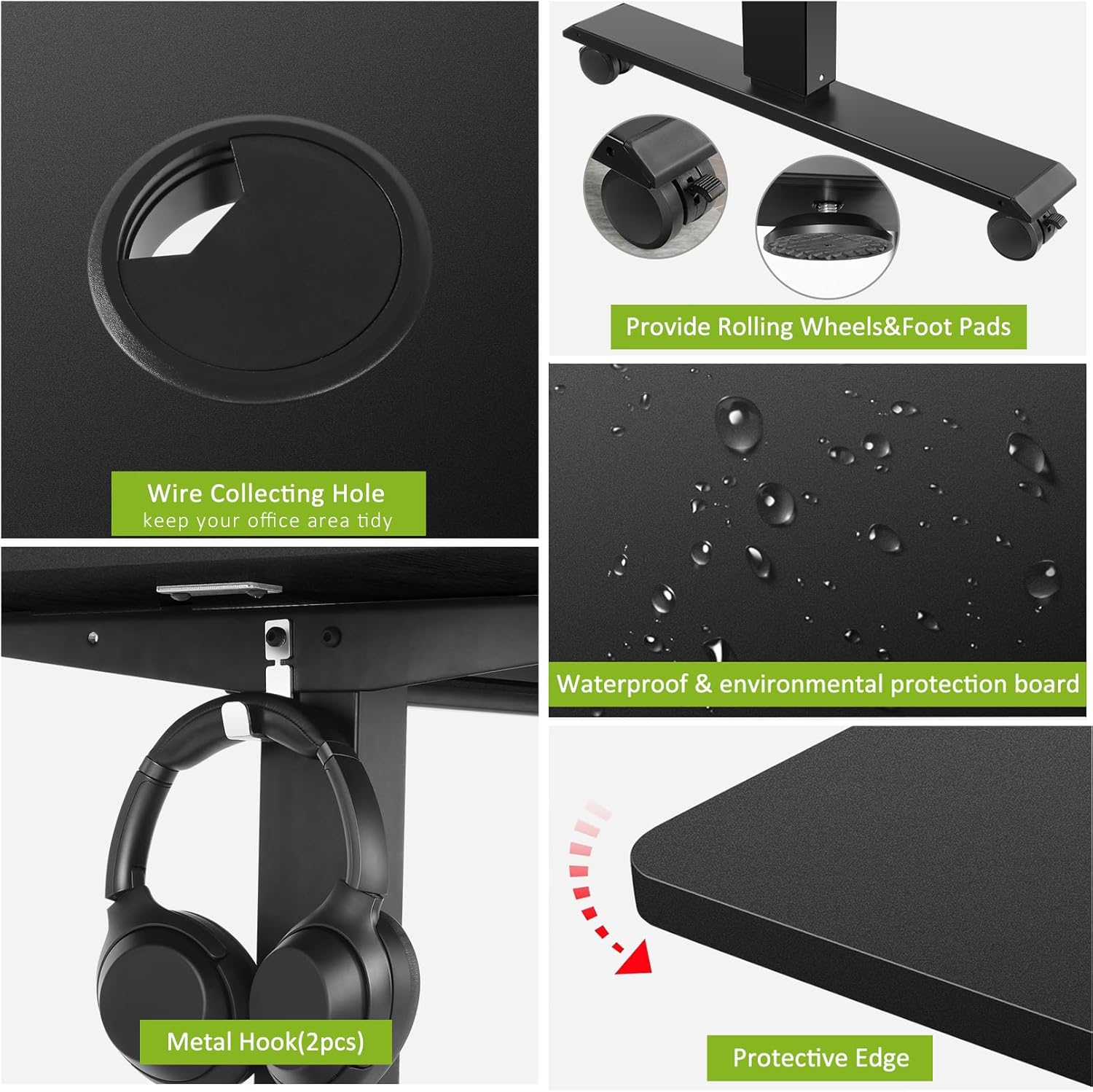
Afbeelding 3.1: Gedetailleerd view of key desk features including the wire collecting hole, interchangeable rolling wheels and non-slip foot pads, the waterproof tabletop surface, and the protective edge design.
4. Opstelling en montage
Assembly of the farexon Electric Standing Desk is designed to be straightforward. All necessary assembly tools are included with the product.
4.1 Uitpakken en inspectie
- Haal alle onderdelen voorzichtig uit de verpakking.
- Verify that all parts listed in the assembly manual are present and undamaged.
- Plaats de onderdelen op een zachte, schone ondergrond om krassen tijdens de montage te voorkomen.
4.2 Montagestappen
Follow the detailed step-by-step instructions provided in the included assembly manual. Key steps typically include:
- Attaching the lifting columns to the desktop.
- Securing the foot supports to the lifting columns.
- Installing the control box and connecting the motor cables.
- Mounting the control panel.
- Attaching the caster wheels or non-slip foot pads as desired.
- Installing the accessory hooks and cable management grommets.
It is recommended to have assistance during certain assembly steps due to the weight of some components.
5. Gebruiksaanwijzing
The farexon Electric Standing Desk features an intuitive control panel for easy height adjustment and memory functions.
5.1 Configuratiescherm voorbijview
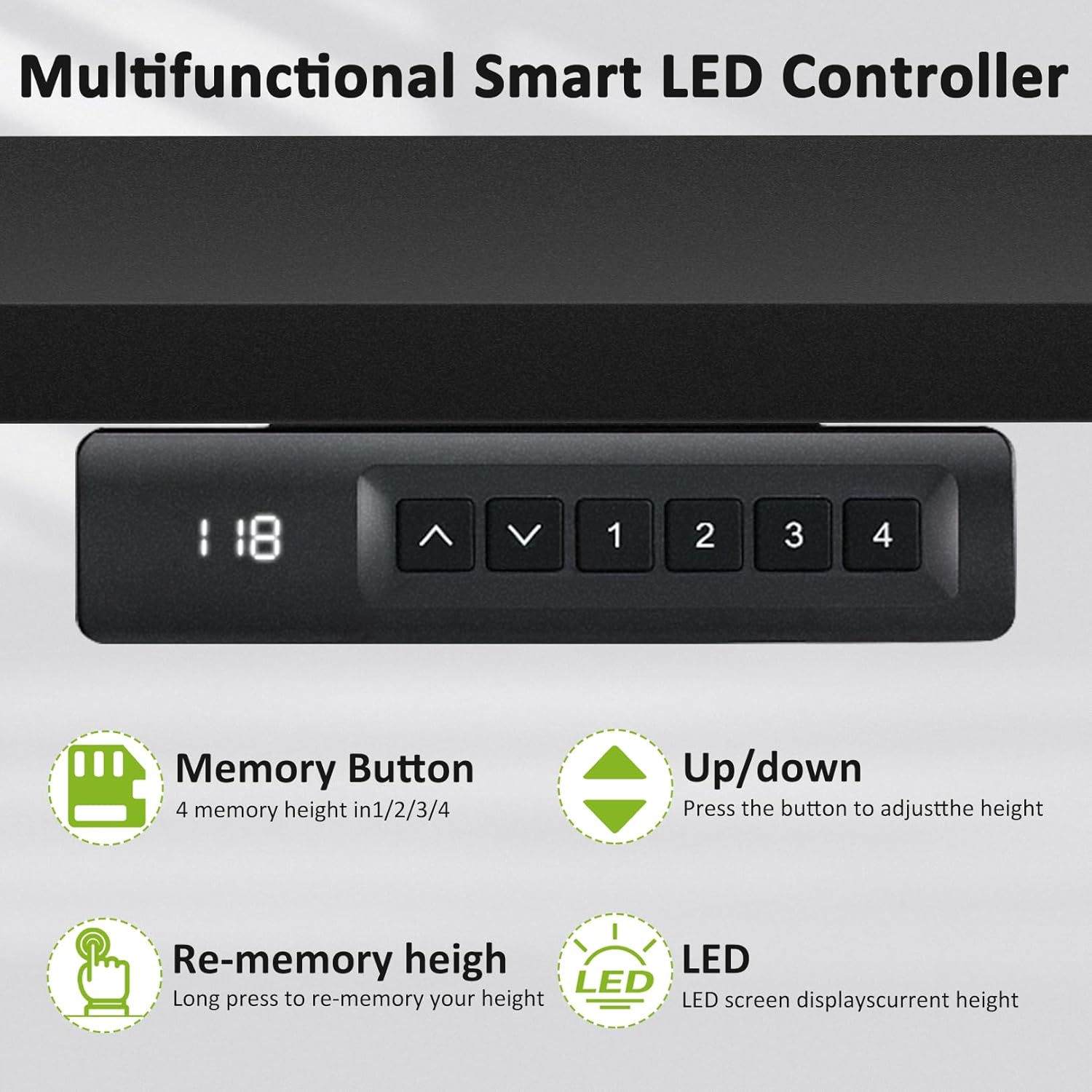
Image 5.1: The multifunctional smart LED controller, showing the LED display for current height, up/down buttons, and four memory preset buttons (1, 2, 3, 4).
- Led scherm: Geeft de huidige hoogte van het bureau in inches weer.
- Omhoog/omlaag-knoppen (▲ / ▼): Press to adjust the desk height incrementally.
- Geheugenknoppen (1, 2, 3, 4): Hiermee kunt u uw voorkeurshoogte-instellingen opslaan en oproepen.
5.2 Hoogte aanpassen
- Houd de Omhoog (▲) or Omlaag (▼) button to move the desk to your desired height.
- Release the button when the desk reaches the desired position. The LED display will show the current height.
5.3 Geheugenvoorinstellingen instellen
You can save up to four preferred height settings:
- Adjust the desk to the desired height using the Up/Down buttons.
- Press and hold one of the memory buttons (1, 2, 3, or 4) until the LED display flashes or indicates that the height has been saved.
- Om een opgeslagen hoogte op te roepen, drukt u eenvoudig op de bijbehorende geheugenknop (1, 2, 3 of 4). Het bureau beweegt dan automatisch naar de opgeslagen positie.
5.4 Anti-Collision Sensitivity
The anti-collision system is active during height adjustments. If the desk encounters an obstruction, it will stop and reverse slightly. There is no user adjustment for sensitivity.

Image 5.2: A user demonstrating the standing position at the farexon electric desk, highlighting its ergonomic benefits for a healthy lifestyle.
6. Onderhoud
Regular maintenance ensures the longevity and optimal performance of your farexon Electric Standing Desk.
- Schoonmaak: Veeg het bureaubladoppervlak af met een zachte, droge doek.amp cloth. Avoid abrasive cleaners or harsh chemicals that could damage the finish. For the metal frame, use a dry or slightly damp lap.
- Kabelbeheer: Periodically check and reorganize cables to prevent tangling or damage during height adjustments.
- Bevestigingsmiddelen: Controleer regelmatig of alle schroeven en bouten goed vastzitten. Draai ze indien nodig opnieuw aan.
- Motor and Mechanism: The electric motor and lifting mechanism are designed for maintenance-free operation. Do not attempt to lubricate or disassemble these components.
- Stroomkabel: Controleer het netsnoer op beschadigingen. Indien beschadigd, stop dan met het gebruik en neem contact op met de klantenservice.
7. Probleemoplossing
If you encounter issues with your farexon Electric Standing Desk, refer to the following common troubleshooting steps:
| Probleem | Mogelijke oorzaak | Oplossing |
|---|---|---|
| Het bureau beweegt niet. | Power cord disconnected; Overload; Motor overheating. | Check power connection. Reduce weight on desk. Allow motor to cool down for 20 minutes. |
| Het bureau beweegt onregelmatig of maakt vreemde geluiden. | Loose connections; Obstruction; Uneven weight distribution. | Check all assembly connections. Remove any obstructions. Redistribute weight evenly on the desktop. |
| Geheugenpresets werken niet. | Voorinstellingen niet correct opgeslagen. | Re-save the memory presets by following the operating instructions (Section 5.3). |
| Het antibotsingssysteem wordt te vaak geactiveerd. | Obstruction; Desk is too close to a wall/object. | Ensure there are no objects in the path of the desk's movement. Maintain adequate clearance from walls or furniture. |
If the problem persists after attempting these solutions, please contact farexon customer support for further assistance.
8. Specificaties
| Attribuut | Detail |
|---|---|
| Merk | farexon |
| Modelnummer | 1 |
| Productafmetingen (D x B x H) | 24"D x 48"B x 46"H |
| Kleur | Zwart |
| Minimale hoogte | 27 inch |
| Maximale hoogte | 46 inch |
| Tafelblad dikte | 0.75 inch |
| Basismateriaal | Metaal |
| Topmateriaaltype | Hout |
| Hefmechanisme | Elektrisch |
| Artikelgewicht | 46 pond |
| Meegeleverde componenten | 4 Caster Wheels, 4 non-slip heightening foot pads, 2 Hooks |
| Vereiste montage | Ja |
| Inclusief alle montagegereedschappen | Ja |
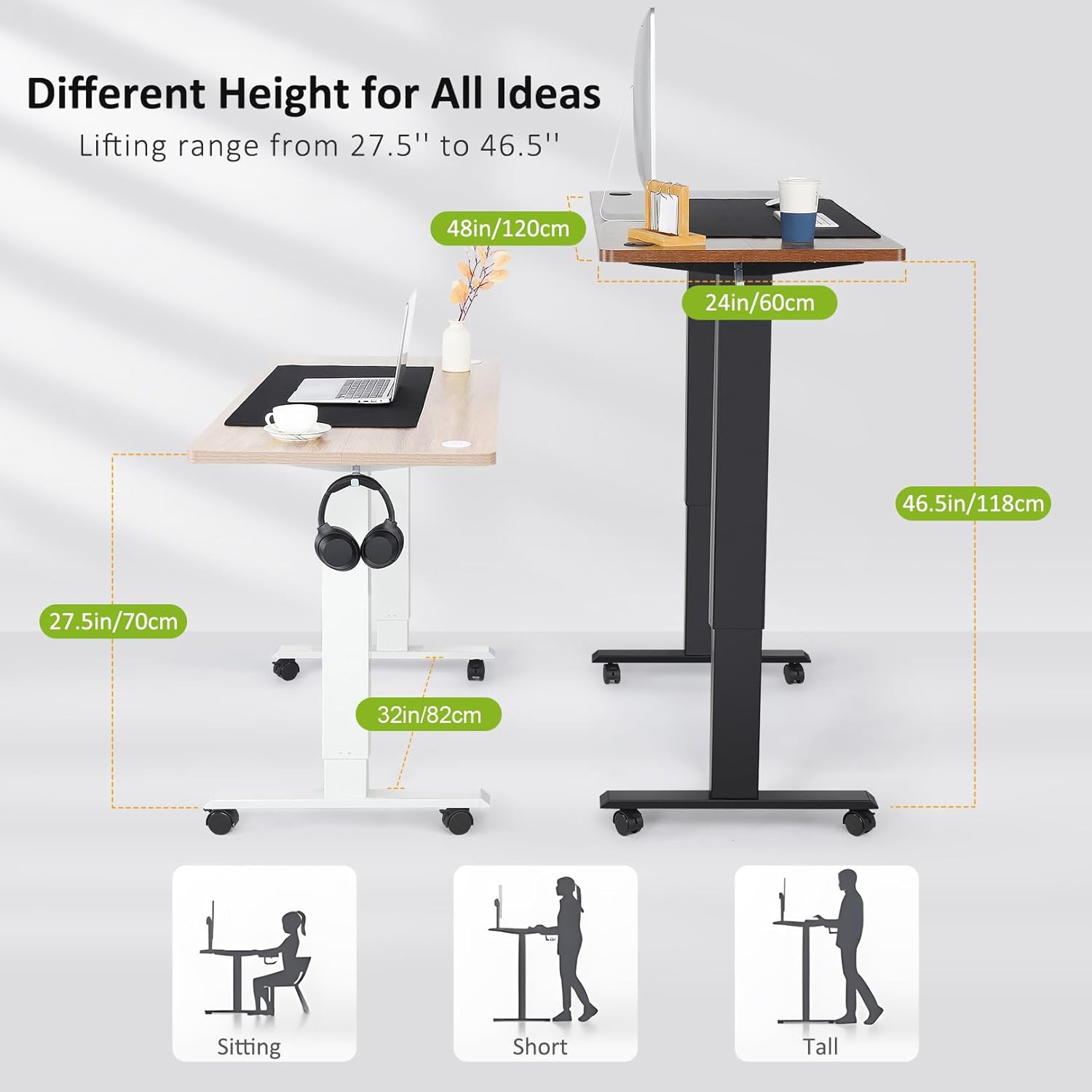
Image 8.1: Visual representation of the desk's adjustable height range from 27.5 inches to 46.5 inches, illustrating suitable heights for sitting, and standing for individuals of various heights.
9. Garantie-informatie
The farexon Electric Standing Desk comes with a Volledige garantie. For specific details regarding the terms, duration, and coverage of your warranty, please refer to the warranty card included in your product packaging or contact farexon customer support.
10. Klantenservice
For any questions, concerns, or assistance with your farexon Electric Standing Desk, please do not hesitate to contact our customer support team. Your satisfaction is our top priority.
Contact information can typically be found on the farexon official webwebsite of op het verpakkingsmateriaal.


