1. Inleiding
This manual provides detailed instructions for the Cellularline HUSH Bluetooth In-Ear Earbuds. These earbuds feature an interactive touch display, Active Noise Cancelling (ANC), Noise-Free Calls technology, and customizable sound with 5 EQ modes. Please read this manual carefully to ensure proper use and optimal performance of your device.
2. Wat zit er in de doos?
- Cellularline HUSH Earbuds
- Oplaadcase
- Gebruiksaanwijzing
3. Product voorbijview
The Cellularline HUSH earbuds are designed for an advanced and personalized audio experience. The compact charging case features an interactive touch display for easy control.

Image 1: Cellularline HUSH Earbuds in their charging case, showcasing the sleek design and in-ear fit.
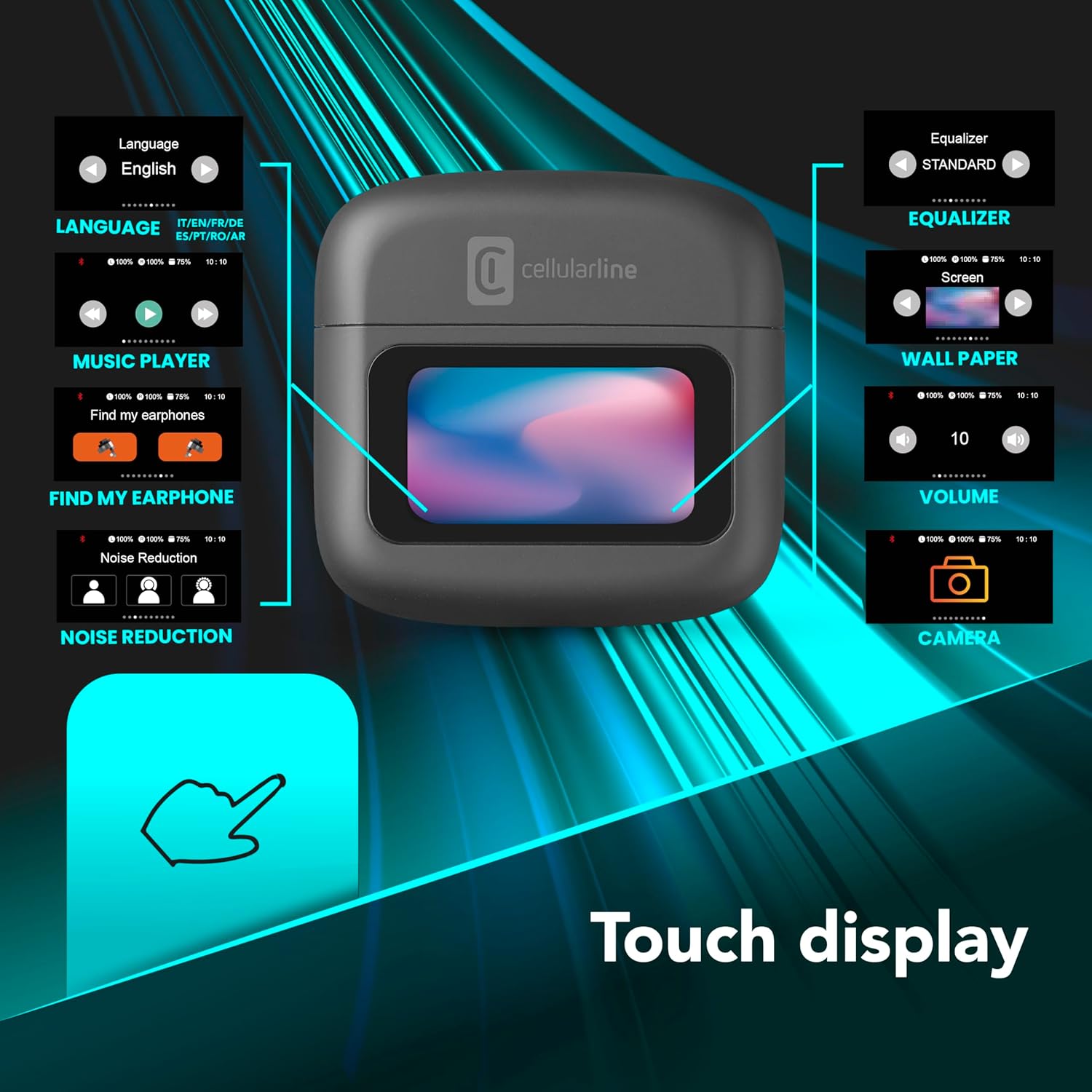
Image 2: An illustration highlighting the various functions accessible via the touch display on the charging case, including language, music player, 'Find My Earphone', noise reduction, equalizer, wallpaper, volume, and camera control.
4. Instellen
4.1 Opladen
Before first use, fully charge the earbuds and the charging case. Place the earbuds into the charging case. The magnetic closure ensures proper placement for charging. The case and earbuds offer up to 42 hours of total play time.

Image 3: Graphic indicating 42 hours of total play time and 6 hours of charger time for the Cellularline HUSH earbuds.
4.2 Koppelen
The earbuds feature an Autopairing function. When removed from the charging case, they will automatically enter pairing mode or reconnect to the last paired device. To pair with a new device, ensure Bluetooth is enabled on your device and select 'Cellularline HUSH' from the list of available devices.
5. Gebruiksaanwijzing
5.1 Touch Display Controls
The interactive touch display on the charging case allows for easy management of various functions. You can control music playback, manage calls, adjust noise reduction modes, and select EQ settings directly from the display.
5.2 Actieve ruisonderdrukking (ANC)
Activate Active Noise Cancelling to reduce ambient low-frequency noise, providing an immersive listening experience. This feature can be controlled via the touch display.
5.3 Noise-Free Calls
The integrated microphones utilize Noise-Free Calls technology to eliminate background noise, ensuring clear and crisp voice transmission during calls.

Image 4: The charging case display showing an incoming call with options to answer or decline, next to a smartphone displaying a similar call interface.
5.4 Equalizer (EQ)-modi
Customize your audio experience by selecting one of the 5 available EQ modes through the touch display. This allows you to tailor the sound profile naar uw voorkeuren.
5.5 Noise Reduction Modes
Switch between different noise reduction modes, including Active Noise Cancelling, Normal Mode, and Transparency Mode, to suit your environment. These modes are accessible via the touch display.

Image 5: The charging case display showing options for Noise Reduction, including Active Noise Cancelling, Normal Mode, and Transparency Mode.
6. Onderhoud
To ensure the longevity and optimal performance of your Cellularline HUSH earbuds:
- Houd de oordopjes en het oplaadhoesje schoon en droog.
- Stel het apparaat niet bloot aan extreme temperaturen of vochtigheid.
- Clean the ear tips regularly with a soft, dry cloth.
- Bewaar de oordopjes in het oplaadhoesje wanneer u ze niet gebruikt.
7. Probleemoplossing
If you encounter issues with your Cellularline HUSH earbuds, refer to the following common solutions:
- Geen geluid:
- Zorg ervoor dat de oordopjes zijn opgeladen.
- Controleer de Bluetooth-verbinding met uw apparaat.
- Pas het volume aan op zowel de oordopjes als het aangesloten apparaat.
- Kan niet koppelen:
- Zorg ervoor dat de oordopjes in de koppelingsmodus staan (meestal aangegeven door een knipperend lampje).
- Schakel Bluetooth op uw apparaat uit en weer in.
- Verwijder het apparaat uit de Bluetooth-instellingen van uw telefoon en probeer het opnieuw te koppelen.
- ANC werkt niet:
- Ensure ANC is activated via the touch display.
- Check for proper fit of the earbuds in your ears.
- Problemen met opladen:
- Zorg ervoor dat de oplaadkabel goed is aangesloten.
- Controleer of het oplaadhoesje voldoende stroom heeft.
- Maak de oplaadcontacten op de oordopjes en het oplaaddoosje schoon.
8. Specificaties
| Functie | Detail |
|---|---|
| Merk | cellularline |
| Model | BTHUSHTWSK |
| Compatibele apparaten | Bluetooth-apparaten |
| Controlemethode | Aanraken |
| Extra functies | Active Noise Cancellation and Noise-Free Calls |
| Gemiddelde batterijduur | 42 uur |
| Artikelgewicht | 126 gram |
| Kleur | Nero |
| Plaatsing van de oren | In-ear |
| Vormfactor | In-ear |
| Geluidsbeheersing | Actieve ruisonderdrukking |
| Koptelefoonaansluiting | Jack-less |
| Connectiviteitstechnologie | Draadloze |
| Draadloze communicatietechnologie | Bluetooth |
9. Garantie en ondersteuning
For warranty information and customer support, please refer to the documentation included with your product or visit the official Cellularline webwebsite. Bewaar uw aankoopbewijs voor garantieclaims.


