Invoering
The Epson EpiqVision Mini EF11 Laser Projector delivers a versatile and immersive viewing experience. Designed for portability and ease of use, this projector features advanced 3LCD technology for vibrant Full HD 1080p images up to 150 inches. With 1000 lumens of color and white brightness, a built-in dual-speaker audio system, and flexible connectivity options, it's ideal for various entertainment and presentation needs.
Belangrijkste kenmerken zijn:
- Verbluffende beeldkwaliteit: Enjoy immersive Full HD 1080p images up to 150 inches.
- Hoge helderheid: Delivers 1000 lumens of color and white brightness for clear visuals.
- Integrated Dual-Speaker Audio System: Features a high-quality internal speaker system for rich audio.
- Elegant Compact Design: Portable and modern design allows for easy placement and transport.
- Epson MicroLaser Array Technology: Provides exceptional brightness and enhanced black density.
- Advanced Scene Adaptive Color Correction: Automatically adjusts color for a natural picture.
- True 3-Chip Projector Design: Ensures outstanding color accuracy and brightness without "rainbowing."
- Auto Picture Skew Correction: Automatically corrects vertical image geometry for optimal viewind.
- Single HDMI Input: Standard HDMI port for video and audio connections.
Wat zit er in de doos?
Upon unboxing your Epson EpiqVision Mini EF11 Laser Projector, ensure all the following items are present:
- Epson EF-11 Laser Projector
- Stroomkabel
- Remote Control with AAA Batteries
- Installatiehandleiding

Image: Contents of the Epson EpiqVision Mini EF11 box, including the projector, remote, power cord, and quick setup guide.
Instellen
- Plaatsing: Position the projector on a stable, flat surface. Ensure there is adequate space around the projector for ventilation. The projector can be placed in front of the screen or wall, or mounted on a ceiling.
- Stroomaansluiting: Connect the provided power cord to the projector's power input and then to an electrical outlet.
- Apparaten aansluiten:
- HDMI: Connect your streaming device (e.g., Apple TV, Roku, Amazon Fire TV, Android TV, game console) to the projector's HDMI port using an HDMI cable.
- USB-poort: The projector features a USB Type-A port (5V/2A power supply) for connecting compatible devices.
- Inschakelen: Press the power button on the projector or the remote control to turn on the device. The projector will automatically perform initial setup and image adjustments.
- Beeldaanpassing: The projector features Auto Picture Skew Correction to automatically adjust the vertical geometry of the picture. Manual adjustments for focus and keystone can be made via the projector's settings menu if needed.

Image: The Epson EpiqVision Mini EF11 Projector showcasing its compact design and projected image quality.
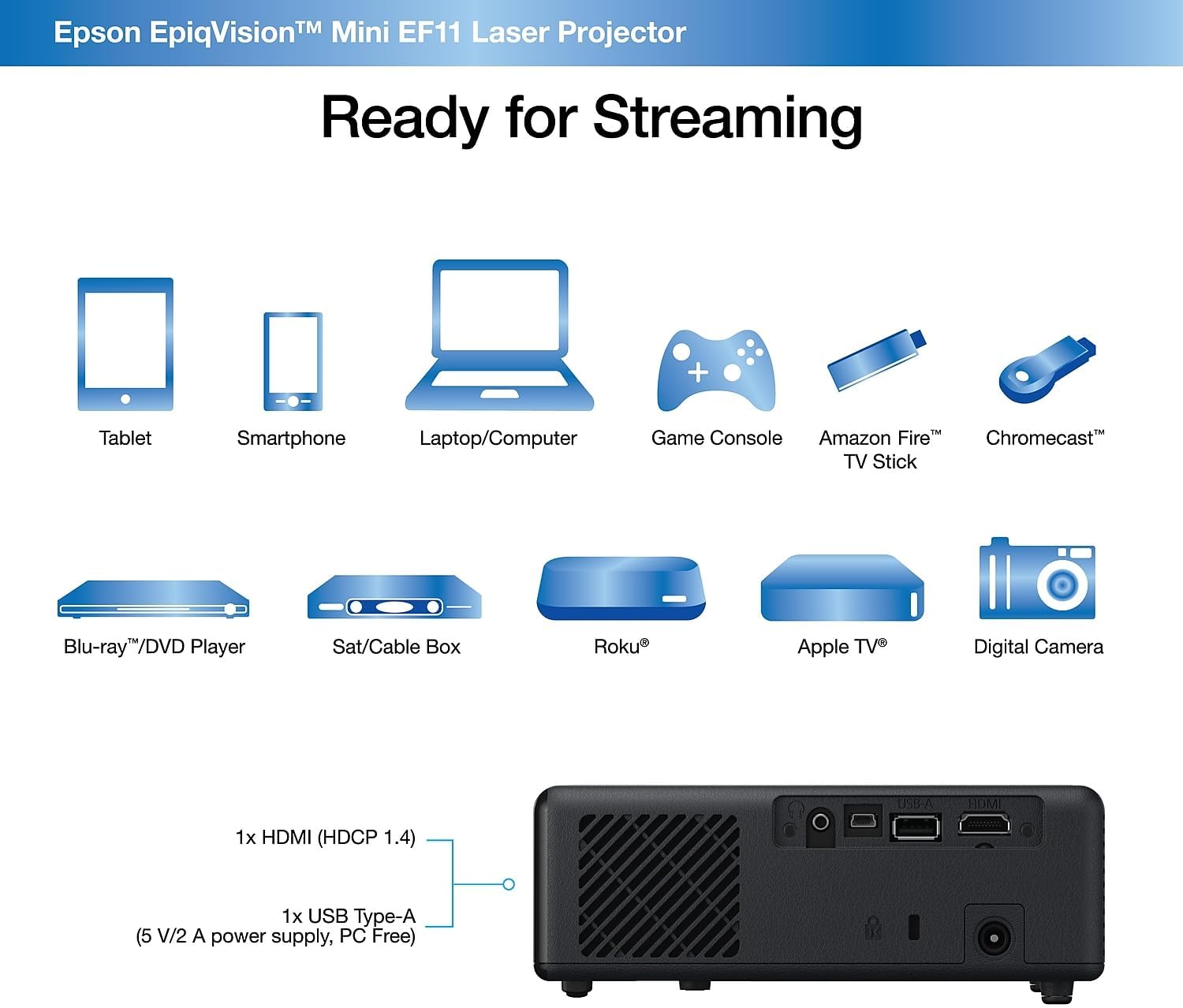
Afbeelding: Achterkant view of the Epson EpiqVision Mini EF11 Projector, highlighting the HDMI and USB ports for connecting various devices.
Bediening
- Aan/uit: Press the power button on the projector's top panel or the remote control to turn on the device.
- Bronselectie: Use the "Source" button on the remote or projector to cycle through available input sources (e.g., HDMI).
- Volumeregeling: Adjust the volume using the '+' and '-' buttons on the remote control or the projector's top panel.
- Toegang tot inhoud:
- If using an external streaming device, navigate its interface using its remote.
- The projector is compatible with various streaming solutions like Apple TV, Roku, Amazon Fire TV, or Android TV.
- Beeldinstellingen: Access the projector's menu to adjust picture settings such as color mode, light output, scene adaptive gamma, color temperature, dynamic contrast, and noise reduction.
- Geluidsinstellingen: Customize your audio experience through sound settings, including sound mode (e.g., Theatre, TV, Studio), virtual surround, clear voice, auto loudness, and bass extension.

Image: The Epson EpiqVision Mini EF11 Laser Projector displaying a high-quality, vibrant image on a wall.

Image: A visual representation of the Epson EpiqVision Mini EF11 Projector's capability to project images at different sizes, from 70 inches to 150 inches.
Media-integratie
Official Product Video: EF12 Plug and Play
Video: This official video from Epson America Inc. demonstrates the "Plug and Play" functionality of the EpiqVision Mini EF12 (similar to EF11), highlighting its ease of setup and immediate use for various media content.
Specificaties
| Functie | Detail |
|---|---|
| Productafmetingen | 6.89 x 6.89 x 2.28 inch |
| Artikelgewicht | 2.7 pond |
| Artikelmodelnummer | EF11 |
| Merk | Epson |
| Aanbevolen toepassingen | Gamen |
| Speciale kenmerken | Ingebouwde luidspreker, lichtgewicht |
| Connectiviteitstechnologie | HDMI |
| Weergaveresolutie | 1920 x 1080 (volledig HD) |
| Helderheid | 1000 lumen (kleur- en withelderheid) |
| Projectietechnologie | 3LCD, Laser |
Onderhoud
Goed onderhoud zorgt voor een lange levensduur en optimale prestaties van uw projector:
- De lens reinigen: Use a soft, dry, lint-free cloth to gently wipe the projector lens. Avoid using abrasive cleaners or solvents.
- Het reinigen van ventilatieroosters: Regularly check and clean the air vents to prevent dust buildup, which can lead to overheating. Use a soft brush or a vacuum cleaner with a brush attachment.
- Opslag: Wanneer u de projector gedurende langere tijd niet gebruikt, bergt u deze op op een koele, droge plaats, uit de buurt van direct zonlicht en extreme temperaturen.
Probleemoplossing
Als u problemen ondervindt met uw projector, probeer dan de volgende veelvoorkomende stappen voor probleemoplossing:
- Geen stroom:
- Ensure the power cord is securely connected to both the projector and the electrical outlet.
- Controleer of het stopcontact werkt door er een ander apparaat op aan te sluiten.
- Geen afbeelding:
- Controleer of de juiste ingangsbron op de projector is geselecteerd.
- Ensure the HDMI cable (or other video cable) is securely connected to both the projector and the source device.
- Controleer of het bronapparaat is ingeschakeld en een signaal uitzendt.
- Wazig beeld:
- Adjust the focus using the projector's settings menu.
- Ensure the projector is placed at an appropriate distance from the screen or wall.
- Check for any obstructions in front of the lens.
- Geen geluid:
- Verhoog het volume op zowel de projector als het bronapparaat.
- Check the audio output settings on your source device to ensure it's sending audio via HDMI.
- Als u externe luidsprekers gebruikt, zorg er dan voor dat deze goed zijn aangesloten en ingeschakeld.
Garantie en ondersteuning
The Epson EpiqVision Mini EF11 Laser Projector comes with a standard 2-year limited warranty, including full-unit replacement. Free technical phone support is available for the life of the product.
For further assistance or to explore other Epson products, please visit the Epson-winkel.


