
1. Inleiding en voorbijview
The FanJu FJ2245 is a wireless digital meat thermometer designed to help you achieve perfectly cooked food every time. It features a large LCD display, a durable stainless steel probe, and a wireless receiver that allows you to monitor temperatures from up to 200 feet away. With USDA-recommended preset temperatures for various meats and doneness levels, this thermometer simplifies your cooking process for grilling, smoking, baking, and more.
Inhoud van het pakket:
- 1 x FanJu FJ2245 Thermometer Main Unit
- 1 x draadloze ontvanger
- 1 x Food/Oven Temperature Probe (6.5-inch stainless steel)
- 1 x Gebruikershandleiding (Engels en Duits)
Opmerking: Batteries are not included. The main unit requires 2x AA batteries, and the wireless receiver requires 2x AAA batteries.
2. Instellen
2.1 Batterij installatie
- Locate the battery compartments on the back of both the main unit and the wireless receiver.
- Open de batterijklepjes.
- Insert 2x AA batteries into the main unit, observing the correct polarity (+/-).
- Insert 2x AAA batteries into the wireless receiver, observing the correct polarity (+/-).
- Sluit de batterijklepjes goed af.
2.2 Sondeverbinding
Insert the stainless steel probe connector firmly into the port on the side of the main thermometer unit.
2.3 Plaatsingsopties
The FanJu FJ2245 offers versatile placement options for convenience:
- Geïntegreerde standaard: The main unit features a fold-out stand on the back, allowing it to be placed upright on a countertop or table.
- Magnetische achterkant: A strong magnet on the back of the main unit allows it to be securely attached to metallic surfaces like an oven door or refrigerator.
- Hanggat: A hang hole is provided on the back for wall mounting or hanging on a hook.

Image: The thermometer can stand on a table, attach magnetically to an oven, or hang from a hook.

Image: Labeled diagram of the thermometer's components and features.
3. Gebruiksaanwijzing
3.1 In-/uitschakelen
Press the power button on both the main unit and the wireless receiver to turn them on. To turn off, press and hold the power button until the display shuts down.
3.2 Selecting Meat Type and Doneness
- Druk op de VLEES button on the main unit to cycle through the 8 preset meat types (Beef, Lamb, Veal, Hamburger, Pork, Turkey, Chicken, Fish).
- Once a meat type is selected, press the SMAAK button to select your desired doneness level (Rare, Medium Rare, Medium, Medium Well, Well Done).
- The target temperature will automatically adjust based on your selection, following USDA recommendations.
3.3 Custom Temperature Setting
Om een aangepaste streeftemperatuur in te stellen:
- After selecting a meat type, use the UP (^) En DOWN (v) arrow buttons to manually adjust the target temperature to your preference.
- The thermometer will remember your custom setting for that meat type until changed again.

Image: Meat and doneness selection options on the thermometer.
3.4 Temperatuurbewaking
Insert the probe into the thickest part of the meat, avoiding bone or gristle. The current internal temperature of the food will be displayed on both the main unit and the wireless receiver. The display also shows the target temperature and a temperature trend indicator.

Afbeelding: Gedetailleerd view of the thermometer's LCD display.
3.5 Wireless Remote Function
The wireless receiver allows you to monitor your food's temperature from a distance of up to 200 feet. This means you can attend to other tasks or relax while your food cooks, without needing to constantly check the oven or grill. The receiver will alert you when the target temperature is reached.

Image: Illustration of the 200ft wireless remote range.
3.6 Alarmfunctie:
When the food reaches the set target temperature, both the main unit and the wireless receiver will emit an audible alarm to notify you. This helps prevent overcooking and ensures your food is cooked to perfection.
4. Temperatuurinstellingen
The FanJu FJ2245 comes with USDA-recommended preset temperatures for 8 types of meat and 5 doneness levels. These settings are designed to ensure food safety and optimal taste.
Preset Meat Types:
- Rundvlees
- Lam
- Kalfsvlees
- Hamburger
- Varkensvlees
- Kalkoen
- Kip
- Vis
Doneness Levels:
- Zeldzaam
- Medium Zeldzaam
- Medium
- Gemiddeld goed
- Goed gedaan
You can also adjust the temperature to your desired taste using the UP and DOWN arrow buttons.

Image: Visual guide to various meat types for temperature settings.
5. Onderhoud
5.1 Reinigen
- Doorvragen: Always clean the stainless steel probe thoroughly after each use. Wash with warm, soapy water and rinse well. Dry completely before storing. Do not immerse the probe connector or cable in water.
- Main Unit & Receiver: Wipe the main unit and wireless receiver with a damp lap. Do not immerse either unit in water or place them in a dishwasher.
5.2 Opslag
Store the thermometer and its components in a clean, dry place when not in use. Remove batteries if the device will not be used for an extended period to prevent leakage.
5.3 Batterij vervangen
Replace batteries when the display becomes dim or the units fail to power on. Follow the battery installation steps in Section 2.1.
6. Probleemoplossing
- Geen beeld/apparaat schakelt niet in:
Check battery polarity. Ensure batteries are fresh and correctly inserted. Replace batteries if necessary. - Onnauwkeurige temperatuurmetingen:
Ensure the probe is inserted into the thickest part of the meat, away from bone or gristle. Verify the probe is clean and undamaged. - Wireless Receiver Not Connecting/Losing Signal:
Ensure both the main unit and receiver are within the 200ft range. Check for obstructions between the units (e.g., thick walls, large metal objects). Replace batteries in both units. - Alarm klinkt niet:
Check if the target temperature has been set correctly. Ensure the units have sufficient battery power. - Foutmelding van de probe:
Ensure the probe is fully and correctly inserted into the main unit's port. If the error persists, the probe may be damaged and require replacement.
7. Specificaties
| Merk | FanJu |
| Model | FJ2245 |
| Hoofdmateriaal | ABS |
| Kleur | Zwart |
| Temperatuurbereik | -50°C tot 300°C (-30°F tot 662°F) |
| Temperatuurnauwkeurigheid | ±1°C (±1°F) |
| Probe lengte | 6.5 inches (food-grade stainless steel) |
| Kabellengte | 40 inch (roestvrijstalen gaaskabel) |
| Draadloos bereik op afstand | Tot 200 voet |
| Weergavetype | LCD |
| Stroombron (hoofdeenheid) | 2 x AA-batterijen (niet inbegrepen) |
| Stroombron (ontvanger) | 2 x AAA-batterijen (niet inbegrepen) |
| Reactietijd | 4-6 seconden |
| Afmetingen hoofdeenheid | 12.5 x 7.1 x 4.1 cm (4.9 x 2.8 x 1.6 inch) |
| Afmetingen ontvanger | 7.7 x 4.5 x 2.3 cm (3.0 x 1.8 x 0.9 inch) |
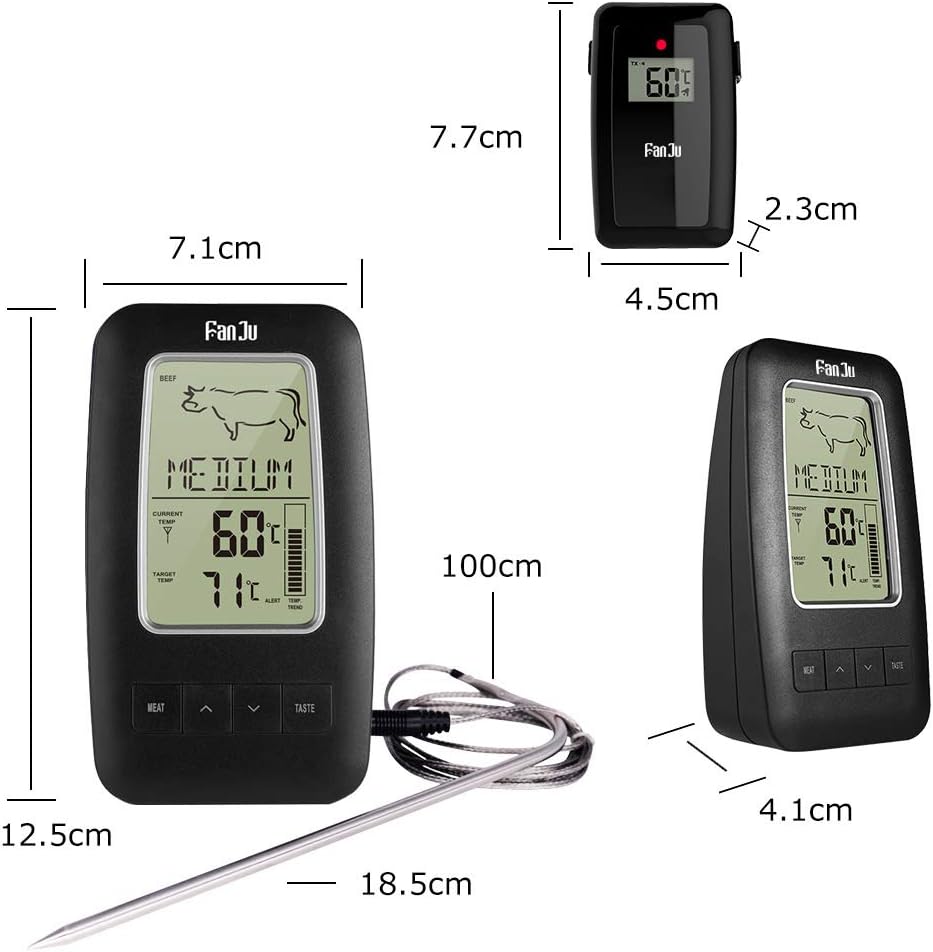
Image: Product dimensions for the thermometer and receiver.
8. Garantie en ondersteuning
Information regarding product warranty and customer support is not provided in the available product data. Please refer to the packaging or contact the retailer for details on warranty coverage and support options.