
1. Apparaat voorbijview
The Ulefone Note 16 Pro is an unlocked smartphone featuring a 6.52-inch screen, a 50MP rear camera, and runs on Android 13. It is powered by an Octa-Core processor and includes 16GB RAM with 512GB internal storage, expandable via Micro SD. Security features include Face Unlock and a Fingerprint Reader.

Afbeelding 1.1: Voor- en achterkant view of the Ulefone Note 16 Pro, highlighting its triple camera system, Android 11 (Note: The device runs Android 13 as per specifications), 6.52-inch waterdrop screen, and security features.
2. Installatiehandleiding
2.1 Pakketinhoud
Controleer of alle artikelen in het pakket aanwezig zijn:
- 1x Ulefone Note 16 Pro Smartphone
- 1x AC Power Charger Adapter (100~240V / US plug)
- 1x Data Cable (100cm)
- 1x Telefoonhoesje
- 1x beschermfolie
2.2 Installatie van SIM-kaart en TF-kaart
The device supports dual Nano SIM cards and one TF (Micro SD) card simultaneously.
- Zoek de SIM-kaarthouder aan de zijkant van de telefoon.
- Insert the SIM ejector tool into the small hole next to the tray and push gently to eject the tray.
- Place your Nano SIM cards and TF card into the designated slots on the tray. Ensure the gold contacts face downwards.
- Plaats de houder voorzichtig terug in de telefoon totdat deze vastklikt.
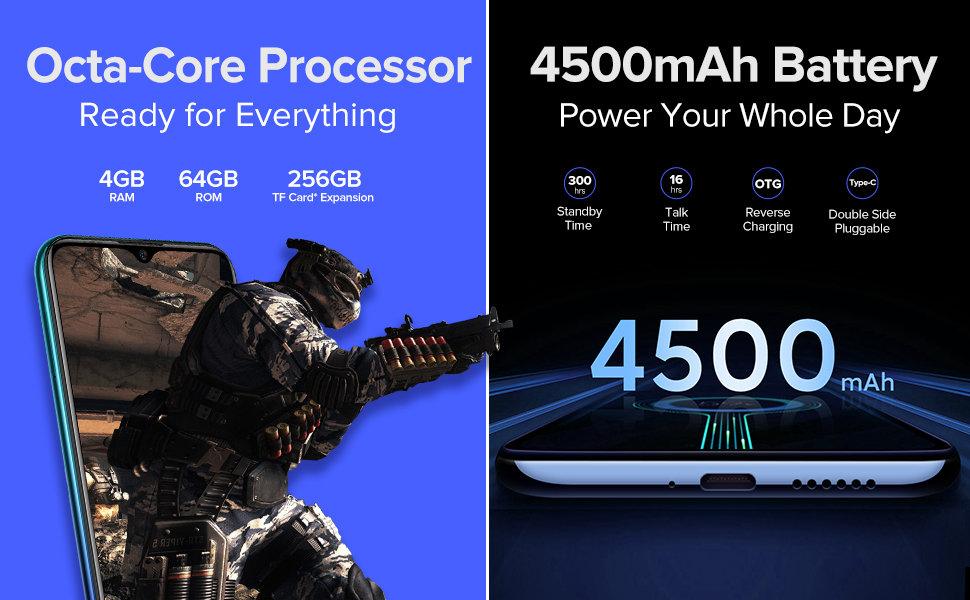
Image 2.1: Illustration of the triple card slot design, accommodating two Nano SIM cards and one TF card.
2.3 Eerste keer inschakelen en netwerkconfiguratie
Press and hold the power button until the Ulefone logo appears. Follow the on-screen instructions to complete the initial setup, including language selection, Wi-Fi connection, and Google account setup.
For network connectivity, ensure your SIM card's frequency bands are compatible. The Ulefone Note 16 Pro supports:
- 2G GSM: B2/3/5/8
- 3G WCDMA: B1/2/4/5/8
- 4G LTE-FDD: B1/2/3/4/5/7/8/12/17/19/20/28A/28B
Note: The product information indicates compatibility with most GSM Networks like T-Mobile and Metro PCS, but not with AT&T, Cricket, or CDMA carriers such as Verizon, Sprint, and Boost Mobile. This information was originally provided for the Ulefone Note 9P, please verify compatibility for your specific Note 16 Pro model with your carrier.
If your device cannot connect to data, you may need to manually input APN settings. Insert your operator's SIM, then navigate to Instellingen > Netwerk & internet > Mobiel netwerk > Geavanceerd > Access point Names. Here you can add or edit APN settings. Contact your network operator for the correct APN parameters.
3. Gebruiksaanwijzing
3.1 Android 13-besturingssysteem
The Ulefone Note 16 Pro runs on Android 13, offering an intuitive user experience with enhanced privacy controls, improved notifications, and a personalized interface.

Image 3.1: The smartphone screen showcasing the Android operating system interface. (Note: While the image displays 'Android 11', the Ulefone Note 16 Pro operates on Android 13).
3.2 Cameragebruik
The device features a 50MP primary rear camera, a 5MP macro lens, and a 2MP lens, along with an 8MP front camera. Open the Camera application to access various shooting modes, including macro photography.

Image 3.2: A user holding the Ulefone Note 16 Pro, illustrating the phone's display and camera features.
3.3 Beveiligingsfuncties
The Ulefone Note 16 Pro includes Face Unlock and a Fingerprint ID for secure access.
- Gezichtsontgrendeling: Register your face in the security settings. The front camera will scan your face to unlock the device.
- Vingerafdrukidentificatie: Register your fingerprint using the sensor, typically located on the rear or side of the device.
Video 3.1: An official product video demonstrating features of the Ulefone Note 9P, including the waterdrop screen, triple camera, battery, processor, face unlock, fingerprint ID, and SIM card slots. While this video specifically references the Note 9P, many features are similar across Ulefone models.
4. Onderhoud
4.1 Batterijonderhoud
The Ulefone Note 16 Pro is equipped with a 4500mAh Lithium-Polymer battery. To prolong battery life:
- Vermijd extreme temperaturen.
- Use the provided charger and data cable.
- Zorg ervoor dat de batterij niet te vaak helemaal leeg raakt.
- For optimal performance, keep the battery charge between 20% and 80%.
4.2 Opslagbeheer
The device comes with 512GB of internal storage (Note: Specifications list 64GB internal storage and 4GB RAM, while feature bullets state 16GB RAM + 512GB ROM. Please refer to your specific device packaging for exact storage). You can expand storage up to 256GB using a Micro SD card. Regularly clear unnecessary fileen toepassingen om optimale prestaties te behouden.
5. Probleemoplossing
5.1 Problemen met de netwerkverbinding
If you experience issues with network connectivity, ensure your SIM card is correctly inserted and your APN settings are configured as described in Section 2.3. Restarting the phone can often resolve temporary network glitches.
5.2 Apparaat reageert niet
Als het apparaat niet meer reageert, houdt u de aan/uit-knop ongeveer 10 tot 15 seconden ingedrukt om het apparaat opnieuw op te starten.
5.3 Andere problemen
For other issues not covered here, please refer to the official Ulefone support resources or contact customer service.
6. Specificaties
| Functie | Specificatie |
|---|---|
| Merk | Ulefone |
| Modelnaam | Ulefone Note 16 Pro |
| Besturingssysteem | Androïde 13.0 |
| Geïnstalleerde RAM-geheugengrootte | 4 GB (Note: Product title and feature bullets mention 16GB RAM) |
| Geheugenopslagcapaciteit | 64 GB (Note: Product title and feature bullets mention 512GB ROM) |
| Schermgrootte | 6.52 inch |
| Cellulaire technologie | 4G |
| Connectiviteitstechnologie | Bluetooth |
| Kleur | Grijs |
| Aantal SIM-kaartsleuven | Dubbele simkaart |
| Aansluitingstype | Micro-USB |
| Biometric Security Feature | Face Recognition, Fingerprint Reader |
| Rear Facing Camera Photo Sensor Resolution | 50 MP (primary lens, as per product title/feature bullets; specifications list 16 MP) |
| Camerabeschrijving | Rear: 50MP+5MP+2MP; Front: 8MP (as per product title/feature bullets; specifications list Rear: 16MP+5MP+2MP) |
| Batterijcapaciteit | 4500 milliamp Uren |
| Gemiddelde batterijduur (gesprekstijd) | 22.5 uur |
| Artikelgewicht | 188 gram |
| Artikelafmetingen | 6.54 x 3.02 x 0.36 inch |
Note: There are discrepancies in RAM, ROM, and camera specifications between the product title/feature bullets and the detailed specifications table. Please refer to your specific product packaging for the most accurate information.
7. Garantie en ondersteuning
Ulefone is dedicated to the innovation and supply of smart devices. For any support inquiries or issues not covered in this manual, please contact Ulefone customer service. If your Ulefone Note 16 Pro (or Note 9P, as per some product information) cannot connect to the network or read your SIM card, you may send an email to amazon@ulefone.com voor hulp.
For more information about Ulefone products and support, visit the official Ulefone store.

Image 7.1: Ulefone brand logo.