
1. Veiligheidsinstructies
Please read these safety instructions carefully before operating the device. Failure to comply with these instructions may result in electric shock, fire, or serious injury.
- Always connect the dehumidifier to a properly grounded power outlet.
- Do not operate the unit with a damaged power cord or plug. If damaged, contact qualified service personnel.
- Houd het apparaat uit de buurt van water en andere vloeistoffen. Dompel het apparaat niet onder in water.
- Zorg voor voldoende ventilatie rondom het apparaat. Blokkeer de luchtinlaten en -uitlaten niet.
- Steek geen voorwerpen in de ventilatieopeningen.
- Haal de stekker uit het stopcontact voordat u het apparaat schoonmaakt, onderhoudt of wanneer u het niet gebruikt.
- Dit apparaat is niet bedoeld voor gebruik door personen (inclusief kinderen) met beperkte fysieke, sensorische of mentale vermogens, of met een gebrek aan ervaring en kennis, tenzij zij onder toezicht staan of instructies hebben gekregen over het gebruik van het apparaat door een persoon die verantwoordelijk is voor hun veiligheid.
- Kinderen moeten onder toezicht staan om ervoor te zorgen dat ze niet met het apparaat spelen.
2. Product voorbijview
The TROTEC TTK 71 E is a comfort dehumidifier designed for efficient moisture control in residential and office spaces. It features electronic humidistat control, automatic defrost, a two-stage fan, a timer function, and a digital display.
Belangrijkste kenmerken:
- Electronic humidistat control for precise humidity settings.
- Automatische ontdooifunctie.
- Twee-stage fan for adjustable air circulation.
- Timerfunctie voor geplande bediening.
- Digital display showing current humidity levels.
- Option for continuous drainage.
Componenten:
Familiarize yourself with the main components of your TTK 71 E dehumidifier.

Afbeelding 1: Voorkant view of the TROTEC TTK 71 E dehumidifier. This image shows the compact design of the unit, highlighting its dimensions: approximately 22 cm in width, 35 cm in depth, and 55 cm in height. The Trotec logo is visible on the front panel.
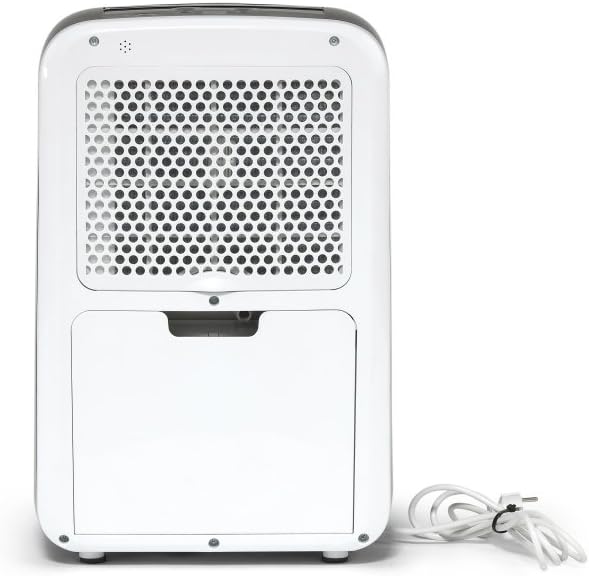
Afbeelding 2: Achterkant view of the TROTEC TTK 71 E dehumidifier. The back panel features a large grille covering the air filter and the power cord neatly coiled to the side.

Afbeelding 3: Achterkant view of the TROTEC TTK 71 E dehumidifier with the water tank removed. This view exposes the internal compartment where the water tank sits, and the continuous drainage port is visible for hose connection.

Afbeelding 4: Close-up of the top control panel of the TROTEC TTK 71 E dehumidifier. The digital display and various control buttons (Fan, Mode, Auto, Timer, Defrost, On/Off) are visible, with the air outlet vent in a closed position.

Afbeelding 5: Close-up of the top control panel of the TROTEC TTK 71 E dehumidifier with the air outlet vent open. This shows the operational state where air is expelled from the top of the unit.
3. Instellen
Uitpakken en plaatsen:
- Haal de luchtontvochtiger voorzichtig uit de verpakking.
- Plaats het apparaat rechtop op een stevige, vlakke ondergrond.
- Ensure there is at least 20 cm of space around the unit for proper air circulation.
- The TTK 71 E is suitable for rooms up to 50 m² (125 m³).
Stroomaansluiting:
- Steek het netsnoer in een geaard stopcontact met het juiste voltage.tage (refer to the rating label on the unit).
Installatie watertank:
- Ensure the water tank is correctly inserted into its compartment at the rear of the unit. The unit will not operate if the tank is not properly seated or is full.
Continue drainage (optioneel):
For continuous operation without manually emptying the water tank, you can connect a hose for direct drainage.
- Locate the continuous drainage port at the rear of the unit (visible when the water tank is removed).
- Sluit een geschikte afvoerslang (niet meegeleverd) aan op deze poort.
- Ensure the hose is routed downwards to a drain or container, allowing gravity to facilitate water flow. Avoid kinks or blockages in the hose.
4. Gebruiksaanwijzing
Configuratiescherm:
The control panel is located on the top of the unit and features a digital display and several buttons.
- Aan/uit-knop: Hiermee schakelt u het apparaat in of uit.
- Modusknop: Selects operating modes (e.g., automatic, continuous).
- Ventilatorknop: Past de ventilatorsnelheid aan (laag, hoog).
- Knoppen voor het instellen van de luchtvochtigheid (pijlen omhoog/omlaag): Hiermee kunt u de gewenste luchtvochtigheid instellen.
- Timerknop: Hiermee stelt u de bedrijfstimer in.
- Digitaal beeld: Shows current room humidity, set humidity, or timer settings.
Basiswerking:
- Inschakelen: Press the On/Off button to start the dehumidifier. The digital display will show the current room humidity.
- Gewenste luchtvochtigheid instellen: Use the Up/Down arrow buttons to set your target humidity level. The adjustable range is between 30% and 80% relative humidity, in 10% increments. The unit will automatically turn on when the room humidity exceeds the set value and turn off when the desired level is reached.
- Pas de ventilatorsnelheid aan: Press the Fan button to cycle between Low and High fan speeds.
- Timerfunctie: Press the Timer button to set an operating duration (e.g., 2, 4, 8 hours). The unit will automatically turn off after the set time.
- Continue werking: Select the continuous operation mode (often indicated by a 'Cont' or similar symbol via the Mode button) for non-stop dehumidification, ideal for very damp environments or when using continuous drainage.
- Uitschakelen: Press the On/Off button again to turn off the unit.
5. Onderhoud
Regelmatig onderhoud zorgt voor optimale prestaties en verlengt de levensduur van uw luchtontvochtiger.
Het waterreservoir legen:
- Wanneer het waterreservoir vol is, stopt het apparaat automatisch met werken en gaat een indicatielampje branden.
- Trek de watertank voorzichtig uit de achterkant van het apparaat.
- Leeg het verzamelde water.
- Reinsert the empty water tank firmly into its position. The unit will resume operation if the humidity level is above the set point.
Het luchtfilter reinigen:
Het luchtfilter moet elke twee weken of vaker worden schoongemaakt, afhankelijk van het gebruik en de luchtkwaliteit.
- Schakel het apparaat uit en haal de stekker uit het stopcontact.
- Remove the air filter cover located at the rear of the unit.
- Verwijder voorzichtig het luchtfilter.
- Reinig het filter met een stofzuiger of was het met lauw water en een mild schoonmaakmiddel.
- Laat het filter volledig drogen voordat u het terugplaatst.
- Replace the air filter and secure the cover.
Reinigen van de buitenkant van het apparaat:
- Veeg de buitenkant van het apparaat af met een zachte, damp doek. Gebruik geen schurende reinigingsmiddelen of oplosmiddelen.
Opslag:
- Als u het apparaat voor langere tijd opbergt, zorg er dan voor dat het waterreservoir leeg en schoon is en dat het filter schoon en droog is.
- Bewaar het apparaat rechtop op een koele, droge plaats, uit de buurt van direct zonlicht.
6. Probleemoplossing
Voordat u contact opneemt met de klantenservice, raadpleegt u de volgende handleiding voor probleemoplossing voor veelvoorkomende problemen.
| Probleem | Mogelijke oorzaak | Oplossing |
|---|---|---|
| Het apparaat gaat niet aan. | Geen stroomvoorziening. Het waterreservoir is vol of verkeerd geplaatst. | Controleer de aansluiting van het netsnoer en het stopcontact. Leeg het waterreservoir en plaats het correct terug. |
| Het apparaat draait wel, maar ontvochtigt niet. | Luchtfilter is verstopt. De kamertemperatuur is te laag. De vochtigheidsinstelling is te hoog. | Maak het luchtfilter schoon. Dehumidifiers operate less efficiently in very cold conditions. Verlaag de gewenste luchtvochtigheidsinstelling. |
| Indicator voor volle watertank brandt, maar de tank is niet vol. | Het waterreservoir is verkeerd geplaatst. Storing in de vlotterschakelaar. | Zorg ervoor dat het waterreservoir volledig en correct is geplaatst. Neem contact op met de klantenservice als het probleem zich blijft voordoen. |
| Eenheid maakt lawaai. | Het apparaat staat niet op een vlakke ondergrond. Luchtfilter verstopt. | Plaats het apparaat op een vlakke, stabiele ondergrond. Maak het luchtfilter schoon. |
7. Specificaties
Technical data for the TROTEC TTK 71 E dehumidifier.
- Merk: TROTEC
- Modelnummer: 1120000071
- Productafmetingen: 22 x 35 x 55 cm (Breedte x Diepte x Hoogte)
- Artikelgewicht: 13 kg
- Ontvochtigingscapaciteit: Max 24 L/day
- Aanbevolen kamergrootte: Tot 50 m² / 125 m³
- Geluidsniveau: 50 decibel
- Hygrostat Adjustment Range: 30% to 80% Relative Humidity (in 10% steps)
8. Garantie en ondersteuning
For warranty information and customer support, please refer to the documentation provided with your purchase or visit the official TROTEC webwebsite. Bewaar uw aankoopbewijs voor eventuele garantieclaims.
- Fabrikant: TROTEC
- ASIN: B07TTP56GP
- Eerste beschikbare datum: 17 januari 2021