1. Inleiding
This manual provides comprehensive instructions for the installation, operation, and maintenance of your GAMEMAX G561 White ATX Middle Tower PC Gaming Case. Please read this manual carefully before proceeding with assembly to ensure proper setup and optimal performance.
The GAMEMAX G561 White case is designed to accommodate various PC components, offering a half acrylic side panel for visibility and efficient cooling solutions. It features pre-installed blue LED fans and supports a range of motherboard sizes and component dimensions.

Afbeelding 1.1: Voorkant view of the GAMEMAX G561 White ATX Middle Tower PC Gaming Case with blue LED fans visible.
2. Installatie en installatie
2.1. Uitpakken
Carefully remove the case from its packaging. Inspect the case for any signs of damage that may have occurred during transit. Retain the packaging for future transportation or warranty claims.
2.2. Component Installation Guidelines
The GAMEMAX G561 White case is compatible with the following component specifications:
- Moederbordondersteuning: ATX, micro-ATX, mini-ITX
- Graphics Card (VGA) Support: Up to 360mm in length
- Hoogte CPU-koeler: Tot 160 mm
- Voeding: Standard ATX, top-mounted (maximum length 170mm)
- Schijfposities: 2 x 3.5" harde schijf, 2 x 2.5" SSD
- Uitbreidingsslots: 7
2.3. Installatie van ventilator en radiator
The case comes with pre-installed fans:
- 2 x 120mm 15 Blue LED Ring fans (front)
- 1 x 120mm 15 Blue LED Ring fan (rear)
Additional fan and radiator support:
- Voorkant: Supports 1 x 120/240mm radiator or an additional 120mm fan (if 5.25" drive bay is not used).
- Achterkant: Supports 1 x 120mm radiator.

Image 2.1: Diagram illustrating the recommended airflow within the GAMEMAX G561 case, showing intake and exhaust paths.
2.4. Aansluitingen op het voorpaneel van de I/O
The front I/O panel provides the following ports:
- 1 x USB 3.0-poort
- 2 x USB 2.0-poorten
- HD-audioaansluitingen (hoofdtelefoon/microfoon)
Connect these cables to the corresponding headers on your motherboard according to your motherboard's manual.
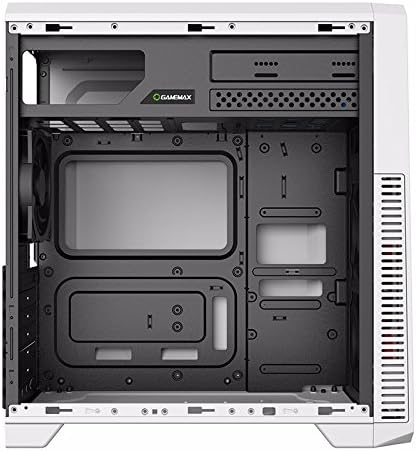
Afbeelding 2.2: Interieur view of the GAMEMAX G561 White case, showing the motherboard tray, drive bays, and fan mounting points.
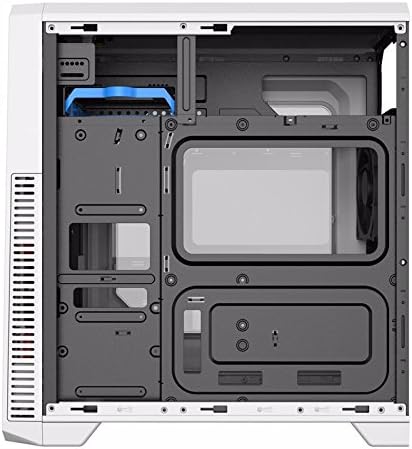
Afbeelding 2.3: Achterinterieur view of the GAMEMAX G561 White case, highlighting cable management space behind the motherboard tray.
3. De zaak behandelen
Once all components are correctly installed and connected, the case functions as an enclosure for your PC system. The pre-installed blue LED fans will illuminate and operate when the system is powered on, providing cooling and visual aesthetics.
Utilize the front I/O ports for connecting peripherals such as USB devices, headphones, and microphones.

Afbeelding 3.1: Recht van voren view of the GAMEMAX G561 White case, showcasing the front panel design and illuminated fans.
4. Onderhoud
Regular maintenance helps ensure the longevity and performance of your PC components by maintaining optimal airflow and preventing dust buildup.
- Stofvrij maken: Periodically clean the interior of the case using compressed air to remove dust from fans, heatsinks, and other components.
- Buitenreiniging: Wipe the exterior surfaces, including the acrylic side panel, with a soft, damp cloth. Avoid abrasive cleaners that may scratch the finish.
- Ventilatorinspectie: Check fan blades for dust accumulation and ensure they spin freely.
5. Probleemoplossing
This section addresses common issues related to the PC case itself. For component-specific issues (e.g., CPU, GPU, RAM), refer to their respective manuals.
- Ventilatoren draaien niet/lichten niet op: Ensure all fan power cables are securely connected to the motherboard or power supply. Check for any obstructions preventing fan rotation.
- Front I/O Ports Not Functioning: Verify that the USB and audio cables from the front panel are correctly connected to the corresponding headers on your motherboard.
- Overmatig lawaai: Check if any cables are interfering with fan blades. Ensure all screws are tightened to prevent vibrations.
6. Specificaties
Detailed technical specifications for the GAMEMAX G561 White ATX Middle Tower PC Gaming Case:
| Functie | Specificatie |
|---|---|
| Productnaam | G561 |
| Kleur | Wit |
| Materiaal | SPCC 0.5mm, Acrylic |
| Case Size (L x W x H) | 424mm x 200mm x 452mm |
| Chassis Size (L x W x H) | 500mm x 240mm x 470mm (Note: This appears to be an error in source data, likely referring to package size or internal dimensions. Refer to Case Size for external dimensions.) |
| Moederbordondersteuning | ATX, micro-ATX, mini-ITX |
| Schijfruimtes | 2 x 3.5" harde schijf, 2 x 2.5" SSD |
| Uitbreidingsslots | 7 |
| Ondersteuning voor stroomvoorziening | Standard ATX (Top Mount, Max Length 170mm) |
| Voorgeïnstalleerde ventilatoren | Front: 2 x 120mm 15 Blue LED Ring; Rear: 1 x 120mm 15 Blue LED Ring |
| Radiatorsteun | Front: 1 x 120/240mm; Rear: 1 x 120mm |
| I/O-paneel | 1 x USB 3.0, 2 x USB 2.0, HD-audio |
| Maximale hoogte CPU-koeler | 160 mm |
| Maximale lengte van de VGA-kaart | 360 mm |
| Artikelgewicht | 4.8 kilogram |
| Datum eerste beschikbaarheid | 27 juli 2018 |

Afbeelding 6.1: Achterkant view of the GAMEMAX G561 White case, showing the expansion slots, rear fan mount, and power supply cutout.
7. Garantie en ondersteuning
GAMEMAX products are manufactured to high-quality standards. For specific warranty information, please refer to the warranty card included with your product or visit the official GAMEMAX webplaats.
For technical support, troubleshooting assistance, or inquiries regarding replacement parts, please contact GAMEMAX customer service through their official support channels. Keep your purchase receipt as proof of purchase for warranty services.
- Officieel Webwebsite: www.gamemaxpc.com (Controleer of de regio correct is) web(website voor ondersteuning)
- Klantenservice: Raadpleeg het contactgedeelte op de officiële website webplaats.


