
FanJu FJ3531B
Gebruikershandleiding voor de FanJu FJ3531B digitale projectiewekker
Model: FJ3531B
Invoering
Bedankt voor uw aankoopasing the FanJu FJ3531B Digital Projection Alarm Clock. This device combines multiple functions including a radio-controlled projection clock, indoor temperature and humidity display, dual alarms, and a USB charging port. Please read this manual carefully to ensure proper use and operation.

Afbeelding: Voorzijde view of the FanJu FJ3531B Digital Projection Alarm Clock, displaying time, date, indoor temperature, and humidity.
Inhoud van het pakket
Controleer het pakket op de volgende items:
- FanJu FJ3531B Digital Projection Alarm Clock
- Stroomadapter
- Gebruiksaanwijzing

Image: The FanJu FJ3531B alarm clock, its power adapter, and the user manual, as found in the product packaging.
Instellen
Het apparaat van stroom voorzien
The FanJu FJ3531B can be powered by either AAA batteries or the included power adapter.
- Batterij installeren: Open the battery compartment on the back of the unit. Insert 2 AAA batteries (not included), ensuring correct polarity (+/-). Batteries allow for portable use and temporary power, but continuous projection and backlight require the power adapter.
- Aansluiting voedingsadapter: Connect the provided power adapter to the DC 5.0V 1.2A port on the back of the alarm clock. Plug the adapter into a standard wall outlet. When powered by the adapter, the backlight and projection can remain continuously on.
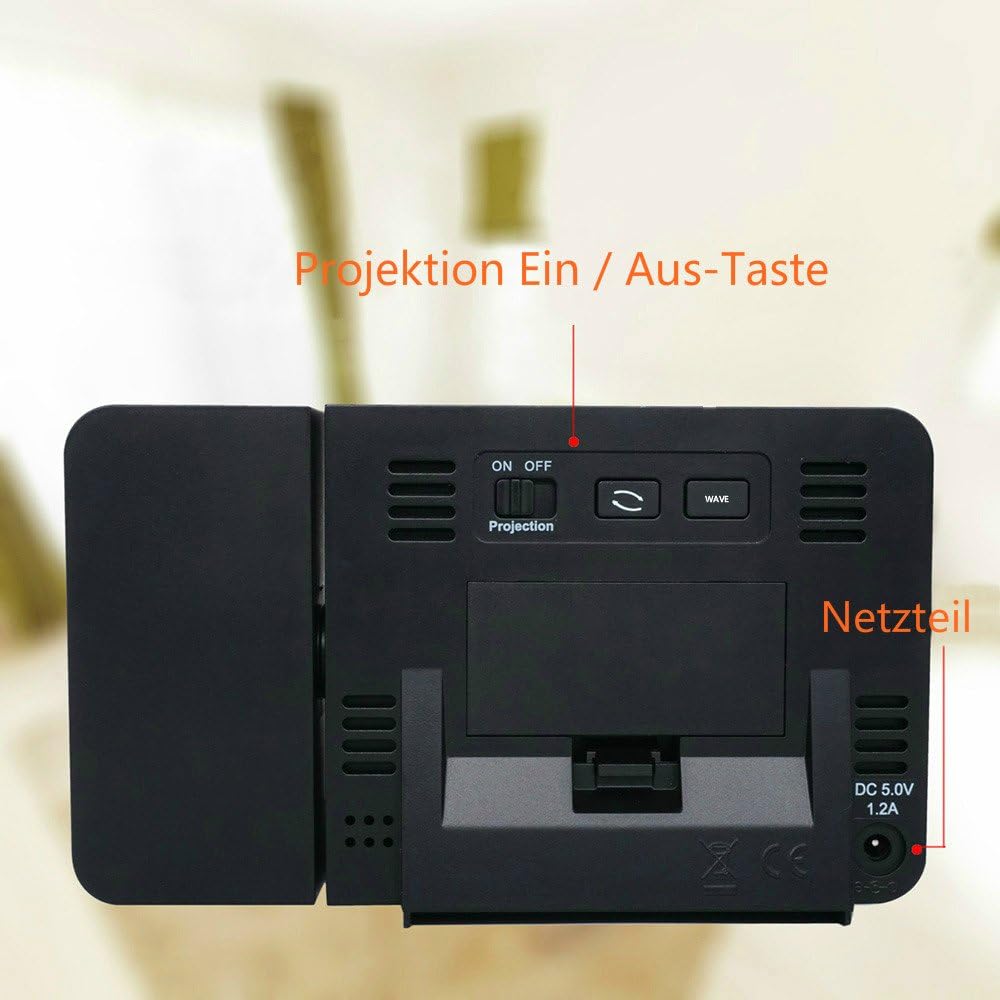
Afbeelding: Achterkant view of the alarm clock, highlighting the power input port and the ON/OFF switch for the projection feature.
Initial Time Setting (DCF Automatic Adjustment)
The clock features DCF automatic time adjustment. Upon initial power-up or after battery replacement, the clock will automatically search for the DCF signal to set the correct time.
- During DCF signal search, the backlight will turn off, and all buttons will be non-functional until synchronization is complete.
- You can press the "WAVE" button to stop the signal search and reactivate all functions.
- For optimal signal reception, place the device near a window and away from electronic interference.
- Note: The automatic time adjustment function (DCF) primarily works within Germany. If you are outside this region, manual time setting may be required.

Image: Close-up of the alarm clock display, showing the radio signal icon indicating DCF time synchronization.
Gebruiksaanwijzing
Basic Display Information
The main display shows the current time, date, day of the week, indoor temperature, and humidity.
- Tijd: Displays in 12/24 hour format.
- Datum en dag: Calendar with 7 language options.
- Temperatuur & Vochtigheid: Indoor temperature can be displayed in °C or °F.

Image: The alarm clock's display showing current time, date, day, indoor temperature, and humidity readings.
Setting Time and Date Manually
If DCF synchronization is not available or desired, you can set the time and date manually.
- Houd de "TIME" knop om de tijdinstelmodus te openen.
- Gebruik de "+" or "-" knoppen om de knipperwaarde aan te passen (bijv. uur, minuut, jaar, maand, dag).
- Pers "TIME" om te bevestigen en naar de volgende instelling te gaan.
- Repeat until all settings are complete. The clock will automatically exit setting mode if no button is pressed for a few seconds.
Alarminstellingen
The device features two independent alarms with a snooze function.
- Druk op de "ALARM" druk één keer om view Alarm 1 keer. Druk nogmaals voor alarm 2.
- Houd de "ALARM" button to enter alarm setting mode for the currently displayed alarm.
- Gebruik de "+" or "-" Knoppen om het alarmuur en de alarmminuut in te stellen.
- Pers "ALARM" om te bevestigen en naar de volgende instelling te gaan.
- Om een alarm te activeren/deactiveren, drukt u op de "ALARM" button repeatedly until the alarm icon (1 or 2) appears/disappears on the display.
- When an alarm sounds, press the top button (Snooze/Light) to activate the snooze function for an extra five minutes of sleep.
Projectie Functie:
Project the time and temperature onto a wall or ceiling for easy viewind.
- Activering: Use the ON/OFF switch located on the back of the unit to control the projection.
- Temporary Projection (Battery Power): If powered by batteries, touch the top of the clock to activate the backlight and projection for 8 seconds.
- Continuous Projection (Adapter Power): When powered by the adapter, the projection can remain continuously on.
- Verstelbare hoek: The projection angle can be adjusted to suit your viewvoorkeur hebben.
- Afbeeldingrotatie: The projected image can be rotated 180 degrees for optimal orientation.

Image: The FanJu FJ3531B projecting the time and temperature in red digits onto a wall in a bedroom setting.

Image: Diagram illustrating the projection capabilities of the alarm clock, including the adjustable projection distance (2-4m) and 180-degree image rotation.
Achtergrondverlichting aanpassen
When powered by the adapter, the display backlight has 4 adjustable levels.
- Press the top button (Snooze/Light) to cycle through the backlight brightness levels.

Image: Four representations of the FanJu FJ3531B display, illustrating the different backlight brightness levels available.
USB-oplaadpoort
The alarm clock includes a USB output interface (5V 1A) for convenient charging of electronic devices.
- Connect your device's USB charging cable to the USB port on the side of the alarm clock.
- Ensure the alarm clock is connected to the power adapter for optimal charging performance.

Image: A smartphone connected to the FanJu FJ3531B via a USB cable, indicating the charging function of the alarm clock's USB port.
Onderhoud
To ensure the longevity and optimal performance of your FanJu FJ3531B Digital Projection Alarm Clock, please follow these maintenance guidelines:
- Schoonmaak: Veeg het apparaat af met een zachte, droge doek. Gebruik geen schurende reinigingsmiddelen, oplosmiddelen of chemische middelen, aangezien deze het oppervlak kunnen beschadigen.
- Plaatsing: Place the clock on a stable, flat surface. Avoid direct sunlight, extreme temperatures, and high humidity.
- Blootstelling aan water: This device is not waterproof. Avoid exposure to water or other liquids.
- Batterij vervangen: If using batteries, replace them when the display dims or functions become unreliable. Dispose of used batteries responsibly.
Probleemoplossing
If you encounter issues with your FanJu FJ3531B, please refer to the following common problems and solutions:
| Probleem | Mogelijke oorzaak / oplossing |
|---|---|
| Het scherm is leeg of donker. |
|
| Projection is unclear or blurry. |
|
| DCF automatic time adjustment fails or is inconsistent. |
|
| Projection turns off periodically. |
|
| USB-opladen werkt niet. |
|
Specificaties
| Functie | Detail |
|---|---|
| Model | FJ3531B |
| Afmetingen (L x B x H) | ca. 13.5 cm x 3 cm x 8 cm |
| Gewicht | Ongeveer 30 gram |
| Stroomvoorziening | 2 x AAA batteries (not included) or DC 5.0V 1.2A power adapter (included) |
| Weergavetype | Digitale LCD |
| Tijdformaat | 12/24 uur selecteerbaar |
| Temperatuurweergave | °C / °F selecteerbaar |
| Achtergrondverlichtingsniveaus | 4 levels (with power adapter) |
| USB-uitgang | 5V 1A |
| Projectieafstand | Optimal between 2m and 4m |
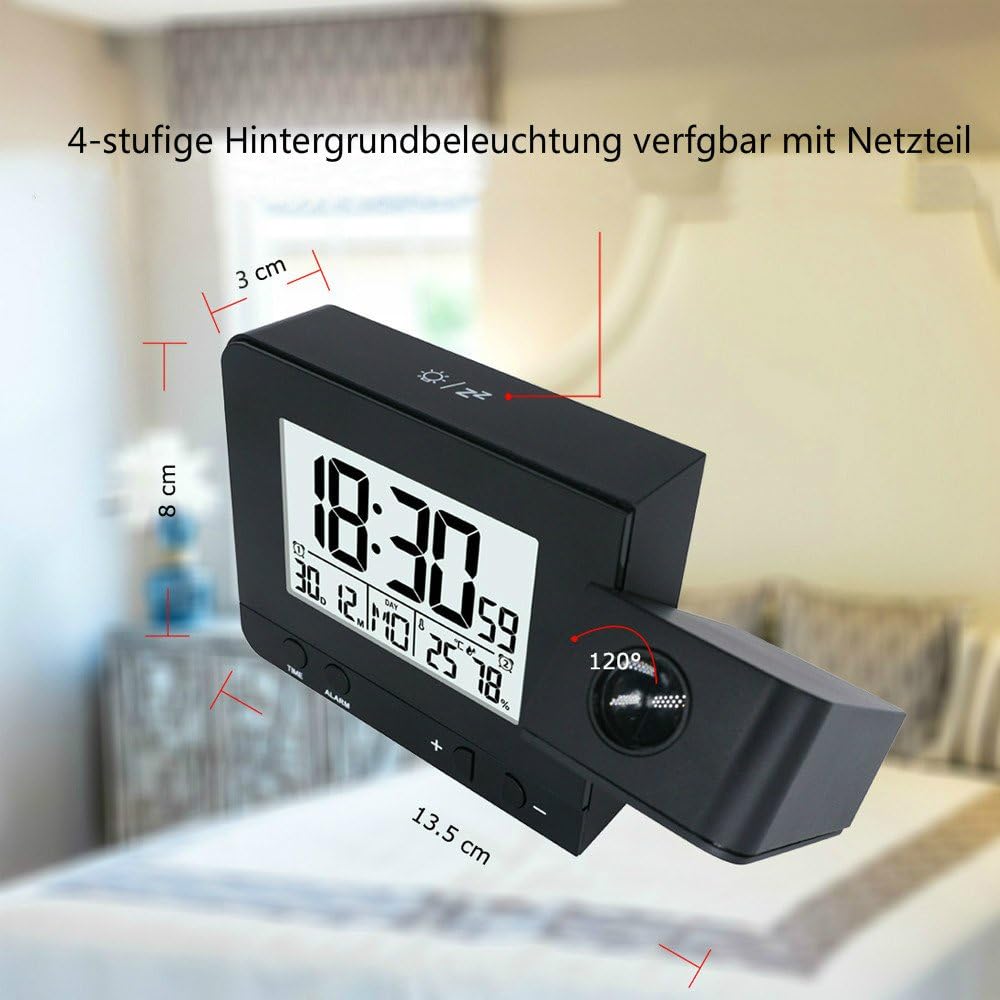
Image: The FanJu FJ3531B alarm clock with its approximate dimensions (13.5 cm length, 3 cm width, 8 cm height) overlaid.
Garantie en ondersteuning
FanJu Technology guarantees that the warranty period for this device is 1 year from the date of purchase.
For any questions, technical support, or warranty claims, please contact FanJu customer service through your purchase platform or the official FanJu webplaats.