1. Inleiding
This manual provides comprehensive instructions for the safe and effective use of the PCE Instruments PCE-170 A Light Meter. This device is designed for measuring illuminance (lux or foot-candles) in various environments, such as offices, factories, and outdoor settings. It features a wide measurement range, fast response time, and a compact design for ease of use.
Lees deze handleiding zorgvuldig door voordat u het apparaat gebruikt en bewaar de handleiding voor toekomstig gebruik.
2. Veiligheidsinformatie
Observe the following safety precautions to prevent injury and avoid damage to the device:
- Stel het apparaat niet bloot aan extreme temperaturen, vochtigheid of direct zonlicht.
- Vermijd sterke trillingen of stoten.
- Probeer het apparaat niet te openen of te wijzigen. Laat alle onderhoudswerkzaamheden uitvoeren door gekwalificeerd personeel.
- Keep the light sensor clean and free from obstructions to ensure accurate readings.
- Verwijder de batterij als u het apparaat gedurende langere tijd niet gebruikt, om lekkage te voorkomen.
- Gooi de batterijen en het apparaat weg volgens de plaatselijke voorschriften.
3. Product voorbijview
The PCE-170 A Light Meter consists of a main unit with a display and control buttons, and an integrated light sensor.

Figuur 1: Voorkant view of the PCE-170 A Light Meter, showing the display, control buttons, and light sensor at the top.
3.1 Componenten
- Lichtsensor: Located at the top of the device, protected by a white dome. This silicon photodiode measures incident light.
- LCD-scherm: A 5-digit display showing measurement values, units (lux/fc), and function indicators (e.g., AUTO RANGE, HOLD, MIN, MAX).
- Aan/uit-knop: Hiermee schakelt u het apparaat in of uit.
- CAL-knop: Used for zero adjustment.
- Pauzeknop: Bevriest de huidige meting op het display.
- fc/lx Button: Toggles between foot-candle (fc) and lux (lx) measurement units.
- RANGE-knop: Manually selects measurement ranges or activates auto-ranging.
- Batterijcompartiment: Located at the rear, houses the 9V battery.

Figuur 2: Van dichtbij view of the LCD display, showing a reading of "534 lx" and "AUTO RANGE 4 000".
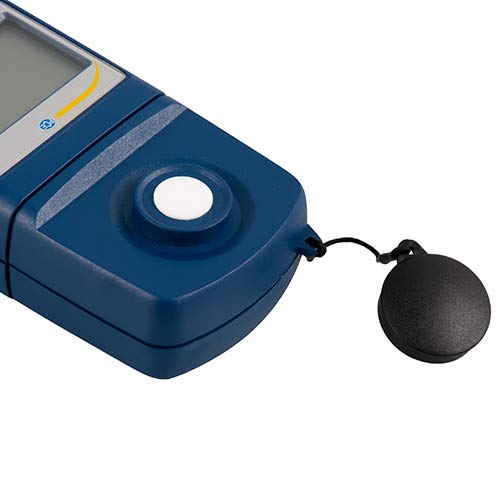
Figuur 3: Gedetailleerd view of the light sensor at the top of the device, with its protective cap removed.
4. Instellen
4.1 Batterij installatie
- Zoek het batterijklepje aan de achterkant van het apparaat.
- Slide the cover open or unscrew it, depending on the model.
- Insert one 9V battery, observing the correct polarity (+/-).
- Plaats het deksel van het batterijcompartiment veilig terug.
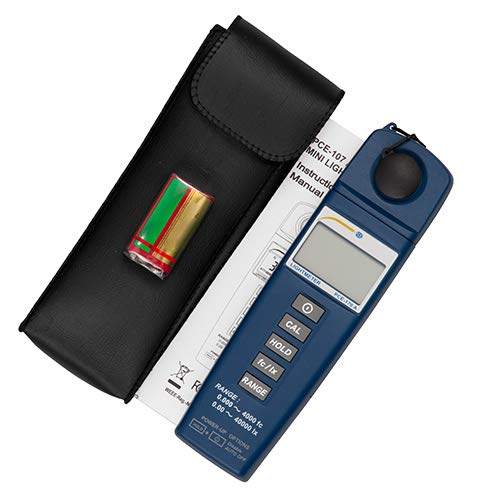
Figuur 4: The PCE-170 A Light Meter shown with its carrying case and the included 9V battery, ready for installation.
4.2 Eerste keer inschakelen
Druk op de Stroom button to turn on the device. The display will illuminate and show a reading. If the battery symbol appears, replace the battery.
5. Gebruiksaanwijzing
5.1 Een meting uitvoeren
- Schakel het apparaat in met behulp van de Stroom knop.
- Zorg ervoor dat de lichtsensor schoon en onbelemmerd is.
- Position the light sensor at the location where illuminance is to be measured. Ensure the sensor is facing the light source directly for accurate readings.
- The current illuminance value will be displayed on the LCD.

Figuur 5: A user measuring light levels in an office environment with the PCE-170 A Light Meter.
5.2 Changing Measurement Units (fc/lx)
Druk op de fc/lx button to toggle between foot-candles (fc) and lux (lx) units. The selected unit will be indicated on the display.
5.3 HOLD-functie
Druk op de UITSTEL button to freeze the current reading on the display. Press it again to release the hold and resume live measurements.
5.4 Zero Adjustment (CAL)
Om een nulaanpassing uit te voeren:
- Place the light sensor in a completely dark environment (e.g., cover it with the protective cap or place it in a dark box).
- Druk op de KAL button. The display should show "0.00" or a value very close to zero.
- If the display does not show zero, repeat the process.
5.5 Bereikselectie
The device typically operates in auto-ranging mode. To manually select a range or cycle through available ranges, press the RANGE button. The display will indicate the active range. Press and hold the RANGE button to return to auto-ranging mode.
5.6 Min/Max Function (Power-Up Option)
The PCE-170 A supports Min/Max recording. To activate this feature, refer to the power-up options indicated on the device label (e.g., press and hold a specific button during power-on). This function records the minimum and maximum illuminance values detected during a measurement session.
6. Onderhoud
6.1 Reinigen
Wipe the device with a soft, dry cloth. Do not use abrasive cleaners or solvents. Keep the light sensor clean and free of dust or smudges, as this can affect measurement accuracy.
6.2 Opslag
When not in use, store the PCE-170 A Light Meter in its carrying case in a cool, dry place, away from direct sunlight and extreme temperatures. Remove the battery if storing for extended periods.
7. Probleemoplossing
| Probleem | Mogelijke oorzaak | Oplossing |
|---|---|---|
| Apparaat gaat niet aan. | Batterij is leeg of verkeerd geplaatst. | Controleer de polariteit van de batterij of vervang deze door een nieuwe 9V-batterij. |
| Op het display verschijnt "OL" (Overload). | Light intensity exceeds the current measurement range. | Switch to a higher measurement range using the RANGE button, or move to a less intensely lit area. |
| Onnauwkeurige metingen. | Dirty sensor, incorrect zero adjustment, or sensor not facing light source correctly. | Clean the sensor, perform zero adjustment in darkness, and ensure the sensor is properly oriented. |
| Het scherm is leeg of knippert. | Batterij bijna leeg. | Vervang de 9V-batterij. |
8. Specificaties
| Parameter | Waarde |
|---|---|
| Meetbereiken | 0.00 ... 40,000 lux / 0.000 ... 4000 fc |
| Oplossing | 0.01 lux / 0.001 fc |
| Nauwkeurigheid | ±3% of measurement value + 5 digits |
| Overbelastingsindicator | "OL" |
| Meetsnelheid: | Elke 2 seconden |
| Bedrijfstemperatuur | 0 ... 40°C / 32 ... 104°F |
| Lichtsensor | Silicon photodiode, corrected cosine angle |
| Weergave | 5-cijferig LCD |
| Energiebron | 9V batterij (inbegrepen) |
| Afmetingen | 33 x 54 x 196 mm / 1.3 x 2.1 x 7.7 inch |
| Gewicht | 180 g / <1 lb (approx. 9.17 ounces) |
8.1 Leveringsomvang
The standard delivery package includes:
- 1 x PCE-170 A Lux Meter
- 1 x 9V-batterij
- 1 x Draagtas
- 1 x Gebruikershandleiding (dit document)
9. Garantie en ondersteuning
PCE Instruments provides a warranty for this product against defects in materials and workmanship. For specific warranty terms and conditions, please refer to the warranty card included with your purchase or visit the official PCE Instruments website. For technical support, service, or calibration inquiries, please contact PCE Instruments customer service.
PCE Instruments VS: Bezoek winkel


