1. Introduzzjoni
Thank you for choosing the VEVOR 4000W Pure Sine Wave Power Inverter. This device converts 12V DC power from your battery into 120V AC household power, enabling you to operate various electronic devices and appliances. Designed for reliability and efficiency, it is ideal for RVs, trucks, outdoor activities, and mobile offices. Please read this manual thoroughly before use to ensure safe and optimal performance.
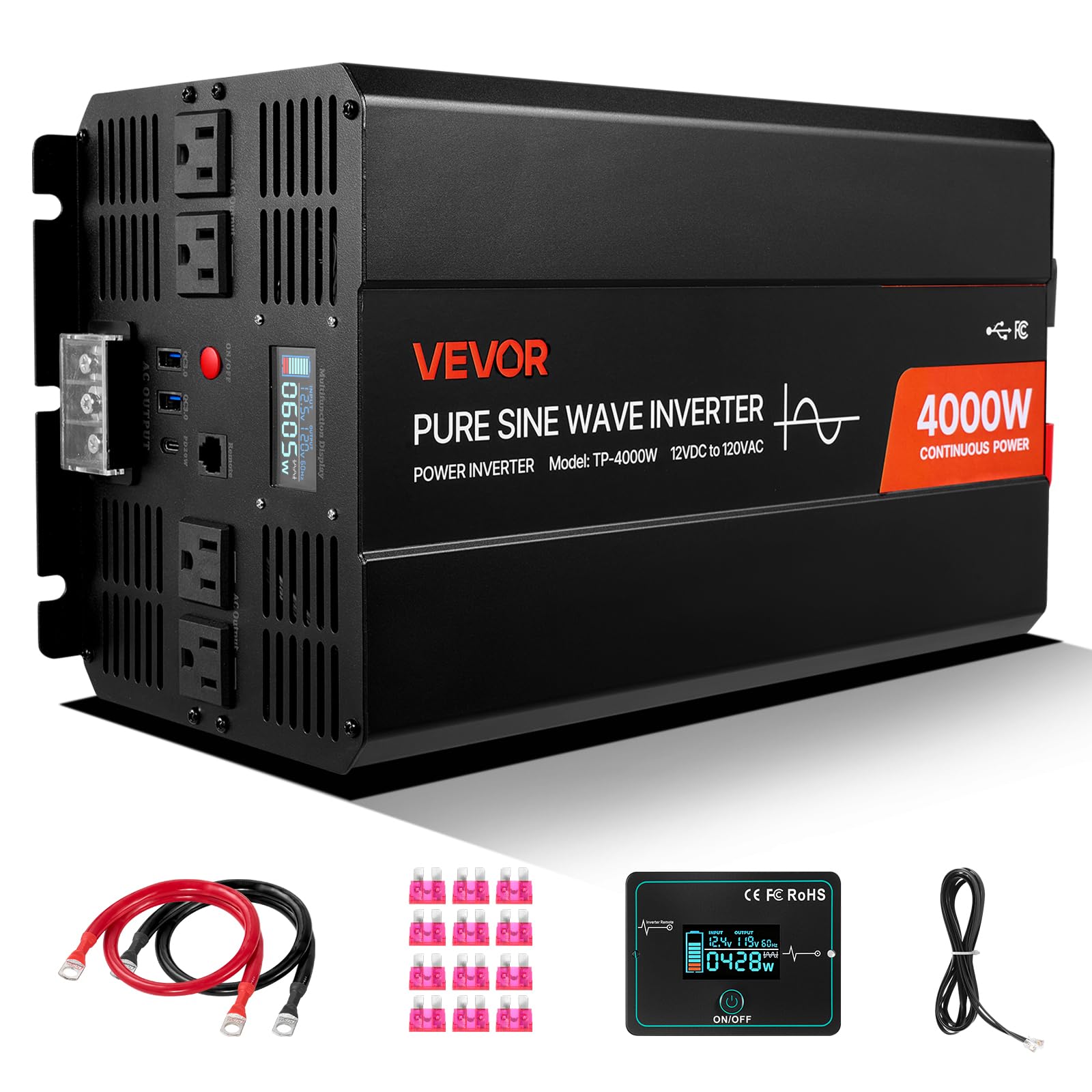
Figure 1: VEVOR 4000W Pure Sine Wave Power Inverter. This image shows the overall design of the inverter, highlighting its compact form factor and robust construction.
2. Informazzjoni dwar is-Sigurtà
TWISSIJA: Jekk ma ssegwix dawn l-istruzzjonijiet ta’ sigurtà, dan jista’ jirriżulta fi korriment serju jew ħsara lill-proprjetà.
- Vol Għolitage: The inverter produces 120V AC, which can be lethal. Treat all connections with extreme caution.
- Ventilazzjoni xierqa: Ensure the inverter is installed in a well-ventilated area. Do not block ventilation openings.
- Evita l-umdità: Tesponix l-inverter għax-xita, l-ilma, jew umdità eċċessiva.
- Materjali li jaqbdu: Do not operate the inverter near flammable liquids, gases, or other combustible materials.
- Sigurtà tal-batterija: Connect the inverter only to 12V DC batteries. Ensure correct polarity (+ to + and - to -). Battery acid is corrosive; wear protective gear.
- L-ertjar: L-inverter għandu jkun ertjat kif suppost.
- Tfal: Żomm l-inverter fejn ma jintlaħaqx mit-tfal.
- Persunal kwalifikat: L-installazzjoni u l-manutenzjoni għandhom isiru minn persunal ikkwalifikat.
3. Karatteristiċi tal-prodott
The VEVOR 4000W Pure Sine Wave Power Inverter is equipped with advanced features for reliable power conversion:
- Seven Output Ports: Includes 2 USB ports, 4 AC outlets, and 1 Type-C port for versatile device charging and power.
- Ħruġ ta' Mewġ Sinus Pur: Provides clean and stable power, suitable for all electronics, including sensitive devices and high-power appliances like refrigerators and air conditioners.
- Flexible Remote Control: A 9.8 ft (3 m) cable remote allows convenient operation from a distance.
- Protezzjonijiet Multipli: Features over-voltage, taħt il-voltage, overload, over-temperature, short circuit, and reverse polarity protection for enhanced safety.
- Display LCD: Real-time display of power usage, input voltage, output power, and error codes for easy monitoring.
- Fann tat-Tkessiħ Intelliġenti: Automatically activates above 113°F (45°C) to maintain optimal operating temperature and extend inverter life.
- Kompatibilità wiesgħa tal-batterija: Compatible with GEL, SLA, LI, FLD, AGM, CLA, and USER battery types.

Figure 2: VEVOR 4000W Power Inverter with multiple output ports (2x USB, 4x AC, 1x Type-C) and compatible battery types (GEL, SLA, LI, FLD, AGM, CLA, USER). This image illustrates the various connectivity options and battery types supported by the inverter.

Figure 3: Diagram illustrating the difference between Pure Sine Wave and Modified Sine Wave output, highlighting the VEVOR inverter's pure sine wave for sensitive electronics. This graphic explains why pure sine wave is superior for powering a wide range of devices.

Figura 4: Eżamples of devices compatible with the VEVOR 4000W Power Inverter, including phones, laptops, air conditioners, and coffee makers, with their typical wattage. This image demonstrates the wide range of applications for the inverter.
4. Istruzzjonijiet ta' Setup
4.1 Spakkjar u Spezzjoni
- Carefully remove the inverter and all accessories from the packaging.
- Spezzjona l-unità għal xi sinjali ta' ħsara waqt it-trasport. Jekk tkun bil-ħsara, tħaddimhiex u kkuntattja l-appoġġ għall-klijenti.
- Ensure all listed accessories are present: user manual, fuses, battery cables, and remote control.
4.2 Mounting and Ventilation
- Mount the inverter in a dry, cool, and well-ventilated area.
- Evita d-dawl tax-xemx dirett, sorsi ta’ sħana, u umdità.
- Ensure there is at least 6 inches (15 cm) of clear space around all sides of the inverter for proper airflow.
- Do not mount the inverter in the same compartment as batteries, as batteries can emit explosive gases.
4.3 Konnessjoni tal-batterija
IMPORTANT: Always connect the inverter to a 12V DC battery system. Ensure the battery is fully charged or has sufficient capacity for your intended load.
- Turn off the inverter and ensure no loads are connected.
- Qabbad il- aħmar kejbil tal-batterija għall- pożittiv (+) terminal tal-inverter u mbagħad lejn il- pożittiv (+) terminal tal-batterija ta' 12V.
- Qabbad il- iswed kejbil tal-batterija għall- negattiv (-) terminal tal-inverter u mbagħad lejn il- negattiv (-) terminal tal-batterija ta' 12V.
- Ensure all connections are tight and secure to prevent loose connections, which can cause overheating.
- Connect the inverter's grounding terminal to a proper earth ground (e.g., vehicle chassis or ground rod).
4.4 Konnessjoni tal-Kontroll mill-Bogħod
Plug the remote control cable into the designated remote port on the inverter. The remote allows you to power the inverter on/off from a convenient location.
5. Istruzzjonijiet Operattivi
5.1 Tixgħel/Jitfi
- After connecting the battery, press and hold the power button on the inverter or the remote control for a few seconds until the LCD display illuminates.
- Biex titfi, agħfas u żomm il-buttuna tal-qawwa mill-ġdid sakemm id-displej jintefa.
5.2 L-Użu tal-Portijiet tal-Output
- Ħwienet AC: Plug your 120V AC appliances into the standard AC outlets. Ensure the total wattage of connected devices does not exceed the inverter's continuous power rating (4000W).
- Portijiet USB: Connect your USB-powered devices for charging. The inverter provides fast charging capabilities (e.g., 20W).
- Port tat-Tip-C: Connect your Type-C compatible devices for fast charging (e.g., 18W).

Figure 5: Illustration of the fast-charging capabilities of the USB (20W) and Type-C (18W) ports on the VEVOR 4000W Power Inverter, showing charging times for an iPhone. This image highlights the efficiency of the charging ports.
5.3 Display LCD
The LCD display provides real-time information about the inverter's operation:
- Input Voltage: Shows the current DC voltage mill-batterija tiegħek.
- Qawwa tal-Ħruġ: Displays the current AC power being drawn by connected devices.
- Kodiċi ta' Żball: In case of a fault, the display will show an error code to help with troubleshooting. Refer to the troubleshooting section for details.
6. Manutenzjoni
6.1 Tindif
- Regularly clean the exterior of the inverter with a dry, soft cloth.
- Ensure ventilation openings are free from dust and debris to maintain proper airflow. Do not use liquids or abrasive cleaners.
6.2 Verifiki tal-Konnessjoni
- Periodically check all battery and output connections to ensure they are tight and secure. Loose connections can cause voltagqtar elettroniku u sħana żejda.
- Inspect battery cables for any signs of wear or damage. Replace if necessary.
6.3 Sistema tat-tkessiħ

Figure 6: Image demonstrating the intelligent cooling fan system of the VEVOR 4000W Power Inverter, which activates automatically when the internal temperature exceeds 113°F (45°C). This graphic illustrates the fan's operational thresholds.
The inverter features an intelligent cooling fan that activates automatically. Ensure the fan is not obstructed and operates freely when the inverter is under load or reaches a certain temperature.
7 Issolvi l-problemi
This section provides solutions to common issues you might encounter with your VEVOR 4000W Power Inverter.
| Problema | Kawża Possibbli | Soluzzjoni |
|---|---|---|
| L-inverter ma jixgħelx. | Konnessjonijiet tal-batterija maħlula, vultaġġ baxx tal-batterijatage, fjus maħruq. | Iċċekkja l-konnessjonijiet tal-kejbil tal-batterija. Kun żgur li l-vultaġġ tal-batterijatage is above 11V. Check and replace internal fuses if necessary (consult a professional). |
| L-ebda output AC. | Overload, over-temperature, low battery voltage, faulty appliance. | Reduce connected load. Allow inverter to cool down. Recharge battery. Test appliance with another power source. |
| Overload alarm/shutdown. | It-tagħbija konnessa taqbeż il-kapaċità tal-inverter. | Disconnect some appliances to reduce the total load. Restart the inverter. |
| Over-temperature alarm/shutdown. | Ventilazzjoni ħażina, temperatura ambjentali għolja, tagħbija eċċessiva. | Ensure proper ventilation around the inverter. Reduce load. Allow inverter to cool down. |
| Vol tal-batterija baxxatage alarm/shutdown. | Il-batterija hija skarikata. | Recharge the battery. Disconnect non-essential loads. |
8. Speċifikazzjonijiet
| Karatteristika | Speċifikazzjoni |
|---|---|
| Isem tal-Mudell | Pure Sine Wave Inverter 4000W (TP-4000W) |
| Qawwa tal-Ħruġ Rated | 4000W |
| L-ogħla qawwa | 8000W (for a short duration) |
| Input Voltage | 12V DC |
| Ħruġ Voltage / Frekwenza | 120V AC, 60Hz |
| Output Waveform | Mewġa Sinjura Pura |
| Numru ta' Ħwienet AC | 4 |
| Portijiet USB | 2 (20W each) |
| Port tat-Tip Ċ | 1 (18W) |
| Materjal Prinċipali | Liga tal-Aluminju |
| Dimensjonijiet tal-Prodott (L x W x H) | 15.35 pulzieri x 6.50 pulzieri x 8.07 pulzieri (390 mm x 165 mm x 205 mm) |
| Piż Nett | 15.65 lbs (7.1 kg) |
| Użi Rakkomandati | Camping, Car, Home, Office, Recreational Vehicle |
| Aċċessorji Inklużi | User Manual, 12x Fuses, 2x 60 cm Battery Cables, 1x Remote Control, 1x 3 m Remote Cable |

Figure 7: Detailed dimensions of the VEVOR 4000W Power Inverter (15.35in x 6.50in x 8.07in) and a list of included accessories: user manual, fuses, battery cables, and remote control. This image provides a visual reference for the inverter's size and package contents.
9. Garanzija u Appoġġ
Il-prodotti VEVOR huma ddisinjati għad-durabbiltà u l-prestazzjoni. Għal informazzjoni dwar il-garanzija, appoġġ tekniku, jew mistoqsijiet dwar is-servizz, jekk jogħġbok irreferi għall-karta tal-garanzija inkluża mal-prodott tiegħek jew żur is-sit uffiċjali ta' VEVOR. website. Please have your model number (TP-4000W) and purchase date available when contacting support.


