1. Introduzzjoni
Welcome to the user manual for your new Lava A1 Music keypad mobile phone. This guide provides essential information on setting up, operating, maintaining, and troubleshooting your device. Please read this manual carefully to ensure proper use and to maximize the performance of your phone.
The Lava A1 Music is designed for reliable communication with features such as clear sound, long battery life, and user-friendly operation.
2. Informazzjoni dwar is-Sigurtà
- Sigurtà tal-batterija: Uża biss batteriji u chargers oriġinali jew approvati. Tagħmilx short circuit, tittaqqabx, jew tesponix il-batterija għal temperaturi estremi. Armi l-batteriji kif suppost.
- Sigurtà tas-Sewqan: Do not use your phone while driving. If necessary, use a hands-free accessory.
- Apparat Mediku: Maintain a safe distance between your phone and medical devices like pacemakers. Consult your physician and medical device manufacturer for specific guidelines.
- Ajruplani: Turn off your phone when on an aircraft.
- Ambjenti Splussivi: Turn off your phone in areas with potentially explosive atmospheres, such as gas stations or chemical plants.
- Reżistenza għall-Ilma: Dan l-apparat mhuwiex reżistenti għall-ilma. Evita l-espożizzjoni għal-likwidi.
- Tfal: Keep the phone and its accessories out of reach of small children.
3. Kontenut tal-Pakkett
Malli tiftaħ il-pakkett, jekk jogħġbok ivverifika li l-oġġetti kollha huma preżenti u f'kundizzjoni tajba:
- Lava A1 Music Mobile Phone
- Batterija
- Adapter (Ċarġer)
- Manwal għall-Utent (Dan id-dokument)
4. Device Overview
Familiarize yourself with the physical components of your Lava A1 Music phone.

Stampa 4.1: Quddiem u lura view of the Lava A1 Music mobile phone, showcasing its compact design and keypad.
The phone features a durable build with a comfortable keypad for easy dialing and navigation. The rear panel includes the speaker grille and the A1 Music branding.
Disinn tat-Tastiera

Stampa 4.2: Dettaljati view of the Lava A1 Music keypad, highlighting the numerical and function keys.
- Ċavetta tan-Navigazzjoni: Użat għan-navigazzjoni u l-għażla tal-menù.
- Ċavetta tas-Sejħa: Initiates or answers calls.
- Ċavetta tat-Tmiem/tal-Enerġija: Ends calls, returns to standby, or powers the phone on/off.
- Soft Keys: Context-sensitive keys for menu options.
- Numerical Keys: Biex iċċempel numri u ddaħħal test.
5. Setup
5.1 Daħħal il-Karta(i) SIM u l-Batterija
- Neħħi l-Għatu ta' Wara: Gently pry open the back cover of the phone from the designated notch.
- Daħħal il-Karta(i) tas-SIM: Locate the SIM card slot(s). Insert your SIM card(s) into the slot(s) with the gold contacts facing down, ensuring they are correctly seated. This phone supports Dual SIM functionality.
- Daħħal il-batterija: Place the battery into the battery compartment, aligning the gold contacts on the battery with those in the phone.
- Ibdel il-Qoxra ta' Wara: Carefully align and press the back cover until it clicks securely into place.
5.2 Iċċarġjar tal-batterija
Qabel l-ewwel użu, huwa rakkomandat li l-batterija tiċċarġja kompletament.
- Connect the charger adapter to a power outlet.
- Connect the other end of the charger to the phone's charging port.
- L-indikatur tal-batterija fuq l-iskrin se juri l-istatus tal-iċċarġjar.
- Ladarba tkun iċċarġjata kompletament, skonnettja l-ċarġer.
The Lava A1 Music features a 1000mAh battery, providing up to 5 days of standby time under optimal conditions.
5.3 Tixgħel/Jitfi
- Biex Tixgħel: Agħfas u żomm il- Tmiem/Power Key sakemm jixgħel l-iskrin.
- Biex Tifi: Agħfas u żomm il- Tmiem/Power Key until the power-off options appear, then select "Power Off".
6. Istruzzjonijiet Operattivi
6.1 Nagħmlu Telefonati
- From the standby screen, enter the phone number using the keypad.
- Agħfas il- Ċavetta tas-Sejħa biex tibda s-sejħa.
- Biex ittemm sejħa, agħfas il- Tmiem/Power Key.
6.2 Sending SMS Messages
- Mur fuq Menu > Messaġġi > Ikteb Messaġġ.
- Enter your message using the keypad.
- Daħħal in-numru tat-telefon tar-riċevitur jew agħżel mill-kuntatti.
- Agħżel Ibgħat.
6.3 Konnettività Bluetooth
The Lava A1 Music supports Bluetooth for wireless connectivity with compatible devices.
- Mur fuq Menu > Settings > Konnettività > Bluetooth.
- Ixgħel il-Bluetooth On.
- Agħżel Apparati mqabbla or Fittex għal apparat ġdid biex jgħaqqdu.
6.4 Plejer tal-Mużika
Enjoy your favorite music with the phone's built-in music player and clear sound output.

Stampa 6.1: Illustration of the powerful sound feature, indicating high-quality audio output for music and calls.
- Mur fuq Menu > Multimedia > Plejer tal-Mużika.
- Select a song from your storage to play.
- Use the navigation keys to control playback (play, pause, skip).
6.5 Torch Function
The phone includes an instant torch feature for convenience.
- To turn on the torch, press and hold the designated torch key (refer to your phone's keypad for exact key, often the '0' or a dedicated side button).
- Repeat the action to turn it off.
6.6 Auto Call Recording
The Lava A1 Music supports automatic call recording.
- Mur fuq Menu > Settings > Sejħa Settings.
- Locate and enable the Reġistrazzjoni Awtomatika tas-Sejħiet għażla.
- Recorded calls will be saved in the phone's memory or on an inserted memory card.
6.7 Appoġġ Lingwistiku
The device supports 22 Indian languages, allowing you to operate the phone in your preferred language.
- Mur fuq Menu > Settings > Settings tat-Telefon > Lingwa.
- Agħżel il-lingwa mixtieqa tiegħek mil-lista.
6.8 Super Battery Mode
Activate Super Battery Mode to extend your phone's battery life when power is low.
- This mode typically optimizes background processes and display settings to conserve power.
- Access this feature through Menu > Settings > Ġestjoni tal-Enerġija or a similar path.
6.9 Display and Contact Photo Icons
The phone features a 2-inch display for clear viewing and supports contact photo icons for easy call verification.

Stampa 6.2: The 2-inch display of the Lava A1 Music, showing clear visuals.
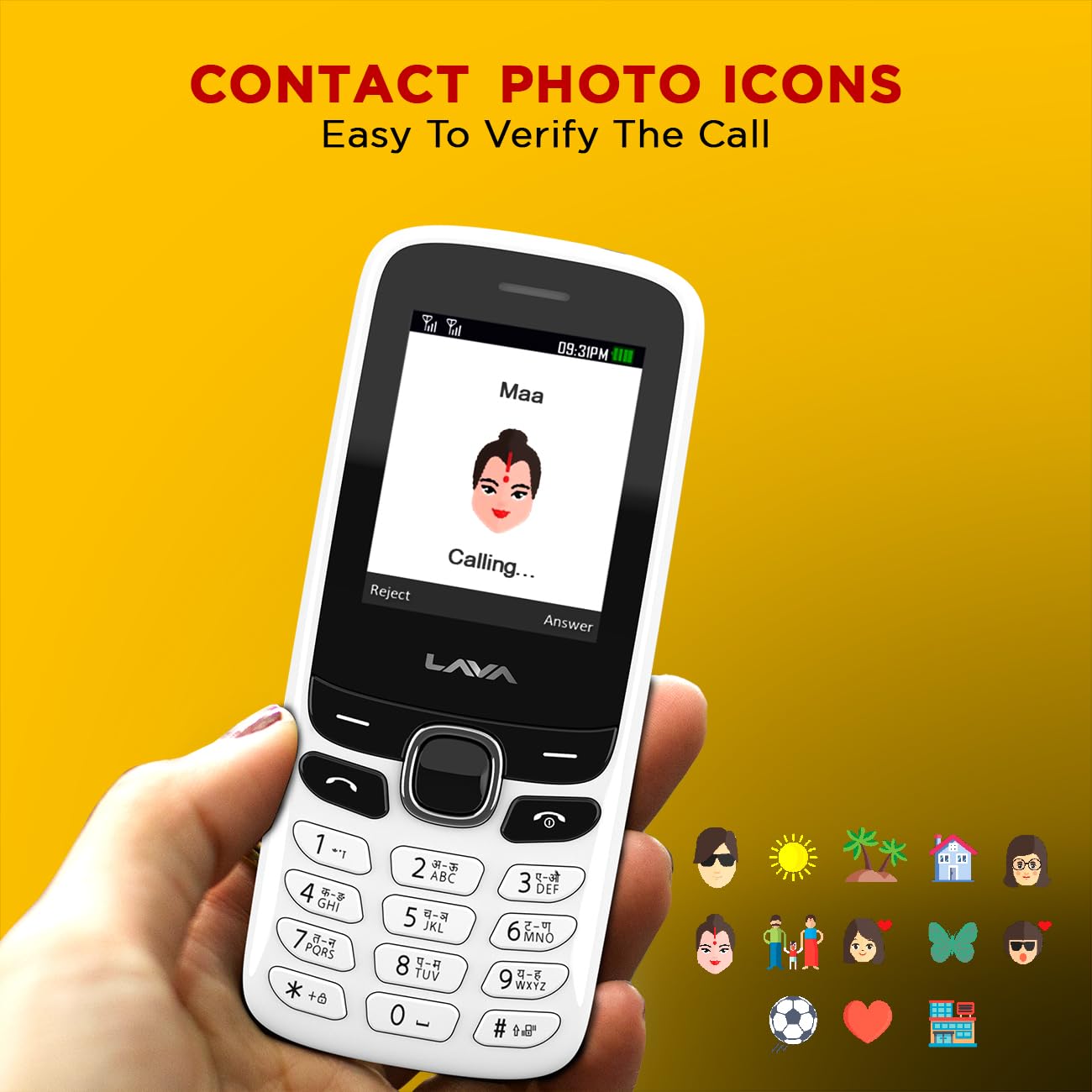
Stampa 6.3: Example of contact photo icons on the Lava A1 Music, aiding in quick identification of callers.
7. Manutenzjoni
7.1 Kura tal-Batterija
- Evita li tiċċarġja żżejjed jew li tbattal il-batterija kompletament ta' spiss.
- Tesponix il-batterija għal sħana jew kesħa estremi.
- If the phone will not be used for an extended period, charge the battery to about 50% before storing.
7.2 Tindif tal-Apparat
- Uża drapp artab u niexef biex tnaddaf il-wiċċ tat-telefon.
- Evita li tuża kimiċi ħarxa, solventi tat-tindif, jew deterġenti qawwija.
- Keep the charging port and audio jack free from dust and debris.
7.3 Ħażna
Aħżen it-telefon f'post frisk u niexef 'il bogħod mix-xemx diretta u minn temperaturi estremi.
8 Issolvi l-problemi
This section addresses common issues you might encounter with your Lava A1 Music phone.
| Problema | Soluzzjoni Possibbli |
|---|---|
| It-telefon ma jixgħelx | Ensure the battery is charged. Check if the battery is correctly inserted. |
| L-ebda sinjal tan-netwerk | Iċċekkja jekk is-SIM card hijiex imdaħħla sew. Mur f'żona b'kopertura tan-netwerk aħjar. Ikkuntattja lill-fornitur tas-servizz tiegħek. |
| Ma nistax nagħmel jew nirċievi telefonati | Check network signal. Ensure your SIM card is active. Verify call barring settings. |
| Il-batterija tiskula malajr | Reduce screen brightness. Close unused applications. Activate Super Battery Mode. |
| It-tastiera ma tirrispondix | Restart the phone. Ensure no physical obstruction on the keys. |
Jekk il-problema tippersisti wara li tipprova dawn is-soluzzjonijiet, jekk jogħġbok ikkuntattja l-appoġġ għall-klijenti.
9. Speċifikazzjonijiet
Detailed technical specifications for the Lava A1 Music mobile phone:
| Brand | Lava |
| Numru tal-Mudell | A1 Music |
| Sistema Operattiva | Android 10.0 |
| Daqs tal-Iskrin | 2 Pulzier (5.08 ċm) |
| Riżoluzzjoni | 240 x 320 pixel |
| Kapaċità tal-batterija | 1000 Milliampqabel is-siegħa (mAh) |
| Ħin tat-Taħdit bit-Telefon | Sa 96-il Siegħa |
| Teknoloġiji tal-Konnettività | USB, Bluetooth |
| Karatteristiċi Speċjali | Dual SIM, Auto Call Recording, Instant Torch, 22 Indian Language Support, Super Battery Mode |
| Awdjo Jack | 3.5 mm |
| Fattur tal-Formola | Bar |
| Dimensjonijiet tal-Prodott | 11.25 x 4.8 x 1.47 ċm |
| Piż tal-oġġett | 70 g |
| Pajjiż ta' Oriġini | Indja |
| X'hemm fil-Kaxxa | Adapter |
10. Garanzija u Appoġġ
10.1 Informazzjoni dwar Garanzija
Your Lava A1 Music mobile phone comes with a Garanzija ta' Sostituzzjoni ta' Sena from the date of purchase. This warranty covers manufacturing defects and ensures a replacement device in case of eligible issues. Please retain your purchase receipt as proof of purchase for warranty claims.
The warranty does not cover damages caused by misuse, accidents, unauthorized repairs, or normal wear and tear.
10.2 Appoġġ għall-Klijent
For any technical assistance, warranty claims, or further inquiries, please contact Lava customer support. Refer to the official Lava website or your product packaging for the most current contact details, including phone numbers and service center locations.
Tista 'wkoll iżżur l-uffiċjal Lava Store on Amazon għal aktar informazzjoni dwar il-prodott u riżorsi ta' appoġġ.


