ATTACK SHARK X98 Wireless Mechanical Keyboard User Manual
Model: X98 | Brand: ATTACK SHARK
Introduzzjoni
The ATTACK SHARK X98 is a versatile wireless mechanical keyboard designed for a superior typing and gaming experience. Featuring tri-mode connectivity, hot-swappable switches, PBT keycaps, and vibrant RGB backlighting, this manual provides essential information for setup, operation, and maintenance to ensure optimal performance.
1. Setup
1.1 Kontenut tal-Pakkett
Before starting, ensure all items are present in the package:
- ATTACK SHARK X98 Wireless Mechanical Keyboard
- USB-C Cable
- Riċevitur USB 2.4GHz
- Keycap Puller
- Iswiċċ Puller
- Extra Switches (2)
- Manwal għall-Utent (dan id-dokument)

Figure 1: Package Contents of the ATTACK SHARK X98 Keyboard.
1.2 Għażliet ta' Konnettività
The X98 keyboard supports three connection modes:
- USB-C bil-wajer: For a stable, direct connection and charging.
- 2.4GHz Wireless: Utilizes a dedicated USB receiver for low-latency wireless performance.
- Bluetooth 5.0: Connects to up to three devices simultaneously.

Figure 2: Triple Mode Connection Overview.
1.3 Il-Konnessjoni tat-Tastiera Tiegħek
- Locate the mode switch on the back edge of the keyboard.
- Select your desired connection mode:
- Wajer: Connect the USB-C cable to the keyboard and your device.
- 2.4GHz: Remove the 2.4GHz USB receiver from its storage slot on the keyboard and plug it into your device. Switch the keyboard to 2.4G mode.
- Bluetooth: Switch the keyboard to BT mode. On your device, search for 'ATTACK SHARK X98' in Bluetooth settings and pair. The keyboard can store up to three Bluetooth profiles (BT1, BT2, BT3).
- Ensure the operating system switch (Win/Mac) is set correctly for your device.

Figure 3: Connectivity Switches.
1.4 Ħlas Inizjali
For optimal performance, fully charge the keyboard before first use. Connect the USB-C cable to the keyboard and a power source. The battery indicator will show charging status.
Video 1: ATTACK SHARK X98 Wireless Mechanical Keyboard Overview. This video demonstrates the keyboard's features and connectivity options.
2. Istruzzjonijiet Operattivi
2.1 Backlighting RGB
The X98 keyboard features 16.8 million RGB colors and 21 lighting effects. Use the following key combinations to control the lighting:
- Fn + \|: Switch between different lighting effects.
- Fn + Enter: Switch between different lighting colors.
- Brightness and speed can also be adjusted via the dedicated software.

Figure 4: RGB Lighting Customization Software.
2.2 Programmable Macro Keys
Customize your workflow or gaming experience with programmable macro keys. Use the dedicated software to assign complex sequences or functions to individual keys.

Figure 5: Programmable Macro Keys Interface.
2.3 Battery Level Check
To check the battery level in wireless mode, press Fn + Backspace. The indicator lights will display the current charge:
- Red light: 20% or less
- Yellow light: 50%
- Green light: 60%
- Full green light: 100%

Figure 6: Battery Level Indicators.
2.4 Gasket Mount Design
The X98 features a gasket mount design with 5 layers of foam (PORON Foam, IXPE Switch Pad, PET Noise Cancellation Pad, EPDM Dampening Pad, Silicone Pad). This construction provides a softer, quieter, and more satisfying 'thocky' typing sound, ideal for both office and gaming environments.
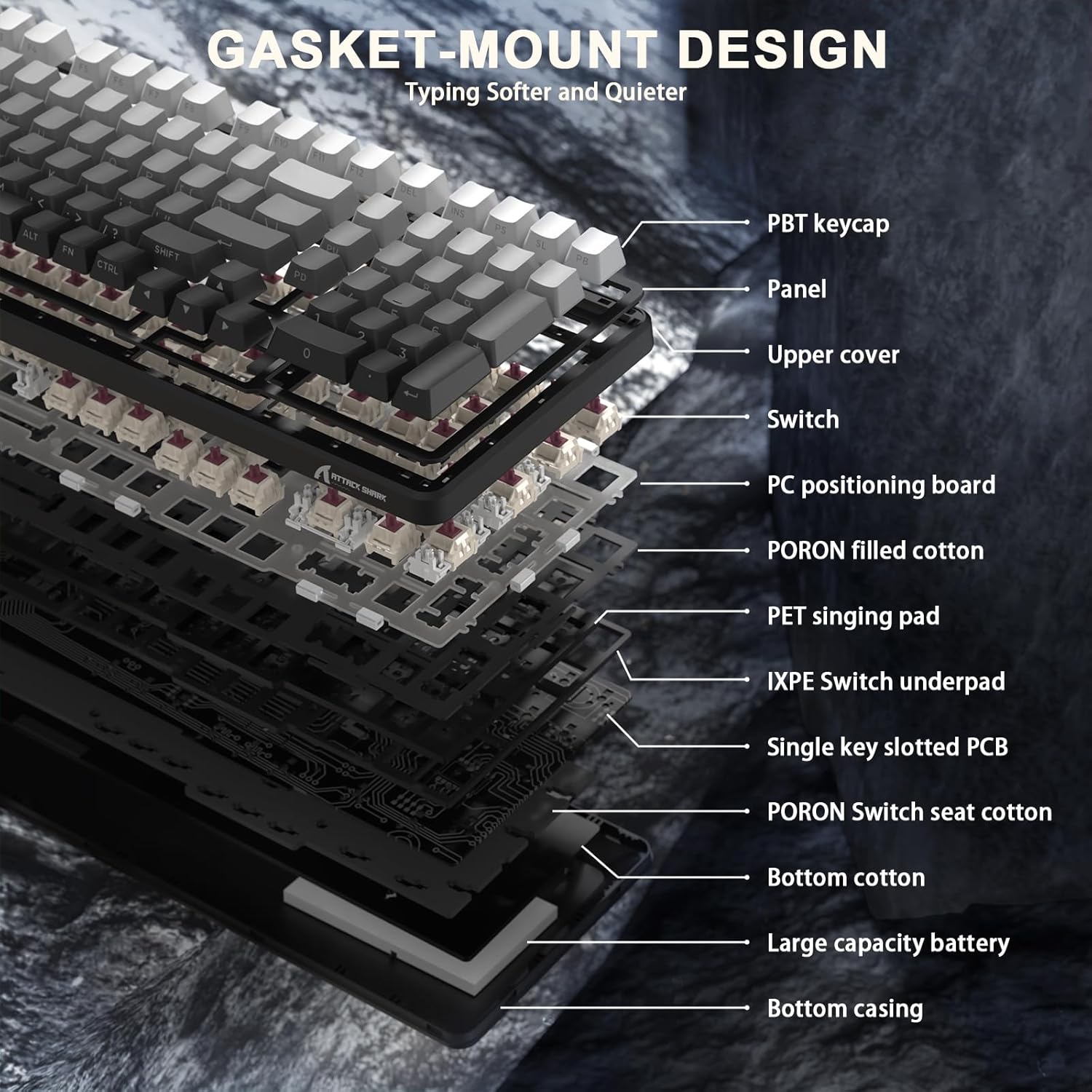
Figure 7: Gasket Mount Design Layers.
2.5 Swiċċijiet li jistgħu jinbidlu bis-sħana
The keyboard is equipped with hot-swappable sockets, allowing you to easily change switches without soldering. This enables customization of your typing feel and sound. The pre-lubed Blueberry linear switches offer a creamy, tactile, yet quiet experience.

Figure 8: Hot-Swappable Switches.
Video 2: X98PRO 98 Keys Mechanical Keyboard with TFT Display. This video highlights various features of the X98PRO keyboard, including its display and lighting effects.
Video 3: ATTACK SHARK X98PRO Wireless Keyboard. A short demonstration of the X98PRO's wireless capabilities and design.
3. Manutenzjoni
3.1 Tindif
- Use a soft, dry cloth to wipe the keyboard surface.
- For deeper cleaning, use the provided keycap puller to remove keycaps and clean underneath with compressed air or a small brush.
- Evita li tuża kimiċi ħarxa jew materjali li joborxu.
3.2 Sostituzzjoni tal-Għatu taċ-Ċwievet u s-Swiċċ
The X98 features durable PBT keycaps that resist shine and fading. If replacement is needed, use the provided keycap puller to gently remove keycaps. For switches, use the switch puller to carefully extract and insert new compatible 3/5-pin mechanical switches.
4 Issolvi l-problemi
- It-tastiera ma tirrispondix: Ensure the keyboard is charged and the correct connection mode (Wired, 2.4GHz, or Bluetooth) is selected. For 2.4GHz, verify the USB receiver is properly inserted. For Bluetooth, ensure it's paired correctly.
- Id-dwal RGB ma jaħdmux: Check if the keyboard is powered on. Use Fn + \| and Fn + Enter to cycle through lighting effects and colors. Adjust brightness via software or keyboard shortcuts.
- Lag or disconnection in wireless mode: Ensure the keyboard is within range of the receiver/device. Minimize interference from other wireless devices.
- Iċ-ċwievet mhux qed jirreġistraw: If specific keys are not working, try replacing the switch using the provided switch puller and spare switches.
5. Speċifikazzjonijiet
| Karatteristika | Dettall |
|---|---|
| Numru tal-Mudell | X98 |
| Dimensjonijiet tal-Prodott | 16 x 5.6 x 1.5 pulzieri |
| Piż tal-oġġett | 2.7 liri |
| Teknoloġija tal-Konnettività | 2.4G Wireless, Bluetooth 5.0, USB-C |
| Deskrizzjoni tat-Tastiera | Gaming/Office/Programming |
| Apparati Kompatibbli | Gaming Console, Laptop, PC, Smartphone, Tablet |
| Karatteristiċi Speċjali | Backlit, Customized Linear Blueberry Switch, Ergonomic, Hot-Swappable, Web Cloud Driver |
| Backlight tat-Tastiera | RGB (16.8 million colors, 21 effects) |
| Tappijiet ewlenin | Durable PBT Keycaps |
| Kapaċità tal-batterija | 4000mAh |
6. Garanzija u Appoġġ
For warranty information and technical support, please refer to the product packaging or contact ATTACK SHARK customer service directly. Keep your purchase receipt for warranty claims.


