1. Introduzzjoni u Fuqview
The Level Lock+ WiFi Deadbolt Smart Lock seamlessly integrates with your existing door hardware, offering a discreet and stylish security solution without visible technology on the inside or outside. It provides advanced features for modern home access and control.
Il-karatteristiċi ewlenin jinkludu:
- Smart Lock, Smarter Design: Integrates discreetly with existing door hardware.
- Tap to Enter with Apple Home Key: Access your home effortlessly by tapping Lock+ with your iPhone or Apple Watch.
- Control Your Lock From Anywhere: Remotely lock/unlock, view activity, and manage key codes via the Level Home app with the included Wi-Fi bridge.
- Dħul mingħajr ċavetta: Use the Level Home app (iOS & Android) or provided key fobs.
- Works with Smart Home Platforms: Compatible with Apple Home, Google Home, and Amazon Alexa for voice commands and automations.
- Sikur u Sikur: Constructed with 440C stainless steel and strengthened metal alloys, achieving a top AAA rating by BHMA standards.
- Installazzjoni DIY: Designed for easy installation on most American standard exterior doors.

Figure 1: The Level Lock+ WiFi Deadbolt Smart Lock, showing the lock components, Wi-Fi bridge, and a smartphone displaying the Level Home app.
2. X'inhu Inkluż
Your Level Lock+ WiFi Deadbolt Smart Lock package includes the following components:
- Level Lock+
- Level Connect Wi-Fi Bridge
- Batterija CR2
- 2 strike plates (short and long)
- 2 key fobs
- 2 ċwievet
- 6 screws (bolt plate screws, security screws, strike plate screws)

Figure 2: Contents of the Level Lock+ package.
3. Setup u Installazzjoni
The Level Lock+ is designed for straightforward DIY installation. Before beginning, ensure your current deadbolt operates smoothly without resistance. If not, contact support for troubleshooting.
Video 1: Official Level Lock+ Installation Guide (Duration: 1:52). This video provides a comprehensive walkthrough of the installation process.
Passi ta' Installazzjoni:
- Test Your Deadbolt: Before disassembling, ensure your existing deadbolt throws smoothly without pushing or pulling the door. This confirms proper door alignment.
- Disassemble Your Existing Lock: Unscrew and remove your current lock housing, deadbolt, and strike plate.
- Install the Backset and Motor: Insert the Level Lock+ backset into the cross bore hole, ensuring the word "TOP" faces upwards. Secure it with the provided bolt plate screws using a Phillips screwdriver (do not overtighten or use a power tool). Then, slide the motor onto the backset and tighten the connecting screw.
- Installa l-Istrike Plate: Fasten the appropriate strike plate (short or long) that best fits your door jamb with the provided strike plate screws.
- Install the Housing and Interior Plate: Line up the tailpiece of the exterior housing with the horizontal opening in the tailpiece adapter and slide it through. For the interior plate, align its horizontal opening with the end of the tailpiece and secure it with the two supplied security screws.
- Activate Your Lock: Unscrew the cap on the end of the bolt and insert the CR2 battery with the negative end towards the cap. If you've adjusted the bolt to the long position, use the included long cap. When you screw the cap back in, you will hear a welcome chime, indicating successful activation.

Figure 3: Easy installation process and compatibility with standard American deadbolts.
4. Operating Your Lock
The Level Lock+ offers multiple convenient ways to control access to your home.
4.1. Tap to Enter with Apple Home Key
Forget your physical keys. With Apple Home Key, you can effortlessly access your home by simply tapping your iPhone or Apple Watch to the lock, just as you would for a payment. The key is securely stored in your Apple Wallet.
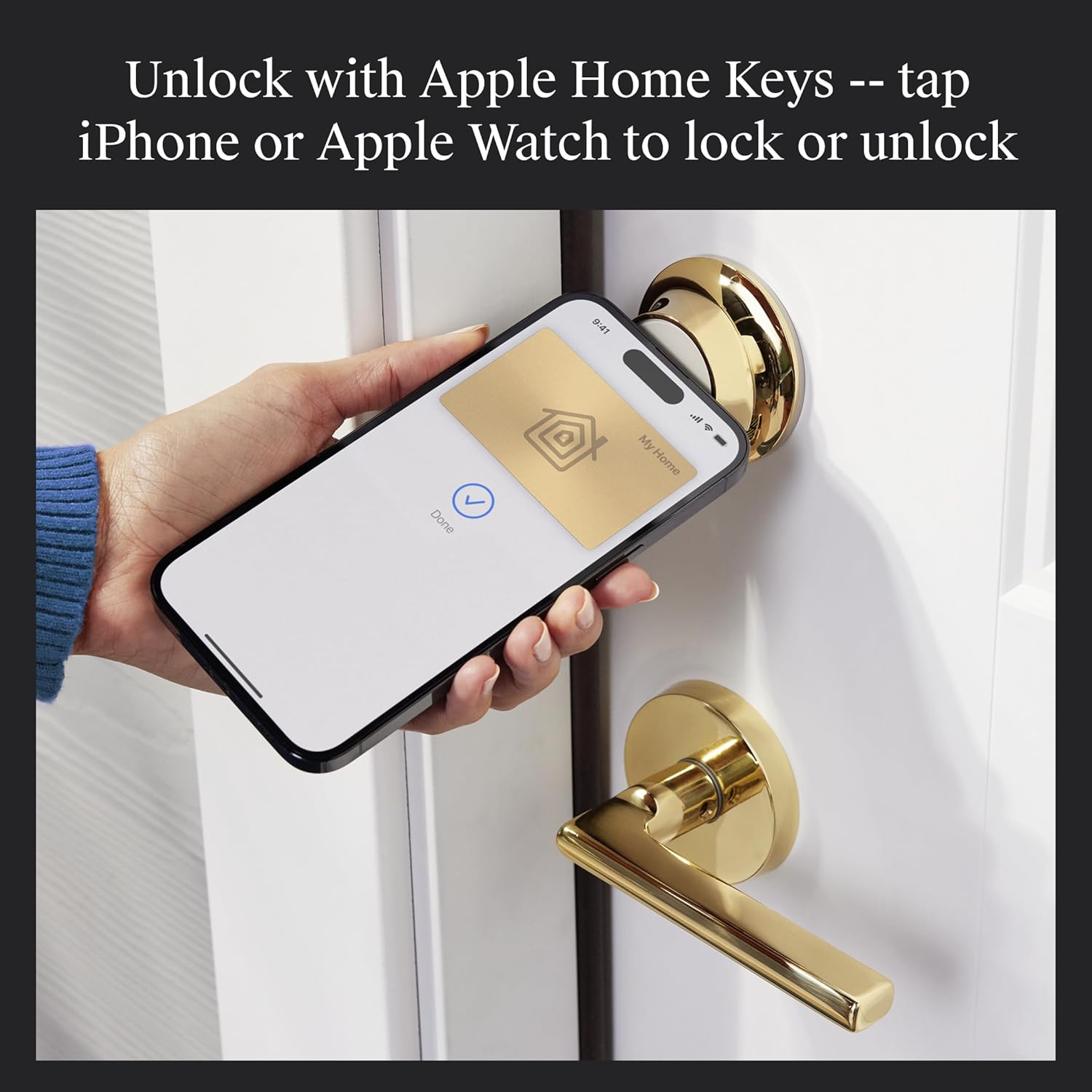
Figure 4: Unlocking the Level Lock+ using Apple Home Key on an iPhone.
4.2. Control Your Lock From Anywhere
With the included Level Connect Wi-Fi bridge, you can remotely lock or unlock your door from anywhere using the Level Home app. This feature also allows you to view live activity history and manage key codes for Level Keypad (sold separately).

Figure 5: Remote control of the Level Lock+ via the Level Home app.
4.3. Keyless Entry via Level Home App & Key Fob
Beyond Apple Home Key, you can easily lock or unlock your door using the Level Home app on iOS or Android devices, or with the provided key fobs. The app also allows you to share keyless access with trusted individuals, check activity history, and configure auto-lock/unlock settings.
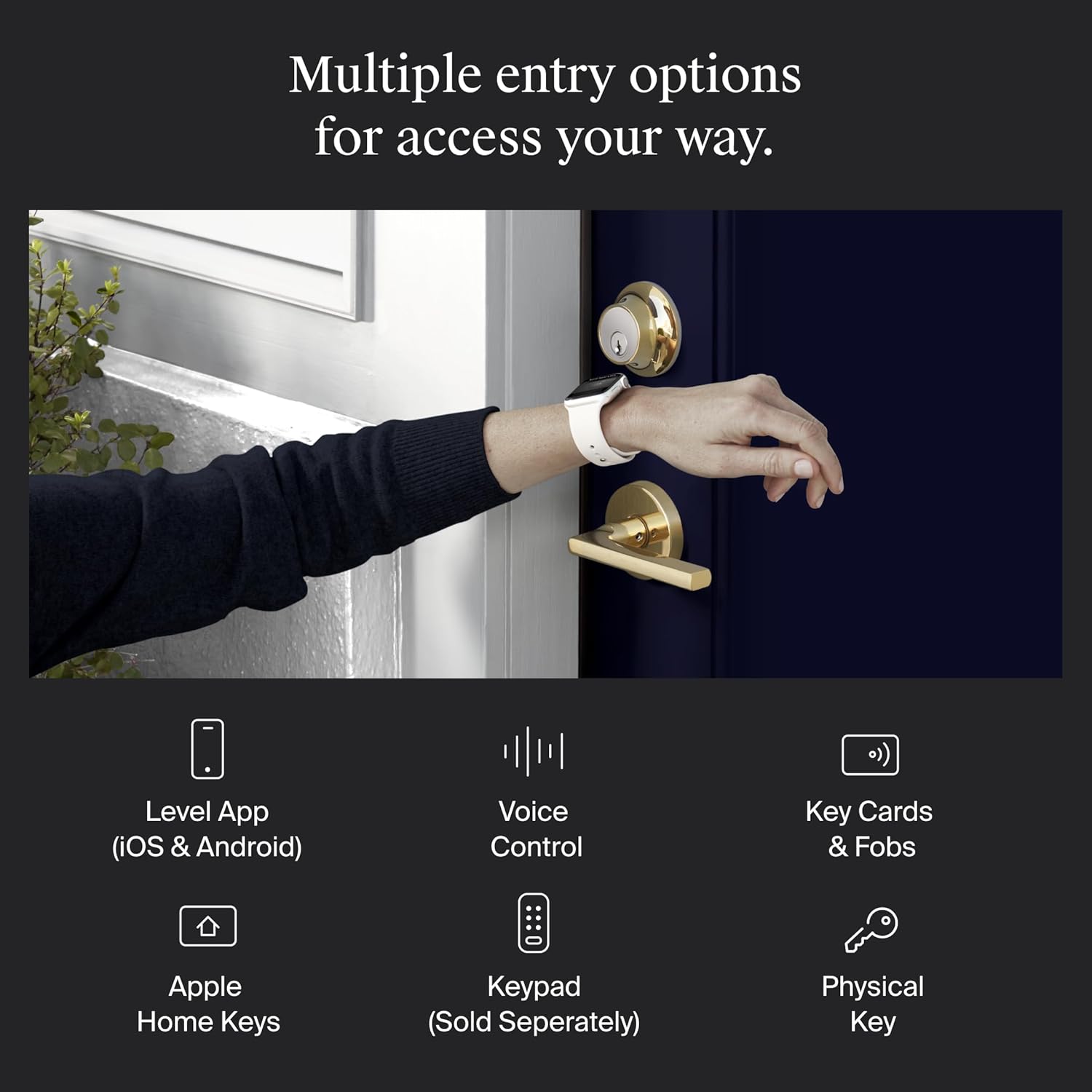
Figure 6: Multiple entry options for accessing your home with Level Lock+.
4.4. Works with Google, Alexa & Apple Home
Integrate your Level Lock+ with popular smart home ecosystems. Lock, unlock, and set automations using voice commands with Apple HomeKit, Google Home, or Amazon Alexa. For example, you can simply say, “Alexa, unlock the front door.”

Figure 7: Level Lock+ compatibility with various smart home platforms.
4.5. View Live Activity History
Keep track of who enters and exits your home with the live activity history feature available in the Level Home app. This provides peace of mind by showing you a detailed log of lock and unlock events.

Figura 8: Viewing live activity history in the Level Home app.
5. Manutenzjoni
5.1. Sostituzzjoni tal-batterija
The Level Lock+ uses one CR2 battery. When the battery level is low, you will receive notifications via the Level Home app. To replace the battery, unscrew the cap on the end of the bolt, remove the old battery, insert a new CR2 battery with the negative end towards the cap, and screw the cap back on until you hear the welcome chime.
5.2. Tindif
To clean your Level Lock+, use a soft, damp drapp. Evita prodotti tat-tindif jew solventi li joborxu li jistgħu jagħmlu ħsara lill-finitura.
6 Issolvi l-problemi
If you encounter issues with your Level Lock+, consider the following common troubleshooting steps:
- Kwistjonijiet ta' Konnettività: Ensure your Level Connect Wi-Fi Bridge is within 20 feet of the lock and connected to a 2.4 GHz Wi-Fi network. Check your home Wi-Fi signal strength.
- App Mhux Tirrispondi: Close and reopen the Level Home app. Ensure your smartphone's Bluetooth is enabled and you are within range of the lock.
- Is-Serratura Ma Tirrispondix: Check the battery level in the Level Home app. If the battery is low, replace it. Ensure the lock is properly installed and the deadbolt moves freely.
- Iċ-Ċavetta Fiżika Mhux Taħdem: Ensure you are using the correct key and that the lock cylinder is free of obstructions.
For more detailed troubleshooting or persistent issues, refer to the comprehensive help section within the Level Home app or visit the official Level support websit.
7. Speċifikazzjonijiet
| Karatteristika | Dettall |
|---|---|
| Brand | Livell |
| Isem tal-Mudell | Smart Lock |
| Numru tal-Mudell | C-F13U-S1 |
| UPC | 850009337894 |
| Tip Lock | Deadbolts |
| Kulur | Ram illustrat |
| Materjal | Azzar li ma jsaddadx, Metall |
| Dimensjonijiet tal-oġġett L x W x H | 4.5 x 2.75 x 2.75 pulzieri |
| Piż tal-oġġett | 2.76 liri |
| Sors tal-Enerġija | 1 batterija CR2 (inkluża) |
| Protokoll tal-Konnettività | Wi-Fi |
| Tip ta' Kontrollur | Apple HomeKit, Assistent tal-Google, Amazon Alexa, iOS, Android |
| Karatteristika Speċjali | Reżistenti għat-temp |
| Klassifikazzjoni tas-Sigurtà | BHMA AAA rated |
8. Garanzija u Appoġġ
For information regarding the product warranty, please refer to the documentation included with your Level Lock+ or visit the official Level Home Inc. website. For technical support, product registration, or to access additional resources, please contact Level customer service through their official channels.


