1. Introduzzjoni
Thank you for choosing the Hama BB/CATV Amplifier 00205234. This device is designed to amplify antenna signals for both cable television (CATV) and satellite antenna systems, ensuring a clear and stable signal reception. With its adjustable gain of up to 25 dB, you can fine-tune the signal strength to suit your specific needs. Please read this manual carefully before installation and use to ensure proper operation and safety.
2. Istruzzjonijiet tas-Sigurtà
- This device is intended for indoor use only. Do not expose it to moisture, rain, or extreme temperatures.
- Tiftaħx l-apparat casing. Is-servizz għandu jsir biss minn persunal kwalifikat.
- Kun żgur li s-sokit tal-elettriku huwa faċilment aċċessibbli u ertjat sew.
- Disconnect the device from the power supply before cleaning or if it will not be used for an extended period.
- Evita li tpoġġi l-apparat ħdejn sorsi tas-sħana jew fid-dawl tax-xemx dirett.
3. Kontenut tal-Pakkett
Jekk jogħġbok iċċekkja li l-oġġetti kollha huma preżenti u f'kundizzjoni tajba:
- Hama BB/CATV Amplifier 00205234 (Main Unit)
4. Prodott Aktarview
Familiarize yourself with the components of your Hama BB/CATV Ampaktar ħaj:
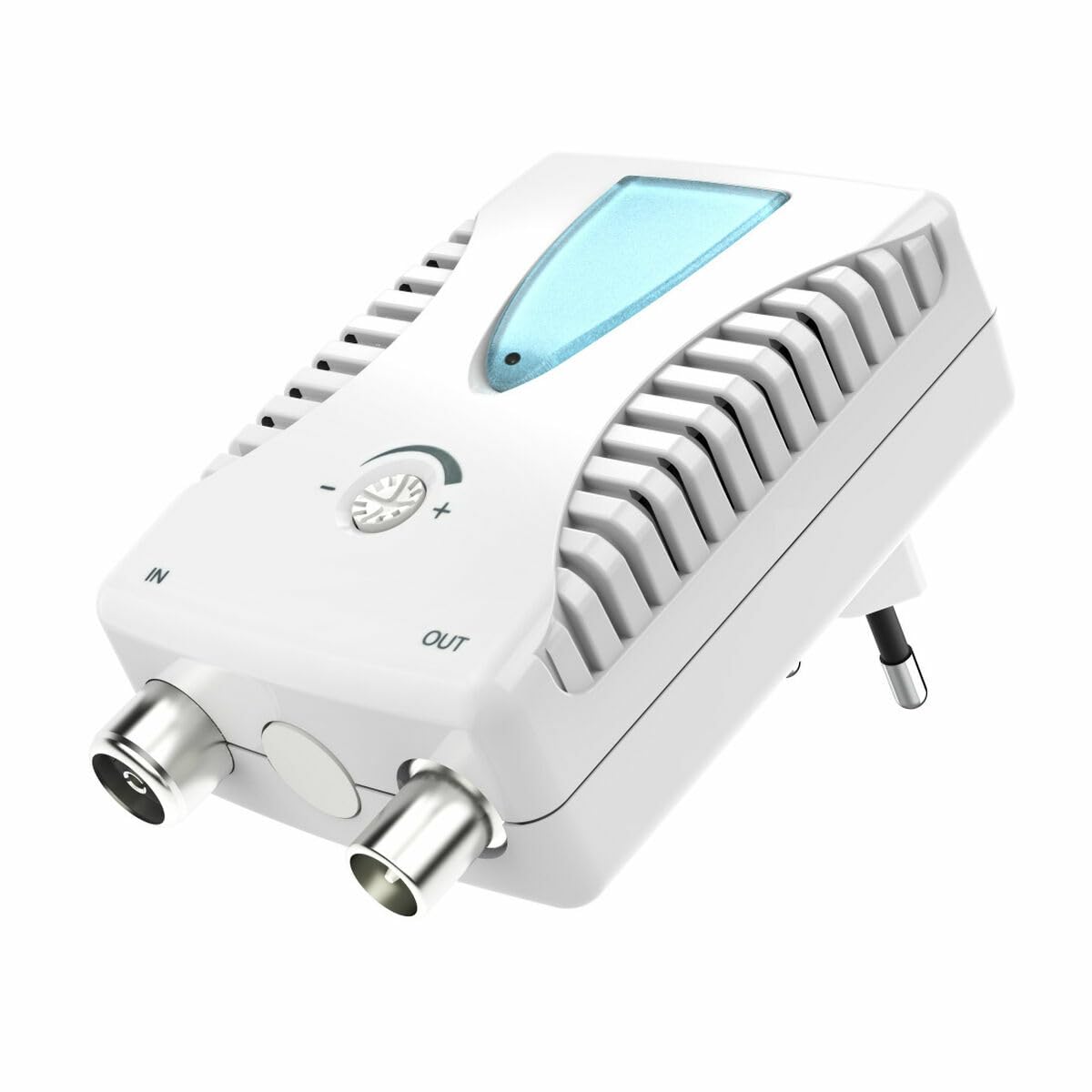
Figura 1: Quddiem view of the Hama BB/CATV Amplifier 00205234. It features an "IN" port for the incoming antenna signal, an "OUT" port for the amplified signal to your television or receiver, a rotary knob for signal gain adjustment, a blue LED indicator, and an integrated power plug.
- FIL-Port: Connects to the incoming antenna cable (from wall outlet or satellite dish).
- Port OUT: Connects to your television, receiver, or distribution system.
- Pum ta' Aġġustament: Użat biex jikkontrolla l- amplification level (gain).
- Indikatur LED: Jixgħel meta l-apparat ikun mixgħul.
- Integrated Power Plug: For connecting to a standard electrical outlet.
5. Setup u Installazzjoni
Follow these steps to install your Hama BB/CATV Ampaktar ħaj:
- Identifika l-Punti ta' Konnessjoni: Locate the antenna cable coming from your wall outlet or satellite dish (this will be your input signal) and the input port on your television or receiver (this will be your output destination).
- Connect Input Cable: Connect the incoming antenna cable to the IN port on the Hama amplifier. Kun żgur li l-konnessjoni hija sigura.
- Connect Output Cable: Use a suitable coaxial cable (not included) to connect the BARRA port of the Hama amplifier to the antenna input on your television or receiver. Ensure the connection is secure.
- Konnessjoni tal-Enerġija: Plug the integrated power plug of the amplifier into a standard electrical wall outlet. The blue LED indicator on the amplifier should illuminate, indicating that the device is powered on.
- Aġġustament Inizjali: Turn the adjustment knob to its minimum setting (usually fully counter-clockwise) before turning on your television.
Nota: For optimal performance, ensure all coaxial cable connections are tight and free from damage.
6. It-tħaddim tal- Ampaktar ħaj
The Hama BB/CATV Amplifier features an adjustable gain control to optimize your signal strength.
- Qawwa Mixgħul: Tiżgura l- amplifier is plugged into a power outlet and the blue LED is lit.
- Turn on TV/Receiver: Switch on your television or receiver and select the appropriate input source (e.g., "Antenna" or "Cable").
- Aġġusta Qligħ: Slowly turn the adjustment knob clockwise to increase the amplification. Observe your television screen for signal quality.
- If the picture is pixelated or distorted, the signal might be too weak or too strong.
- Adjust the knob until you achieve the clearest possible picture and sound.
- iżżejjedamplification can lead to signal distortion, so avoid setting the gain higher than necessary.
- Scan Channels (if necessary): After adjusting the gain, you may need to perform a channel scan on your television or receiver to detect new or improved channels. Refer to your TV's manual for instructions on how to perform a channel scan.
7. Manutenzjoni u Kura
- Tindif: Skonnettja l- amplifier from the power outlet before cleaning. Use a soft, dry, lint-free cloth to wipe the exterior. Do not use liquid cleaners or abrasive materials.
- Ħażna: If storing the device for an extended period, unplug it and keep it in a cool, dry place away from direct sunlight and moisture.
- Konnessjonijiet tal-kejbil: Iċċekkja perjodikament il-konnessjonijiet tal-kejbil kollha biex tiżgura li huma sikuri u ħielsa mill-korrużjoni jew ħsara.
8 Issolvi l-problemi
| Problema | Kawża Possibbli | Soluzzjoni |
|---|---|---|
| No picture or poor signal quality. |
|
|
| Blue LED not illuminated. |
|
|
| Picture is distorted or over-saturated. |
|
|
9. Speċifikazzjonijiet Tekniċi
| Numru tal-Mudell: | 00205234 |
| Ditta: | Hama |
| Amplification (Gain): | Up to 25 dB (adjustable) |
| Medda ta' Frekwenzi: | 862 MHz |
| Tip ta' Konnettur: | Auxiliary (Coaxial F-type) |
| Apparati Kompatibbli: | Satellite Antenna, Television |
| Użu Ambjent: | Ġewwa |
| Piż tal-oġġett: | 0.19 Kilogrammi |
10. Garanzija u Appoġġ
Hama products are subject to strict quality controls. Should you nevertheless experience a problem with this product, please contact your retailer or the Hama service department. Please retain your proof of purchase for any warranty claims. For detailed warranty terms and conditions, please refer to the official Hama websit jew ikkuntattja lill-appoġġ tal-klijenti tagħhom.


