1. Introduzzjoni
The measy T1 Wireless HD Video Transmission System is designed to transmit high-definition HDMI audio/video signals wirelessly over distances up to 200 meters (656 feet). This system supports resolutions up to 4K@30Hz and utilizes a dual antenna design for enhanced signal stability. It offers a convenient plug-and-play solution for extending video signals without the need for long cables, making it suitable for various applications including home entertainment, conference rooms, and professional video setups.
2. Prodott Aktarview
2.1 Karatteristiċi ewlenin
- Firxa ta' Trażmissjoni bla Fili: Transmits HD HDMI signals up to 200m (656ft).
- Vidjow ta' kwalità għolja: Supports resolutions up to 4K@30Hz, with H.264 video compression for efficient transfer and smooth playback.
- Disinn ta' Antenna Doppja: Ensures strong and stable wireless transmission over longer distances.
- Plug & Play: Simple and convenient installation without complex setup or wiring.
- 5GHz Frekwenza: Utilizes digital 5GHz frequency for high-speed A/V transmission.
- Latenza Baxxa: Designed for minimal delay in video and audio transmission.
2.2 Komponenti
The measy T1 system consists of a transmitter unit and a receiver unit, along with necessary accessories.

Figure 2.2.1: measy T1 Wireless HDMI Transmitter and Receiver Units.
This image displays the two main components of the system: the transmitter and the receiver, both equipped with dual antennas for optimal signal performance.

Figure 2.2.2: Dual Antenna Design.
The dual antenna design provides a more robust and reliable wireless link, particularly beneficial in environments where a direct line of sight might be challenging.

Figure 2.2.3: measy Tour T1 System Overview.
This graphic summarizes key performance indicators of the measy T1, including its 200-meter range, low latency, 4K@30Hz support, HDMI connectivity, and 5G wireless technology.
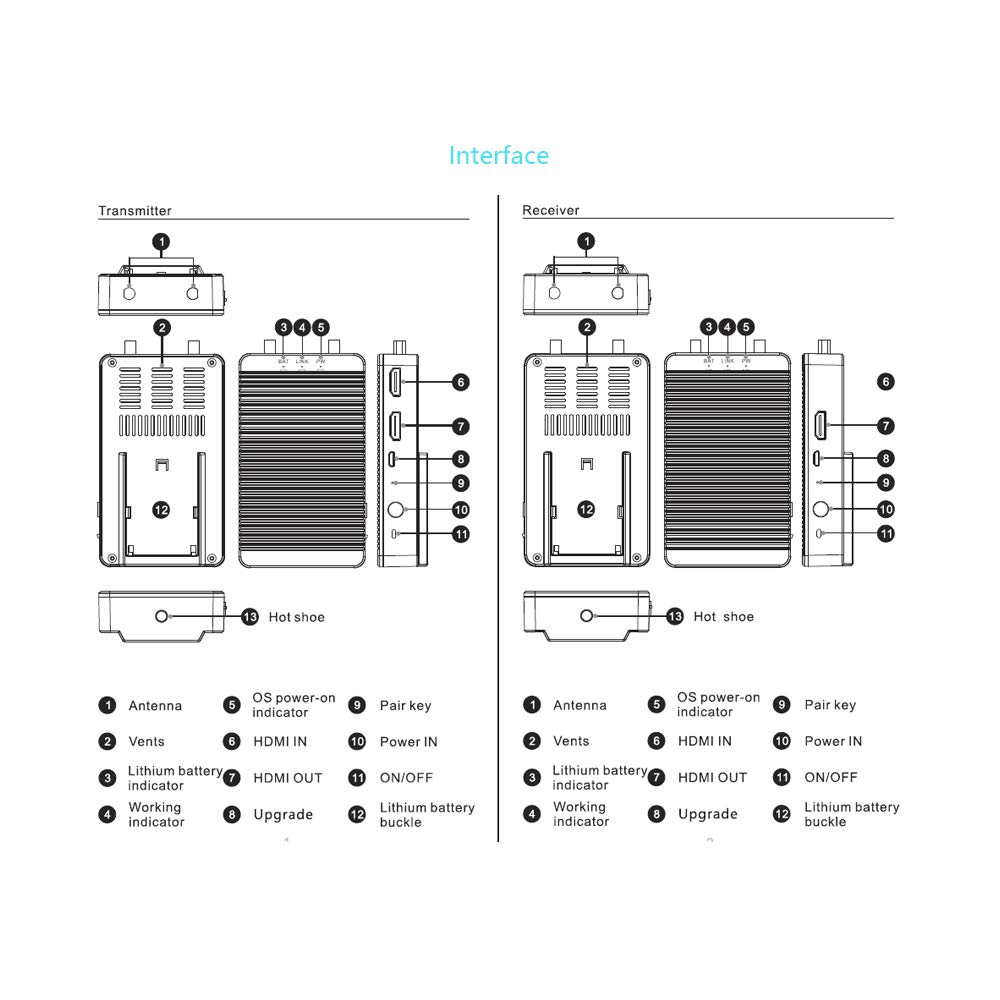
Figure 2.2.4: Transmitter and Receiver Interface Diagram.
Din id-dijagramma tipprovdi deskrizzjoni dettaljata view of the ports and indicators on both the transmitter and receiver units, including antenna connections, power indicators, HDMI input/output, and power buttons. Refer to this diagram for proper connection and operation.

Figura 2.2.5: Kontenut tal-Pakkett.
The standard package includes one transmitter unit, one receiver unit, and two power adapters for powering both devices.
3. Istruzzjonijiet ta' Setup
The measy T1 system is designed for easy plug-and-play setup. Follow these steps to get your system operational:
- Qabbad l-antenni: Screw the provided antennas firmly onto the antenna ports (1) of both the transmitter and receiver units.
- Konnessjoni tal-Enerġija: Connect one power adapter to the "Power IN" port (10) of the transmitter unit and the other power adapter to the "Power IN" port (10) of the receiver unit. Plug both adapters into a power outlet.
- Qabbad it-Trasmettitur: Connect your HDMI source device (e.g., laptop, set-top box, camera) to the "HDMI IN" port (6) on the transmitter unit using an HDMI cable.
- Qabbad ir-Riċevitur: Connect your display device (e.g., TV, monitor, projector) to the "HDMI OUT" port (7) on the receiver unit using an HDMI cable.
- Qawwa Mixgħul: Press the "ON/OFF" button (11) on both the transmitter and receiver units to power them on. The "PW" (Power) indicator light should illuminate.
- Tqabbil (Awtomatiku): The transmitter and receiver units are typically pre-paired. The "LINK" indicator light should illuminate when a stable wireless connection is established. If not, refer to the troubleshooting section or press the "Pair key" (9) on both units simultaneously to initiate pairing.

Figure 3.1: Basic Connection Diagram.
This diagram illustrates the typical connection flow from an HDMI source to the transmitter, wireless transmission, and then from the receiver to a display.
4. Istruzzjonijiet Operattivi
Once the measy T1 system is set up and powered on, it will automatically establish a wireless connection and begin transmitting the HDMI signal.
4.1 Signal Transmission
Ensure both the transmitter and receiver units are within the effective transmission range (up to 200 meters line-of-sight). The system will automatically detect the input resolution and transmit it to the receiver. The "LINK" indicator on both units will confirm an active wireless connection.
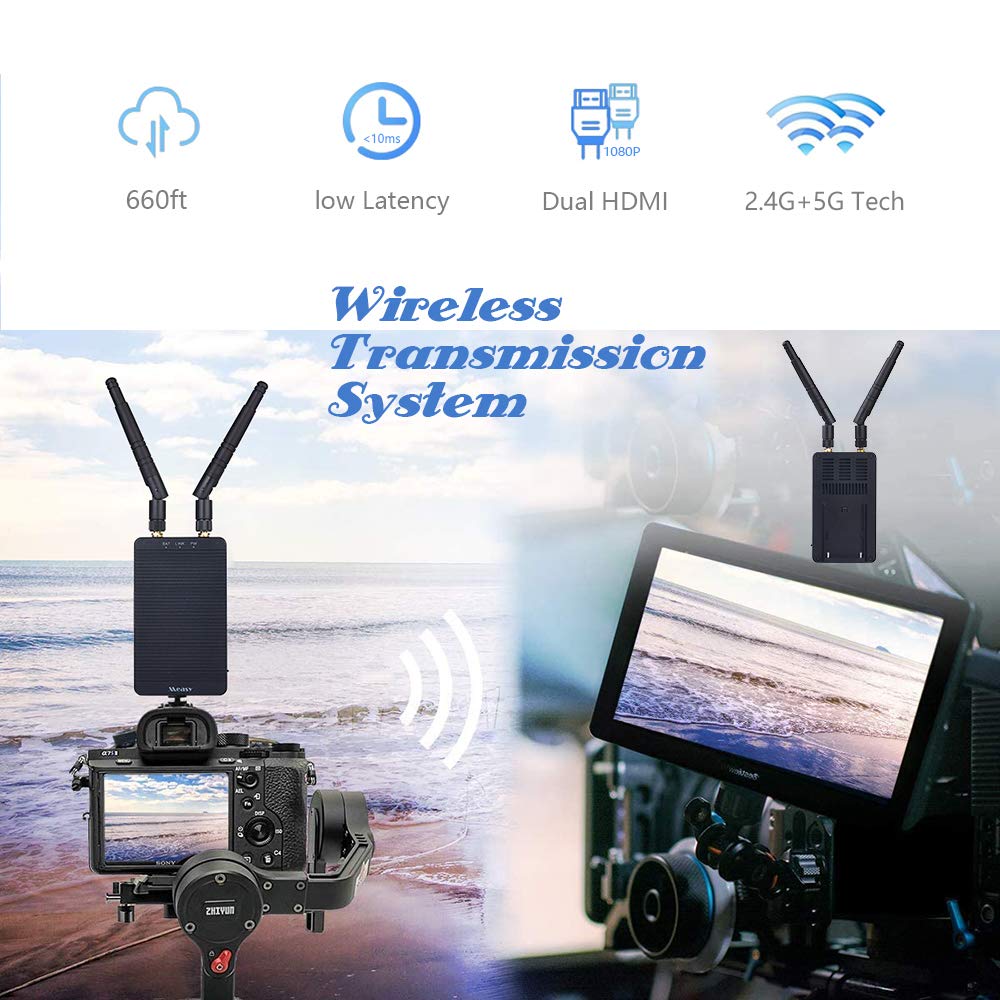
Figure 4.1.1: Wireless Transmission in Use.
This image demonstrates a practical application of the measy T1 system, wirelessly connecting a camera to a remote monitor, suitable for various professional and personal uses.
4.2 Resolution Support
The system supports a wide range of HDMI resolutions, including 1080P and 4K@30Hz. The output resolution on the display will match the input resolution from the source device, provided the display supports it.

Figure 4.2.1: 4K Resolution Support.
The measy T1 system is capable of transmitting video signals up to 4K resolution, ensuring high-quality visual output.
5. Manutenzjoni
To ensure the longevity and optimal performance of your measy T1 Wireless HD Video Transmission System, follow these maintenance guidelines:
- Tindif: Use a soft, dry cloth to clean the exterior of the units. Do not use liquid cleaners or aerosols, as they may damage the components.
- Ventilazzjoni: Ensure that the ventilation vents (2) on both units are not blocked to prevent overheating.
- Ħażna: Meta ma tkunx qed tużahom għal perjodi twal, aħżen l-unitajiet f'post frisk u niexef 'il bogħod mix-xemx diretta u minn temperaturi estremi.
- Immaniġġjar: Immaniġġja l-unitajiet b'attenzjoni. Evita li twaqqagħhom jew li tissottomettihom għal impatti qawwija.
6 Issolvi l-problemi
If you encounter issues with your measy T1 system, refer to the following common problems and solutions:
| Problema | Kawża Possibbli | Soluzzjoni |
|---|---|---|
| L-ebda sinjal fuq il-wiri. |
|
|
| Sinjal intermittenti jew ta’ kwalità fqira. |
|
|
| Audio/video delay. |
|
|
7. Speċifikazzjonijiet
| Karatteristika | Dettall |
|---|---|
| Numru tal-Mudell | T1 |
| Brand | miżeru |
| Teknoloġija tal-Konnettività | HDMI Wireless |
| Massimu Distanza tat-Trażmissjoni | 200m (656-il pied) |
| Riżoluzzjonijiet Appoġġjati | Up to 4K@30Hz, 1080P |
| Kodifikazzjoni tal-vidjo | H.264 (AVI) |
| Modalità tal-Ħruġ tal-Awdjo | Stereo |
| Surround Sound | 5.1 Konfigurazzjoni tal-Kanal |
| Portijiet HDMI totali | 3 (1x HDMI IN on TX, 1x HDMI Loop OUT on TX, 1x HDMI OUT on RX) |
| Tip ta' Kontrollur | Imbotta Buttuna |
| Karatteristika Speċjali | Multiroom |
| Apparati Kompatibbli | HD Source |
| Dimensjonijiet tal-Pakkett | 7.48 x 6.1 x 3.31 pulzieri |
| Piż tal-oġġett | 1.47 Liri |
8. Garanzija u Appoġġ
8.1 Informazzjoni dwar Garanzija
Specific warranty details for the measy T1 Wireless HD Video Transmission System are typically provided with the product packaging or through the point of purchase. Please retain your proof of purchase for warranty claims.
8.2 Gwida għall-Utent u Appoġġ
For further detailed information, you may refer to the official Certificate of Compliance document available online: measy T1 Certificate of Compliance (PDF).
For technical support or inquiries not covered in this manual, please contact measy customer service through their official webis-sit jew il-bejjiegħ bl-imnut li mingħandu nxtara l-prodott.


