Introduzzjoni
This manual provides essential information for the safe and efficient operation, installation, and maintenance of your Samsung WA54R7200AW 5.4 Cu.Ft. Top Load Washer. Please read all instructions thoroughly before using the appliance to ensure proper function and to prevent damage or injury. Keep this manual for future reference.
Informazzjoni dwar is-Sigurtà
TWISSIJA: Biex tnaqqas ir-riskju ta’ nar, xokk elettriku, jew korriment lil persuni meta tuża l-apparat tiegħek, segwi l-prekawzjonijiet bażiċi, inklużi dawn li ġejjin:
- Aqra l-istruzzjonijiet kollha qabel tuża l-apparat.
- Taħsilx oġġetti li jkunu ġew imnaddfa qabel, maħsula, mxarrba, jew imtebbgħin bil-gażolina, solventi tat-tindif niexef, jew sustanzi oħra fjammabbli jew splussivi, għax dawn jarmu fwar li jista' jieħu n-nar jew jisplodi.
- Tħallix lit-tfal jilagħbu fuq jew fl-apparat. Superviżjoni mill-qrib tat-tfal hija meħtieġa meta l-apparat jintuża ħdejn it-tfal.
- Tlaħħaqx fl-apparat jekk it-tub jew l-aġitatur ikun miexi.
- Tinstallax jew taħżinx dan l-apparat fejn ikun espost għat-temp.
- M'għandekx tamper bil-kontrolli.
- Tissewwiex jew tissostitwixxix xi parti tal-apparat u lanqas ma tippruvax tagħmel xi manutenzjoni sakemm ma jkunx speċifikament rakkomandat f'dan il-manwal jew f'istruzzjonijiet ippubblikati għat-tiswija tal-utent li tifhem u għandek il-ħiliet biex twettaq.
- Dejjem skonnettja l-apparat mill-provvista tal-enerġija qabel ma tipprova tagħmel xi manutenzjoni.
Setup u Installazzjoni
1. Spakkjar
Carefully remove all packaging materials, including the shipping bolts and base packaging. Retain packaging for potential future transport. Inspect the washer for any damage during transit.
2. Rekwiżiti tal-Post
Install the washer on a firm, level floor. Ensure there is adequate space around the washer for proper ventilation and access for maintenance. Avoid installing in areas where temperatures may drop below freezing.
3. Konnessjoni tal-Provvista tal-Ilma
Connect the hot and cold water inlet hoses to the corresponding hot and cold water faucets. Ensure rubber washers are inserted into the hose connectors. Tighten connections firmly by hand, then an additional two-thirds turn with pliers. Do not overtighten.
4. Installazzjoni tal-Pajp tad-Drenaġġ
Securely attach the drain hose to the drain outlet at the rear of the washer. Place the other end of the drain hose into a standpipe or laundry tub. Ensure the drain hose is properly secured to prevent it from dislodging during operation, which could cause flooding.
5. Konnessjoni tal-Enerġija
Plug the washer's power cord into a grounded 120V, 60Hz, 15 Amp electrical outlet. Do not use an extension cord or adapter.
6. Invellar tal-Washer
Use a level to check if the washer is balanced. Adjust the leveling feet at the bottom of the washer by turning them clockwise to raise or counter-clockwise to lower until the appliance is stable and level. Tighten the lock nuts against the washer base.

Immaġni: Angolata view of the Samsung WA54R7200AW Top Load Washer with its lid open, showing the drum and control panel. This view helps in understanding the overall structure and access points for loading and controls.
Istruzzjonijiet Operattivi
1. Control Panel Overview
The control panel features a cycle selector knob, digital display, and various option buttons. Familiarize yourself with the layout before operation.
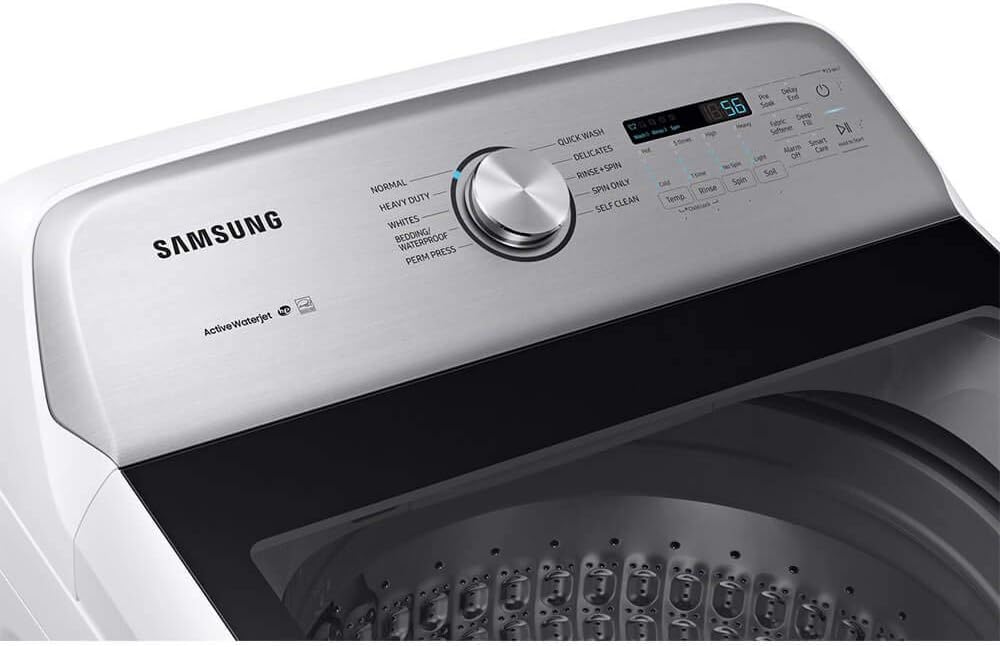
Immaġni: Close-up view of the Samsung WA54R7200AW washer's control panel, highlighting the cycle selector knob, digital display, and touch buttons for various wash options like temperature, spin, and soil level.
2. Tagħbija tal-Londri
Open the washer lid and load items loosely into the wash drum. Do not overload the washer, as this can affect washing performance and cause excessive vibration. Distribute items evenly around the drum.

Immaġni: Intern view of the Samsung WA54R7200AW washer drum, showing the stainless steel pulsator at the bottom and the textured inner walls designed for effective washing.
3. Żieda ta' Deterġent u Addittivi
Add the appropriate amount of high-efficiency (HE) detergent to the main detergent dispenser. For fabric softener, pour it into the designated softener dispenser. Do not overfill.

Image: Close-up of the detergent and softener dispenser area located under the lid of the Samsung WA54R7200AW washer. Labels indicate where to add detergent and fabric softener.
4. Għażla ta 'Ċiklu tal-Ħasil
Dawwar il-pum tas-selettur taċ-ċiklu biex tagħżel iċ-ċiklu tal-ħasil mixtieq. Iċ-ċikli disponibbli jinkludu:
- Normali
- Heavy Duty
- Bojod
- Friex/Waterproof
- Perm Press
- Aħsel malajr
- Delikati
- Laħlaħ + Spin
- Spin Biss
- Awto Nadif
5. Adjusting Cycle Options
After selecting a cycle, you can customize options such as water temperature, spin speed, and soil level using the corresponding buttons on the control panel.
6. Tibda Ċiklu tal-Ħasil
Close the lid and press the Start/Pause button to begin the wash cycle. The washer will fill with water and proceed with the selected cycle.
7. Child Lock
To activate the Child Lock feature, press and hold the Child Lock button (if available) for 3 seconds. This prevents accidental changes to settings during operation. Repeat the action to deactivate.

Immaġni: Minn fuq għal isfel view of the Samsung WA54R7200AW Top Load Washer with its lid open, providing a clear perspective of the control panel at the rear and the spacious wash drum with its pulsator at the bottom.
Manutenzjoni
1. Cleaning the Washer
- Barra: Imsaħ l-uċuħ ta 'barra b'artab, damp drapp. Tużax tindif li joborxu.
- Wash Drum: Use the Self Clean cycle regularly to maintain the cleanliness of the wash drum. For manual cleaning, wipe the drum with a soft cloth and a mild detergent solution, then rinse thoroughly.
2. Tindif tad-Dispenser tad-Deterġent
Remove the detergent dispenser drawer and rinse it under warm water to remove any residue. Use a small brush if necessary. Dry thoroughly before reinserting.
3. Tindif tal-Filtru tad-Drenaġġ
Periodically check and clean the drain filter (if accessible, refer to specific model diagrams for location). This prevents lint and debris from clogging the drain system. Ensure the washer is unplugged and drain any residual water before opening the filter cover.
4. Winterizing
If the washer is to be stored in an area subject to freezing temperatures, drain all water from the hoses and internal components. Consult a qualified technician if unsure about this procedure.
Issolvi l-problemi
Qabel ma tikkuntattja lis-servizz, erġa'view il-kwistjonijiet u s-soluzzjonijiet komuni li ġejjin:
| Problema | Kawża Possibbli | Soluzzjoni |
|---|---|---|
| Il-washer ma jibdax | Power cord unplugged; Lid not closed; Circuit breaker tripped | Ensure power cord is securely plugged in; Close lid completely; Reset circuit breaker |
| Water does not fill or fills slowly | Water faucets turned off; Water inlet hoses kinked; Inlet screens clogged | Turn on water faucets; Straighten hoses; Clean inlet screens |
| Washer vibrates excessively | Washer not level; Load unbalanced; Shipping bolts not removed | Level the washer; Redistribute laundry; Ensure shipping bolts are removed |
| Clothes are not clean | Overloading; Too little detergent; Incorrect cycle selection | Reduce load size; Use recommended amount of HE detergent; Select appropriate wash cycle |
| Kodiċi Żball murija | Kwistjoni operazzjonali speċifika | Refer to the full user manual for a list of error codes and their specific solutions. Often, unplugging the unit for a few minutes can reset minor errors. |
Speċifikazzjonijiet
| Karatteristika | Speċifikazzjoni |
|---|---|
| Brand | Samsung |
| Mudell | WA54R7200AW |
| Kapaċità | 5.4 Piedi kubi |
| Veloċità Max Spin | 700 RPM |
| Tip ta' Installazzjoni | Freestanding |
| Karatteristika Speċjali | Lock tat-Tfal |
| Kulur | Abjad |
| Kontroll Console | Touch, Push Button, Knob |
| Ċikli Standard | 10 |
| Aċċess Post | Tagħbija Fuq |
| Materjal | Azzar Inossidabbli (Tanbur) |
| Komponenti Inklużi | Drain Hose, Fill Hose, Power Cord |
Garanzija u Appoġġ
Your Samsung WA54R7200AW washer is covered by a limited warranty. For specific warranty terms and conditions, please refer to the warranty card included with your product or visit the official Samsung website. For technical support, service requests, or to purchase genuine Samsung parts, please contact Samsung Customer Service.
Appoġġ onlajn: www.samsung.com/us/support/


