1. Introduzzjoni
Thank you for choosing the Targus 15.6 Commuter Backpack. This manual provides essential information to help you understand and utilize your backpack effectively. Designed for daily use and travel, this backpack offers protection for your laptop and organized storage for your essentials.
2. Karatteristiċi tal-prodott
The Targus Commuter Backpack is engineered with several features to enhance your carrying experience:
- Kompartiment tal-laptop ikkuttunat: Securely holds laptops up to 15.6 inches.
- Multiple Storage Pockets: Includes a spacious main compartment, a front quick-access pocket, and an organizer workstation.
- Disinn Ergonomiku: Padded shoulder straps and a breathable mesh back panel for comfort during extended wear.
- Trolley Strap: Allows the backpack to be easily secured to rolling luggage.
- Materjali Durabbli: Constructed with robust fabrics for longevity.

Quddiem view of the Targus 15.6 Commuter Backpack, showcasing its sleek black design with blue accents and the Targus logo.

Wara view of the backpack, highlighting the padded shoulder straps, breathable mesh back panel, and adjustable sternum strap for comfort.
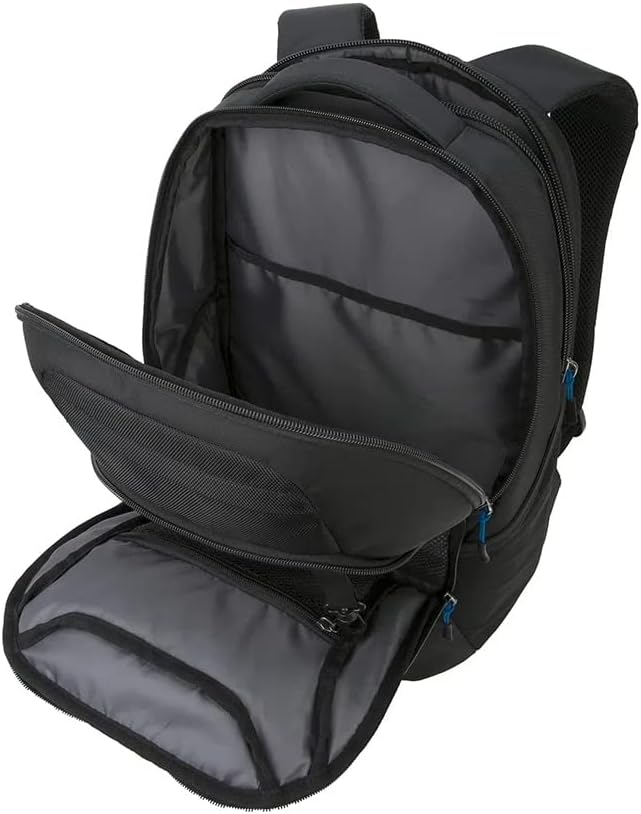
The main compartment of the backpack, revealing the padded laptop sleeve designed to secure a 15.6-inch laptop.

Dettaljati view of the front organizer compartment, featuring multiple pockets for pens, notebooks, and other accessories.
3. Twaqqif u Aġġustament
Proper setup ensures comfort and optimal weight distribution.
3.1 Loading Your Laptop
- Unzip il-kompartiment prinċipali tal-backpack.
- Carefully slide your 15.6-inch laptop into the dedicated padded sleeve. Ensure it sits snugly to prevent movement.
- Close the zipper securely.
3.2 Aġġustament taċ-Ċingi tal-Ispalla
- Put on the backpack.
- Pull the strap ends located at the bottom of each shoulder strap to tighten, or lift the buckles to loosen.
- Adjust until the backpack sits comfortably on your back, with the weight evenly distributed across your shoulders.
3.3 Utilizing the Trolley Strap
For convenient travel, use the integrated trolley strap:
- Locate the horizontal strap on the back panel of the backpack.
- Slide the handle of your rolling luggage through this strap.
- Ensure the backpack is securely seated on top of your luggage before moving.

The integrated trolley strap on the back of the backpack, allowing it to be securely attached to rolling luggage handles for easier travel.
4. Operating and Daily Use
The Targus Commuter Backpack is designed for efficient organization and comfortable carrying.
- Kompartiment Prinċipali: Ideal for larger items such as books, documents, or clothing.
- But tal-Organizzatur ta' Quddiem: Use the various slots and pockets for pens, keys, mobile phones, and other small accessories.
- Quick-Access Pocket: Convenient for items you need to reach frequently, like a wallet or travel pass.
- Bwiet tal-ġenb: Suitable for water bottles or compact umbrellas.
5. Manutenzjoni u Kura
To ensure the longevity of your Targus backpack, follow these care instructions:
- Tindif: Post nadif ma adamp drapp u sapun ħafif. La taħsilx fil-magna tal-ħasil, la tibbliċjax, u lanqas tnixxifx fit-tumble dryer.
- Tnixxif: Air dry completely away from direct sunlight or heat.
- Ħażna: Store in a cool, dry place when not in use. Avoid storing heavy items inside for extended periods if the backpack is not supported.
- Evita tagħbija żejda: Do not exceed the backpack's capacity to prevent strain on zippers and seams.
6 Issolvi l-problemi
Hawn huma soluzzjonijiet għal kwistjonijiet komuni li tista' tiltaqa' magħhom:
- Zipper Snagging: If a zipper snags, gently pull the fabric away from the zipper teeth. Avoid forcing the zipper, as this can cause damage. Ensure the zipper path is clear of obstructions.
- Discomfort During Wear: Re-adjust the shoulder straps to ensure even weight distribution. Make sure the backpack is not overloaded.
- Backpack Feels Too Small: Verify that the items you are carrying are within the intended capacity and dimensions of the backpack. This model is designed for a 15.6-inch laptop and daily essentials.
7. Speċifikazzjonijiet
| Attribut | Dettall |
|---|---|
| Numru tal-Mudell | TSB950US |
| Dimensjonijiet tal-Prodott | 12.75 x 7.5 x 18 pulzieri |
| Piż tal-oġġett | 2 liri |
| Manifattur | Targus |
| Deskrizzjoni tal-Firxa ta' Età | Adulti |
| Numru ta 'Oġġetti | 1 |
| Unitajiet | 1 Għadd |
8. Garanzija u Appoġġ
For information regarding warranty coverage and customer support, please refer to the official Targus webis-sit jew ikkuntattja lis-servizz tal-konsumatur tagħhom direttament. Żomm l-irċevuta tax-xiri tiegħek bħala prova tax-xiri.
Targus Official Websit: www.targus.com


