1. Introduzzjoni
This manual provides instructions for the Rii i8 Mini Bluetooth Keyboard with Touchpad. This compact wireless keyboard is designed for convenient control of various devices, including PCs, laptops, tablets, smartphones, Android TV Boxes, Google TV Boxes, Xbox360, PS3, HTPC/IPTV, and Raspberry Pi.
It features a full QWERTY keyboard, a multi-touch touchpad, and multimedia control keys, offering a versatile input solution.
2. Kontenut tal-Pakkett
- 1 x Rii i8 Mini Wireless Keyboard
- 1 x Charging Data Cable
- 1 x Manwal għall-Utent
- 1 x USB Receiver (2.4GHz Wireless Dongle)
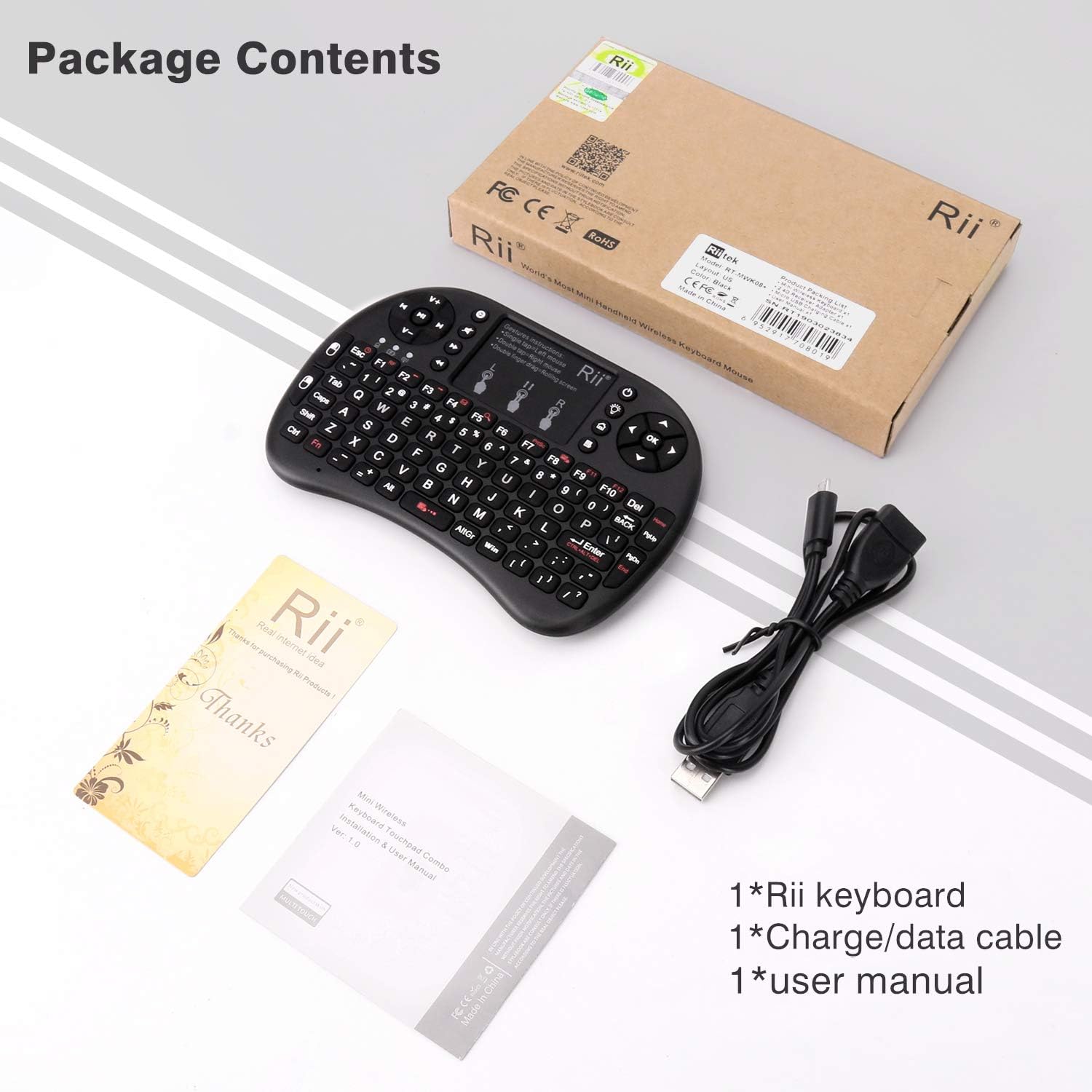
Image: Package contents including the keyboard, charging cable, user manual, and USB receiver.
3. Prodott Aktarview
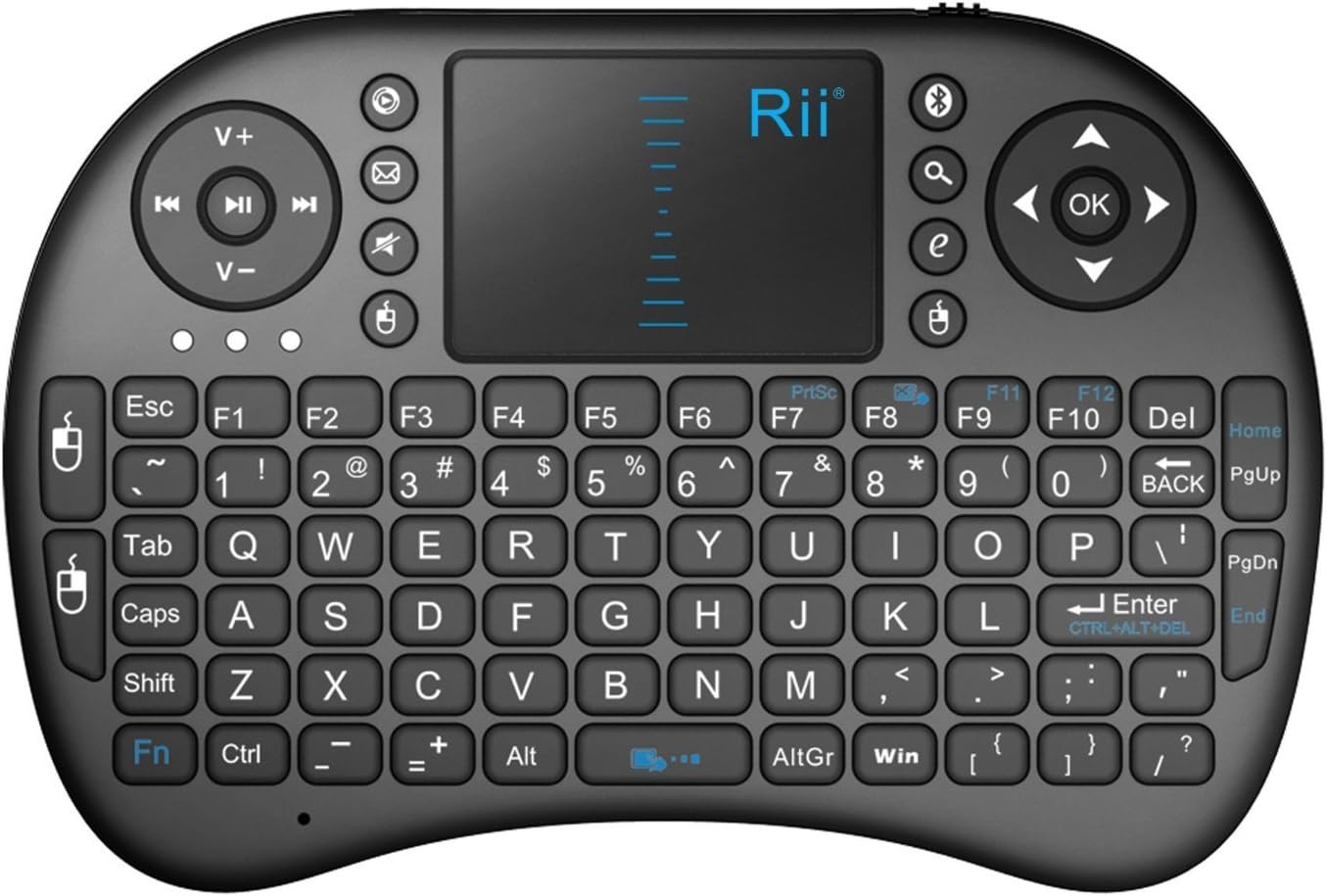
Image: Rii i8 Mini Bluetooth Keyboard layout.
3.1 Karatteristiċi ewlenin
- Tastiera QWERTY: 92 keys for standard typing.
- Touchpad: High-sensitive smart touchpad with 360-degree flip design and adjustable DPI functions.
- Multimedia Control Keys: Dedicated keys for media playback.
- PC Gaming Control Keys: Integrated controls for gaming.
- Disinn Ergonomiku: Handheld design for comfortable operation.
- Batterija rikarikabbli: Built-in removable Li-ion battery.
3.2 Ġesti tat-Touchpad

Image: Touchpad gesture instructions.
- Tektek b'Saba' Wieħed: Ikklikkja fuq ix-xellug tal-maws.
- Tektek Żewġ Swaba: Ikklikkja bil-lemin tal-maws.
- Two Fingers Drag: Scroll up/down the page.
4. Setup
4.1 Iċċarġjar tat-Tastiera
- Locate the Micro USB charging port on the side of the keyboard.
- Connect the provided charging data cable to the keyboard and a USB power source (e.g., computer USB port, USB wall adapter).
- The charging indicator light will illuminate. It will be steady red during charging and turn off when fully charged.
4.2 Connecting via 2.4GHz USB Receiver
- Open the battery compartment cover on the back of the keyboard.
- Remove the USB receiver (dongle) from its storage slot.
- Plug the USB receiver into an available USB port on your device (PC, TV Box, etc.).
- Slide the power switch on the keyboard to the 'ON' position.
- The keyboard should automatically connect to your device. The indicator light will stop blinking once connected.
4.3 Konnessjoni permezz tal-Bluetooth
This keyboard supports Bluetooth 4.0 connectivity.
- Ensure your device has Bluetooth enabled and is in pairing mode.
- Slide the power switch on the keyboard to the 'ON' position.
- Press and hold the Bluetooth pairing button (often indicated by a Bluetooth icon) on the keyboard until the Bluetooth indicator light starts blinking rapidly.
- On your device, search for available Bluetooth devices. Select 'Rii i8' or a similar name from the list.
- Follow any on-screen prompts to complete the pairing process. The indicator light will stop blinking once successfully paired.
5. Istruzzjonijiet Operattivi
5.1 Operazzjoni Bażika
- Ittajpjar: Use the QWERTY keys for text input.
- Kontroll tal-ġurdien: Use the touchpad to move the cursor.
- Navigazzjoni: Use the directional pad (D-pad) for menu navigation.
5.2 Function Keys (Fn + Key Combinations)
Many keys have secondary functions accessed by holding the 'Fn' key and pressing the desired key.
- Fn + Spazju: Adjusts the sensitivity (DPI) of the cursor.
- Fn+F6: Locks or unlocks the letter keys and the touchpad.
- Fn+F8: Locks or unlocks the touchpad independently.
- Fn + Touchpad: Activates scroll mode on the touchpad (use two fingers to scroll).
- Ċwievet Multimedia: Control media playback (play/pause, next/previous track, volume up/down, mute).
5.3 Ġestjoni tal-Enerġija
- Modalità Auto Sleep: The keyboard will enter sleep mode after 3 minutes of inactivity to conserve battery.
- Qiegħed: Press any key for approximately 1 second to wake the keyboard from sleep mode.
6. Speċifikazzjonijiet
| Karatteristika | Deskrizzjoni |
|---|---|
| Medda Operattiva | Up to 15 meters (without signal disturbance) |
| Medda ta' Frekwenzi | 2.403GHz ~ 2.480GHz |
| Vol Operattivtage | 3.3V |
| Ħlas Voltage | 4.4V ~ 5.25V |
| Modulazzjoni | GFSK |
| Kanali | 78 kanali |
| Qawwa TX | Less than +5dBm |
| Rata ta' Trażmissjoni | 1M bit/sec |
| Tolleranza tal-Frekwenza | +/-30ppm |
| Konsum tal-Enerġija | 55mA (on), 1mA (sleep) |
| Kulur | Iswed |
| Tip ta 'batterija | Batterija tal-jone tal-litju inkorporata |
| Dimensjonijiet (LxWxH) | 7 x 4 x 1 pulzieri |
| Piż tal-oġġett | 3.98 uqija |
7 Issolvi l-problemi
- It-tastiera ma tirrispondix:
- Kun żgur li t-tastiera tkun mixgħula.
- Iċċekkja l-livell tal-batterija; recharge jekk baxx.
- Iċċekkja li r-riċevitur tal-USB huwa mdaħħal sew fl-apparat.
- For Bluetooth connection, ensure it is paired correctly and within range.
- Try restarting both the keyboard and the connected device.
- Il-moviment tal-cursor huwa irregolari jew bil-mod:
- Adjust the touchpad DPI sensitivity using Fn + Space.
- Ensure the touchpad is clean and free of debris.
- Keys are not working:
- Check if the letter keys are locked (Fn + F6).
- Kun żgur li t-tastiera hija konnessa sew.
- Low power indicator blinking:
- This indicates low battery. Connect the keyboard to a power source using the charging cable.
8. Manutenzjoni
- Keep the keyboard away from liquids and extreme temperatures.
- Clean the surface and touchpad with a soft, dry cloth. Avoid abrasive cleaners.
- Store the USB receiver in its designated slot when not in use to prevent loss.
9. Garanzija u Appoġġ
For warranty information or technical support, please refer to the contact details provided with your product packaging or visit the official Rii websit. Żomm l-irċevuta tax-xiri tiegħek għal pretensjonijiet ta' garanzija.


