1. Introduzzjoni
This manual provides detailed instructions for the safe and efficient operation of your Samsung Glyde U940 mobile phone. Please read this manual thoroughly before using your device to ensure proper functionality and to understand all features.
2. Kontenut tal-Pakkett
Ivverifika li l-pakkett tal-prodott tiegħek fih l-oġġetti li ġejjin:
- Samsung Glyde U940 Mobile Phone
- Batterija Standard
- Travel Adapter/Charger
- Manwal għall-Utent (dan id-dokument)
- Note: Specific accessories may vary by region or retailer.
3. Device Overview
The Samsung Glyde U940 features a large touch-sensitive display and a slide-out QWERTY keyboard for versatile input.
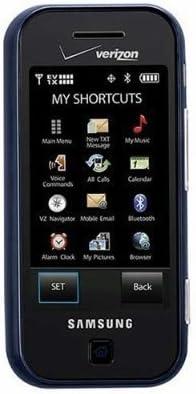
Figura 3.1: Quddiem view of the Samsung Glyde U940, showing the 2.8-inch display and navigation buttons. The screen displays "MY SHORTCUTS" with icons for various functions like Main Menu, New TXT Message, My Music, Voice Commands, All Calls, Calendar, Mobile Email, Bluetooth, Alarm Clock, My Pictures, and Browser. "SET" and "Back" buttons are visible below the screen.
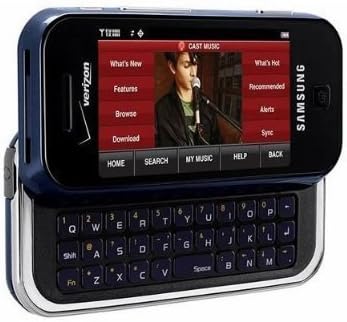
Figura 3.2: Samsung Glyde U940 with its full QWERTY keyboard extended. The phone is oriented horizontally, displaying a media interface on the screen with options like "What's New", "Features", "Browse", "Download", "What's Hot", "Recommended", "Alerts", and "Sync". Navigation buttons for "HOME", "SEARCH", "MY MUSIC", "HELP", and "BACK" are visible below the screen.
Karatteristiċi ewlenin:
- Large 2.8" Display
- Slide-out QWERTY Keyboard
- Touch Screen Interface
- Full HTML Browser
- 2.0 MP Camera and Camcorder
4. Setup
4.1. Installazzjoni tal-batterija
- Sib l-għatu tal-batterija fuq wara tat-telefon.
- Gently remove the battery cover by sliding or lifting it.
- Align the battery's gold contacts with the contacts in the battery compartment.
- Daħħal il-batterija sew f'postha.
- Replace the battery cover, ensuring it clicks securely.
4.2. Iċċarġjar tal-batterija
- Connect the travel adapter to the charging port on your phone.
- Plug the other end of the travel adapter into a standard electrical outlet.
- Ħalli t-telefon jiċċarġja kompletament qabel l-ewwel użu. L-indikatur tal-batterija fuq l-iskrin se juri l-istatus tal-iċċarġjar.
- Skonnettja l-ċarġer ladarba l-batterija tkun iċċarġjata kompletament.
4.3. Tixgħil / Mitfi
- Biex Tixgħel: Press and hold the Power/End key until the screen lights up.
- Biex Tifi: Press and hold the Power/End key until the power-off options appear, then select "Power off".
5. Istruzzjonijiet Operattivi
5.1. L-użu tat-Touch Screen
The Samsung Glyde U940 features a resistive touch screen. Use your fingertip or a stylus (if provided) to interact with the display.
- Tektek: Lightly touch the screen once to select an item or open an application.
- Iddreggja: Touch and hold an item, then move your finger across the screen to reposition it.
- Skrollja: Slide your finger up or down on the screen to navigate through lists or web paġni.
5.2. Using the QWERTY Keyboard
Slide the screen horizontally to reveal the full QWERTY keyboard. This keyboard is ideal for typing messages, emails, and web indirizzi.
- Press individual keys to input characters.
- Uża l- Shift key for uppercase letters and symbols.
- Il- Fn key provides access to additional functions or symbols.
5.3. Tagħmel u Riċeviment Sejħiet
- Tagħmel Sejħa: From the home screen, tap the Phone icon or dial the number using the keypad and press the Call key.
- Jirċievu Sejħa: When a call comes in, tap the "Answer" button on the screen.
- Tmiem Sejħa: Tap the "End" button on the screen or press the Power/End key.
5.4. Messaġġi (SMS/MMS)
To send a text or multimedia message:
- From the main menu, select "Messages" or "New TXT Message".
- Daħħal in-numru tat-telefon tar-riċevitur jew agħżel mill-kuntatti tiegħek.
- Type your message using either the touch screen or the QWERTY keyboard.
- To add multimedia (pictures, videos, audio), select the attachment option.
- Tektek "Ibgħat".
5.5. Camera and Camcorder Functions
The Glyde U940 is equipped with a 2.0 MP camera.
- Nieħdu Ritratti: Open the Camera application, frame your shot, and press the dedicated camera button or tap the capture icon on the screen.
- Vidjos ta 'Reġistrazzjoni: Switch to camcorder mode within the Camera application, press the record button to start, and press again to stop.
- Access your captured media in the "My Pictures" or "Gallery" application.
5.6. Web Browser
Utilize the full HTML browser to access the internet.
- From the main menu, select "Browser".
- Daħħal dak mixtieq web indirizz fil- URL bar.
- Use the touch screen to navigate pages, zoom in/out, and click links.
6. Manutenzjoni
6.1. Kura tal-batterija
- Evita li tesponi l-batterija għal temperaturi estremi.
- Tittaqqabx jew tagħmel ħsara lill-batterija.
- For optimal battery life, avoid frequent partial discharges and charges.
- Jekk it-telefon ma se jintużax għal perjodu twil ta' żmien, aħżnu bil-batterija parzjalment iċċarġjata.
6.2. Tindif tal-Apparat
- Use a soft, lint-free cloth to clean the screen and exterior of the phone.
- Tużax kimiċi ħarxa, sprejs tat-tindif, jew materjali li joborxu.
- Ensure no moisture enters openings such as the charging port or headphone jack.
6.3. Aġġornamenti tas-Software
Periodically check for available software updates to improve performance and add new features. Consult your service provider or the Samsung websit għal proċeduri ta' aġġornament.
7 Issolvi l-problemi
This section addresses common issues you might encounter with your Samsung Glyde U940.
| Problema | Soluzzjoni Possibbli |
|---|---|
| It-telefon ma jixgħelx. | Ensure the battery is correctly installed and fully charged. Connect the charger and attempt to power on. |
| Touch screen is unresponsive or erratic. |
|
| Il-batterija tiskula malajr. |
|
| Ma nistax nagħmel jew nirċievi telefonati. | Check network signal strength. Ensure "Airplane Mode" is not enabled. Contact your service provider if network issues persist. |
| QWERTY keyboard input is incorrect. | Ensure the keyboard is fully extended and locked into position. Restart the device if keys are unresponsive. |
8. Speċifikazzjonijiet
| Karatteristika | Dettall |
|---|---|
| Numru tal-Mudell | U940 |
| Wiri | 2.8 Inches, Touch Screen |
| Metodu ta 'Input | Touch Screen, Slide-out QWERTY Keyboard |
| Kamera | 2.0 MP (Camera and Camcorder) |
| Browser | Full HTML Browser |
| Piż tal-oġġett | 11.2 uqija |
| Dimensjonijiet | 8.1 x 5.4 x 2.2 pulzieri (Dimensjonijiet tal-Pakkett) |
| Konnettività | Wireless, USB 2.0 |
| Manifattur | Samsung |
9. Garanzija u Appoġġ
Għal informazzjoni dwar il-garanzija, jekk jogħġbok irreferi għall-karta tal-garanzija inkluża mal-prodott tiegħek jew żur is-sit uffiċjali ta' Samsung. website. For technical support, contact your service provider or Samsung customer service.
Servizz tal-Klijent ta' Samsung: www.samsung.com/us/support/


