pengenalan
The Havit H2015PRO is a versatile gaming headset designed for multi-platform compatibility and immersive audio experiences. Featuring five distinct connection modes, this headset offers flexibility for various gaming setups and entertainment needs. It delivers high-fidelity sound with 360° spatial audio and low latency, ensuring a competitive edge in gaming. This manual provides essential information for setting up, operating, maintaining, and troubleshooting your Havit H2015PRO headset.
Produk Selesaiview
The Havit H2015PRO headset includes the following components:
- Havit H2015PRO Gaming Headset
- Mikrofon boleh tanggal
- 2.4 GHz USB Wireless Dongle
- Kabel Pengecas USB-C
- Kabel Audio 3.5mm
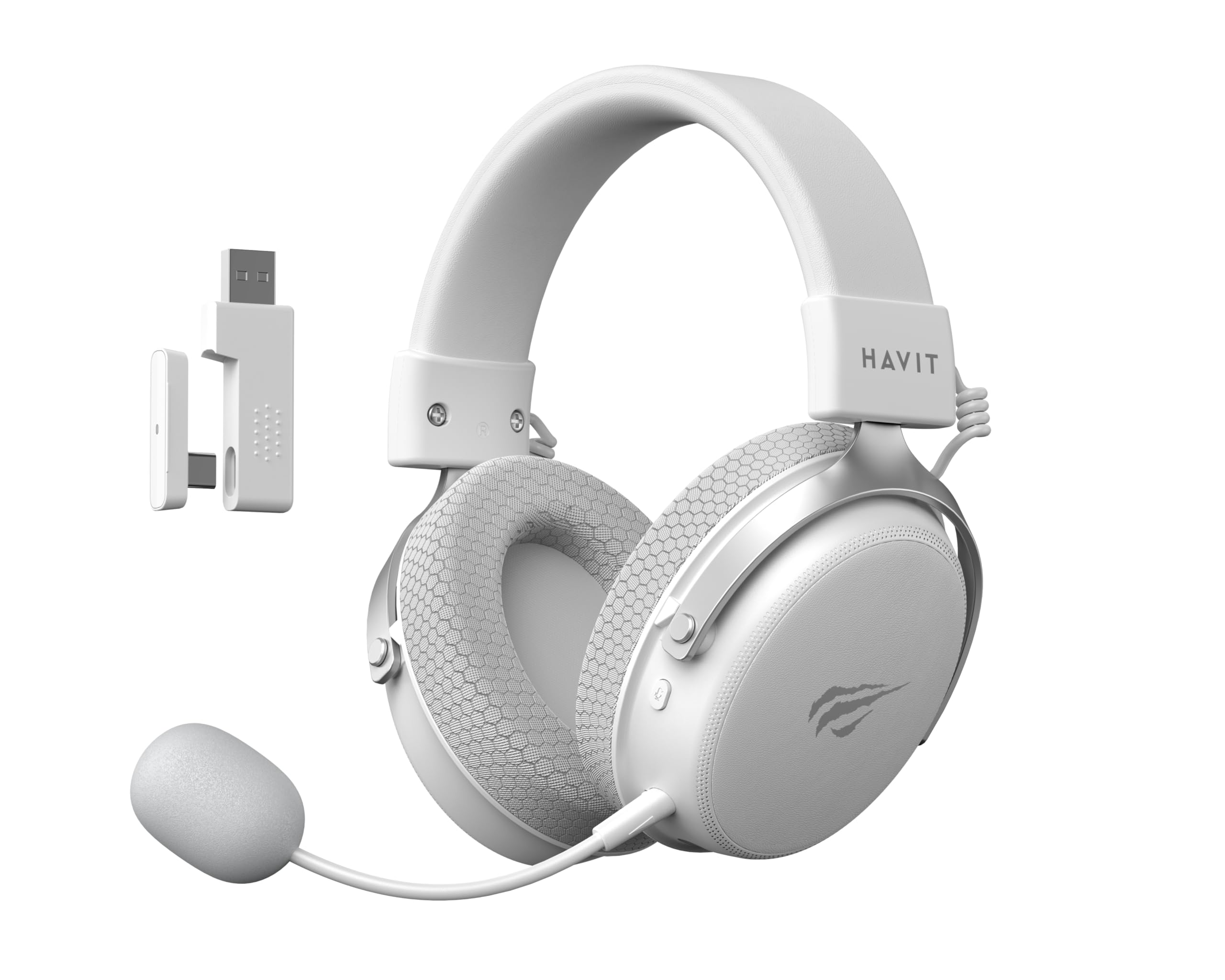
Image: The Havit H2015PRO headset in white, showcasing the main unit, detachable microphone, and the 2.4 GHz USB wireless dongle. This image provides a clear view of the primary components included with the product.
Persediaan
The Havit H2015PRO offers five connectivity options to suit various devices and preferences.
1. 2.4 GHz Wireless Connection (USB Dongle)
- Insert the 2.4 GHz USB wireless dongle into an available USB port on your PC, PlayStation, or Nintendo Switch (in docked mode).
- Power on the headset. The headset should automatically connect to the dongle.
- Pastikan alat dengar dipilih sebagai peranti output dan input audio dalam tetapan sistem anda.
2. Sambungan Bluetooth
- Power on the headset and switch it to Bluetooth mode (refer to the headset controls for mode selection).
- On your device (smartphone, tablet, PC with Bluetooth), go to Bluetooth settings and enable Bluetooth.
- Select "Havit H2015PRO" from the list of available devices to pair.
3. Sambungan Berwayar (Kabel Audio 3.5mm)
- Sambungkan satu hujung kabel audio 3.5mm ke port 3.5mm alat dengar.
- Connect the other end to the 3.5mm audio jack on your PC, console controller, or mobile device.
- This mode does not require the headset to be powered on.
4. Wired Connection (USB-C Cable)
- Connect the USB-C cable to the headset's USB-C port.
- Connect the other end to a compatible USB-C port on your PC or device.
- This connection can be used for both audio and charging.

Imej: Bersudut view of the Havit H2015PRO headset, highlighting the earcups, headband, and visible controls on the side. This perspective helps in identifying connection ports and buttons.
Arahan Operasi
Hidupkan/Mati Kuasa
- Untuk menghidupkan kuasa, tekan dan tahan butang Kuasa sehingga lampu penunjuk menyala.
- Untuk mematikan kuasa, tekan dan tahan butang Kuasa sehingga lampu penunjuk dimatikan.
Kawalan Kelantangan
- Use the volume roller or buttons located on the earcup to adjust the audio level.
Penggunaan Mikrofon
- Attach the detachable microphone to the designated port on the headset.
- Adjust the microphone's flexible arm for optimal voice pickup.
- Use the microphone mute button (if available) on the headset to toggle mute on/off.
Mengecas Alat Dengar
- Connect the USB-C charging cable to the headset's USB-C port and the other end to a USB power source.
- The indicator light will show charging status (e.g., red for charging, off or green for fully charged).
- Pengecasan penuh biasanya mengambil masa kira-kira 2-3 jam.
Penyelenggaraan
Proper care ensures the longevity and performance of your Havit H2015PRO headset.
- Pembersihan: Gunakan kain lembut dan kering untuk mengelap set kepala. Untuk cup telinga, damp Kain dengan sabun lembut boleh digunakan, tetapi pastikan tiada kelembapan memasuki gril pembesar suara.
- Storan: Simpan alat dengar di tempat yang sejuk dan kering jauh dari cahaya matahari langsung dan suhu yang melampau.
- Penjagaan Bateri: Untuk mengekalkan hayat bateri, elakkan menyahcas sepenuhnya set kepala dengan kerap. Mengecasnya dengan kerap, walaupun tidak digunakan untuk tempoh yang lama.
- Elakkan Cecair: Do not expose the headset to water or other liquids, as it is not water-resistant.
Menyelesaikan masalah
If you encounter issues with your Havit H2015PRO headset, refer to the following common solutions:
| Masalah | Penyelesaian |
|---|---|
| Tiada bunyi dari set kepala |
|
| Mikrofon tidak berfungsi |
|
| Fon kepala tidak bersambung secara wayarles |
|
| Isu pengecasan |
|
Spesifikasi
Detailed technical specifications for the Havit H2015PRO headset:
- Nama Model: HAVIT H2015PRO
- Teknologi Ketersambungan: Hybrid (2.4 GHz Wireless, Bluetooth, 3.5mm Jack, USB-C)
- Saiz Pemandu: 53 mm
- Impedans: 64 ohm
- Respons Kekerapan: 20.2 Hz (Specific value provided, typical range is 20Hz-20kHz)
- Kapasiti Bateri: 1500 mAh
- Latensi Rendah: 24 ms
- Ciri-ciri audio: 360° Spatial Audio, Virtual 7.1 Surround Sound
- mikrofon: Boleh ditanggalkan dan boleh laras
- Jenis Kawalan: Integrated (Touch controls)
- Bahan: plastik
- Berat produk: 500 Gram
- Keserasian: Desktops, PC, PlayStation, Xbox, Nintendo Switch, Mobile Devices
- Tahap Rintangan Air: Tidak kalis air

Imej: Menghadap ke hadapan view of the Havit H2015PRO headset, clearly showing the earcups, headband, and the attached microphone. This view emphasizes the ergonomic design and microphone placement.
Waranti dan Sokongan
Maklumat Waranti
The Havit H2015PRO headset comes with a Waranti pengilang 1 tahun. Waranti ini melindungi kecacatan pada bahan dan mutu kerja di bawah penggunaan biasa. Sila simpan bukti pembelian anda untuk tuntutan waranti.
Sokongan Pelanggan
For technical assistance, warranty claims, or further inquiries, please contact Havit customer support through their official website or the retailer where the product was purchased. Provide your product model number (H2015PRO) and proof of purchase when seeking support.


