1. Pengenalan
This manual provides essential information for setting up, operating, and maintaining your Samsung Galaxy A17 5G smartphone. Please read this guide thoroughly to ensure proper use and to maximize your device's capabilities. The Samsung Galaxy A17 5G is an international version designed for global connectivity, featuring an immersive AMOLED display, a powerful camera system, and a long-lasting battery.
2. Apa yang ada di dalam Kotak
Upon unboxing your Samsung Galaxy A17 5G, verify that all components are present:
- Telefon Pintar Samsung Galaxy A17 5G
- Penyesuai Kuasa (Pengecas Pantas 25W)
- Kabel USB (Jenis-C)
- Panduan Mula Pantas (mungkin berbeza mengikut wilayah)

Image: Contents of the Samsung Galaxy A17 5G retail package, including the smartphone, USB Type-C cable, and 25W power adapter.
3. Persediaan
3.1. Reka Letak Peranti
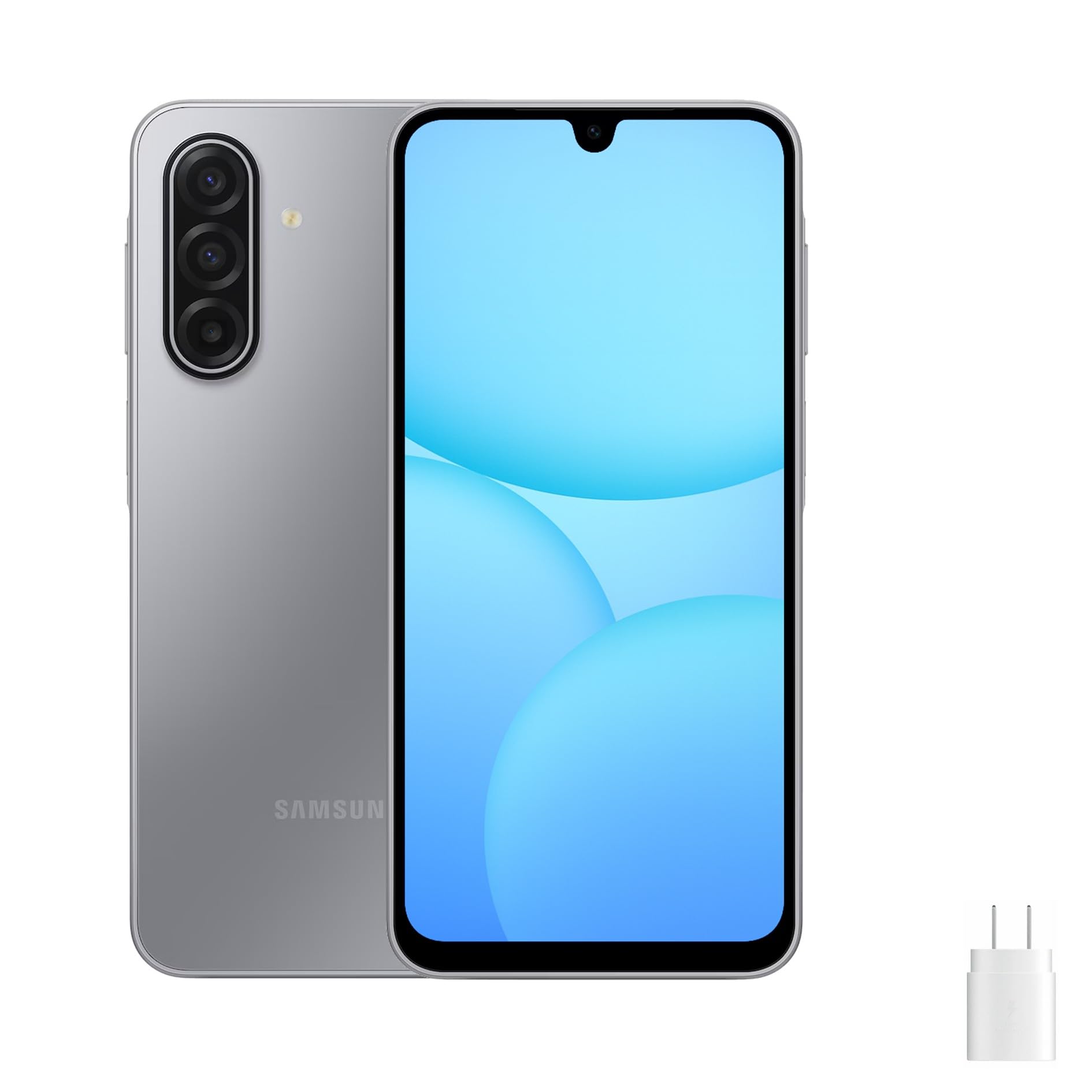
Image: Front, left, and right side views of the Samsung Galaxy A17 5G, illustrating the display, camera, volume buttons, power button, and SIM tray location.
3.2. Memasukkan Kad SIM dan Kad MicroSD
- Cari dulang SIM di sisi peranti anda.
- Insert the ejection pin (not included) into the small hole on the SIM tray to open it.
- Place your Nano-SIM card(s) and/or microSD card into the tray with the gold contacts facing down. The Galaxy A17 5G supports Dual SIM or one SIM with a microSD card.
- Tolak dulang perlahan-lahan ke dalam slot sehingga ia berbunyi klik pada tempatnya.
3.3. Hidupkan dan Persediaan Awal
- Tekan dan tahan butang Kuasa sehingga logo Samsung muncul.
- Ikut gesaan pada skrin untuk memilih bahasa anda, menyambung ke rangkaian Wi-Fi dan menyediakan akaun Google anda.
- Transfer data from an old device if desired, using Samsung Smart Switch or Google's data transfer tools.
- Set up security features such as a PIN, pattern, password, or fingerprint recognition.
4. Mengendalikan Peranti Anda
4.1. Paparan dan Navigasi
The Galaxy A17 5G features a 6.7-inch FHD+ Super AMOLED display with a 90Hz refresh rate. This provides vibrant colors, deep blacks, and smooth scrolling. Navigate your device using touch gestures:
- Ketik: Pilih item atau buka apl.
- Leret: Tatal melalui skrin atau senarai.
- Cubit: Zum masuk atau keluar pada foto dan web muka surat.
- Tekan lama: Akses menu kontekstual atau alihkan ikon aplikasi.
4.2. Ciri-ciri Keselamatan
Protect your device and data using the following security options:
- Sensor cap jari: Located on the side power button for quick and secure unlocking.
- Pengecaman Muka: Buka kunci peranti anda menggunakan wajah anda.
- PIN, Pattern, Password: Kaedah keselamatan standard untuk akses peranti.
5. Ciri-ciri Kamera
Galaxy A17 5G dilengkapi dengan sistem kamera serba boleh:
- 50MP Triple Rear Camera: Capture high-resolution photos with optical image stabilization (OIS) for steady shots. Includes wide-angle and depth sensors for various photographic effects.
- Kamera Depan 13MP: Ideal for clear selfies and high-quality video calls.
To access the camera, tap the Camera app icon. You can switch between photo, video, portrait, and other modes by swiping across the screen. Tap the shutter button to take a photo or start/stop video recording.
6. Ketersambungan
Your Galaxy A17 5G supports various connectivity options:
- 5G & 4G LTE: Enjoy fast mobile data speeds. This is an international version, compatible with most major U.S. GSM carriers like T-Mobile, Metro, and Mint Mobile. It is not compatible with Verizon or CDMA networks.
- Dwi SIM: Use two SIM cards simultaneously for separate personal and work numbers, or for international travel.
- Wi-Fi: Sambung ke rangkaian wayarles untuk akses internet.
- Bluetooth: Gandingkan dengan fon kepala wayarles, pembesar suara dan peranti berdaya Bluetooth lain.
- USB Jenis-C: Untuk pengecasan dan pemindahan data.
7. Pengurusan Bateri
The device is powered by a 5000mAh battery, providing extended usage time. To charge your device:
- Connect the included USB Type-C cable to the phone's charging port.
- Connect the other end of the cable to the 25W fast charger power adapter.
- Palamkan penyesuai kuasa ke salur keluar dinding.
To optimize battery life, consider these tips:
- Kurangkan kecerahan skrin.
- Lumpuhkan Wi-Fi, Bluetooth dan GPS apabila tidak digunakan.
- Tutup apl yang tidak digunakan yang berjalan di latar belakang.
- Enable power-saving modes in Settings.
8. Penyelenggaraan
Proper care ensures the longevity of your device:
- Pembersihan: Gunakan kain lembut dan tidak berbulu untuk membersihkan skrin dan badan. Elakkan bahan kimia yang keras.
- Kemas Kini Perisian: Semak dan pasang kemas kini perisian secara berkala untuk memastikan prestasi dan keselamatan yang optimum. Pergi ke Tetapan > Kemas kini perisian.
- Pengurusan Storan: Kosongkan secara berkala yang tidak perlu filedan aplikasi untuk mengosongkan ruang storan.
- Keadaan Persekitaran: Elakkan mendedahkan peranti kepada suhu yang melampau, cahaya matahari langsung atau kelembapan berlebihan.
9. Penyelesaian masalah
Jika anda menghadapi masalah dengan peranti anda, cuba penyelesaian biasa berikut:
9.1. Peranti Tidak Dihidupkan
- Pastikan bateri dicas. Sambungkan pengecas dan tunggu beberapa minit sebelum cuba menghidupkan.
- Tekan dan tahan butang Kuasa selama sekurang-kurangnya 10 saat untuk melakukan mula semula secara paksa.
9.2. Isu Ketersambungan Rangkaian
- Periksa sama ada kad SIM anda dimasukkan dengan betul.
- Verify that your device is within network coverage.
- Mulakan semula peranti anda.
- Pergi ke Settings > Connections > Mobile networks > Network operators and select your network manually.
- Confirm compatibility with your carrier. This international model is primarily compatible with GSM carriers like T-Mobile in the U.S.
9.3. Apl Ranap atau Membeku
- Tutup dan buka semula apl.
- Kosongkan cache dan data apl (Tetapan > Apl > [Nama Apl] > Storan).
- Pastikan apl dikemas kini kepada versi terkininya.
- Mulakan semula peranti anda.
9.4. Bateri Cepat Kehabisan
- Review penggunaan bateri dalam Tetapan > Bateri dan penjagaan peranti > Bateri untuk mengenal pasti apl yang haus kuasa.
- Kurangkan kecerahan skrin dan tamat masa skrin.
- Disable background app refresh for non-essential apps.
10. Spesifikasi
| Nama Model | Samsung Galaxy A17 5G |
| Nombor Model | SM-A176B/DS |
| Paparan | 6.7-inch FHD+ Super AMOLED, 90Hz Refresh Rate |
| Pemproses | Samsung Exynos 1330 |
| RAM | 8 GB |
| Storan Dalaman | 256 GB (Boleh dikembangkan melalui microSD) |
| Kamera Belakang | 50MP Triple Camera with OIS |
| Kamera Depan | 13MP |
| Bateri | 5000mAh, Pengecasan Pantas 25W |
| Sistem Operasi | Android 14 |
| Ketersambungan | 5G, 4G LTE, Wi-Fi, Bluetooth, Dual SIM |
| Dimensi | 20 x 10 x 8 inci (Pakej) |
| Berat badan | 15 paun (Berat Item) |
11. Waranti dan Sokongan
This Samsung Galaxy A17 5G is an international version. Please note the following regarding warranty and support:
- No U.S. Manufacturer Warranty: This device does not come with a U.S. manufacturer warranty.
- Seller Return Policy: Any warranty or return claims will be subject to the seller's return policy. Please refer to the purchase platform for details on the applicable return and refund policies.
For technical assistance or further information, you may visit the official Samsung support website for your region or contact the seller directly.


