1. Persediaan
This section guides you through the initial setup of your OPPO Reno 14 5G smartphone.
1.1 Membuka Kotak dan Kandungan Pakej
Carefully unbox your device. The standard package typically includes:
- Telefon Pintar OPPO Reno 14 5G
- Kabel Jenis-C USB
- Penyesuai Kuasa
- Alat Ejector SIM
- Panduan Mula Pantas
- Panduan Keselamatan
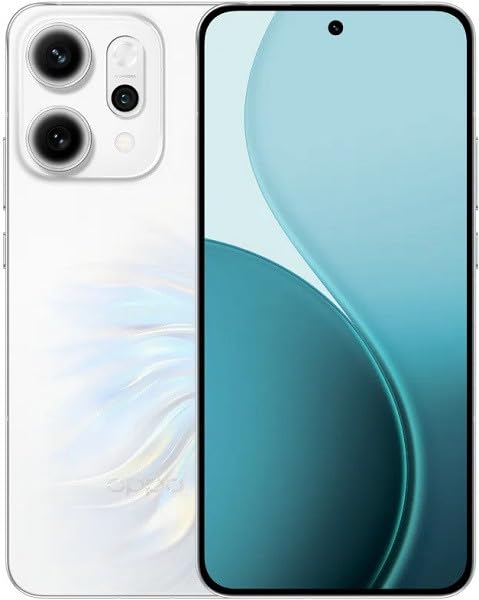
Image: OPPO Reno 14 5G smartphone and typical package contents. This image provides a general overview of the device and what you might find in the box.
1.2 Memasukkan Kad SIM
- Cari dulang kad SIM di sisi telefon anda.
- Masukkan alat ejektor SIM ke dalam lubang kecil di sebelah dulang dan tekan dengan kuat sehingga dulang terkeluar.
- Place your Nano-SIM card(s) into the tray with the gold contacts facing down, ensuring they are correctly aligned. This device supports Dual SIM functionality.
- Tolak dulang kembali ke dalam telefon dengan berhati-hati sehingga ia berbunyi pada tempatnya.
Note: Ensure the phone is powered off before inserting or removing SIM cards.
1.3 Hidupkan dan Persediaan Awal
- Tekan dan tahan butang Kuasa (biasanya di sebelah kanan) sehingga logo OPPO muncul.
- Ikut arahan pada skrin untuk memilih bahasa, rantau, sambung ke Wi-Fi dan sediakan akaun Google anda.
- You will be prompted to set up security features like a PIN, pattern, fingerprint, or face unlock.
1.4 Mengecas Peranti
Sebelum penggunaan pertama, disyorkan untuk mengecas peranti anda sepenuhnya.
- Sambungkan kabel USB Jenis-C ke port pengecasan di bahagian bawah telefon.
- Sambungkan hujung kabel yang satu lagi ke penyesuai kuasa, kemudian pasangkan penyesuai ke soket kuasa.
- Penunjuk pengecasan akan muncul pada skrin.
2. Mengendalikan Peranti Anda
Learn how to navigate and use the core functions of your OPPO Reno 14 5G.
2.1 Navigasi Asas
- Butang Kuasa: Press to turn the screen on/off. Press and hold to power off or restart.
- Butang Kelantangan: Laraskan kelantangan media, kelantangan panggilan atau kelantangan nada dering.
- Gerak isyarat skrin sentuh: Swipe up for app drawer, swipe down for notifications/quick settings, pinch to zoom, tap to select.
2.2 Membuat Panggilan dan Menghantar Mesej
- Panggilan: Open the Phone app, enter the number or select a contact, then tap the call icon.
- Mesej: Buka aplikasi Mesej, ketik ikon mesej baharu, masukkan penerima dan mesej anda, kemudian ketik hantar.
2.3 Penggunaan Kamera
Your OPPO Reno 14 5G features a high-quality camera system.
- Buka apl Kamera daripada skrin utama atau laci apl anda.
- Pilih mod yang anda inginkan (Foto, Video, Potret, Malam, dll.).
- Ketik butang pengatup untuk menangkap foto atau mula/berhenti merakam video.
- Tap on the screen to focus on a specific area.
2.4 Menyambung ke Wi-Fi dan Bluetooth
- Wi-Fi: Pergi ke Tetapan > Wi-Fi, turn Wi-Fi on, select your network, and enter the password if required.
- Bluetooth: Pergi ke Tetapan > Bluetooth, turn Bluetooth on, select the device you wish to pair with from the available devices list.
3. Penyelenggaraan
Penyelenggaraan yang betul memastikan jangka hayat dan prestasi optimum peranti anda.
3.1 Membersihkan Peranti Anda
- Gunakan kain lembut dan tidak berbulu untuk mengelap skrin dan badan.
- Elakkan penggunaan bahan kimia yang keras, bahan kasar atau semburan aerosol.
- Jangan dedahkan peranti kepada kelembapan berlebihan.
3.2 Kemas Kini Perisian
Regularly check for and install software updates to enhance security, stability, and introduce new features.
- Pergi ke Tetapan > Perihal peranti > Terkini (or similar path depending on ColorOS version).
- Ikut arahan pada skrin untuk memuat turun dan memasang sebarang kemas kini yang tersedia.
3.3 Penjagaan Bateri
- Elakkan suhu yang melampau, yang boleh merendahkan hayat bateri.
- Use only the original OPPO charger and cable or certified compatible accessories.
- Jangan biarkan bateri habis sepenuhnya dengan kerap.
3.4 Pengurusan Storan
To maintain optimal performance, regularly manage your device's storage.
- Pergi ke Tetapan > Storan kepada view penggunaan storan.
- Padam yang tidak perlu files, apps, and clear cache data.
- Consider backing up photos and videos to cloud storage or an external device.
4. Penyelesaian masalah
This section addresses common issues you might encounter with your OPPO Reno 14 5G.
4.1 Peranti Tidak Dihidupkan
- Pastikan bateri dicas. Sambungkan pengecas dan tunggu beberapa minit sebelum cuba menghidupkan.
- Perform a forced restart: Press and hold the Power button and Volume Up button simultaneously for about 10-15 seconds until the OPPO logo appears.
4.2 Network Issues (No Signal, Cannot Make Calls)
- Check if the SIM card is correctly inserted.
- Ensure Airplane Mode is off (swipe down from the top for Quick Settings).
- Mulakan semula peranti.
- Pergi ke Tetapan > Rangkaian mudah alih and check network settings.
4.3 Aplikasi Ranap atau Terhenti
- Tutup apl dan buka semula.
- Kosongkan cache aplikasi: Pergi ke Settings > Apps > [App Name] > Storage usage > Clear cache.
- Kemas kini aplikasi daripada Gedung Google Play.
- Jika isu berterusan, nyahpasang dan pasang semula apl.
4.4 Tetapan Semula Kilang (Pilihan Terakhir)
Warning: A factory reset will erase all data on your phone. Back up important data before proceeding.
- Pergi ke Tetapan > Tetapan sistem > Sandarkan dan tetapkan semula > Tetapkan semula telefon.
- Pilih Padamkan semua data.
- Sahkan keputusan anda dan masukkan kata laluan skrin kunci anda jika digesa.
5. Spesifikasi
Key technical specifications for the OPPO Reno 14 5G CPH2737.
| Ciri | Spesifikasi |
|---|---|
| Jenama | OPPO |
| Model | Reno 14 5G (CPH2737) |
| Kapasiti Penyimpanan Memori | 256 GB |
| Saiz Terpasang Memori RAM | 12 GB |
| Jenis Paparan | AMOLED |
| Teknologi Selular | 5G |
| Teknologi Ketersambungan | 5G |
| Kiraan Slot Kad SIM | Dual SIM |
| Faktor Bentuk | Bar |
| Pembekal Perkhidmatan Tanpa Wayar | Dibuka kunci |
| warna | putih |
6. Waranti dan Sokongan
Information regarding your product's warranty and how to obtain support.
6.1 Waranti Produk
Your OPPO Reno 14 5G is covered by a limited manufacturer's warranty. The specific terms and duration of the warranty may vary by region and local laws. Please refer to the warranty card included in your product packaging or visit the official OPPO weblaman web untuk maklumat jaminan terperinci.
The warranty typically covers defects in materials and workmanship under normal use. It does not cover damage caused by accidents, misuse, unauthorized modifications, or normal wear and tear.
6.2 Sokongan Pelanggan
If you encounter any issues that cannot be resolved using the troubleshooting steps in this manual, or if you require further assistance, please contact OPPO customer support.
- Sokongan dalam talian: Lawati OPPO rasmi website and navigate to the 'Support' section for FAQs, online chat, and service center locations.
- Sokongan Telefon: Refer to your region-specific OPPO website or the quick start guide for local customer service contact numbers.
- Pusat Perkhidmatan: For hardware-related issues, you may need to visit an authorized OPPO service center. Check the official website for the nearest location.
When contacting support, please have your device's model number (CPH2737) and IMEI number ready. The IMEI can usually be found by dialing *#06# on your phone's dialer, on the product packaging, or in Settings > About device > Status.


