pengenalan
The Marshall Kilburn III is a premium portable Bluetooth speaker designed to deliver exceptional audio quality with a classic aesthetic. It features 360° True Stereophonic sound, robust dust and water resistance, and an extended battery life, making it suitable for various environments. This manual provides detailed instructions for setting up, operating, maintaining, and troubleshooting your Kilburn III speaker.
Apa yang ada dalam Kotak
- Marshall Kilburn III Speaker
- Kabel pengecas USB-C ke USB-C
- Panduan Mula Pantas
- Maklumat Undang-undang dan Keselamatan
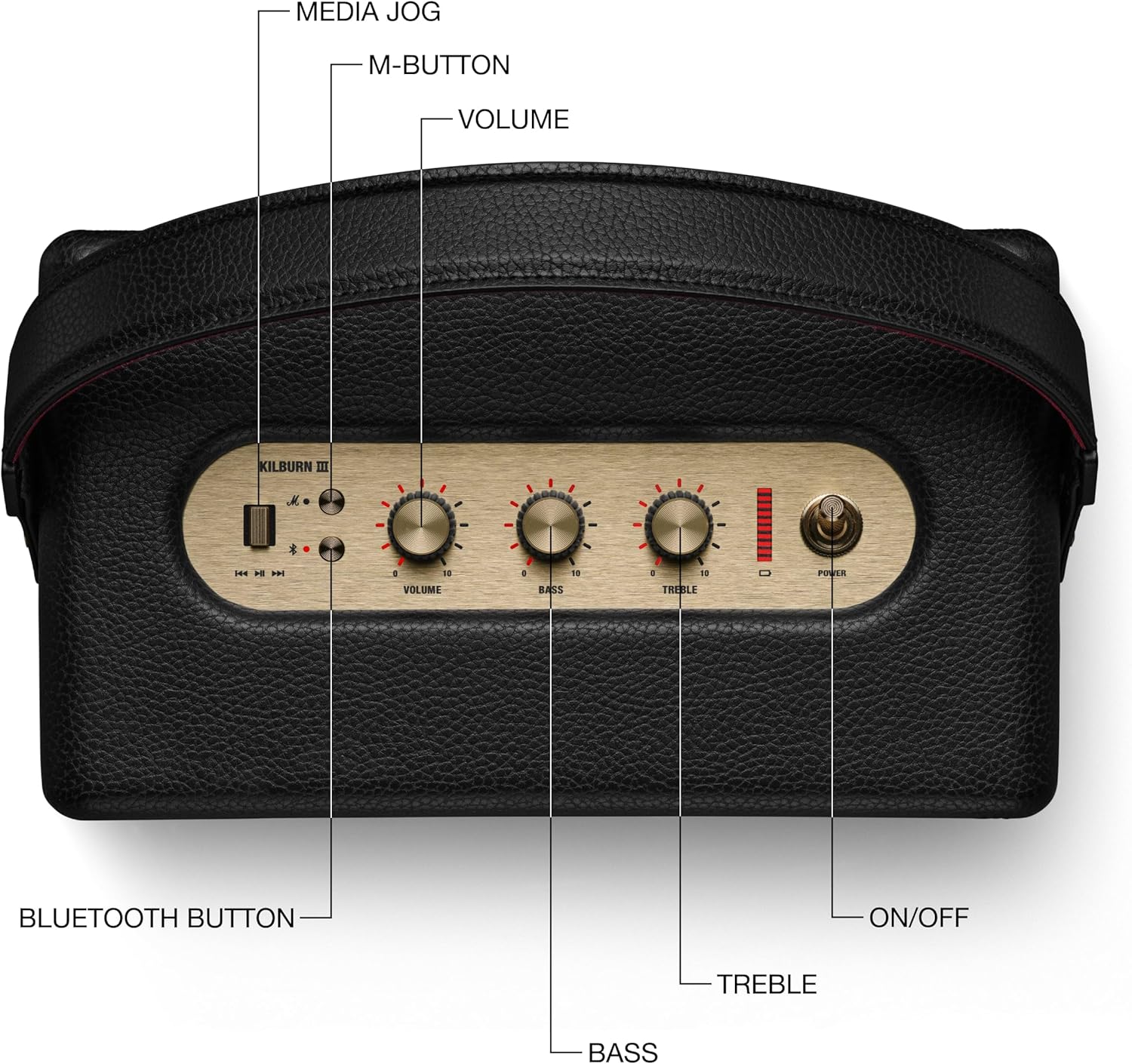
Figure 1: Included components with the Marshall Kilburn III speaker.
Produk Selesaiview
The Kilburn III features intuitive controls and a durable design. Familiarize yourself with the main components and controls:

Figure 2: Top panel controls of the Kilburn III speaker.
- Tombol Kelantangan: Melaraskan tahap output bunyi keseluruhan.
- Tombol Bes: Controls the low-frequency audio output.
- Tombol Treble: Controls the high-frequency audio output.
- Suis kuasa: Toggles the speaker on/off.
- Butang Bluetooth: Memulakan mod berpasangan Bluetooth.
- M-Button: Allows switching between custom EQ modes (configurable via the Marshall app).
- Penunjuk Bateri: LED bar indicating remaining battery life.

Figure 3: Rear panel connections of the Kilburn III speaker.
- USB-C Power Input/Output: Used for charging the speaker and for using the speaker as a power bank to charge other devices.
- AUX 3.5mm Input: For connecting audio devices via a 3.5mm audio cable.
Persediaan
Mengecas Speaker
Before first use, fully charge the Kilburn III speaker. Use the included USB-C to USB-C charging cable.
- Connect one end of the USB-C cable to the USB-C port on the rear of the speaker.
- Connect the other end of the USB-C cable to a compatible USB power adapter (not included) or a USB-C power source.
- The battery indicator LEDs on the top panel will illuminate to show charging progress. All LEDs will be solid when fully charged.

Figure 4: Charging the Kilburn III speaker via USB-C.
Berpasangan Bluetooth
To connect your audio device to the Kilburn III via Bluetooth:
- Tarik suis kuasa ke arah hadapan sehingga pembesar suara dihidupkan.
- Push and hold the Bluetooth button on the top panel until the LED turns to a slow pulse, indicating pairing mode.
- On your audio device (smartphone, tablet, laptop), open the Bluetooth settings.
- Select "Kilburn III" from the list of available devices.
- Once connected, the Bluetooth LED on the speaker will turn solid.

Figure 5: Marshall Kilburn III ready for Bluetooth pairing.
Arahan Operasi
Main Semula Asas
- Ensure the speaker is powered on and connected via Bluetooth or AUX.
- Start playing audio from your connected device.
- Adjust the Volume knob on the speaker to your desired listening level.

Figure 6: Adjusting the volume on the Kilburn III.
Melaraskan Bunyi
Customize your audio experience using the dedicated Bass and Treble knobs:
- Pusingkan Tombol bass clockwise to increase bass, or counter-clockwise to decrease it.
- Pusingkan Tombol treble clockwise to increase treble, or counter-clockwise to decrease it.
Using the M-Button (Custom Modes)
The M-button allows you to cycle through pre-set or custom equalizer modes. To configure these modes, you may need to use the official Marshall app (if available for this model).
- Tekan ke butang M to switch between available sound modes.
Charging External Devices (Power Bank Function)
The Kilburn III can act as a power bank to charge your mobile devices:
- Connect your device's USB-C charging cable to the USB-C port on the rear of the Kilburn III.
- The speaker will begin charging your device. Note that using this feature will reduce the speaker's playtime.
Penyelenggaraan
To ensure the longevity and optimal performance of your Marshall Kilburn III speaker, follow these maintenance guidelines:
- Pembersihan: Use a soft, dry cloth to wipe the speaker's surfaces. Do not use abrasive cleaners, alcohol, or chemical solvents.
- Tahan Air dan Debu: The speaker is IP54 rated, meaning it is resistant to dust and water splashes from any direction. However, it is not waterproof and should not be submerged in water. Ensure all ports are dry before charging.
- Storan: Simpan pembesar suara di tempat yang sejuk dan kering jauh dari cahaya matahari langsung dan suhu yang melampau.
- Penjagaan Bateri: Untuk hayat bateri yang optimum, elakkan daripada menyahcas sepenuhnya bateri dengan kerap. Cas pembesar suara dengan kerap, walaupun tidak digunakan untuk tempoh yang lama.
Menyelesaikan masalah
If you encounter issues with your Kilburn III, try the following solutions:
| Masalah | Penyelesaian yang Mungkin |
|---|---|
| Speaker tidak dihidupkan. | Pastikan bateri dicas. Sambungkan pembesar suara ke sumber kuasa menggunakan kabel USB-C. |
| Tidak boleh berpasangan melalui Bluetooth. |
|
| Tiada bunyi atau kelantangan rendah. |
|
| Penyelewengan bunyi. |
|
| Bateri cepat habis. |
|
Spesifikasi
| Ciri | Perincian |
|---|---|
| Nama Model | Kilburn III |
| Jenis Pembesar Suara | Pembesar suara mudah alih |
| warna | Black & Brass |
| Dimensi Produk | 10.75"D x 5.91"W x 6.65"H |
| Berat Barang | 6.17 paun |
| Hayat Bateri | 50 Jam |
| Masa Mengecas | 3 Jam |
| Teknologi Komunikasi Tanpa Wayar | Bluetooth |
| Julat Bluetooth | 33 Kaki |
| Tahap Ketahanan Air | Water Resistant (IP54 rated) |
| Kuasa Output Maksimum Pembesar Suara | 36 Watt |
| Mod Keluaran Audio | Stereo |
| Kaedah Kawalan | Touch (Knobs) |
| Sumber Kuasa | Dikuasakan Bateri |
Waranti dan Sokongan
The Marshall Kilburn III comes with a Limited Warranty. For detailed warranty information, please refer to the "Legal and Safety Information" document included in your product packaging.
For further assistance, technical support, or to purchase replacement parts, please visit the official Marshall weblaman web atau hubungi khidmat pelanggan mereka. Anda juga boleh merujuk kepada Manual Pengguna (PDF) untuk butiran tambahan.


