1. Pengenalan
The Aiper HydroComm Pure Communication Module is designed to enhance the functionality of your Aiper Scuba X Series robotic pool cleaner. This module facilitates real-time underwater communication, allowing you to remotely switch cleaning modes and initiate one-tap surface retrieval directly from your mobile device.
This manual provides essential information for the proper setup, operation, and maintenance of your HydroComm Pure module, ensuring optimal performance and longevity.
2. Produk Lebihview
The HydroComm Pure module acts as an underwater communication station, bridging the gap between your Aiper app and your Scuba X Series robotic pool cleaner. It is a floating device equipped with communication capabilities.
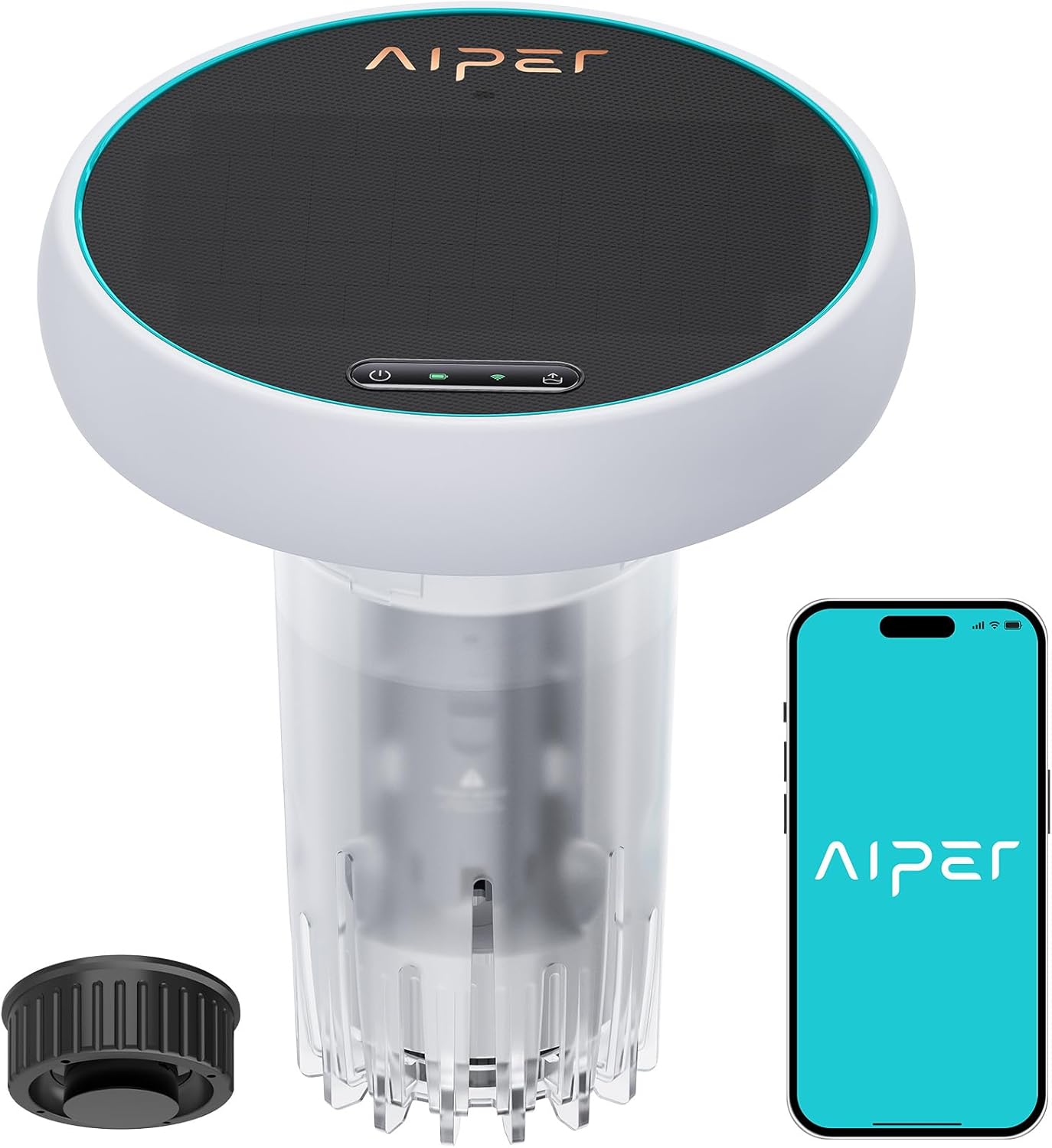
Figure 2.1: Aiper HydroComm Pure Communication Module and companion app interface.
Ciri-ciri Utama:
- Real-Time Underwater Communication: Enables seamless communication with Aiper Scuba X Series pool cleaners.
- Switch Cleaning Modes: Allows real-time adjustment of cleaning modes while the robot is operating underwater.
- One-Tap Surface Retrieval: Instantly brings the robotic cleaner back to the surface with a single command from the app.
- Kawalan Apl: Integrates with the Aiper app for remote control and monitoring.
- Solar-Assisted Charging: Features a solar panel to help maintain battery charge.

Figure 2.2: HydroComm Series comparison, highlighting the Pure module's underwater communication feature.

Figure 2.3: Compatibility of HydroComm Pure with Aiper Scuba X1, Scuba X1 Pro, and Scuba X1 Pro Max models.
3. Persediaan
- Charge the Module: Ensure the HydroComm Pure module is sufficiently charged before first use. While it features solar charging, an initial charge via the included adapter is recommended.
- Download the Aiper App: Download and install the official Aiper app on your smartphone or tablet. The app is available on both iOS and Android platforms.
- Pasangkan dengan Apl: Follow the in-app instructions to pair the HydroComm Pure module with your Aiper account and your Scuba X Series robotic pool cleaner. Ensure Bluetooth and Wi-Fi are enabled on your device.
- Penempatan di Kolam Renang: Once paired, turn on the HydroComm Pure module and gently place it into the pool. It is designed to float on the surface, acting as a communication hub.
- Activate Pool Cleaner: Start your Aiper Scuba X Series robotic pool cleaner as per its own instruction manual.
4. Arahan Operasi
The HydroComm Pure module provides enhanced control over your Aiper Scuba X Series robotic pool cleaner through the Aiper app.
4.1 Switching Cleaning Modes Underwater
- Ensure the HydroComm Pure module is floating in the pool and connected to your Aiper app.
- Open the Aiper app and select your connected Scuba X Series pool cleaner.
- Navigate to the cleaning mode selection interface within the app.
- Choose your desired cleaning mode (e.g., Floor, Wall, Smart) from the available options. The command will be transmitted to the underwater robot via the HydroComm Pure module.
- Confirm the mode change in the app.

Figure 4.1: App interface demonstrating the ability to switch cleaning modes while the robot is underwater.
4.2 One-Tap Surface Retrieval
- Ensure the HydroComm Pure module is floating in the pool and connected to your Aiper app.
- Open the Aiper app and select your connected Scuba X Series pool cleaner.
- Locate the "Surface Retrieval" or similar one-tap retrieval option within the app interface.
- Tap the button to initiate the retrieval process. The robotic cleaner will receive the command and begin moving towards the surface or a designated wall for easy retrieval.
- Wait for the robot to reach the surface before attempting to remove it from the pool.

Figure 4.2: App interface demonstrating the one-tap surface retrieval function.
4.3 Pemantauan
The Aiper app also allows you to monitor the battery charge level of your robotic pool cleaner and the HydroComm Pure module, providing real-time status updates.
5. Penyelenggaraan
- Pembersihan: After each use, retrieve the HydroComm Pure module from the pool. Turn it off and rinse it thoroughly with fresh water to remove any pool chemicals or debris.
- Storan: Store the module in a cool, dry place away from direct sunlight when not in use for extended periods.
- Penjagaan Panel Suria: Lap permukaan panel solar secara berkala dengan lembut, damp cloth to ensure it remains clean and can efficiently absorb sunlight for charging.
- Bateri: The module's battery is designed to be maintained by the solar panel during sunny conditions. For optimal battery life, avoid prolonged storage with a completely depleted battery.
6. Penyelesaian masalah
| Masalah | Kemungkinan Punca | Penyelesaian |
|---|---|---|
| Module not connecting to app/robot |
|
|
| Solar charging ineffective |
|
|
| Commands not reaching robot |
|
|
7. Spesifikasi
| Ciri | Perincian |
|---|---|
| Nombor Model | W2SE |
| Jenama | AIPER |
| Sumber Kuasa | Berkuasa Suria |
| Kaedah Kawalan | Apl |
| Ciri Khas | One-tap Retrieval Underwater, Switch Cleaning Modes Underwater, Underwater Comm |
| Dimensi Produk | 9.2"L x 10.2"W x 9.2"H |
| Berat Barang | 7.43 paun (3.38 Kilogram) |
| Jenis Bateri | 1 bateri Lithium Ion diperlukan (termasuk) |
| Kandungan Tenaga Bateri Lithium | Jam 37.44 Watt |
| bahan | plastik |
| warna | putih |
8. Waranti dan Sokongan
8.1 Maklumat Waranti
The Aiper HydroComm Pure Communication Module comes with a waranti dua tahun dari tarikh pembelian. Waranti ini meliputi kecacatan pembuatan dan kerosakan dalam penggunaan biasa. Sila simpan bukti pembelian anda untuk tuntutan waranti.
For detailed warranty terms and conditions, please refer to the official Aiper webtapak atau hubungi sokongan pelanggan.
8.2 Sokongan Pelanggan
If you encounter any issues or have questions regarding your Aiper HydroComm Pure Communication Module, please visit the official Aiper support website or contact their customer service team. Contact information can typically be found on the product packaging or the Aiper official webtapak.
Aiper Official Webtapak: www.aiper.com


