1. Pengenalan
This manual provides comprehensive instructions for the installation, operation, and maintenance of your Techage CG6E Solar Security Camera. Designed for outdoor use, this wireless camera system offers 2K high-definition video, AI motion detection, color night vision, two-way audio communication, and is built with an IP66 waterproof rating for reliable performance in various weather conditions. The integrated solar panel ensures continuous power, reducing the need for frequent battery recharges.
2. Kandungan Pakej
Sahkan bahawa semua item terdapat dalam pakej anda:
- Techage Solar Security Camera (2 units)
- Panel Suria (2 unit)
- Pendakap dan Skru Pemasangan
- Kabel Pengecas USB
- Manual Pengguna (dokumen ini)

Image: Two Techage CG6E solar security cameras and two solar panels, illustrating the complete product package.
3. Produk Lebihview
The Techage CG6E camera system is engineered for robust outdoor surveillance. Key features include:
- Resolusi Ultra HD 2K: Tangkap video yang jelas footage with 1.5 times the clarity of standard 1080P cameras.
- Kecekapan Dikuasakan Suria: Equipped with an external solar panel for continuous battery charging, ensuring uninterrupted operation.
- Pengesanan Gerakan AI: Advanced algorithms identify human movement, reducing false alerts and sending instant notifications.
- Penglihatan Malam Warna: Dual LED spotlights enable full-color video recording even in low-light conditions.
- Audio Dua hala: Mikrofon dan pembesar suara terbina dalam membolehkan komunikasi masa nyata melalui kamera.
- IP66 Kalis Cuaca: Designed to withstand rain, snow, and extreme temperatures for year-round outdoor use.
- Storan Fleksibel: Supports local storage via a Micro SD card (up to 128GB, not included) and cloud storage options.

Imej: Tamatview of the Techage CG6E camera highlighting its main features: long-lasting battery, free 3-day cloud storage, AI motion detection, and full-color night vision.
4. Persediaan
4.1 Pemasangan Aplikasi
The Techage CG6E camera operates with the Vicohome app. Download the app from your device's app store:
- For iOS devices, search for "Vicohome" in the Apple App Store.
- For Android devices, search for "Vicohome" in the Google Play Store.
Follow the on-screen instructions to create an account and log in.

Image: A smartphone displaying the Vicohome app interface, indicating where to download the application.
4.2 Berpasangan Kamera
- Pastikan telefon pintar anda disambungkan ke rangkaian Wi-Fi 2.4GHz. Kamera tidak menyokong Wi-Fi 5GHz.
- Open the Vicohome app and tap the "Add Device" or "+" icon.
- Power on the camera. The camera will enter pairing mode, indicated by a specific LED light pattern or voice prompt.
- Follow the app's instructions to scan the QR code on the camera or manually select the device.
- Masukkan kata laluan rangkaian Wi-Fi anda apabila digesa.
- Once connected, the camera will confirm successful pairing, and you can name your device within the app.
4.3 Pemasangan Fizikal
The camera and solar panel are designed for wall mounting.
- Pilih Lokasi: Pilih lokasi luar yang menyediakan yang diingini viewing angle and receives ample direct sunlight for the solar panel. Ensure the camera is within range of your 2.4GHz Wi-Fi network.
- Lekapkan Kamera: Use the provided mounting bracket and screws to securely attach the camera to a wall or other stable surface. Adjust the camera angle for optimal coverage.
- Pasang Panel Suria: Position the solar panel in a location that maximizes sun exposure throughout the day. Connect the solar panel cable to the camera's charging port.
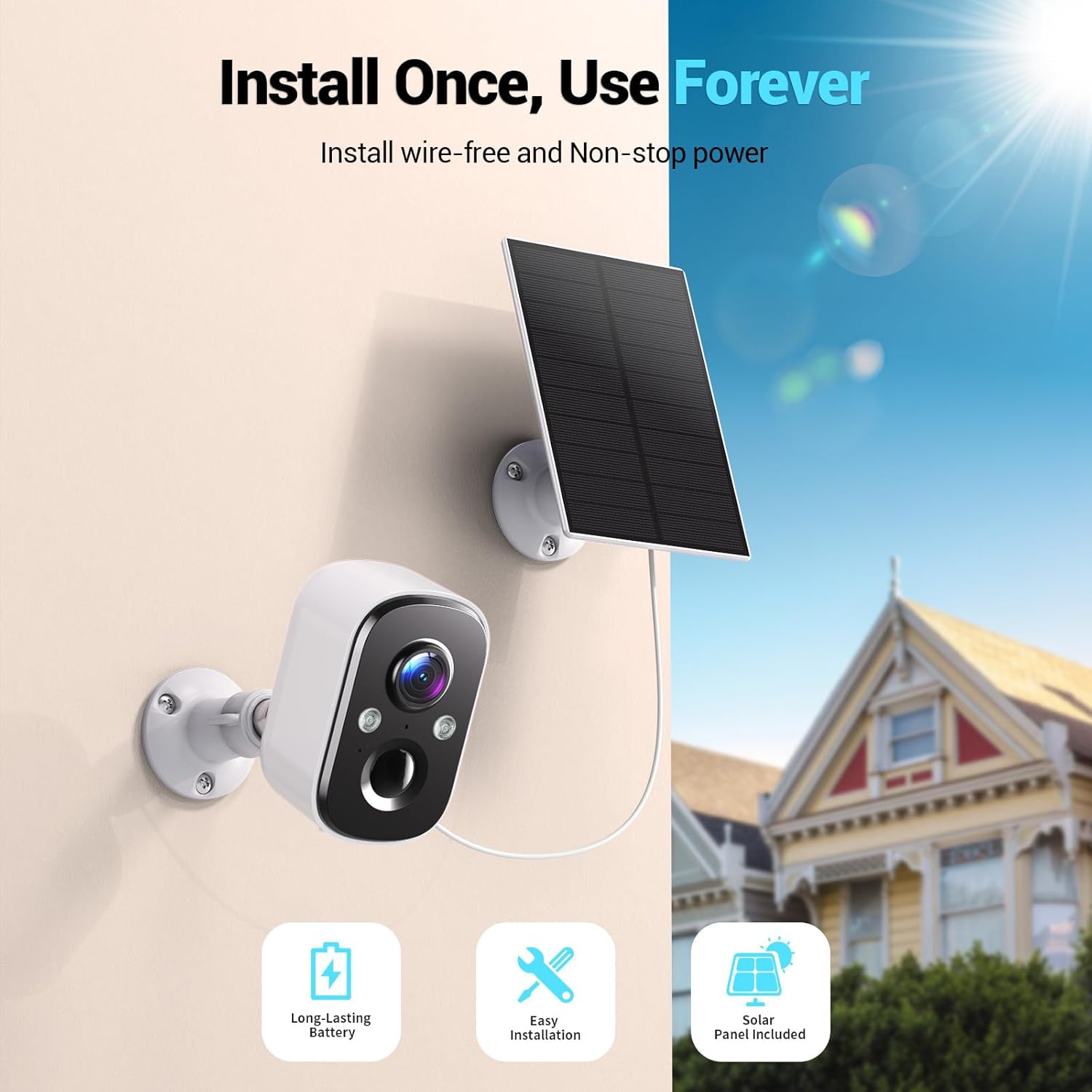
Image: A Techage CG6E camera and its solar panel are shown mounted on an outdoor wall, illustrating a typical installation scenario.
5. Arahan Operasi
5.1 Langsung View
Access real-time video feed from your camera through the Vicohome app. Simply select the desired camera from your device list to view its live stream.
5.2 Tetapan Pengesanan Pergerakan
The camera features advanced AI motion detection. You can customize settings within the Vicohome app:
- Sensitiviti: Adjust the detection sensitivity to minimize false alerts.
- Zon Aktiviti: Tentukan kawasan tertentu dalam kamera view di mana pengesanan gerakan harus aktif, mengabaikan kawasan lain.
- Pengecaman AI: The camera can differentiate between people, vehicles, packages, and pets, providing more relevant alerts.
- Makluman: Configure push notifications to your smartphone when motion is detected.

Image: A visual representation of the camera detecting motion near a doorway, triggering a spotlight, siren, and sending a notification to the Vicohome app.
5.3 Audio Dua Hala
Utilize the two-way audio feature to communicate with individuals near the camera. Tap the microphone icon in the live view interface of the Vicohome app to speak, and the camera's speaker will broadcast your voice. You can also hear audio from the camera's location.

Image: A person inside a house communicating via the camera with another person outside, demonstrating the two-way audio function.
5.4 Mod Penglihatan Malam
The camera offers two night vision modes:
- Penglihatan Malam Warna: When the built-in spotlights are activated (either manually or by motion detection), the camera captures full-color video in dark environments.
- Penglihatan Malam Inframerah: With spotlights off, the camera uses infrared LEDs to provide clear black-and-white video in darkness.

Image: A comparison showing the difference between color night vision (spotlight on) and infrared night vision (spotlight off) in a dark setting.
5.5 Pilihan Storan
Kamera anda menyokong dua kaedah penyimpanan:
- Kad SD mikro: Insert a Micro SD card (up to 128GB, not included) into the designated slot on the camera for local recording.
- Storan Awan: The Vicohome app offers a free 3-day rolling event recording cloud storage. Optional premium cloud plans are available for extended storage and advanced features.
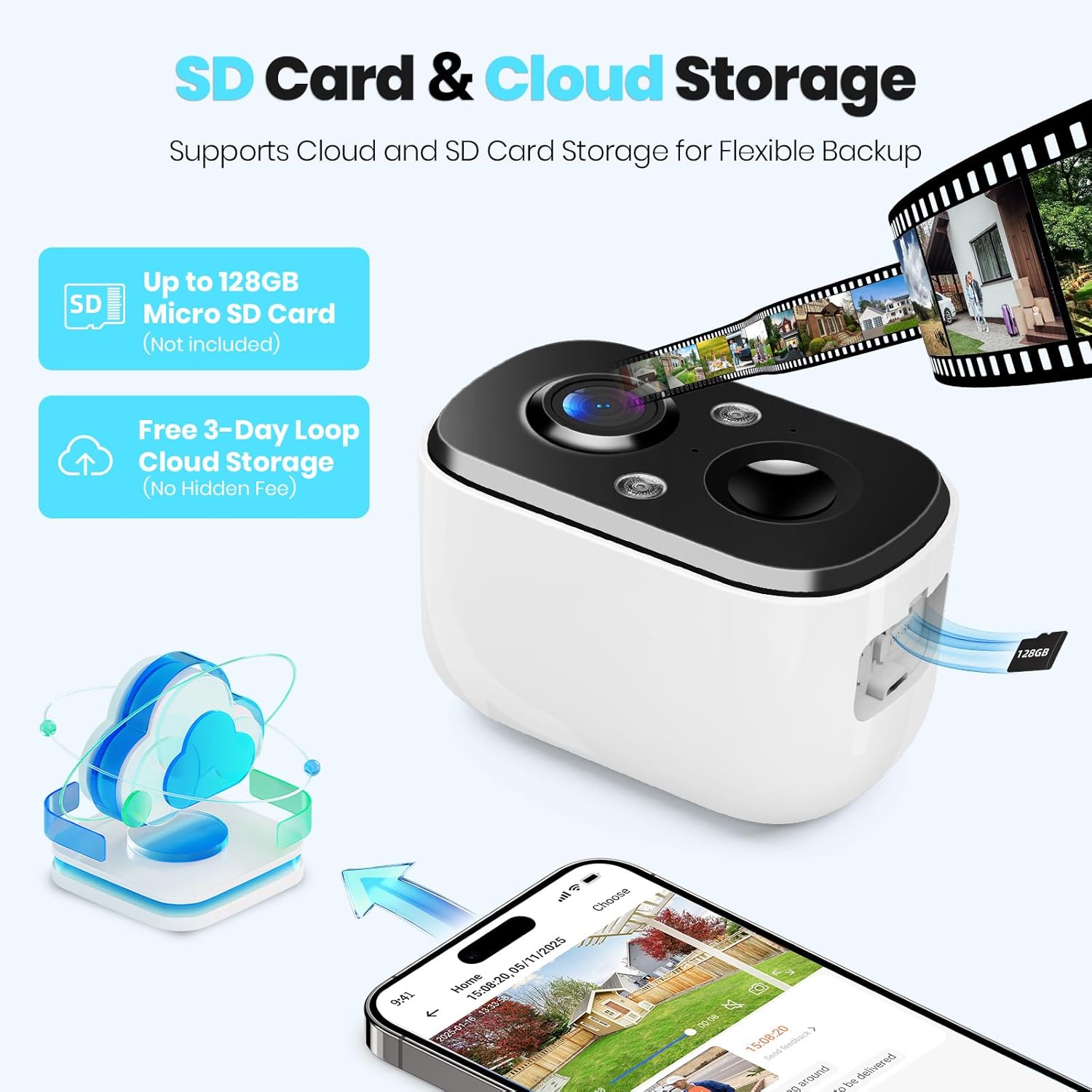
Image: A close-up of the camera highlighting the Micro SD card slot and illustrating cloud storage functionality.
5.6 Akses Perkongsian
You can share camera access with family members or trusted individuals through the Vicohome app. This allows multiple users to view suapan langsung dan terima makluman.
6. Penyelenggaraan
6.1 Battery Charging and Solar Panel Placement
The solar panel is designed to keep the camera battery charged. Ensure the solar panel is positioned to receive maximum direct sunlight daily. If the camera's battery level drops significantly due to prolonged cloudy weather or insufficient sunlight, you may need to temporarily charge the camera using the provided USB cable.
6.2 Pembersihan
Periodically clean the camera lens and the surface of the solar panel with a soft, damp kain untuk memastikan prestasi optimum. Elakkan penggunaan bahan kimia yang keras atau bahan yang melelas.
6.3 Kemas Kini Perisian Tegar
The Vicohome app will notify you of available firmware updates. It is recommended to keep your camera's firmware updated to ensure the latest features, security enhancements, and bug fixes.
7. Penyelesaian masalah
- Kamera tidak bersambung ke Wi-Fi: Ensure your Wi-Fi network is 2.4GHz. Check Wi-Fi signal strength at the camera's location. Restart your router and the camera.
- Frequent false alerts: Adjust motion detection sensitivity and configure activity zones within the Vicohome app to focus on relevant areas.
- Penglihatan malam yang lemah: Ensure the camera lens is clean. Check if the spotlights are enabled for color night vision.
- Bateri tidak dicas: Verify the solar panel is connected correctly and receives sufficient direct sunlight. Clean the solar panel surface.
- No cloud recording: Confirm your cloud storage subscription status. The free plan offers 3-day rolling event recording.
Untuk bantuan lanjut, rujuk bahagian bantuan dalam aplikasi atau hubungi khidmat pelanggan.
8. Spesifikasi
| Ciri | Spesifikasi |
|---|---|
| Nama Model | CG6E |
| Penggunaan Dalaman/Luar | Luar |
| Sumber Kuasa | Berkuasa Suria |
| Teknologi Ketersambungan | Tanpa Wayar (Wi-Fi 2.4GHz sahaja) |
| Resolusi Tangkapan Video | 2K (1440p) |
| Julat Penglihatan Malam | 33 Kaki |
| Tahap Ketahanan Air | IP66 Kalis Air |
| Audio Dua Hala | ya |
| Pilihan Storan | Kad Mikro SD (sehingga 128GB), Storan Awan |
| Peranti Serasi | Telefon pintar (melalui aplikasi Vicohome) |
| Dimensi Produk | 6 x 3.49 x 7.5 inci |
| Berat Barang | 2.09 paun |
9. Waranti dan Sokongan
Techage provides free technical support for its products. For warranty information or to contact support, please refer to the contact details provided within the Vicohome app or visit the official Techage webtapak.

Image: A customer support representative, symbolizing the availability of technical assistance.


