pengenalan
This manual provides essential instructions for setting up, operating, maintaining, and troubleshooting your OPPO Reno 12 F 5G CPH2637 smartphone. Please read this guide thoroughly to ensure proper use and to maximize the device's capabilities.
1. Persediaan
1.1 Membuka Kotak dan Pemeriksaan Awal
Keluarkan semua item dari bungkusan dengan berhati-hati. Sahkan bahawa komponen berikut hadir:
- OPPO Reno 12 F 5G CPH2637 Smartphone
- Kabel Jenis-C USB
- Penyesuai Kuasa
- Alat Ejector SIM
- Panduan Mula Pantas (dokumen ini)
Inspect the device for any physical damage before proceeding.
1.2 Memasukkan Kad SIM
The OPPO Reno 12 F 5G CPH2637 supports Dual SIM functionality.
- Cari dulang kad SIM di sisi peranti.
- Masukkan alat ejektor SIM ke dalam lubang kecil di sebelah dulang dan tekan perlahan-lahan sehingga dulang terkeluar.
- Letakkan kad Nano-SIM anda ke dalam slot yang ditetapkan pada dulang, pastikan kenalan emas menghadap ke bawah.
- Tolak dulang kembali ke dalam peranti dengan berhati-hati sehingga rata dengan sisi.
1.3 Mengecas Peranti
Sebelum penggunaan pertama, disyorkan untuk mengecas peranti sepenuhnya.
- Sambungkan kabel USB Jenis-C ke port pengecasan di bahagian bawah telefon.
- Sambungkan hujung kabel yang lain ke penyesuai kuasa.
- Palamkan penyesuai kuasa ke salur keluar dinding.
- Penunjuk pengecasan akan muncul pada skrin.
1.4 Menghidupkan dan Konfigurasi Awal
To power on the device, press and hold the Power button located on the side until the OPPO logo appears. Follow the on-screen instructions to complete the initial setup, including language selection, Wi-Fi connection, Google account setup, and security settings.
2. Arahan Operasi
2.1 Navigasi Asas
The OPPO Reno 12 F 5G CPH2637 features a touchscreen interface. Use gestures such as tapping, swiping, pinching, and spreading to interact with the device. The navigation bar at the bottom of the screen typically includes Back, Home, and Recent Apps buttons.
2.2 Membuat Panggilan dan Menghantar Mesej
Untuk membuat panggilan, buka telefon aplikasi, masukkan nombor dan ketik ikon panggilan. Untuk menghantar mesej, buka Mesej app, tap the new message icon, enter the recipient and your message, then tap send.
2.3 Menyambung ke Rangkaian
Your device supports both Wi-Fi and 5G cellular networks.
- Wi-Fi: Pergi ke Tetapan > Wi-Fi, turn on Wi-Fi, select your desired network, and enter the password if required.
- 5G Cellular Data: Ensure your SIM card has an active 5G plan. Go to Settings > Mobile Network > Data usage to manage your cellular data.
2.4 Menggunakan Kamera
Buka Kamera app from your home screen or app drawer. Tap the shutter button to take a photo. Swipe left or right to switch between different camera modes such as Photo, Video, Portrait, and Night. Tap on the screen to focus on a specific area.
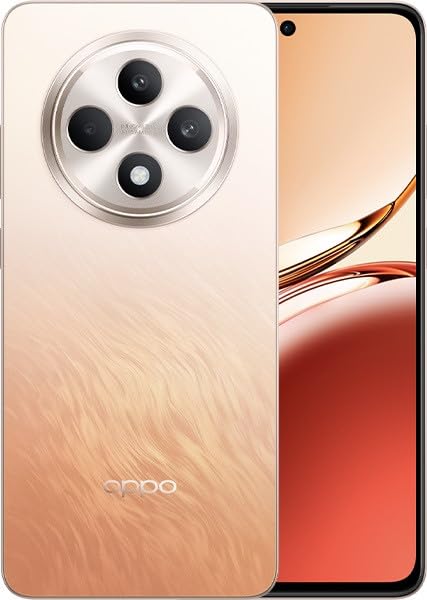
Image: OPPO Reno 12 F 5G CPH2637 smartphone in Amber Orange. This image displays the front and back of the device, highlighting its design and camera module.
2.5 Ciri Keselamatan
The device offers various security options to protect your data:
- Buka kunci cap jari: Daftarkan cap jari anda Settings > Password & Biometrics > Fingerprint.
- Buka Kunci Wajah: Sediakan pengecaman wajah dalam Settings > Password & Biometrics > Face.
- Kunci skrin: Choose a PIN, pattern, or password for screen lock in Settings > Password & Biometrics > Lock screen password.
3. Penyelenggaraan
3.1 Membersihkan Peranti
Use a soft, lint-free cloth to clean the screen and body of your phone. Avoid using harsh chemicals, abrasive materials, or aerosol sprays, as these can damage the device's finish and coatings. For stubborn smudges, slightly dampen kain dengan air.
3.2 Kemas Kini Perisian
Semak dan pasang kemas kini perisian secara kerap untuk memastikan prestasi optimum, keselamatan dan akses kepada ciri baharu. Pergi ke Tetapan > Perihal peranti > Terkini untuk menyemak kemas kini yang tersedia.
3.3 Penjagaan Bateri
To prolong battery life, avoid exposing the device to extreme temperatures. It is recommended to keep the battery charge between 20% and 80% for daily use. Avoid leaving the phone plugged in for extended periods after it is fully charged.
3.4 Pengurusan Storan
Semula secara berkalaview dan padam yang tidak perlu files, apps, and media to free up storage space. You can check storage usage in Settings > About device > Storage.
4. Penyelesaian masalah
4.1 Peranti Tidak Dihidupkan
If your device does not turn on, ensure it is sufficiently charged. Connect it to the charger for at least 15 minutes, then try pressing and holding the Power button again for 10-15 seconds.
4.2 Isu Ketersambungan Rangkaian
If you experience issues with cellular data or Wi-Fi:
- Hidupkan dan matikan Mod Pesawat.
- Mulakan semula peranti.
- For cellular issues, ensure your SIM card is properly inserted and your plan is active.
- For Wi-Fi issues, restart your router and ensure you are within range.
4.3 Aplikasi Ranap atau Terhenti
If an app is not responding, try force-closing it from the Recent Apps screen. If the issue persists, clear the app's cache and data in Settings > Apps > [App Name] > Storage usageSebagai langkah terakhir, nyahpasang dan pasang semula aplikasi tersebut.
4.4 Tetapan Semula Kilang
A factory reset will erase all data on your device and restore it to its original factory settings. Back up all important data before performing a factory reset. Pergi ke Tetapan > Tetapan sistem > Sandarkan dan tetapkan semula > Tetapkan semula telefon > Padam semua data.
5. Spesifikasi
| Ciri | Spesifikasi |
|---|---|
| Jenama | OPPO |
| Nama Model | Reno 12 F 5G |
| Nombor Model | CPH2637 |
| Kapasiti Penyimpanan Memori | 256 GB |
| Saiz Terpasang Memori RAM | 12 GB |
| Teknologi Selular | 5G |
| Teknologi Ketersambungan | 5G |
| Kiraan Slot Kad SIM | Dual SIM |
| warna | Amber Orange |
| Input Antara Muka Manusia | Skrin sentuh |
| Faktor Bentuk | Batu tulis |
6. Waranti dan Sokongan
Your OPPO Reno 12 F 5G CPH2637 is covered by a limited warranty. Please refer to the warranty card included in your product packaging for specific terms and conditions, including warranty period and coverage details. For technical support, service inquiries, or further assistance, please visit the official OPPO support webtapak atau hubungi talian khidmat pelanggan mereka di rantau anda.


