1. Pengenalan
The Autel MaxiTPMS TS508WF is an advanced Tire Pressure Monitoring System (TPMS) service tool designed for comprehensive TPMS sensor management. This device facilitates activation, programming, relearning, and diagnosis of TPMS sensors, ensuring proper tire pressure monitoring for vehicle safety. The TS508WF features Wi-Fi connectivity for convenient software updates, enhancing its functionality and vehicle coverage over time.

Image 1.1: Autel MaxiTPMS TS508WF device overview highlighting its core functions.
2. Apa yang ada di dalam Kotak
Selepas membuka pakej, sahkan bahawa semua komponen ada:
- Unit Utama TS508WF
- Kabel Utama (sambungan OBDII)
- Palam Kuasa
- sepana
- Membawa Sarung
- Kabel USB Mini
- Manual Arahan (dokumen ini)
- Magnet (for certain sensor types)

Image 2.1: Contents of the TS508WF package.
3. Ciri-ciri Utama
The Autel MaxiTPMS TS508WF offers a range of features for efficient TPMS service:
- Wi-Fi Update Capability: Allows for direct software updates over a Wi-Fi connection, eliminating the need for a PC.
- Pengaturcaraan Sensor MX: Supports programming of all Autel MX-Sensors using two methods: Copy by OBD and Auto Create 1-16.
- TPMS Sensor Belajar Semula: Provides three methods for relearning TPMS sensors: Automatic Relearn, Stationary Relearn, and OBD Relearn.
- Pengaktifan Sensor TPMS: Activates all 315MHz and 433MHz TPMS sensors to retrieve sensor data.
- Diagnosis Sistem TPMS: Reads and clears TPMS diagnostic trouble codes (DTCs) and displays live sensor data.
- Dual Service Modes: Offers Quick Mode for basic TPMS functions and Advanced Mode for comprehensive TPMS diagnostics.
- Liputan Kenderaan yang Luas: Compatible with a broad range of US, European, and Asian vehicles.

Image 3.1: Main menu of the TS508WF.

Image 3.2: Wi-Fi and USB update feature comparison.
4. Persediaan dan Konfigurasi Awal
4.1 Mengecas Peranti
Before first use, ensure the TS508WF is fully charged. Connect the Mini USB cable to the device and the power plug to an electrical outlet. The device will indicate charging status on its screen.
4.2 Wi-Fi Connection and Software Update
The TS508WF supports Wi-Fi for convenient software updates. It is recommended to update the device regularly to ensure compatibility with the latest vehicle models and sensor types.
- Dari menu utama, pilih "Peranti Saya".
- Choose "Update by Wi-Fi".
- For the first-time Wi-Fi update, select "Scan Wi-Fi". The device will search for available WLAN hotspots.
- Pilih rangkaian yang anda inginkan daripada senarai dan masukkan kata laluan jika digesa.
- Once connected, ensure the TS508WF is plugged into a power source.
- Confirm to begin the update process. The device will download and install the latest software.
Video 4.1: Official Autel video demonstrating the Wi-Fi update feature of the TS508WF.
5. Arahan Operasi
The TS508WF offers two main service modes: Quick Mode and Advanced Mode. Quick Mode is suitable for basic TPMS functions, while Advanced Mode provides more in-depth diagnostics and programming options.

Image 5.1: Quick Mode and Advanced Mode overview.
5.1 Activating TPMS Sensors
To activate a TPMS sensor:
- Select the "TPMS" function from the main menu.
- Choose "Activate Sensors".
- Follow the on-screen prompts to select the vehicle make, model, and year.
- Position the tool near each tire's valve stem and press the trigger button to activate the sensor. The tool will display sensor ID, tire pressure, temperature, and battery status.
5.2 Programming MX-Sensors
The TS508WF can program Autel MX-Sensors to replace faulty or missing sensors. Two programming methods are available:
- Salinan oleh OBD: This method retrieves the sensor IDs from the vehicle's ECU via the OBDII port and writes them directly to the new MX-Sensor. This is ideal when the original sensor is no longer functional.
- Cipta Automatik 1-16: This method generates new, unique sensor IDs for up to 16 MX-Sensors. This is useful when original sensor IDs are unavailable.
To program a sensor:
- Select "Program Sensor" from the TPMS menu.
- Choose the desired programming method (Copy by OBD or Auto Create 1-16).
- Follow the on-screen instructions to complete the programming. Ensure the MX-Sensor is within 4 inches of the tool during programming.

Image 5.2: MX-Sensor programming methods.
5.3 Relearning TPMS Sensors
After replacing sensors or rotating tires, the vehicle's ECU needs to learn the new sensor IDs. The TS508WF supports three relearn procedures:
- Belajar Semula Automatik: The vehicle automatically learns new sensor IDs by driving under specific conditions.
- Belajar Semula Pegun: Requires the vehicle to be placed in a "Learn Mode" (often initiated via the vehicle's dashboard controls) and sensors activated in a specific order.
- Belajar Semula OBD: The tool writes new sensor IDs directly to the vehicle's TPMS module via the OBDII connector. This is often the fastest method.
To perform a relearn:
- Select "Position Relearn" from the TPMS menu.
- Follow the on-screen instructions, which will guide you through the appropriate relearn procedure for the selected vehicle.
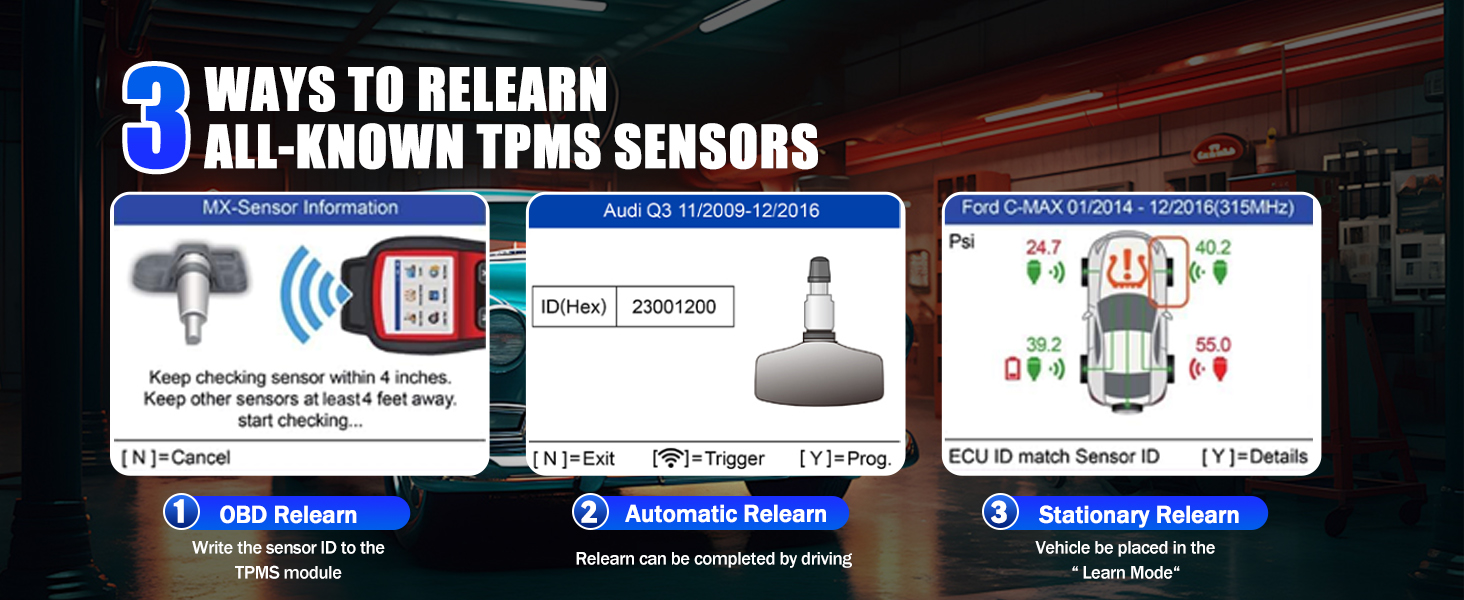
Image 5.3: TPMS sensor relearn methods.
5.4 TPMS System Diagnosis
The TS508WF can diagnose issues within the TPMS system:
- Connect the main cable to the vehicle's OBDII port and the TS508WF.
- Select "TPMS Diagnose" from the menu.
- The tool will read TPMS DTCs (Diagnostic Trouble Codes) and display detailed information about the system's health, including sensor IDs, tire pressure, temperature, and battery condition.
- If DTCs are present, you can choose to clear them after addressing the underlying issue.

Image 5.4: Reading and clearing TPMS DTCs.
6. Penyelenggaraan
To ensure the longevity and optimal performance of your Autel MaxiTPMS TS508WF:
- Pembersihan: Gunakan yang lembut, damp kain untuk membersihkan peranti. Elakkan pembersih atau pelarut yang melelas.
- Storan: Store the tool in its carrying case in a dry, cool environment when not in use.
- Penjagaan Bateri: Charge the internal Lithium Polymer battery regularly, even if the device is not frequently used, to maintain battery health. Avoid fully discharging the battery for extended periods.
- Kemas Kini Perisian: Regularly check for and install software updates via Wi-Fi to ensure the tool has the latest vehicle coverage and features.
7. Penyelesaian masalah
If you encounter issues with your TS508WF, refer to the following common problems and solutions:
| Masalah | Kemungkinan Punca | Penyelesaian |
|---|---|---|
| Peranti tidak dihidupkan | Bateri rendah atau habis | Connect the device to a power source and charge for at least 30 minutes. |
| Unable to activate sensor | Incorrect sensor type selected, sensor too far from tool, or faulty sensor. | Verify vehicle selection. Ensure the tool is positioned correctly near the valve stem. Try activating a known good sensor. |
| Wi-Fi update fails | Weak Wi-Fi signal, incorrect password, or device not connected to power. | Move closer to the Wi-Fi router. Re-enter Wi-Fi password. Ensure the device is plugged into a power source during the update. |
| Cannot connect to vehicle OBDII | Loose cable connection, vehicle ignition off, or faulty OBDII port. | Ensure the OBDII cable is securely connected to both the tool and the vehicle. Turn the vehicle ignition to the ON position (engine off). Test the OBDII port with another diagnostic tool if available. |
8. Spesifikasi
Key technical specifications for the Autel MaxiTPMS TS508WF:
- model: autelTS508WIFI
- Berat Barang: 3.89 paun
- Dimensi Pakej: 12 x 10.5 x 4 inci
- Bateri: 1 Bateri Litium Polimer diperlukan (termasuk)
- Sumber Kuasa: Dikuasakan Bateri
- Sistem pengendalian: Android 11.0
- Saiz Skrin: 3 Inci
- UPC: 792499188818
- Tarikh Mula-mula Tersedia: 20 Ogos 2024

Image 8.1: Advanced hardware features of the TS508WF.
9. Waranti dan Sokongan
For warranty information, please refer to the documentation included with your product or visit the official Autel website. Autel provides free lifetime software updates for the TS508WF. For technical assistance, troubleshooting beyond this manual, or service inquiries, please contact Autel customer support directly.
You can find additional support and resources by visiting the Kedai Autel di Amazon.


