1. Pengenalan
This manual provides detailed instructions for the installation, operation, and maintenance of your PNI House WiFi800 NVR and PNI IP840 Outdoor Camera Wireless Surveillance Kit. Please read this manual thoroughly before using the product to ensure proper setup and functionality. Keep this manual for future reference.
2. Maklumat Keselamatan
- Pastikan semua sambungan kuasa selamat dan memenuhi volum yang ditetapkantage (12V DC).
- Do not expose the NVR to moisture or extreme temperatures.
- The PNI IP840 cameras are IP65 rated for outdoor use; however, avoid submerging them in water.
- Installation should be performed by qualified personnel if you are unsure about electrical connections or mounting procedures.
- Jauhkan produk daripada medan magnet yang kuat.
- Use only original or certified replacement parts and accessories.
3. Kandungan Pakej
Sahkan bahawa semua item yang disenaraikan di bawah terdapat dalam pakej anda:
- PNI House WiFi800 NVR (1 unit)
- PNI IP840 Outdoor Cameras (2 units)
- Power Adapters (for NVR and cameras)
- USB Mouse (for NVR)
- Fixing Screws and Wall Plugs (for cameras)
- User Manuals (for NVR and cameras)

Image: PNI House WiFi800 NVR with included USB mouse and power adapter.

Image: PNI IP840 Outdoor Camera with its power adapter and mounting hardware.
4. Produk Lebihview
4.1 PNI IP840 Outdoor Camera
The PNI IP840 camera is a high-resolution wireless outdoor surveillance camera featuring 8MP 4K video, pan/tilt functionality, and advanced night vision. It is designed for robust performance in various weather conditions.
- Penderia: 1/2.7" CMOS, 8MP
- Resolusi: 3840x2160 (4K)
- Kanta: 3.6mm, 90° viewsudut ingatan
- Kuali/Condongkan: Mendatar 355°, Menegak 90°
- Penglihatan Malam: 4 IR LEDs and 4 White LEDs, up to 15m
- Storan: MicroSD card slot (up to 256GB, card not included)
- Ketersambungan: WiFi 2.4GHz, ONVIF support
- ciri-ciri: Motion Detection, Human Shape Detection, Rotation after movement, ICSee app support
- Rintangan Cuaca: Nilai IP65

Imej: Depan view of the PNI IP840 outdoor camera, showing the lens, LEDs, and antennas.

Image: Close-up of the PNI IP840 camera's connection cables for power and wired network.
4.2 PNI House WiFi800 NVR
The PNI House WiFi800 NVR (Network Video Recorder) is the central unit for managing and recording video from your surveillance cameras. It supports up to 8 channels at 5MP or 4 channels at 4K (8MP) resolution.
- Video Channels: 8 channels (5MP) / 4 channels (4K/8MP)
- Pemampatan Video: H.265AI/H.265+
- Resolusi Main Semula: 1080P (HDMI output)
- Storan: Supports 1x 2.5" HDD (up to 14TB) or 1x MicroSD card (up to 128GB)
- Antara Muka Rangkaian: RJ45 10/100/1000 Mbit/s
- Kekerapan Wayarles: 2.4 GHz (for NVR-camera communication)
- Keluaran: 1x HDMI, 1x USB 2.0
- ciri-ciri: Mobile/PC viewing (Android, iOS, Windows), ICSee/XMEye app support, Integrated voice prompt speaker

Image: Rear panel of the PNI House WiFi800 NVR, displaying its various ports including power, HDMI, Ethernet, USB, and reset button.

Imej: Sisi view of the PNI House WiFi800 NVR, showing its antennas and port layout.
5. Persediaan
5.1 Persediaan Awal NVR
- Sambungkan Kuasa: Sambungkan NVR ke penyesuai kuasanya dan palamkannya ke salur keluar elektrik.
- Paparan Sambungkan: Connect the NVR to a monitor or TV using an HDMI cable.
- Sambung Tetikus: Plug the USB mouse into the NVR's USB port for navigation.
- Sambungan Rangkaian (Pilihan): For remote access and firmware updates, connect the NVR to your router using an Ethernet cable.
- Storage Installation (Optional): If using an HDD, open the NVR casing and install a 2.5" SATA HDD. Alternatively, insert a MicroSD card into the designated slot.
5.2 Pemasangan Kamera
- Pilih Lokasi: Select a suitable outdoor location for each camera, ensuring good Wi-Fi signal strength and an unobstructed view. The IP65 rating allows for outdoor exposure.
- Lekapkan Kamera: Use the provided screws and wall plugs to securely mount the camera to a wall or ceiling.
- Sambungkan Kuasa: Connect the camera to its power adapter and plug it into an electrical outlet. Ensure the power cable is protected from the elements.
5.3 Pairing Cameras with NVR
The cameras are typically pre-paired with the NVR in the kit. If not, or if adding new cameras:
- Ensure both the NVR and cameras are powered on.
- On the NVR interface (connected to a monitor), navigate to the camera management or channel settings.
- Select the option to add or search for wireless cameras. The NVR will scan for available PNI IP840 cameras.
- Ikut gesaan pada skrin untuk melengkapkan proses berpasangan.
5.4 Mobile App Configuration (ICSee / XMEye)
- Muat turun Aplikasi: Download the ICSee or XMEye app from your smartphone's app store (Android or iOS).
- Daftar Akaun: Cipta akaun pengguna baharu atau log masuk jika anda sudah mempunyainya.
- Tambah Peranti: In the app, select "Add Device" or scan the QR code displayed on the NVR's monitor (if available) or the NVR itself.
- Ikuti Gesaan: Follow the in-app instructions to connect your NVR and cameras to your mobile device for remote viewing dan kawalan.
6. Arahan Operasi
6.1 Langsung View
Access live video feeds from your cameras via the NVR's connected monitor or through the ICSee/XMEye mobile application. The NVR interface allows for multi-channel display.
6.2 Rakaman
- Rakaman Berterusan: Configure the NVR to record continuously to the installed HDD or MicroSD card.
- Rakaman Diaktifkan Pergerakan: Set up recording to trigger only when motion is detected by the cameras.
- Rakaman Berjadual: Tentukan tempoh masa tertentu untuk rakaman.
6.3 Main semula
Untuk kembaliview dirakam footage:
- On the NVR interface, select the "Playback" option.
- Choose the desired camera, date, and time range.
- Use the controls to play, pause, fast forward, or rewind footage.
- Mobile app playback functions similarly, allowing remote access to recorded video.
6.4 Pengesanan Gerakan dan Fungsi AI
The PNI IP840 cameras feature advanced detection capabilities:
- Pengesanan Pergerakan: Configurable sensitivity to detect movement within the camera's field of view.
- Human Shape Detection: Intelligent analysis to differentiate human figures from other moving objects, reducing false alarms.
- Rotation After Movement: The camera can be set to automatically track detected movement within its pan/tilt range.
- Pemberitahuan Penggera: Enable push notifications to your mobile phone when an alarm event (e.g., motion detection) occurs.
Access these settings through the NVR menu or the mobile application to customize detection zones, sensitivity, and notification preferences.
6.5 Kawalan Pan/Condong/Zum (PTZ)
For PNI IP840 cameras, you can remotely control the camera's orientation:
- Use the PTZ controls available in the NVR interface or the ICSee/XMEye mobile app.
- Drag your finger on the live view screen in the app to pan (horizontal 355°) and tilt (vertical 90°) the camera.
- Digital zoom functionality may be available through the app.
7. Penyelenggaraan
- Pembersihan: Regularly clean the camera lenses with a soft, dry cloth to ensure clear image quality. Do not use harsh chemicals.
- Kemas kini Firmware: Periodically check for firmware updates for both the NVR and cameras through the mobile app or NVR interface. Updates can improve performance and add new features.
- Semak Sambungan: Ensure all power and network cables are securely connected and free from damage.
- Pengurusan Storan: Regularly back up important recordings and manage storage space on your HDD or MicroSD card.
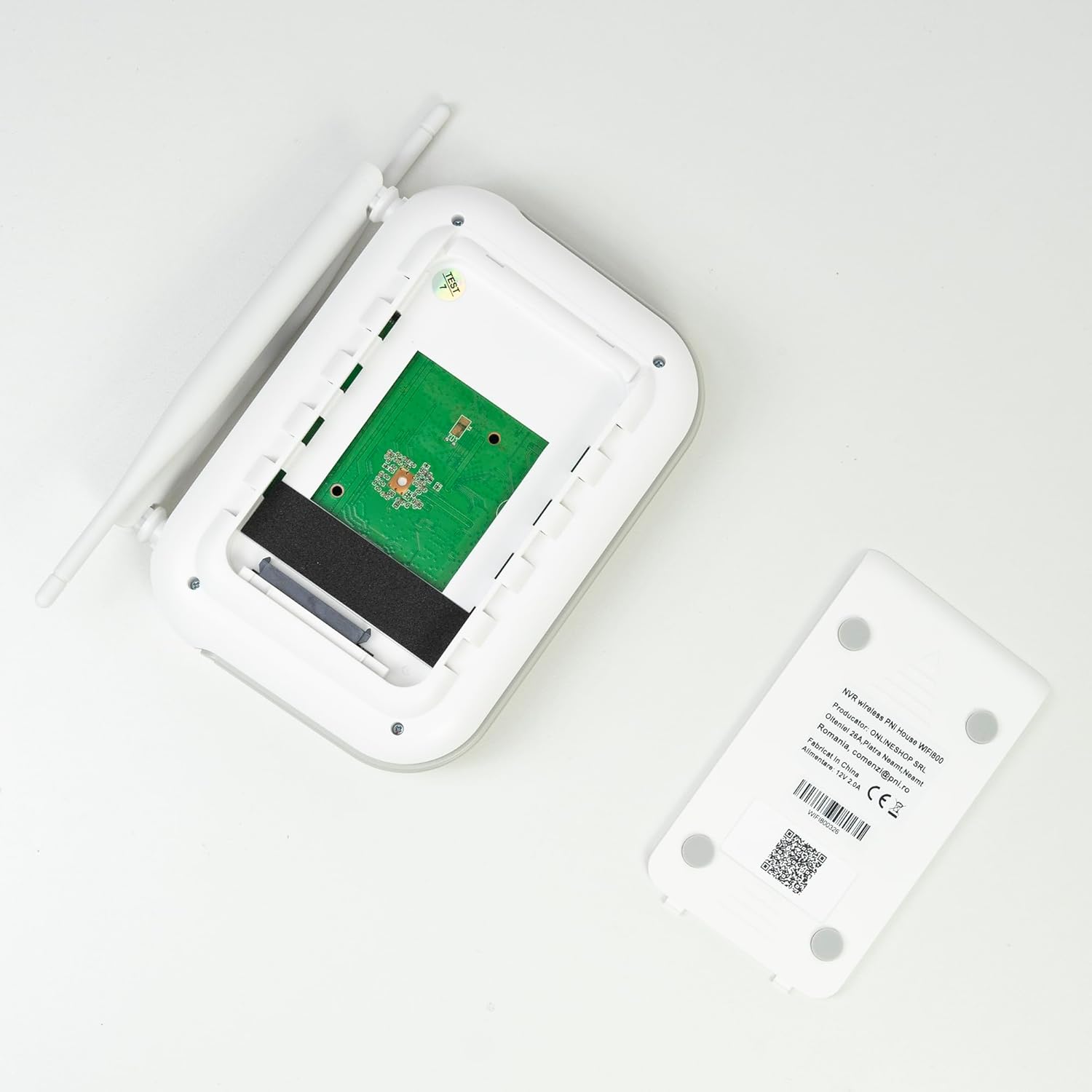
Imej: Dalaman view of the PNI House WiFi800 NVR, illustrating the circuit board and the bay for HDD installation.
8. Penyelesaian masalah
- Tiada Imej pada Monitor:
- Check NVR power supply and HDMI cable connection to the monitor.
- Pastikan monitor ditetapkan kepada sumber input yang betul.
- Cameras Not Connecting:
- Sahkan kamera telah dihidupkan.
- Check Wi-Fi signal strength at camera locations.
- Re-pair cameras with the NVR if necessary (refer to Section 5.3).
- No Remote Access via App:
- Ensure the NVR is connected to the internet via Ethernet.
- Periksa sambungan internet telefon pintar anda.
- Verify NVR is correctly added to the ICSee/XMEye app.
- Kualiti Imej Lemah:
- Clean camera lenses.
- Periksa halangan dalam bidang kamera view.
- Ensure adequate lighting for night vision.
- Isu Rakaman:
- Check if an HDD or MicroSD card is properly installed and formatted.
- Sahkan jadual rakaman dan tetapan pengesanan gerakan.
- Pastikan ruang simpanan mencukupi tersedia.
9. Spesifikasi
9.1 PNI IP840 Outdoor Camera Specifications
| Ciri | Perincian |
|---|---|
| Penderia Imej | CMOS 1/2.7" |
| Resolusi Sensor | 8MP |
| Resolusi Video | 3840x2160 (4K) |
| Jenis Kanta | 3.6mm |
| Viewsudut | 90° |
| Kuali/Condongkan | Mendatar: 355°, Menegak: 90° |
| Pencahayaan Inframerah | 4x IR LEDs, 4x White LEDs |
| Jarak IR | Sehingga 15m |
| Pemampatan Video | H.265X (compatible with H.264+/H.264) |
| Audio | Integrated Microphone and Speaker |
| Kekerapan Wayarles | 2.4 GHz |
| Protokol yang Disokong | ONVIF |
| Penyimpanan | Slot kad MicroSD (maks 256GB) |
| Bekalan Kuasa | 12V/1A |
| Kelas Perlindungan | IP65 |
| Suhu Operasi | -26°C ~ +80°C |
| Dimensi | 86x135x146mm |
| Berat badan | 371 gram |
9.2 PNI House WiFi800 NVR Specifications
| Ciri | Perincian |
|---|---|
| Saluran Video | 8 saluran 5MP / 4 saluran 4K (8MP) |
| Pemampatan Video | H.265AI/H.265+ |
| Resolusi Main Semula | 1080P (HDMI) |
| Kapasiti Storan | 1x 2.5" HDD (max 14TB) / 1x MicroSD card (max 128GB) |
| Antara Muka Rangkaian | RJ45 - 10/100/1000 Mbit/s |
| Output Video | 1x HDMI |
| Antaramuka USB | 1x USB 2.0 |
| Pemproses | MSR621Q |
| Bekalan Kuasa | 12V/2A |
| Dimensi | 170x120x35mm |
| Berat badan | 245 gram |
| Wi-Fi Frequency (NVR-Camera) | 2.4 GHz |
| Gesaan Suara | Yes, integrated speaker |
10. Waranti dan Sokongan
For warranty information, please refer to the documentation provided at the time of purchase or contact your retailer. For technical support, product inquiries, or assistance with troubleshooting, please visit the official PNI website or contact PNI customer service directly. Keep your purchase receipt as proof of purchase.
Pengeluar: ONLINESHOP SRL
Nombor Model: PNI-WF8-840-2


