1. Produk Lebihview
The DALY Smart Battery Management System (BMS) is designed for LiFePO4 battery packs, offering comprehensive protection and monitoring capabilities. This specific model is a 24S 72V 40A unit, equipped with a Bluetooth module for enhanced connectivity and control.
Ciri-ciri Utama:
- Perlindungan Caj Terlebih
- Perlindungan berlebihan
- Perlindungan Arus Lebih
- Perlindungan Litar pintas
- Perlindungan Suhu
- Reka Bentuk Kalis Air
- Integrated parallel module to prevent large current impacts during parallel battery pack connections.
- High-power pre-charging to avoid false protection triggers from high startup currents.
- 100mA passive balancing for extended lithium battery life.
- Bluetooth module for monitoring and control via mobile application.
2. Setup and Wiring Installation
Proper wiring is crucial for the safe and correct operation of the DALY Smart BMS. Always ensure the battery pack is fully discharged before beginning installation.
2.1. Balance Wire Connection
Connect the balance wires to your battery cells in the correct sequence. The black B0 cable connects to the total negative pole of the battery. Subsequent red cables (B1, B2, etc.) connect to the positive pole of each cell string in ascending order.

Image: Detailed diagram showing the connection of balance wires (B0 to B13) to individual battery cells. B0 connects to the total negative, and B1 to B13 connect to the positive terminals of each cell in sequence.
After connecting the balance wires, use a multimeter to measure the voltage between adjacent wires. If the voltage difference between the batteries in each string of wires is less than 1V, the wires are connected correctly.

Image: A multimeter is used to verify the voltage between adjacent balance wires, ensuring correct wiring before connecting to the BMS.
2.2. BMS Main Power Cable Connection
Connect the main negative cable (B-) from the battery pack to the B- terminal on the BMS. Connect the main positive cable (P+) from the battery pack to the P+ terminal on the BMS. Ensure all connections are secure.

Image: The BMS is shown connected to a battery pack with main power cables. The B- cable connects to the total negative of the battery, and the P+ cable connects to the total positive.
2.3. Sambungan Pengecas
Connect the negative output of the charger to the P- cable port of the BMS. Connect the positive output of the charger to the total positive pole of the battery pack.
2.4. Power Switch Connection
Connect the provided power switch to the designated port on the BMS. Press the switch button to start the BMS after all connections are complete.
Video: This video demonstrates the detailed wiring process for a JKBMS, including connecting balance wires, main power cables, and the power switch. It also shows how to verify connections using a multimeter.
Video: An introduction to the 100balance Smart Active Balance BMS, including its features and a general overview of the wiring process for battery packs.
3. Arahan Operasi
The DALY Smart BMS can be monitored and configured using a mobile application or PC software.
3.1. Mobile Application (Bluetooth)
The BMS features a built-in Bluetooth module for wireless communication with a mobile application. This allows for real-time monitoring of battery parameters such as voltage, current, temperature, and State of Charge (SOC).

Image: A smartphone screen displaying the DALY Smart BMS mobile application interface, showing various battery parameters and settings.
Video: This video provides instructions on how to install the JKBMS Android application on a mobile device.
3.2. PC Host Software
For more advanced monitoring and configuration, the BMS can be connected to a PC using a UART cable. The PC host software provides a detailed interface to view battery data, adjust parameters, and perform firmware upgrades.
Video: This video demonstrates how to connect the 100balance Smart BMS to a PC host and navigate the software interface for monitoring and settings.
4. Penyelenggaraan
Regular maintenance ensures the longevity and optimal performance of your battery pack and BMS.
- Pengimbangan Pasif: The 100mA passive balancing feature helps to equalize cell voltages, extending the overall life of the lithium battery pack.
- Pemantauan Parameter: Regularly check battery parameters via the mobile app or PC software to identify any anomalies.
- Kemas kini Firmware: Keep the BMS firmware updated using the PC host software to benefit from the latest features and improvements.
5. Penyelesaian masalah
If you encounter issues with your DALY Smart BMS, refer to the following common troubleshooting steps:
- Pemeriksaan pendawaian: Ensure all balance wires and main power cables are securely connected and in the correct sequence. Use a multimeter to verify voltage readings between adjacent balance wires.
- BMS Not Powering On: Verify the power switch connection and ensure it is pressed to activate the BMS.
- Isu Komunikasi: For mobile app connectivity, ensure Bluetooth is enabled on your device and the BMS. For PC host connection, verify the UART cable is correctly connected and the appropriate drivers are installed.
- Alarm Indications: Check the alarm list in the mobile app or PC software for specific error codes or warnings.
6. Spesifikasi
| Ciri | Spesifikasi |
|---|---|
| Dimensi Produk | 4.84 x 2.56 x 0.55 inci |
| Berat Barang | 6.3 auns (0.18 Kilogram) |
| Nombor Model Item | 4S-24S 12V-72V 40A-500A (Specific model: LifePO4 24S 72V 40A) |
| Input Voltage | 72 Volt |
| warna | merah |
| Pengeluar | Dongguan Daly Electronics Co., Ltd. |
| Perlindungan Caj Terlebih | ya |
| Perlindungan berlebihan | ya |
| Perlindungan Arus Lebih | ya |
| Perlindungan Litar pintas | ya |
| Perlindungan Suhu | ya |
| Perlindungan Kalis Air | ya |
| Passive Balancing Current | 100mA |
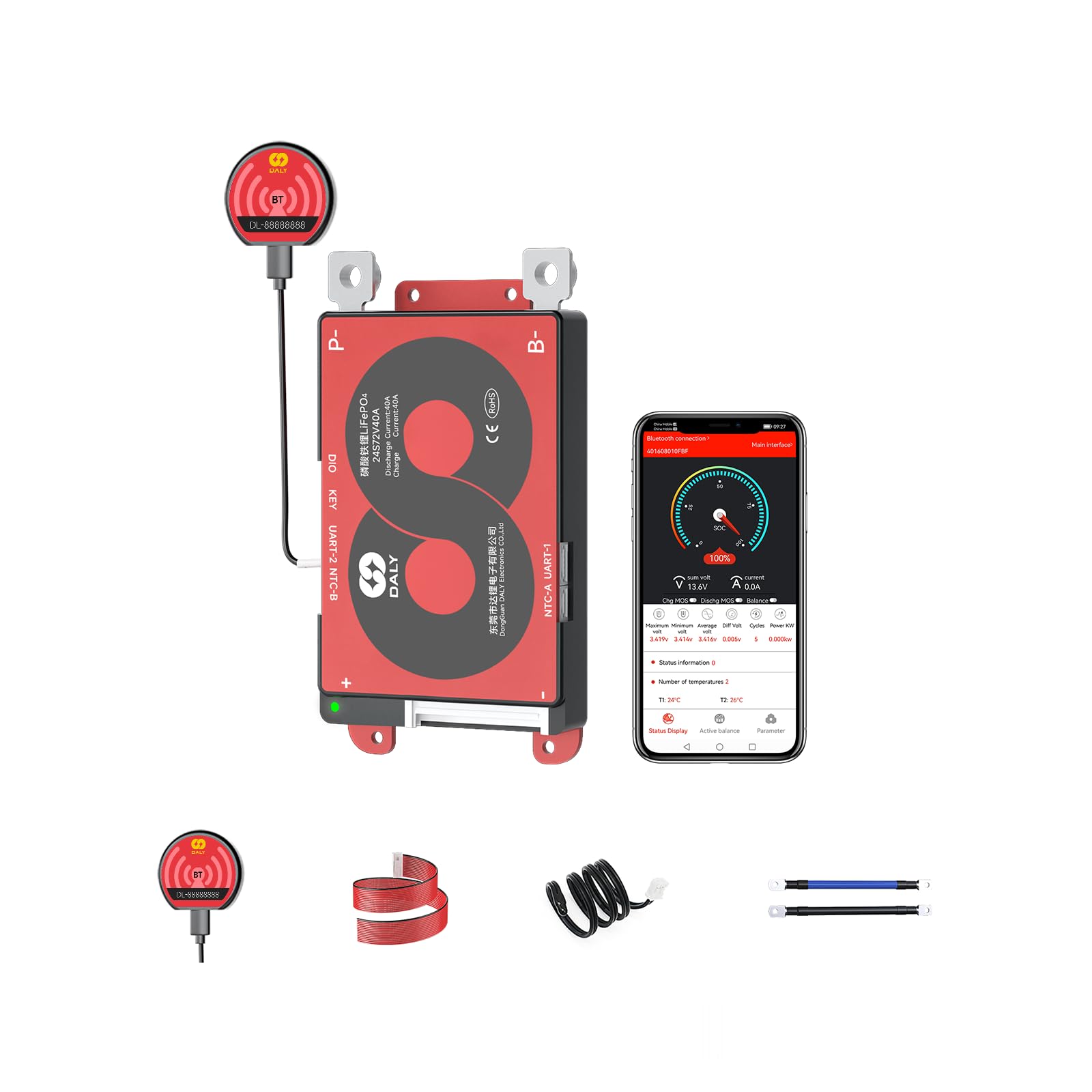
Image: A visual representation of the DALY Smart BMS with its dimensions and a table detailing key specifications like discharge current, overcharge voltage, and model number.
7. Waranti dan Sokongan
DALY provides comprehensive customer service and technical support for its products.
- Perkhidmatan Pelanggan: 24-hour one-on-one customer service is available for any questions or assistance.
- Sokongan Teknikal: Dedicated technical support is provided to help with installation, operation, and troubleshooting.
- Pensijilan: The product is ISO/FCC/RoHS/PSE/CE APPROVED, ensuring quality and safety standards.
For further assistance, please refer to the contact information provided with your product or visit the official DALY webtapak.


