1. Arahan Keselamatan Penting
Sila baca semua arahan dengan teliti sebelum menggunakan perkakas dan simpannya untuk rujukan masa hadapan. Kegagalan mematuhi arahan ini boleh mengakibatkan renjatan elektrik, kebakaran atau kecederaan serius.
- Pastikan voltage yang ditunjukkan pada perkakas sepadan dengan vol utama andatage.
- Jangan rendamkan perkakas, kord kuasa, atau palamkan ke dalam air atau sebarang cecair lain.
- Sentiasa tanggalkan plag perkakas daripada soket kuasa sebelum membersihkan dan apabila tidak digunakan.
- Jauhkan perkakas daripada kanak-kanak.
- Jangan kendalikan perkakas dengan kord atau palam yang rosak, atau selepas perkakas tidak berfungsi atau rosak dalam apa jua cara.
- Gunakan hanya aksesori yang disyorkan oleh pengilang.
- Avoid contact with hot surfaces, especially the steam wand and portafilter during operation.
- Perkakas ini adalah untuk kegunaan rumah sahaja.
2. Produk Lebihview
Familiarize yourself with the components of your Jocca Espresso Coffee Machine.

Rajah 1: Depan view of the Jocca Espresso Coffee Machine, showing the main unit, portafilter, and included measuring spoon with tampeh.

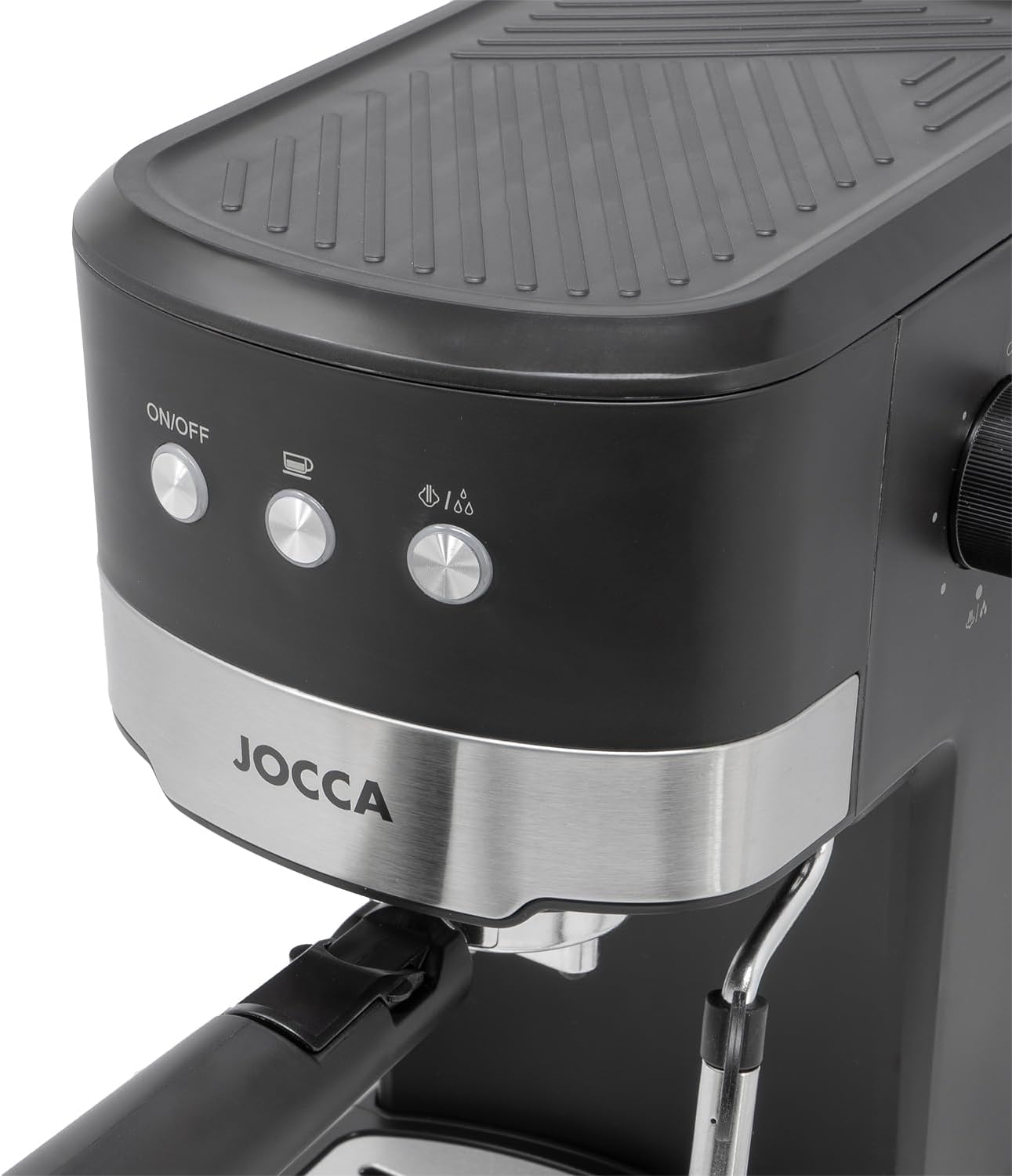
Rajah 2: Bahagian hadapan terperinci view highlighting the control panel with ON/OFF button, coffee brewing button, and steam function button.

Rajah 3: sebelah view of the machine, showing the portafilter handle and the steam wand.

Rajah 4: belakang view, illustrating the removable water tank on the right side of the appliance.
Rajah 5: Close-up of the water tank with its lid open, ready for filling.

Rajah 6: The portafilter, designed for holding ground coffee, with its handle.
Senarai Komponen:
- Water Tank (1.25L, removable)
- Control Panel (ON/OFF, Coffee, Steam buttons)
- Portafilter with Double Outlet
- Steam Wand with Protective Sleeve
- Dulang Titis (boleh tanggal)
- Sudu Pengukur dengan Tamper
- Tombol Kawalan Wap
3. Persediaan dan Penggunaan Pertama
3.1 Membongkar
- Keluarkan semua bahan pembungkusan dengan berhati-hati.
- Semak bahawa semua komponen yang disenaraikan dalam Bahagian 2 ada dan tidak rosak.
- Clean the water tank, portafilter, and drip tray with warm soapy water, then rinse thoroughly.
3.2 Mengisi Tangki Air
- Tanggalkan tangki air dari bahagian belakang mesin.
- Fill the tank with fresh, cold water up to the MAX level indicator. Do not overfill.
- Letakkan tangki air kembali ke tempatnya, pastikan ia diletakkan dengan selamat.
3.3 Initial Priming (Before First Coffee)
Before brewing your first coffee, it is important to prime the system to ensure proper operation and clean any manufacturing residues.
- Pastikan tangki air diisi.
- Palamkan perkakas ke dalam salur keluar kuasa yang sesuai.
- Tekan butang ON/OFF. Lampu penunjuk akan menyala.
- Letakkan cawan atau bekas besar di bawah saluran keluar penapis porta.
- Press the coffee brewing button. Water will start to flow out. Let it run for approximately 30 seconds, then press the button again to stop.
- Turn the steam control knob to activate the steam wand. Let steam release for 15-20 seconds, then turn the knob off.
- Repeat steps 5 and 6 once more. Your machine is now primed and ready for use.
4. Arahan Operasi
4.1 Membuat Espresso
- Ensure the water tank is filled and the machine is plugged in and turned ON.
- Place the desired filter basket (single or double shot) into the portafilter.
- Using the included measuring spoon, add ground espresso coffee to the filter basket. For a single shot, use one level spoon; for a double shot, use two.
- Gunakan tamper end of the spoon to gently press the coffee grounds evenly. Do not over-compress.
- Pasangkan portafilter pada kepala pembuatan bir dengan menyelaraskannya dan pusingkan dengan kuat ke kanan sehingga kukuh.
- Place one or two espresso cups on the drip tray directly under the portafilter's double outlet.
- Press the coffee brewing button. The machine will start extracting espresso.
- Once the desired amount of espresso is brewed (typically 25-30ml per shot), press the coffee brewing button again to stop the flow.
- Carefully remove the portafilter by twisting it to the left. Dispose of the used coffee grounds.

Rajah 7: The espresso machine actively brewing coffee into two separate cups, demonstrating its double outlet feature.
4.2 Frothing Milk (Steam Function)
The adjustable steam wand allows you to create frothed milk for cappuccinos and lattes.
- Ensure the water tank is filled and the machine is turned ON.
- Press the steam function button. The indicator light will illuminate, indicating the machine is heating up for steam. Wait until the light stabilizes, signaling it's ready.
- Fill a stainless steel frothing pitcher with cold milk (do not fill more than one-third).
- Letakkan tongkat stim betul-betul di bawah permukaan susu.
- Slowly turn the steam control knob to release steam. Move the pitcher up and down to incorporate air and create foam.
- Once the milk has reached the desired temperature and consistency, turn the steam control knob off.
- Segera lap tongkat wap dengan iklanamp kain untuk mengelakkan sisa susu daripada kering.

Rajah 8: Terperinci view of the steam wand and the rotary control knob for steam activation and intensity.
5. Penyelenggaraan dan Pembersihan
Pembersihan tetap memastikan prestasi optimum dan memanjangkan jangka hayat mesin espreso anda.
5.1 Pembersihan Harian
- Portafilter dan Bakul Penapis: After each use, remove the portafilter, discard coffee grounds, and rinse thoroughly under running water.
- Dulang Drip: Empty and rinse the drip tray daily. It is removable for easy cleaning.
- Tongkat Stim: Sejurus selepas susu berbuih, lap tongkat wap dengan iklanamp cloth. Briefly activate the steam function to clear any internal milk residue.
- Luaran: Lap bahagian luar mesin dengan lembut, damp kain. Jangan gunakan pembersih atau penyental yang kasar.
5.2 Penyahkelasan
Depending on water hardness and frequency of use, descaling should be performed every 2-3 months to prevent mineral buildup.
- Sediakan larutan penyahkerak mengikut arahan pengeluar penyahkerak.
- Isikan tangki air dengan larutan penyahkerak.
- Letakkan bekas besar di bawah penapis porta dan tongkat stim.
- Turn on the machine and run half of the solution through the coffee brewing cycle.
- Then, activate the steam function and release the remaining solution through the steam wand.
- Matikan mesin dan biarkan selama 15-20 minit.
- Bilas tangki air dengan teliti dan isikannya dengan air bersih.
- Run several cycles of fresh water through both the coffee brewing head and the steam wand to rinse out any descaling solution residue.
6. Penyelesaian masalah
Rujuk bahagian ini untuk isu biasa dan penyelesaiannya.
| Masalah | Kemungkinan Punca | Penyelesaian |
|---|---|---|
| Tiada aliran kopi | Water tank empty; Clogged filter basket; Machine not primed; Mineral buildup. | Fill water tank; Clean filter basket; Perform initial priming; Descale the machine. |
| Kopi diseduh terlalu perlahan | Abuk kopi terlalu halus atau over-tamped; Clogged filter basket; Mineral buildup. | Gunakan kisar yang lebih kasar atau kurang tekanan apabilaamping; Clean filter basket; Descale the machine. |
| Coffee brews too quickly / watery | Coffee grounds too coarse or under-tamped; Insufficient coffee. | Gunakan kisar yang lebih halus atau lebih banyak tekanan apabilaamping; Add more coffee. |
| Tiada wap dari tongkat | Steam wand clogged; Machine not heated to steam temperature; Water tank empty. | Clean steam wand; Wait for steam indicator light to stabilize; Fill water tank. |
| Mesin bocor air | Water tank not seated correctly; Portafilter not securely attached. | Re-seat water tank; Re-attach portafilter firmly. |
Jika masalah berterusan selepas mencuba penyelesaian ini, sila hubungi sokongan pelanggan.
7. Spesifikasi
| Jenama | Jocca |
| Nombor Model | 2377 |
| kuasa | 1100 Watt |
| Tekanan | 20 Bar |
| Kapasiti Tangki Air | 1.25 Liter |
| Voltage | 220-240V, 50Hz |
| bahan | Copper (internal components), Plastic/Metal (exterior) |
| Dimensi (L x W x H) | 19 x 25 x 34 cm (lebih kurang) |
| Berat badan | 3.8 Kilogram |
| Ciri Khas | Milk Frother, Removable Water Tank, Removable Drip Tray, Double Outlet Portafilter |
8. Waranti dan Sokongan
This product is covered by a manufacturer's warranty. Please refer to the warranty card included in your product packaging for specific terms and conditions.
For technical support, spare parts, or warranty claims, please contact Jocca customer service through their official webtapak atau peruncit tempat produk itu dibeli.
Note: Specific warranty details and contact information may vary by region.


