1. Lebihview
1.1 Penerangan Produk
The PNI GreenHouse SC1800C PRO Solar Inverter is a central component for small off-grid solar systems, suitable for areas with or without grid electricity. It provides a continuous output of 3000W with a pure sine wave, making it suitable for various household lighting installations and other small electronic motors, including refrigerators, pumps, tools, and charging devices for phones, laptops, and TVs.
1.2 Ciri-ciri Utama
- Maximum photovoltaic panel input power: 2000 W.
- Input DC maksimum voltage from photovoltaic panels: 30 - 120 VDC (Vmp).
- Maximum solar charge current: 30 A input from panels, 60 A output to batteries.
- Solar charging efficiency: 98%.
- MPPT solar charger type.
- Output dinilai voltage: 230 V.
- Rated output power: 3000 W (under ideal conditions with proportional battery count and 100% charged batteries).
- Maximum apparent power: 6000 VA (peak, 0.5 seconds under ideal conditions).
- Keluaran voltage waveform: Pure sine wave.
- Output signal frequency: 50, 60 Hz.
- Masukan voltage: 230 V AC.
- Grid connection for backup.
- Compatible with 24V batteries: AGM, lead-acid, gel, flooded lithium-ion.
- Minimum battery start voltage: 23 V (cold start voltagdan).
- Integrated high-frequency inverter type (switching).
- Inverter efficiency: 90% ~ 93% (100% charged battery).
- Typical transfer time: 10 ms (UPS, VDE) 20 ms (APL).
- Line mode efficiency: > 95% (rated R load, fully charged battery).
- Hybrid operating modes: SBU – Solar/Battery/Utility, Solar Utility (UPS).
- AC charge voltage: 230 V.
- Maximum AC charge current: 30 A.
- Automatic switching: Solar - Batteries - Grid.
- Fungsi penjimatan tenaga.
- Multiple protections.
- Paparan pelbagai fungsi.
- Dedicated menu for advanced settings.
- Monitoring with PC software (USB cable included).
- Remote monitoring from mobile/PC (with optional WiFi USB dongle).
1.3 Kandungan Pakej
- PNI GreenHouse SC1800C PRO Solar Inverter
- Kabel USB
- Manual Pengguna
- PNI Smart Dongle-WLAN (for WiFi monitoring)
2. Maklumat Keselamatan
Sila baca semua arahan dan amaran dengan teliti sebelum pemasangan dan pengendalian. Kegagalan mematuhi arahan ini boleh mengakibatkan renjatan elektrik, kebakaran atau kecederaan parah.
- Kakitangan Berkelayakan: Pemasangan dan penyelenggaraan mesti dilakukan oleh kakitangan yang berkelayakan.
- Bahaya Kejutan Elektrik: Peranti ini beroperasi dengan vol tinggitages. Do not open the casing unless specifically instructed.
- Keselamatan Bateri: Batteries can produce explosive gases. Ensure proper ventilation. Do not smoke or allow sparks or flames near batteries. Wear eye protection.
- Pengudaraan yang Betul: Install the inverter in a well-ventilated area to prevent overheating.
- Keadaan Persekitaran: Avoid exposure to rain, snow, spray, or any liquids. Operate within the specified temperature range (-26 °C to 80 °C).
- Pembumian: Pastikan inverter dibumikan dengan betul mengikut kod elektrik tempatan.
- Putuskan Kuasa: Always disconnect all power sources (solar, battery, AC grid) before performing any wiring or maintenance.
3. Komponen Produk
3.1 PNI GreenHouse SC1800C PRO Solar Inverter

Rajah 3.1: Depan view of the PNI GreenHouse SC1800C PRO Solar Inverter, showing the display and control buttons.

Rajah 3.2: Belakang view of the PNI GreenHouse SC1800C PRO Solar Inverter, illustrating the various connection ports for solar panels, batteries, AC input, and AC output.
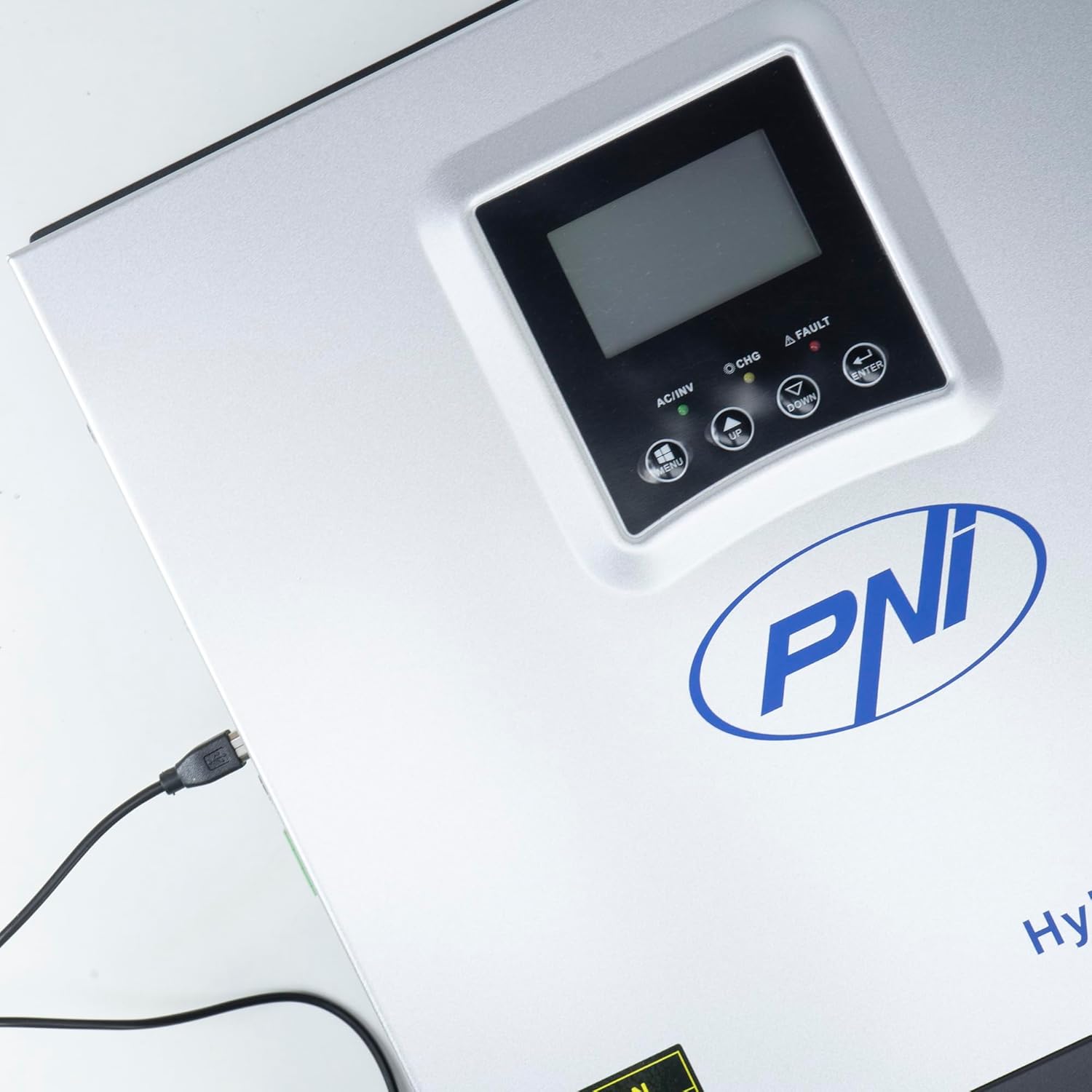
Figure 3.3: Close-up of the USB connection port on the inverter, used for PC monitoring.
3.2 PNI Smart Dongle-WLAN (Optional)

Figure 3.4: The PNI Smart Dongle-WLAN, an optional accessory for remote WiFi monitoring of the inverter.

Figure 3.5: The PNI Smart Dongle-WLAN connected to the inverter's dedicated port for WiFi communication.
4. Pemasangan dan Persediaan
4.1 Pemasangan Dinding
The inverter is designed for wall mounting. Choose a location that is dry, well-ventilated, and protected from direct sunlight and moisture. Ensure sufficient clearance around the unit for proper airflow and heat dissipation. Use appropriate mounting hardware for your wall type.
4.2 Gambarajah Sambungan Sistem

Figure 4.1: Basic application diagram showing the connections between solar panels, utility grid, generator, inverter, battery, and home loads. Note: Generator, PV modules, WiFi module, and battery are not included with the inverter unless specified.
4.3 Sambungan Pendawaian
Follow the diagram above and the labels on the inverter for correct wiring. Ensure all connections are secure and properly insulated. It is highly recommended that a qualified electrician performs all wiring.
- Sambungan Panel Suria: Connect your solar panels to the designated PV input terminals. Observe correct polarity (positive to positive, negative to negative). The maximum DC input voltage ialah 120 VDC.
- Sambungan Bateri: Connect the 24V battery bank to the battery terminals. Ensure correct polarity. The inverter supports AGM, lead-acid, gel, and flooded lithium-ion batteries.
- AC Input (Grid/Generator): Connect the AC utility grid or a generator to the AC input terminals. This provides backup power and can charge batteries.
- AC Output (Loads): Connect your household loads to the AC output terminals.
4.4 Kuasa Permulaan
After all connections are made and verified:
- Hidupkan pemutus bateri.
- Turn on the solar panel breaker (if applicable).
- Turn on the AC input breaker (if connected to grid/generator).
- Turn on the inverter's power switch.
- Observe the display for status indicators and initial readings.
5. Mod Operasi
The PNI GreenHouse SC1800C PRO offers intelligent energy management with several configurable operating modes:
- Solar Priority Mode (SBU): In this mode, the inverter prioritizes power consumption from solar energy. If solar power is insufficient, it will draw from batteries. The utility grid acts as a backup.
- Mod Keutamaan Bateri: The inverter prioritizes drawing power from the batteries. Solar energy will charge the batteries. The utility grid is used only when battery voltage jatuh di bawah ambang yang ditetapkan.
- Utility Priority Mode (UPS): This mode prioritizes power from the utility grid. Solar energy will charge the batteries. The inverter switches to battery power only when the grid is unavailable, functioning as an Uninterruptible Power Supply (UPS).
These modes can be configured via the inverter's multifunction display and dedicated menu for advanced settings.
5.1 Pemantauan
The inverter supports monitoring through:
- PC Software (USB): Connect the inverter to a PC using the provided USB cable and dedicated software for detailed monitoring and analysis of parameters.
- Remote Monitoring (WiFi - Optional): With the optional PNI Smart Dongle-WLAN, you can monitor the inverter remotely via a mobile application or web antara muka.
6. Penyelenggaraan
Penyelenggaraan berkala memastikan prestasi optimum dan jangka hayat inverter anda. Sentiasa putuskan sambungan semua sumber kuasa sebelum melakukan sebarang penyelenggaraan.
- Pembersihan: Periodically clean the exterior of the inverter with a dry cloth. Ensure ventilation openings are free from dust and debris. Do not use liquid cleaners.
- Pemeriksaan Sambungan: Annually inspect all wiring connections (solar, battery, AC input/output) for tightness and signs of corrosion. Tighten any loose connections.
- Pemeriksaan Bateri: If using lead-acid batteries, check electrolyte levels and terminal condition as per battery manufacturer guidelines.
- Pemeriksaan Alam Sekitar: Pastikan persekitaran pemasangan kekal dalam julat suhu dan kelembapan yang ditetapkan.
7. Penyelesaian masalah
Bahagian ini menyediakan panduan untuk isu biasa. Untuk masalah yang rumit, hubungi kakitangan perkhidmatan yang berkelayakan.
| Masalah/Penggera | Kemungkinan Punca | Penyelesaian |
|---|---|---|
| Penggera Bateri Rendah | Bateri voltage berada di bawah vol rendahtage warning threshold. | Check battery charge level. Ensure solar panels are producing power or AC input is connected for charging. Reduce load. |
| Battery Disconnected Alarm | Battery cables are loose or disconnected. | Safely disconnect all power sources and check battery connections. Reconnect securely. |
| Overvoltage Penggera | Masukan voltage (PV or AC) exceeds safe limits. | Verify solar panel array voltage or AC input voltage. Ensure it is within the inverter's specifications. |
| Perlindungan Lebihan AC | Connected loads exceed the inverter's output capacity. | Reduce the total load connected to the inverter. Check individual appliance power consumption. |
| Tiada Kuasa Keluaran | Inverter off, low battery, overload, or fault. | Check if the inverter is powered on. Verify battery voltage. Check for overload or fault codes on the display. |
8. Spesifikasi
| Ciri | Spesifikasi |
|---|---|
| Jenama | PNI |
| Nombor Model | PNI-SC1800P-DG |
| Kuasa Dinilai | 3000 W |
| Kuasa Puncak | 6000 VA (0.5 seconds) |
| Bateri Voltage | 24 V |
| Maks. Kuasa Input PV | 2000 W |
| Maks. Input PV Voltage (Vmp) | 30 - 120 VDC |
| MPPT Solar Charge Current | 60 A (output to batteries) |
| Input AC Voltage | 230 V |
| Keluaran AC Voltage | 230 V |
| Bentuk Gelombang Output | Gelombang Sinus Tulen |
| Kekerapan Output | 50/60 Hz |
| Max. AC Charge Current | 30 A |
| Kecekapan Inverter | 90% ~ 93% |
| Suhu Operasi | -26 °C hingga 80 °C |
| Dimensi (L x W x H) | 29 x 12 x 35 cm |
| Berat badan | 6.9 kg |
| Penggunaan Siap Sedia | ≈ 25 W (Energy saving mode ≈ 12.5 W) |
| Komunikasi | USB, Optional WiFi Dongle |
9. Waranti dan Sokongan
Untuk maklumat jaminan dan sokongan teknikal, sila rujuk dokumentasi yang disediakan bersama pembelian anda atau hubungi peruncit anda. Simpan bukti pembelian anda untuk tuntutan jaminan.


