1. Pengenalan
This manual provides detailed instructions for the setup, operation, and maintenance of your CZEview ZY-D1 Babyphone. Please read this manual thoroughly before using the device to ensure proper functionality and safety. The CZEview ZY-D1 is designed to help you monitor your baby with advanced features such as 2K Ultra HD video, AI-powered detection, two-way audio, and environmental monitoring.
2. Kandungan Pakej
- CZEview ZY-D1 Babyphone Camera
- Penyesuai Kuasa dan Kabel
- Aksesori Pemasangan (untuk pemasangan dinding)
- Manual Pengguna (dokumen ini)
3. Produk Lebihview dan Ciri
CZEview ZY-D1 Babyphone offers a comprehensive monitoring solution with the following key features:
- Video Ultra HD 2K: Provides clear and detailed video surveillance.
- 360° AI Tracking: Intelligent AI technology tracks movements, ensuring no blind spots with 355° horizontal and 90° vertical rotation.
- Pemberitahuan Segera: Receive immediate alerts for detected motion, noise, or crying.
- Audio Dua hala: Communicate with your baby remotely using the built-in microphone and speaker.
- Stable Dual-Band Wi-Fi: Compatible with both 2.4 GHz and 5 GHz Wi-Fi networks for reliable connectivity.
- Penglihatan Malam Inframerah: Clear monitoring even in low-light or dark conditions.
- Comfort Night Light & Lullabies: Features a looping night light and 14 pre-installed lullabies to soothe your baby.
- Pemantauan Suhu dan Kelembapan: Keep track of the nursery environment.
- Analisis Tidur: Monitor and analyze your baby's sleep patterns.
- Integrasi Alexa: Seamlessly integrates with Amazon Alexa for voice control and viewing.

Imej 1: CZEview ZY-D1 Babyphone camera, featuring a white body and colorful ears, designed for monitoring infants.
4. Persediaan
4.1 Menghidupkan
- Connect the provided power cable to the camera's power port.
- Palamkan penyesuai kuasa ke soket elektrik standard.
- Kamera akan dihidupkan dan lampu penunjuk akan menunjukkan statusnya.
4.2 Pemasangan Aplikasi
- Scan the QR code provided on the product packaging or in the quick start guide to download the official CZEview apl.
- Pasang aplikasi pada telefon pintar atau tablet anda.
- Daftar untuk akaun baharu atau log masuk jika anda sudah mempunyai akaun.
4.3 Sambungan Wi-Fi
- Buka CZEview app and follow the on-screen instructions to add a new device.
- Select your Wi-Fi network (supports both 2.4 GHz and 5 GHz).
- Masukkan kata laluan Wi-Fi anda.
- The app will guide you through pairing the camera with your network. This usually involves scanning a QR code displayed on your phone with the camera lens.
- Once connected, the camera's indicator light will change, and you will see the live feed in the app.

Imej 2: Illustration of the CZEview Babyphone's compatibility with both 5GHz and 2.4GHz dual-band Wi-Fi for a stable connection.
4.4 Memasang Kamera
CZEview ZY-D1 Babyphone can be placed on a flat surface or mounted to a wall. If wall mounting, use the provided accessories and ensure the camera is securely fastened at a safe distance from the crib, out of reach of children.
5. Arahan Operasi
5.1 Langsung View dan Kawalan Pan/Tilt
- Buka CZEview app and select your camera to view suapan langsung.
- Gunakan kawalan pada skrin untuk menyorot (355° mendatar) dan condongkan (90° menegak) kanta kamera untuk melaraskan viewsudut ing.
- The automatic tracking feature will detect and follow moving objects within its field of view.
5.2 Audio Dua Hala

Imej 3: A parent using the CZEview app on a smartphone to engage in two-way communication with a baby in a crib.
- Semasa dalam live view, ketik ikon mikrofon dalam aplikasi.
- Bercakap ke dalam mikrofon telefon anda untuk menghantar suara anda melalui pembesar suara kamera.
- Release the microphone icon to listen to your baby.
5.3 AI Detection and Notifications

Imej 4: CZEview Babyphone camera positioned near a baby in a crib, highlighting its intelligent AI detection capabilities for motion, noise, and crying.
- Access the detection settings in the app.
- Enable Motion Detection, Noise Detection, and Cry Detection as needed.
- Laraskan tahap kepekaan untuk meminimumkan penggera palsu.
- You will receive instant push notifications on your smartphone when an event is detected.
5.4 Night Vision and Lullabies

Imej 5: CZEview Babyphone emitting a soft glow as a night light, with musical notes floating around a sleeping baby, illustrating its infrared night vision and lullaby features.
- Penglihatan malam diaktifkan secara automatik dalam keadaan cahaya malap.
- To play lullabies or activate the night light, navigate to the respective controls in the app.
- Select from the 14 available lullabies to soothe your baby.
5.5 Pemantauan Suhu dan Kelembapan
The app displays real-time temperature and humidity readings from the camera's environment. You can set alerts for specific temperature or humidity ranges.
5.6 Sleep Analysis

Imej 6: A visual representation of a sleep analysis timeline on a smartphone screen, showing snapshots of a baby at different times during sleep.
CZEview app provides a timeline view of your baby's activity, which can be used to analyze sleep patterns. Review recorded events and snapshots to understand sleep duration and disturbances.
5.7 Penyepaduan Amazon Alexa
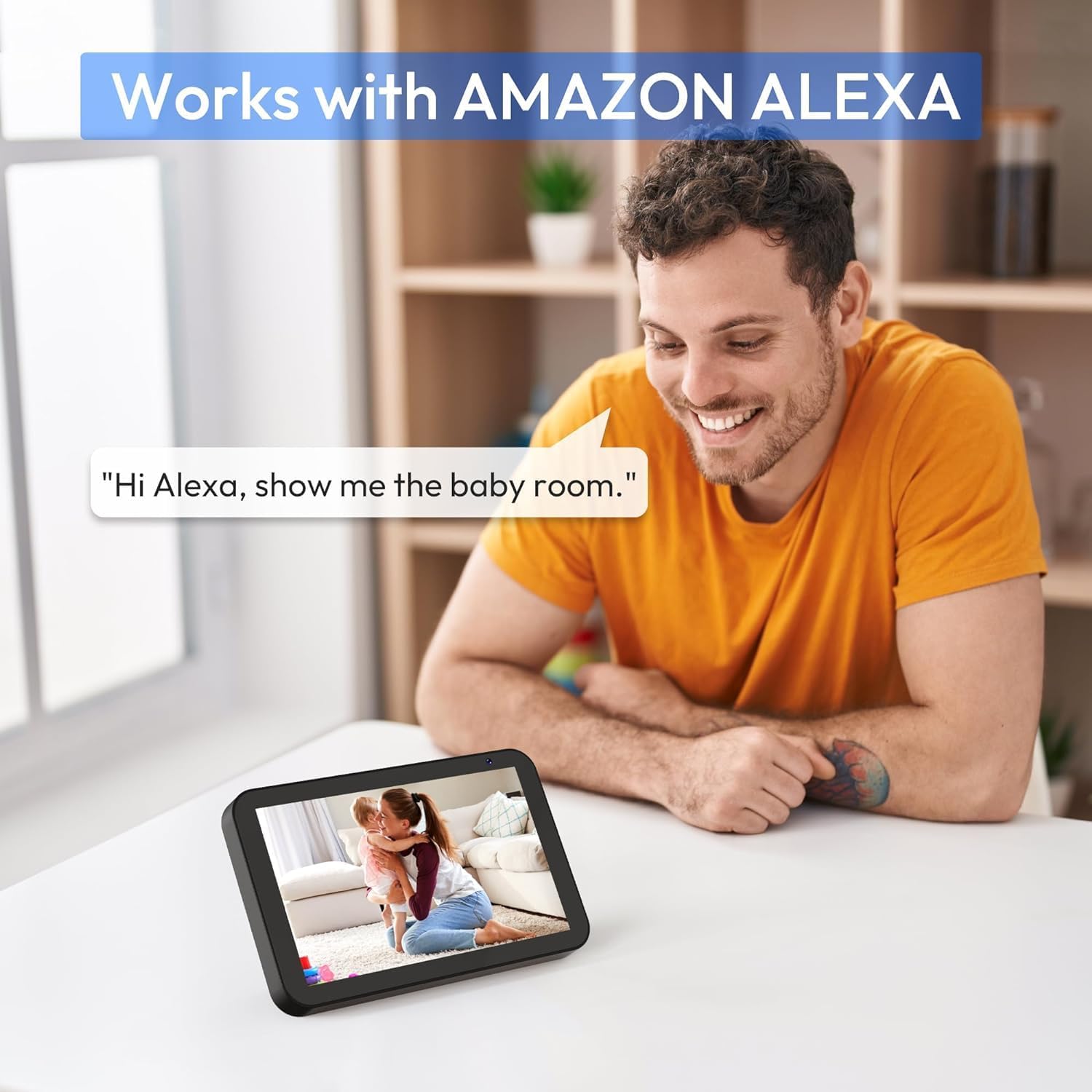
Imej 7: A person interacting with an Amazon Echo Show device, displaying the live feed from the CZEview Babyphone, demonstrating Alexa integration.
- Dayakan CZEview skill in your Amazon Alexa app.
- Pautkan CZE andaview account with Alexa.
- Use voice commands such as "Alexa, show me the baby room" to view the camera feed on compatible Alexa devices.
5.8 Multi-User Access and SD Card Recording
- Perkongsian Keluarga: You can invite family members to view the camera feed through the app. Invited users may have limited control functions compared to the primary account holder.
- Storan Setempat: Insert an SD card (not included) into the camera's designated slot for local video recording and to enable certain features like playing lullabies directly from the camera.
6. Penyelenggaraan
- Pembersihan: Gunakan kain lembut dan kering untuk membersihkan kanta dan badan kamera. Jangan gunakan pembersih cecair atau aerosol.
- Kemas kini Firmware: Semak aplikasi secara berkala untuk kemas kini perisian tegar yang tersedia bagi memastikan prestasi dan keselamatan yang optimum.
- penempatan: Ensure the camera is placed in a well-ventilated area and not exposed to extreme temperatures or direct sunlight.
7. Penyelesaian masalah
- Tiada Kuasa: Ensure the power cable is securely connected to both the camera and the power outlet. Try a different outlet.
- Isu Sambungan Wi-Fi: Verify your Wi-Fi password. Ensure the camera is within range of your router. Restart your router and the camera. Confirm your network is 2.4 GHz or 5 GHz compatible.
- Kualiti Imej Lemah: Check your internet connection speed. Ensure the camera lens is clean and free from obstructions. Adjust the video quality settings in the app if available.
- Kualiti Audio Lemah: Ensure there are no obstructions near the camera's microphone or speaker. Check the volume settings in the app.
- Pemberitahuan Tidak Diterima: Check app notification settings on your phone and within the CZEview app. Ensure the camera is connected to Wi-Fi.
- Kamera Tidak Menjawab: Unplug the camera, wait 10 seconds, and plug it back in to restart.
8. Spesifikasi
| Ciri | Spesifikasi |
|---|---|
| Nombor Model | ZY-D1 |
| Teknologi Komunikasi Tanpa Wayar | Wi-Fi (2.4 GHz & 5 GHz) |
| Viewsudut | 360 Darjah (355° mendatar, 90° menegak) |
| bahan | plastik |
| Dimensi Item (L x W x H) | 12.7 x 7.62 x 7.62 cm |
| Protokol Ketersambungan | Wi-Fi |
| Jenis Pengawal | Amazon Alexa |
| Jenis Pemasangan | Lekap di dinding |
| warna | putih |
| Komponen Termasuk | kabel |
| Penggunaan yang Disyorkan | Babyphone, Baby Monitoring, Night Vision |
9. Maklumat Keselamatan
- Jauhkan kamera dan semua aksesori daripada capaian kanak-kanak.
- Do not place the camera or its power cord within 1 meter (3 feet) of the crib or playpen to prevent strangulation hazards.
- Gunakan hanya penyesuai kuasa yang disediakan. Menggunakan penyesuai yang tidak dibenarkan boleh merosakkan peranti dan membatalkan jaminan.
- Jangan dedahkan peranti kepada air, lembapan atau suhu yang melampau.
- Jangan cuba membuka atau membaiki peranti sendiri. Hubungi sokongan pelanggan untuk mendapatkan bantuan.
10. Waranti dan Sokongan
For warranty information and customer support, please refer to the warranty card included in your product packaging or visit the official CZEview website. If you encounter any issues not covered in this manual, please contact CZEview perkhidmatan pelanggan untuk mendapatkan bantuan.


