pengenalan
This manual provides essential information for the setup, operation, and maintenance of your Focusrite Scarlett 4i4 4th Gen USB Audio Interface. Designed for musicians, songwriters, guitarists, and content creators, the Scarlett 4i4 offers high-fidelity, studio-quality recording capabilities. Please read this manual thoroughly to ensure optimal performance and longevity of your device.

Imej: Depan view of the Focusrite Scarlett 4i4 4th Gen USB Audio Interface, showcasing its inputs and controls.
Persediaan
To begin using your Scarlett 4i4 4th Gen, follow these steps:
- Membuka kotak: Carefully remove the Scarlett 4i4, USB C-C cable, USB C-A adaptor, and USB-C 5V 3A power supply from the packaging.
- Pemasangan Perisian: Lawati Focusrite website and follow the 'Easy Start' guide to download and install the necessary drivers and included software bundle. This process typically involves registering your device.
- Sambung ke Komputer: Connect the Scarlett 4i4 to your computer using the provided USB C-C cable. If your computer only has USB-A ports, use the included USB C-A adaptor.
- Sambungan Kuasa: Connect the USB-C 5V 3A power supply to the Scarlett 4i4 and a power outlet. While the device can draw power from USB, the dedicated power supply ensures stable operation, especially when using phantom power or multiple inputs.
- Sambungan Audio: Connect your microphones, instruments, or line-level devices to the appropriate inputs on the Scarlett 4i4. Connect your headphones to the headphone output and studio monitors to the line outputs.

Image: A user connecting cables to the rear of the Scarlett 4i4, which is placed on a desk next to a laptop.
Mengendalikan Scarlett 4i4 Anda
The Scarlett 4i4 features intuitive controls for managing your audio inputs and outputs.
Kawalan Input
- Gain Knobs (1 & 2): Adjust the input level for microphones or instruments connected to inputs 1 and 2. The gain halos around the knobs indicate signal level (green for good, amber for approaching clip, red for clipping).
- 48V (Kuasa Hantu): Activates +48V phantom power for condenser microphones connected to inputs 1 and 2. Ensure your microphone requires phantom power before enabling.
- Inst (Instrument Mode): Engages high-impedance mode for direct connection of guitars or basses to inputs 1 and 2.
- Mod Udara: Enhances vocals and guitars by adding a musical presence and rich harmonic drive, emulating classic Focusrite transformer-based preamps.
- Keuntungan Auto: Automatically sets the optimal input level for your microphone or instrument, preventing clipping and ensuring a clean recording.
- Klip Selamat: A safety feature that automatically reduces gain if the input signal approaches clipping, preserving your take.
Kawalan Output
- Tombol Output Monitor: Controls the overall volume of your main studio monitor outputs (outputs 1-2).
- Headphone Output Knob: Adjusts the volume for the dedicated headphone output.
MIDI I / O
The Scarlett 4i4 includes MIDI In and Out ports, allowing you to connect MIDI keyboards, controllers, and other MIDI-compatible devices for sequencing and control within your digital audio workstation (DAW).
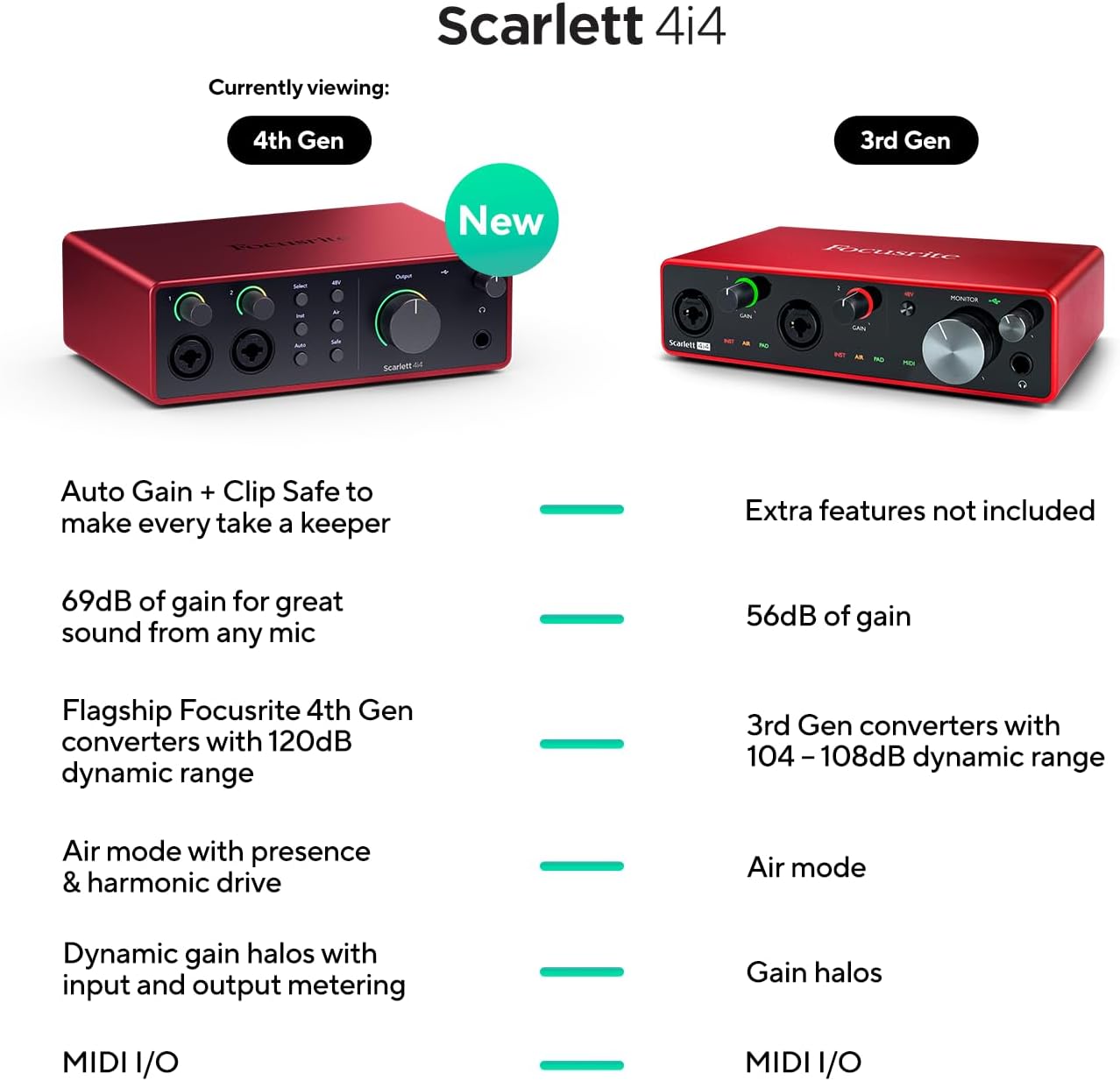
Image: A visual comparison highlighting new features of the Scarlett 4i4 4th Gen, including Auto Gain, Clip Safe, increased gain, improved converters, enhanced Air mode, and dynamic gain halos.
Penyelenggaraan
Proper care ensures the longevity and performance of your Scarlett 4i4:
- Pembersihan: Gunakan kain lembut dan kering untuk membersihkan bahagian luar. Elakkan pembersih atau pelarut yang melelas.
- Storan: Simpan peranti di tempat yang sejuk dan kering jauh dari cahaya matahari langsung dan suhu yang melampau.
- Pengendalian: Elakkan daripada menjatuhkan atau menyebabkan unit terkena hentakan yang kuat.
- Pengudaraan: Pastikan aliran udara yang mencukupi di sekeliling unit untuk mengelakkan terlalu panas.
Menyelesaikan masalah
Jika anda menghadapi masalah dengan Scarlett 4i4 anda, pertimbangkan penyelesaian biasa berikut:
- Tiada Bunyi: Check all cable connections (USB, power, audio inputs/outputs). Verify that the correct audio device is selected in your computer's sound settings and your DAW. Ensure gain levels are appropriately set and not muted.
- Distorted Audio/Clipping: Reduce the input gain using the gain knobs. Utilize the Auto Gain and Clip Safe features to prevent clipping. Check for proper impedance matching for instruments (Inst mode).
- Isu Pemandu: Reinstall the latest drivers from the Focusrite weblaman web. Pastikan sistem pengendalian anda terkini.
- MIDI Tidak Berfungsi: Verify MIDI connections and ensure MIDI devices are properly configured in your DAW.
- Ketersambungan Berselang-seli: Try a different USB port or cable. Ensure the dedicated power supply is connected and functioning.
For further assistance, refer to the Focusrite support webtapak atau hubungi perkhidmatan pelanggan mereka.
Spesifikasi
| Ciri | Perincian |
|---|---|
| Berat Barang | 2.23 paun |
| Dimensi Produk | 7.09 x 5.08 x 2.32 inci |
| Nombor Model Item | AMS-SCARLETT-4I4-4G |
| Bahan Badan | aluminium |
| Nama Warna | merah |
| Peranti Serasi | Mikrofon, Instrumen, Komputer Peribadi, Fon Kepala, Monitor Studio |
| Jenis Penyambung | USB-C |
| Antara Muka Perkakasan | USB 2.0 |
| Perisian yang Disokong | Semua perisian rakaman audio |
| Platform Perkakasan | Antara Muka Audio |
| Sistem Operasi | Sistem Operasi Mac, Sistem Operasi Windows |
| Teknologi Ketersambungan | USB |
| Bilangan Saluran | 4 |
| Julat Dinamik | 120dB |
Apa yang ada dalam Kotak
Your Focusrite Scarlett 4i4 4th Gen package includes:
- Scarlett 4i4 Antara Muka Audio Generasi Ke-4
- Kabel CC USB
- USB C-A Adaptor
- USB-C 5V 3A Power Supply
Waranti dan Sokongan
Focusrite provides a three-year warranty for the Scarlett 4i4 4th Gen, ensuring peace of mind regarding your investment. Additionally, 24/7/365 support is available to assist you with any questions or issues you may encounter.
For detailed warranty information and to access support resources, please visit the official Focusrite webtapak: focusrite.com/support


