pengenalan
This manual provides detailed instructions for the Strex Bluetooth 2-in-1 Transmitter and Receiver, Model SP173. This versatile device allows you to wirelessly transmit or receive audio signals, enhancing your audio experience with various devices.
The Strex Bluetooth adapter supports both Pemancar (TX) dan Penerima (RX) modes, utilizing Bluetooth 5.0 technology for stable, high-quality audio transmission.
Kandungan Pakej
- Strex Bluetooth 2-in-1 Audio Transmitter/Receiver
- Kabel Kuasa USB Mikro
- Kabel Audio AUX 3.5mm
- 3.5mm ke Kabel RCA
- Manual Pengguna (dokumen ini)

Peranti Lebihview
Familiarize yourself with the various components and ports of your Strex Bluetooth adapter.

- Suis Hidup/Mati: Menghidupkan atau mematikan peranti.
- Suis Mod (RX/TX): Selects between Receiver (RX) and Transmitter (TX) modes.
- LED Status: Indicates power, pairing, and connection status.
- Port Pengecasan USB Mikro: Untuk mengecas bateri dalaman.
- 3.5mm Audio Input/Output: Connects to audio sources or output devices using the provided cables.
Persediaan dan Operasi
Mengecas Peranti
Before first use, ensure the device is fully charged. Connect the Micro USB power cable to the charging port on the adapter and the other end to a USB power source (e.g., computer USB port, USB wall adapter).
- Cas penuh mengambil masa lebih kurang 90 minit.
- The device provides up to 6-8 jam of continuous playtime on a single charge.

Mod Penerima (RX).
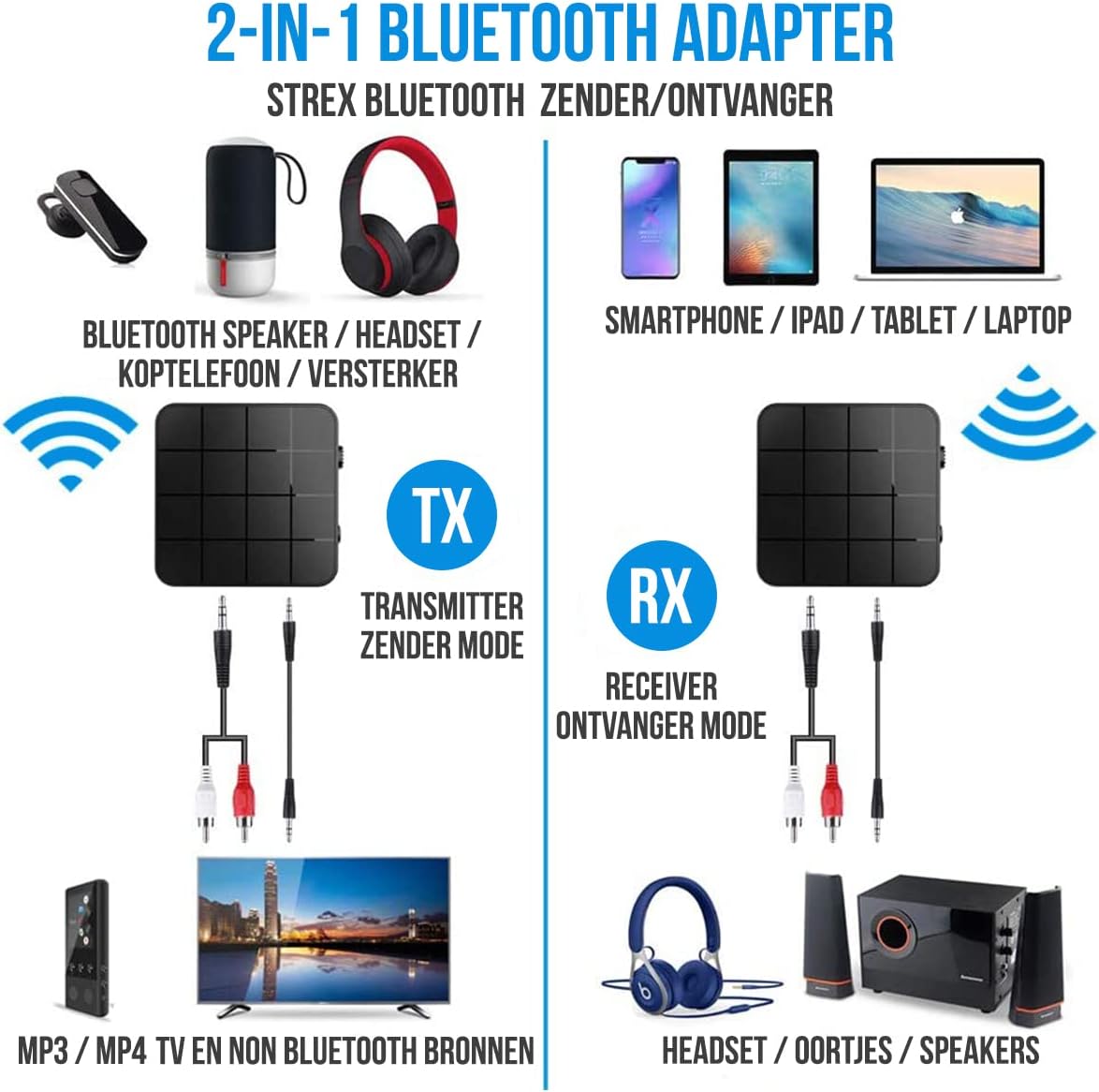
In RX mode, the Strex adapter receives audio wirelessly from a Bluetooth-enabled device (e.g., smartphone, tablet) and outputs it to a non-Bluetooth audio system (e.g., wired speakers, car stereo).
- Tukar peranti ke Mod RX using the mode selector switch.
- Connect the Strex adapter to your non-Bluetooth audio system using either the Kabel AUX 3.5mm atau yang Kabel 3.5mm ke RCA.
- Power on the Strex adapter. The Status LED will indicate pairing mode (typically blinking blue).
- On your Bluetooth-enabled device (e.g., smartphone), go to Bluetooth settings and search for available devices. Select "Strex" (or similar name) to pair.
- Once paired, the Status LED will show a solid blue light. You can now stream audio from your device to your audio system.

Mod Pemancar (TX).
In TX mode, the Strex adapter transmits audio wirelessly from a non-Bluetooth audio source (e.g., TV, PC, old stereo system) to a Bluetooth-enabled receiving device (e.g., Bluetooth headphones, Bluetooth speakers).
- Tukar peranti ke Mod TX using the mode selector switch.
- Connect the Strex adapter to your non-Bluetooth audio source (e.g., TV's audio output) using either the Kabel AUX 3.5mm atau yang Kabel 3.5mm ke RCA.
- Power on the Strex adapter. The Status LED will indicate pairing mode.
- Letakkan fon kepala atau pembesar suara Bluetooth anda ke dalam mod berpasangan.
- The Strex adapter will automatically search for and connect to nearby Bluetooth receiving devices. Once connected, the Status LED will show a solid light.
- Ensure your Bluetooth headphones/speakers are unpaired from any other devices (e.g., smartphone) before attempting to pair with the Strex adapter in TX mode.

Important Notes on Operation:
- The adapter cannot simultaneously send and receive audio. It must be set to either TX or RX mode.
- For optimal performance, ensure the adapter is within 10 meters (33 feet) of the connected Bluetooth device.
- Bluetooth 5.0 provides HD Audio with minimal latency, but some older Bluetooth devices may experience slight synchronization differences.
Penyelenggaraan
- Pembersihan: Gunakan kain lembut dan kering untuk membersihkan peranti. Jangan gunakan pembersih cecair atau aerosol.
- Storan: Simpan peranti di tempat yang sejuk dan kering jauh dari cahaya matahari langsung dan suhu yang melampau.
- Penjagaan Bateri: Untuk memanjangkan hayat bateri, elakkan daripada menyahcas sepenuhnya bateri dengan kerap. Cas peranti dengan kerap, walaupun tidak digunakan untuk tempoh yang lama.
Menyelesaikan masalah
- Tiada Kuasa:
Ensure the device is charged. Connect it to a power source using the Micro USB cable and allow it to charge for at least 15 minutes before attempting to power on.
- Cannot Pair in RX Mode:
Make sure the adapter is in RX mode. Ensure your smartphone/tablet's Bluetooth is enabled and it is searching for new devices. If previously paired, try unpairing and re-pairing. Keep the devices within 10 meters.
- Cannot Pair in TX Mode:
Verify the adapter is in TX mode. Ensure your Bluetooth headphones/speakers are in pairing mode and are not connected to any other device. Some devices may require you to manually initiate pairing on the adapter (refer to Status LED indications).
- Tiada Output/Input Audio:
Check all cable connections (3.5mm AUX or RCA) are secure. Ensure the volume on both the adapter and the connected audio device is turned up. Confirm the correct input/output source is selected on your audio system/TV.
- Audio Lag/Poor Quality:
Ensure devices are within range and there are no significant obstructions. Reduce interference from other wireless devices. While Bluetooth 5.0 minimizes lag, some older audio sources or receiving devices might introduce slight delays.
Spesifikasi
| Nombor Model | SP173 |
| Versi Bluetooth | Bluetooth 5.0 (A2DP, AVRCP in Receiver mode) |
| Mod Pengendalian | Pemancar (TX) dan Penerima (RX) |
| Ketersambungan | 3.5mm AUX, RCA (via 3.5mm to RCA cable) |
| Julat Tanpa Wayar | Sehingga 10 meter (33 kaki) |
| Jenis Bateri | Li-Polymer |
| Kapasiti Bateri | 200 mAh |
| Masa bermain | Lebih kurang 6-8 jam |
| Masa Mengecas | Lebih kurang 90 minit |
| Dimensi (L x W x H) | 4.4 x 4.4 x 1.2 cm (1.73 x 1.73 x 0.47 inci) |
| Berat badan | 18 gram (0.63 auns) |
| bahan | plastik |
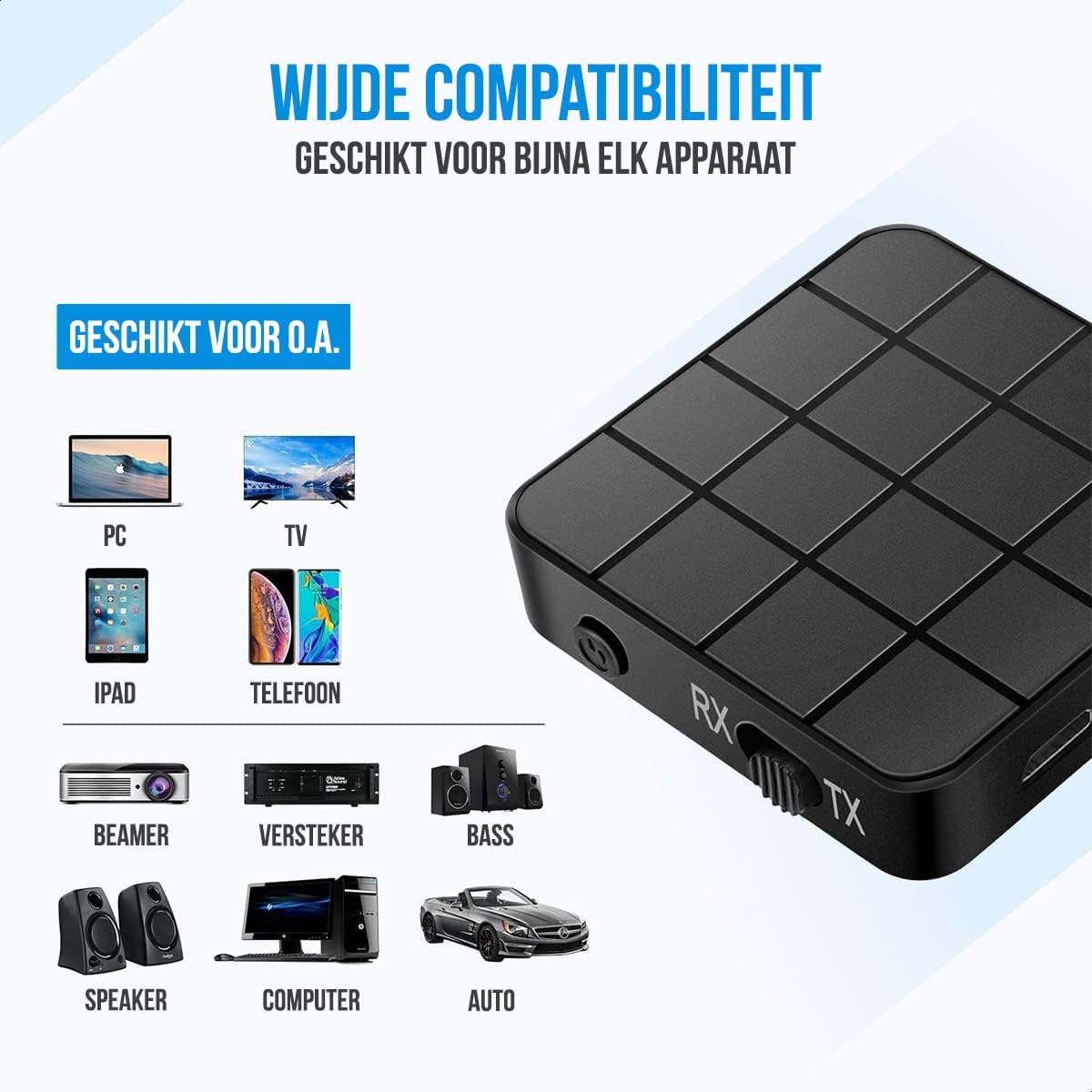
| Peranti Serasi | Smartphones, Tablets, PCs, TVs, Audio Systems, Headphones, Speakers |

Maklumat Keselamatan
- Jangan buang bateri ke dalam api. Bateri boleh meletup.
- Jauhkan peranti daripada air dan kelembapan berlebihan.
- Jangan cas peranti berhampiran bahan mudah terbakar.
- The device has an operating range of 10 meters and may interfere with other wireless devices within this range.
- Always adhere to local regulations for the disposal of electronic waste.
Waranti dan Sokongan
Specific warranty details are not provided in this manual. For warranty information or technical support, please refer to the product packaging or contact Strex customer service through their official webtapak atau peruncit tempat produk itu dibeli.


