1. Pengenalan
This manual provides essential instructions for the safe and efficient use of your Alcatel 3085 mobile phone. Please read this guide thoroughly before operating the device to ensure proper functionality and to prevent damage. Keep this manual for future reference.
2. Kandungan Pakej
Sahkan bahawa pakej anda mengandungi item berikut:
- Alcatel 3085 Mobile Phone
- Bateri
- Pengecas
- Panduan Mula Pantas
- (Optional) Charging Cradle
Jika terdapat sebarang barang yang hilang atau rosak, sila hubungi peruncit anda.
3. Persediaan
3.1. Memasukkan Kad SIM dan Bateri
- Tanggalkan penutup belakang: Gently pry open the back cover of the phone using the notch provided.
- Masukkan kad SIM: Locate the SIM card slot(s). Align your SIM card with the cut corner and slide it into the slot until it clicks into place. Ensure the gold contacts face downwards.
- Masukkan bateri: Place the battery into the battery compartment, ensuring the gold contacts on the battery align with the contacts in the phone.
- Replace back cover: Carefully align the back cover and press it firmly until it snaps into place.
3.2. Mengecas Bateri
Sebelum penggunaan pertama, cas sepenuhnya bateri telefon.
- Connect the charger to the charging port on the phone or place the phone in the charging cradle (if included).
- Palamkan pengecas ke salur keluar kuasa.
- The charging indicator will appear on the screen. Disconnect the charger once the battery is fully charged.
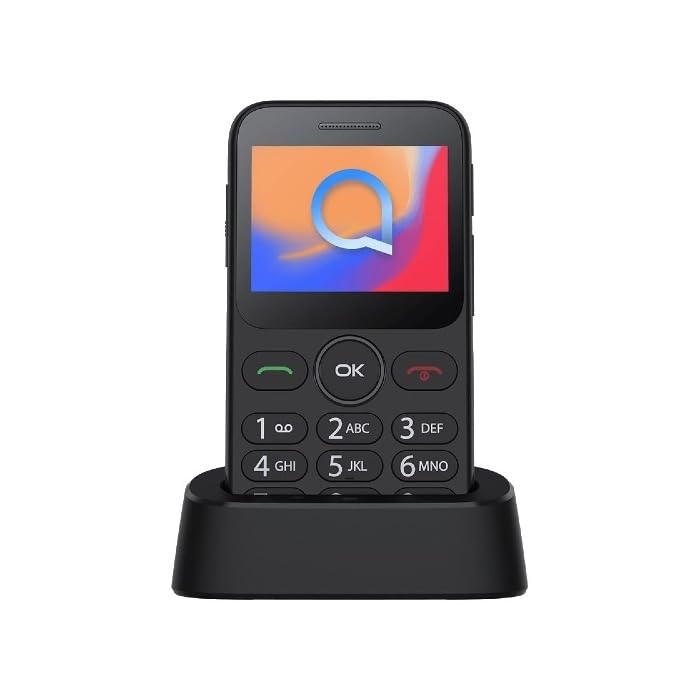
Image 1: Alcatel 3085 mobile phone placed in its charging cradle. The phone features a small color screen and a physical keypad with large, clearly labeled buttons.
4. Arahan Operasi
4.1. Menghidupkan/Mematikan
- Untuk Menghidupkan: Tekan dan tahan butang Kuasa/Tamatkan Panggilan button (red button) until the screen lights up.
- Untuk Mematikan: Tekan dan tahan butang Kuasa/Tamatkan Panggilan button until the power-off options appear, then select "Power off".
4.2. Membuat dan Menerima Panggilan
- Membuat Panggilan: Masukkan nombor telefon menggunakan pad kekunci dan tekan butang Panggil butang (butang hijau).
- Menerima Panggilan: Apabila telefon berdering, tekan butang Panggil butang untuk menjawab.
- Menamatkan Panggilan: Tekan ke Tamatkan Panggilan butang.
4.3. Menghantar dan Menerima Mesej
- Navigasi ke Mesej menu from the main screen.
- Select "Create new message" or "New SMS".
- Enter the recipient's number and type your message using the keypad.
- Tekan "Hantar".
4.4. Navigasi Asas
- Gunakan Kekunci Navigasi (up, down, left, right) to scroll through menus.
- Tekan ke OK/Pilih button (center button) to confirm a selection.
- Tekan ke Belakang/Jelas button (often the right soft key) to go back to the previous screen or delete characters.
5. Penyelenggaraan dan Penjagaan
- Pembersihan: Use a soft, dry cloth to clean the phone's screen and body. Avoid liquid cleaners.
- Storan: Simpan telefon di tempat yang sejuk dan kering, jauh daripada cahaya matahari langsung dan suhu yang melampau.
- Penjagaan Bateri: Do not expose the battery to high temperatures or dispose of it in fire. Use only approved chargers.
- Tahan Air: Telefon ini tidak kalis air. Elakkan pendedahan kepada cecair.
6. Penyelesaian masalah
| Masalah | Penyelesaian yang Mungkin |
|---|---|
| Telefon tidak dihidupkan | Pastikan bateri dimasukkan dan dicas dengan betul. Cuba cas telefon selama sekurang-kurangnya 30 minit. |
| Tidak boleh membuat atau menerima panggilan | Check if the SIM card is properly inserted. Verify that you have network coverage. Contact your service provider if the issue persists. |
| Bateri cepat habis | Reduce screen brightness. Close unused applications. Ensure the phone is not in an area with poor network signal, which can increase battery consumption. |
| Pad kekunci tidak bertindak balas | Restart the phone. Ensure no physical obstruction is affecting the keys. |
7. Spesifikasi
| Ciri | Perincian |
|---|---|
| Jenama | Alcatel |
| Nombor Model | 3085 (HP02945) |
| warna | Hitam Metalik |
| ASIN | B0B8X482MH |
| Pengeluar | Alcatel |
| Kemas Kini Perisian Dijamin Sehingga | Maklumat tidak tersedia |
| Ketersediaan Alat Ganti | Maklumat tidak tersedia |
8. Waranti dan Sokongan
For warranty information, please refer to the warranty card included in your product packaging or visit the official Alcatel website. For technical support, please contact Alcatel customer service through their official channels.
You can find more information and support resources on the official Alcatel webtapak: www.alcatelmobile.com
9. Maklumat Keselamatan
- Do not attempt to disassemble or modify the phone.
- Use only original or approved accessories.
- Avoid exposing the phone to extreme temperatures, direct sunlight, or moisture.
- Keep the phone away from medical devices, as it may interfere with their operation.
- Dispose of the phone and battery responsibly according to local regulations.


