1. Pengenalan
Thank you for choosing the Awei TC-7 Wired Earphones. These in-ear earphones are designed for clear audio and convenient communication, featuring a Type-C connector for modern devices and an inline microphone with control buttons. Please read this manual carefully to ensure proper use and maintenance of your earphones.
2. Kandungan Pakej
- Awei TC-7 Wired Earphones
- Multiple sizes of Ear Cushions (Small, Medium, Large)

Rajah 2.1: The Awei TC-7 earphones include ear caps in various sizes to ensure a comfortable and secure fit for different users.
3. Produk Lebihview
The Awei TC-7 earphones feature a durable design with a Type-C plug for direct connection to compatible devices. The inline remote control allows for easy management of audio playback and calls.

Rajah 3.1: A close view of the Awei TC-7 earphones, showcasing their in-ear design for optimal sound delivery.

Rajah 3.2: The inline remote control features multi-function buttons for managing audio and calls.

Rajah 3.3: The integrated HD microphone is designed to pick up clear audio, even in noisy environments.
4. Persediaan
- Pilih Kusyen Telinga: Choose the ear cushion size (Small, Medium, or Large) that provides the most comfortable and secure fit for your ears. A proper fit enhances sound quality and noise isolation.
- Sambung ke Peranti: Insert the USB-C plug of the earphones into the Type-C port of your smartphone, tablet, laptop, or other compatible device.
- Output Audio: Ensure your device's audio output is set to the connected earphones. This is usually automatic upon connection.
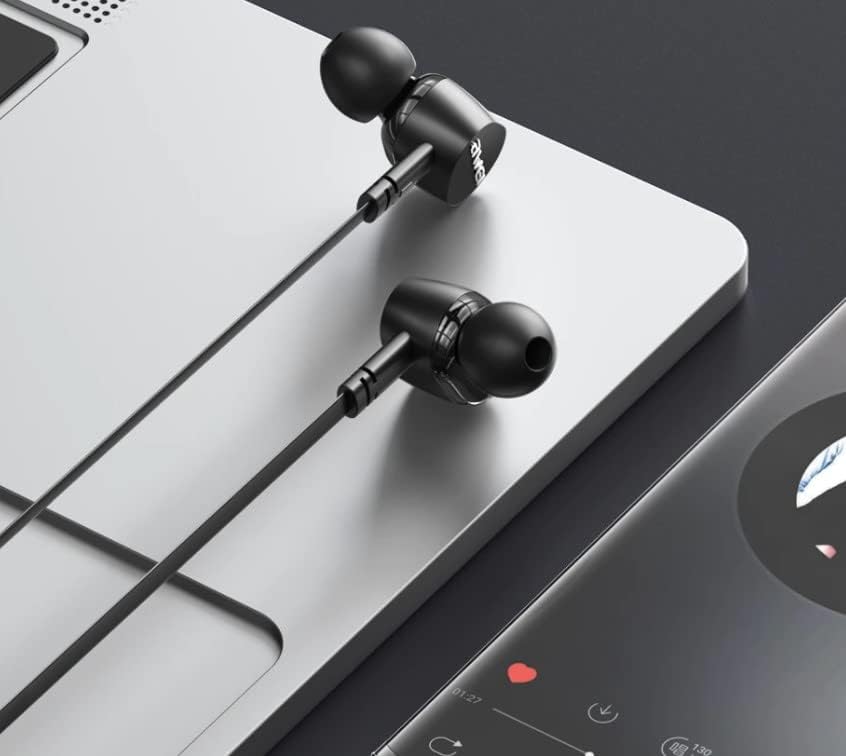
Rajah 4.1: The earphones are compatible with various devices featuring a USB-C port, such as laptops and smartphones.
5. Arahan Operasi
The Awei TC-7 earphones feature an inline remote with buttons for convenient control of your audio and calls.
5.1. Kawalan Main Semula Muzik
- Main/Jeda: Tekan butang tengah sekali.
- Lagu Seterusnya: Tekan butang tengah dua kali dengan cepat.
- Trek Sebelumnya: Tekan butang tengah tiga kali dengan cepat.
- Kelantangan: Tekan butang '+'.
- Perlahankan suara: Tekan butang '-'.
5.2. Pengurusan Panggilan
- Jawab/Tamatkan Panggilan: Tekan butang tengah sekali semasa panggilan masuk atau panggilan aktif.
- Tolak Panggilan: Tekan dan tahan butang tengah selama lebih kurang 2 saat semasa panggilan masuk.
6. Penyelenggaraan
Proper care will extend the lifespan of your Awei TC-7 earphones.
- Membersihkan Kusyen Telinga: Regularly remove the ear cushions and clean them with a soft, damp kain. Pastikan ia benar-benar kering sebelum dipasang semula.
- Penjagaan Kabel: The cable is designed to be tangle-free. Avoid excessive pulling or sharp bending to prevent internal damage.
- Storan: When not in use, store the earphones in a clean, dry place, away from extreme temperatures.
- Tahan Air: The earphones are rated as waterproof. However, avoid prolonged submersion and ensure the USB-C port is dry before connecting to a device after exposure to water.
7. Penyelesaian masalah
If you encounter issues with your Awei TC-7 earphones, please refer to the following common solutions:
| Masalah | Kemungkinan Punca | Penyelesaian |
|---|---|---|
| Tiada bunyi dari fon telinga | Earphones not properly connected; device volume too low; incorrect audio output setting on device. | Ensure the USB-C plug is fully inserted. Increase device volume. Check device audio settings to confirm output is set to earphones. |
| Mikrofon tidak berfungsi | Microphone port blocked; incorrect input setting on device; application permissions. | Ensure the microphone area is clear. Check device sound settings for microphone input. Verify application permissions for microphone access. |
| Butang tidak bertindak balas | Loose connection; device incompatibility; software glitch. | Reconnect the earphones. Test with another compatible device if possible. Restart your device. |
8. Spesifikasi
| Ciri | Perincian |
|---|---|
| Nama Model | TC-7 |
| Teknologi Ketersambungan | berwayar |
| Bicu Fon Kepala | USB-C |
| Penempatan Telinga | Di Telinga |
| Julat Kekerapan | 20Hz - 20kHz |
| Ciri-ciri Tambahan | Microphone Included, Inline Control |
| bahan | plastik |
| Tahap Ketahanan Air | Kalis air |
| Ciri-ciri Kabel | Bebas Kusut |
| Peranti Serasi | Smartphones, Laptops, Tablets, Desktops with USB-C |
9. Waranti dan Sokongan
Untuk maklumat waranti dan sokongan pelanggan, sila rujuk dokumentasi yang diberikan semasa pembelian atau hubungi peruncit anda. Simpan bukti pembelian anda untuk sebarang tuntutan waranti.