1. Pengenalan
This manual provides detailed instructions for the setup, operation, and maintenance of your Marvo M729W Wireless Gaming Mouse. Please read this guide thoroughly before using the product to ensure optimal performance and longevity. This device is designed for gaming and general computer use, offering wireless convenience and customizable features.
2. Kandungan Pakej
- Marvo M729W Wireless Gaming Mouse
- Penerima Wayarles USB
- Kabel Pengecas USB-C
- Manual Pengguna
3. Produk Lebihview
Susun atur tetikus

The Marvo M729W Wireless Gaming Mouse features a sleek black design with integrated RGB lighting zones. It includes standard left and right click buttons, a scroll wheel, and a DPI adjustment button located centrally.

Bahagian view of the Marvo M729W mouse highlights its ergonomic shape and the location of the USB wireless receiver, which is stored in a dedicated compartment on the underside for portability.
4. Persediaan
4.1 Menyambung Tetikus
- Cari penerima wayarles USB. Ia biasanya disimpan di dalam petak di bahagian bawah tetikus.
- Keluarkan penerima USB dari petaknya.
- Palamkan penerima USB ke dalam port USB yang tersedia pada komputer anda.
- Hidupkan tetikus menggunakan suis kuasa yang terletak di bahagian bawah.
- Your computer should automatically detect and install the necessary drivers. The mouse is ready for use once detected.
4.2 Mengecas Tetikus
Before initial use, it is recommended to fully charge the mouse. The Marvo M729W features a 700 mAh rechargeable battery.

Pro sampinganfile of the Marvo M729W mouse illustrates the USB-C charging port located at the front. Connect the provided USB-C cable here to charge the internal battery.
- Connect the small end of the USB-C charging cable to the charging port on the front of the mouse.
- Connect the larger USB-A end of the cable to a USB port on your computer or a USB wall adapter (not included).
- The mouse's RGB lighting may indicate charging status. Refer to the mouse's behavior for specific charging indicators.
- Once fully charged, disconnect the charging cable. The mouse can be used while charging.
5. Arahan Operasi
5.1 Fungsi Asas
- Butang Klik Kiri: Tindakan utama, pemilihan.
- Butang Klik Kanan: Tindakan kedua, menu konteks.
- Roda Tatal: Tatal ke atas/bawah, klik tengah.
- Butang Maju/Mundur: Navigasi web pages or folders (located on the side).
- Butang DPI: Melaraskan sensitiviti tetikus.
5.2 Pelarasan DPI
The Marvo M729W mouse features an adjustable DPI (Dots Per Inch) sensor, allowing you to change the cursor sensitivity to suit your preferences or game requirements. There are 6 adjustable levels up to 4800 DPI.

This image shows the top of the Marvo M729W mouse, clearly indicating the DPI button located below the scroll wheel. Pressing this button cycles through the available DPI settings.
To adjust the DPI, press the butang DPI located below the scroll wheel. Each press will cycle through the preset DPI levels. The mouse's RGB lighting may change color or pattern to indicate the current DPI setting.
5.3 Mod Pencahayaan RGB
The Marvo M729W mouse features dynamic RGB lighting with 7 different modes. These modes enhance the aesthetic appeal of the mouse. The lighting typically cycles automatically or can be changed by a specific button combination (if available, refer to product packaging for details not specified here). The lighting will turn off after 3 minutes of idling to conserve battery.
6. Penyelenggaraan
Proper maintenance ensures the longevity and performance of your gaming mouse.
- Pembersihan: Gunakan kain lembut dan kering untuk mengelap permukaan tetikus. Untuk kotoran degil, gunakan sedikit kainamp cloth can be used, but ensure no moisture enters the mouse. Do not use harsh chemicals or abrasive cleaners.
- Penjagaan Sensor: Keep the optical sensor on the underside clean and free from dust or debris to ensure accurate tracking.
- Storan: Apabila tidak digunakan untuk tempoh yang lama, simpan tetikus di tempat yang kering dan sejuk.
- Penjagaan Bateri: Avoid fully discharging the battery frequently. Charge the mouse when the battery indicator suggests it.
7. Penyelesaian masalah
If you encounter issues with your Marvo M729W mouse, refer to the following common solutions:
- Tetikus tidak bertindak balas:
- Pastikan tetikus dihidupkan.
- Periksa sama ada penerima USB dipasang dengan kukuh ke port USB yang berfungsi. Cuba port USB yang lain.
- Ensure the mouse battery is charged. Connect the charging cable and try again.
- Gerakkan tetikus lebih dekat kepada penerima USB untuk mengelakkan gangguan.
- Pergerakan kursor tidak menentu:
- Bersihkan sensor optik di bahagian bawah tetikus.
- Ensure you are using the mouse on a suitable surface (e.g., a mouse pad, not a reflective or transparent surface).
- Check for any wireless interference from other devices.
- Pencahayaan RGB tidak berfungsi:
- Pastikan tetikus dihidupkan.
- The lighting turns off after 3 minutes of idling to save power. Move the mouse to reactivate.
- Check if the battery is low. Charge the mouse.
- Tetikus tidak dicas:
- Pastikan kabel USB-C disambungkan dengan betul kepada kedua-dua tetikus dan sumber kuasa.
- Try a different USB port or charging adapter.
- Pastikan kabel pengecas tidak rosak.
8. Spesifikasi
Below are the technical specifications for the Marvo M729W Wireless Gaming Mouse:
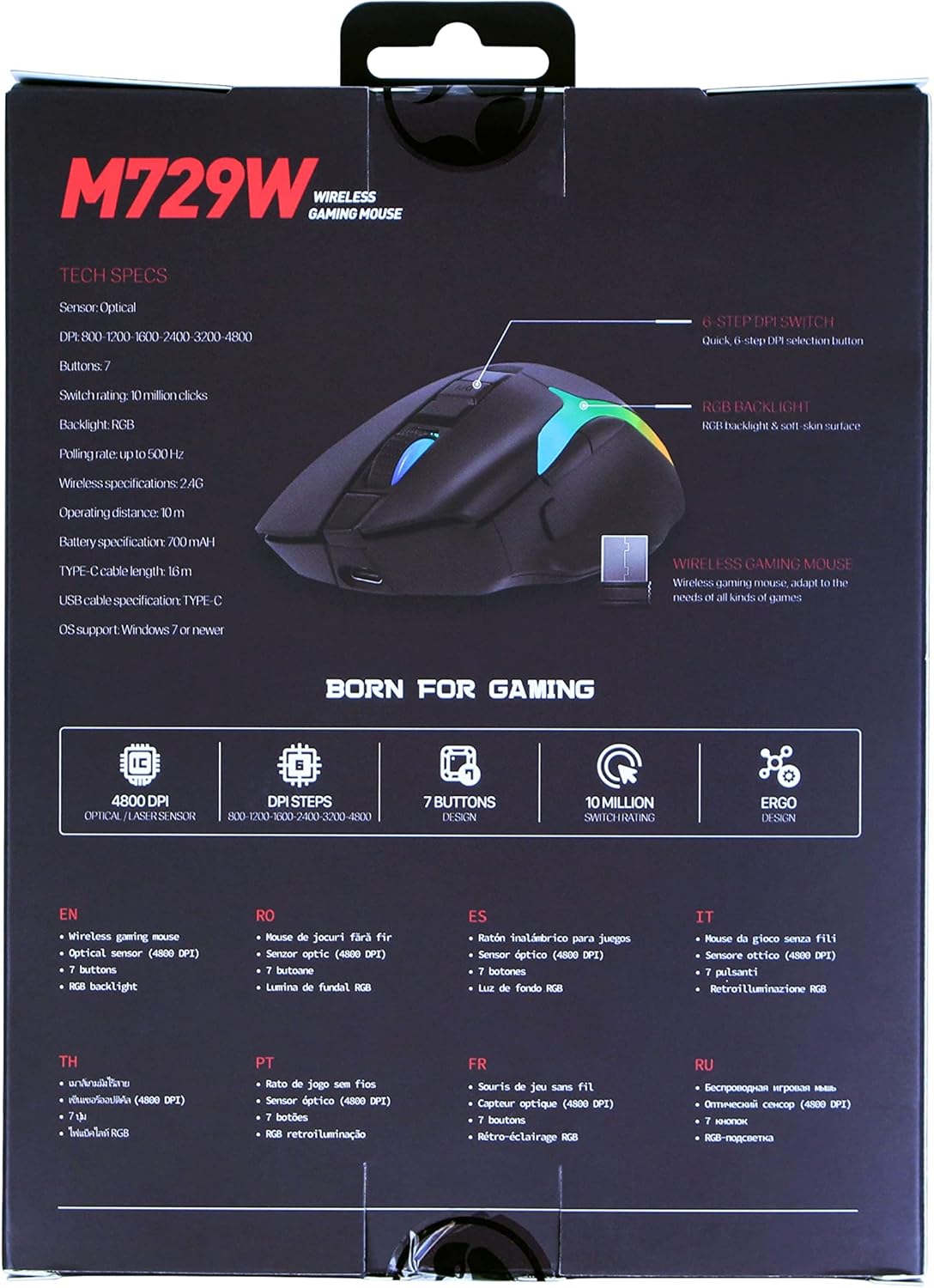
The back of the Marvo M729W product packaging displays key technical specifications and features in multiple languages, including DPI settings, button count, and battery information.
| Ciri | Spesifikasi |
|---|---|
| Model | M729W |
| Jenama | MARVO |
| Ketersambungan | Wayarles (Penerima USB) |
| Jenis Sensor | Optik |
| DPI (Titik Seinci) | Up to 4800 DPI (6 adjustable levels) |
| Bilangan Butang | 7 |
| Tukar Peringkat | 10 Juta Klik |
| Kadar Mengundi | Sehingga 500Hz |
| Jenis Bateri | Lithium-ion yang boleh dicas semula |
| Kapasiti Bateri | 700 mAh |
| Port Pengecasan | USB-C |
| Panjang Kabel | 1.6m (USB-C to USB-A) |
| Pencahayaan RGB | 7 Mod |
| Orientasi Tangan | Ambidextrous |
| Sokongan OS | Windows 7 atau lebih baru |
9. Maklumat Waranti
The Marvo M729W Wireless Gaming Mouse is covered by a standard return policy, typically offering a 31-day refund or replacement period from the date of purchase. This warranty covers manufacturing defects and malfunctions under normal use. It does not cover damage caused by misuse, accidents, unauthorized modifications, or normal wear and tear. Please retain your proof of purchase for any warranty claims.
10. Sokongan
For technical support, warranty claims, or further assistance with your Marvo M729W Wireless Gaming Mouse, please contact Marvo customer service through their official website or the retailer from whom you purchased the product. Please have your product model number (M729W) and proof of purchase ready when contacting support.


