1. Pengenalan
This manual provides essential information for the safe and efficient use of your Samsung QM85R 85-inch 4K UHD LCD Display. Please read this manual thoroughly before operating the device and retain it for future reference. The Samsung QM85R is a commercial-grade display designed for continuous operation, featuring a 4K UHD resolution and integrated MagicINFO S6 and SSSP 6.0 for advanced content management.
2. Maklumat Keselamatan
Sentiasa patuhi langkah keselamatan berikut untuk mengelakkan kejutan elektrik, kebakaran atau kerosakan pada paparan.
- Sumber Kuasa: Use only the specified power supply. Ensure the power cord is securely plugged into an appropriate outlet.
- Pengudaraan: Do not block ventilation openings. Ensure adequate space around the display for proper airflow to prevent overheating.
- Pendedahan Cecair: Keep the display away from liquids. Do not expose it to rain or moisture.
- Pembersihan: Disconnect the power cord before cleaning. Use a soft, dry cloth. Avoid using liquid or aerosol cleaners directly on the screen.
- Pemasangan: If wall-mounting, ensure the wall mount is compatible with the display's weight and VESA standards. Professional installation is recommended for large displays.
- Servis: Jangan cuba servis produk ini sendiri. Rujuk semua perkhidmatan kepada pegawai perkhidmatan yang berkelayakan.
3. Kandungan Pakej
Please check that the following items are included with your display. If any items are missing, contact your vendor.
- Samsung QM85R 85-inch 4K UHD LCD Display
- Kord Kuasa
- Kawalan Jauh dengan Bateri
- Manual Pengguna (dokumen ini)
- Kad Waranti (mungkin berbeza mengikut wilayah)
4. Persediaan
4.1 Pemasangan Fizikal
The Samsung QM85R display can be installed using a compatible wall mount or a floor stand (sold separately). Due to its size and weight (approximately 140.4 pounds), professional installation is highly recommended.
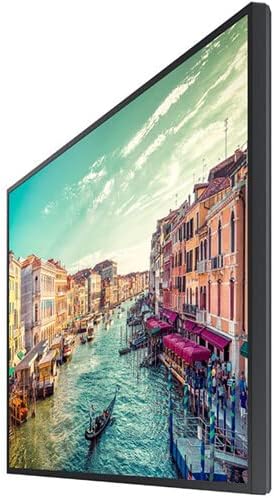
Rajah 1: sebelah view of the Samsung QM85R display. Note the slim design suitable for various mounting options.
4.2 Menyambung Kabel
Before connecting any cables, ensure the display and all connected devices are powered off.
- Sambungan Kuasa: Sambungkan kord kuasa ke input kuasa paparan dan kemudian ke soket elektrik yang dibumikan.
- Input Video: Connect your video source (e.g., PC, media player) to one of the display's HDMI or DisplayPort inputs using appropriate cables. The display supports 4K UHD (3840x2160) resolution.
- Sambungan Rangkaian: For MagicINFO S6 and SSSP 6.0 functionality, connect an Ethernet cable to the display's LAN port for network access.
- Sambungan Lain: Connect any other peripheral devices as required (e.g., USB devices, audio output).
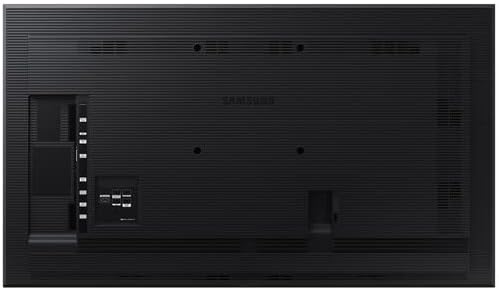
Rajah 2: belakang view of the Samsung QM85R display, illustrating the location of power, video, and network ports.
4.3 Hidupkan Kuasa Awal
After all connections are made, power on the display using the power button on the remote control or the display itself. Follow any on-screen prompts for initial setup, such as language selection and network configuration.
5. Beroperasi
5.1 Kawalan Asas
Use the provided remote control to access the display's functions:
- Butang Kuasa: Menghidupkan atau mematikan paparan.
- Butang Sumber: Cycles through available input sources (HDMI1, HDMI2, DisplayPort, etc.).
- Butang Menu: Opens the On-Screen Display (OSD) menu.
- Butang Navigasi (Atas/Bawah/Kiri/Kanan): Navigasi melalui pilihan menu.
- Butang Masukkan: Mengesahkan pilihan dalam menu.
5.2 Tetapan Paparan
Akses menu OSD untuk melaraskan pelbagai tetapan paparan:
- Mod Gambar: Select from preset modes (e.g., Standard, Dynamic, Custom) or adjust individual settings like brightness, contrast, sharpness, and color temperature.
- Resolusi: The display natively supports 3840x2160 (4K UHD) resolution. Ensure your source device is configured to output this resolution for optimal clarity.
- Kadar Segar Semula: The display operates at a 75Hz refresh rate, providing smooth motion for compatible content.
- Audio: Adjust volume, mute, and select audio output options if external speakers are connected.
5.3 Smart Signage Platform (SSSP 6.0) and MagicINFO S6
The QM85R features Samsung's integrated Smart Signage Platform (SSSP 6.0) powered by MagicINFO S6. This allows for advanced content management, scheduling, and remote control capabilities. Refer to the dedicated MagicINFO S6 user guide for detailed instructions on utilizing these features.
6. Penyelenggaraan
6.1 Membersihkan Paparan
To maintain the display's appearance and performance:
- Skrin: Lap skrin perlahan-lahan dengan kain lembut yang tidak berbulu. Untuk tanda degil, ringankan dampen the cloth with water or a specialized screen cleaner, then wipe dry immediately. Do not spray liquids directly onto the screen.
- Badan: Wipe the display's frame and back panel with a soft, dry cloth.
- Elakkan: Do not use abrasive cleaners, waxes, or solvents (e.g., alcohol, benzene, paint thinner) as they can damage the display surface.
6.2 Pertimbangan Alam Sekitar
Ensure the display is operated within its specified temperature and humidity ranges to ensure longevity and optimal performance. Avoid direct sunlight exposure and extreme temperature fluctuations.
7. Penyelesaian masalah
If you encounter issues with your display, refer to the following common problems and solutions before contacting support.
| Masalah | Kemungkinan Punca | Penyelesaian |
|---|---|---|
| Tiada kuasa | Kord kuasa terputus; masalah soket kuasa. | Periksa sambungan kord kuasa. Uji soket dengan peranti lain. |
| Tiada isyarat | Sumber input yang dipilih salah; kabel video diputuskan sambungannya. | Press the 'Source' button on the remote to select the correct input. Ensure video cables are securely connected. |
| Kualiti imej yang lemah | Resolusi salah; tetapan paparan. | Ensure source device outputs 3840x2160 resolution. Adjust picture settings (brightness, contrast) in the OSD menu. |
| Alat kawalan jauh tidak berfungsi | Bateri mati; halangan. | Replace batteries. Ensure no obstructions between remote and display's IR receiver. |
8. Spesifikasi
| Ciri | Spesifikasi |
|---|---|
| Nama Model | QM85R |
| Saiz Skrin | 85 Inci |
| Resolusi | 3840 x 2160 (4K UHD) |
| Kadar Segar Semula | 75Hz |
| Kecerahan | 500 NIT |
| Waktu Operasi | 24/7 |
| Ciri Terbina dalam | MagicINFO S6, SSSP 6.0 |
| Dimensi Produk (LxWxH) | 82.52 x 49.02 x 10.51 inci |
| Berat Barang | 140.4 paun |
| warna | Hitam |
| Pengeluar | Samsung |
9. Waranti dan Sokongan
Your Samsung QM85R display is covered by a manufacturer's warranty. For specific warranty terms and conditions, please refer to the warranty card included with your product or visit the official Samsung website. For technical assistance, troubleshooting beyond this manual, or to inquire about service, please contact Samsung Customer Support.
Sokongan dalam talian: melawat www.samsung.com/us/support/
Sokongan Telefon: Rujuk maklumat hubungan sokongan Samsung serantau anda.


