pengenalan
Thank you for choosing the JBL Cinema SB190 Soundbar. This manual provides essential information for setting up, operating, and maintaining your soundbar system. Please read it thoroughly to ensure proper use and optimal performance.
Maklumat Keselamatan Penting
Always follow these basic safety precautions when using your soundbar system:
- Baca arahan ini dengan teliti.
- Simpan arahan ini untuk rujukan masa hadapan.
- Patuhi semua amaran.
- Ikut semua arahan.
- Jangan gunakan alat ini berhampiran air.
- Bersihkan hanya dengan kain kering.
- Jangan sekat sebarang bukaan pengudaraan. Pasang mengikut arahan pengilang.
- Jangan pasang berhampiran mana-mana sumber haba seperti radiator, daftar haba, dapur, atau radas lain (termasuk amppenghidup) yang menghasilkan haba.
- Lindungi kord kuasa daripada berjalan atau tersepit, terutamanya pada palam, bekas kemudahan dan tempat keluar dari radas.
- Hanya gunakan lampiran/aksesori yang ditentukan oleh pengilang.
- Cabut plag radas ini semasa ribut petir atau apabila tidak digunakan untuk jangka masa yang lama.
- Rujuk semua servis kepada kakitangan perkhidmatan yang berkelayakan. Servis diperlukan apabila radas telah rosak dalam apa jua cara, seperti kord bekalan kuasa atau palam rosak, cecair telah tertumpah atau objek jatuh ke dalam radas, radas telah terdedah kepada hujan atau lembapan, tidak beroperasi seperti biasa. , atau telah digugurkan.
Apa yang ada dalam Kotak
Your JBL Cinema SB190 package includes the following components:
- Bar bunyi
- Subwufer Tanpa Wayar
- Alat kawalan jauh dengan bateri
- Power cords (region specific)
- Kabel HDMI
- Kit pendakap pelekap dinding dengan skru
- Panduan permulaan cepat
- Kad jaminan
- Lembaran keselamatan

Image: Included accessories for the JBL Cinema SB190, featuring the remote control, HDMI cable, power cords, and wall-mount hardware.
Produk Selesaiview
Soundbar Front and Top Panel

Imej: Depan view of the JBL Cinema SB190 Soundbar, showcasing reka bentuknya yang anggun.
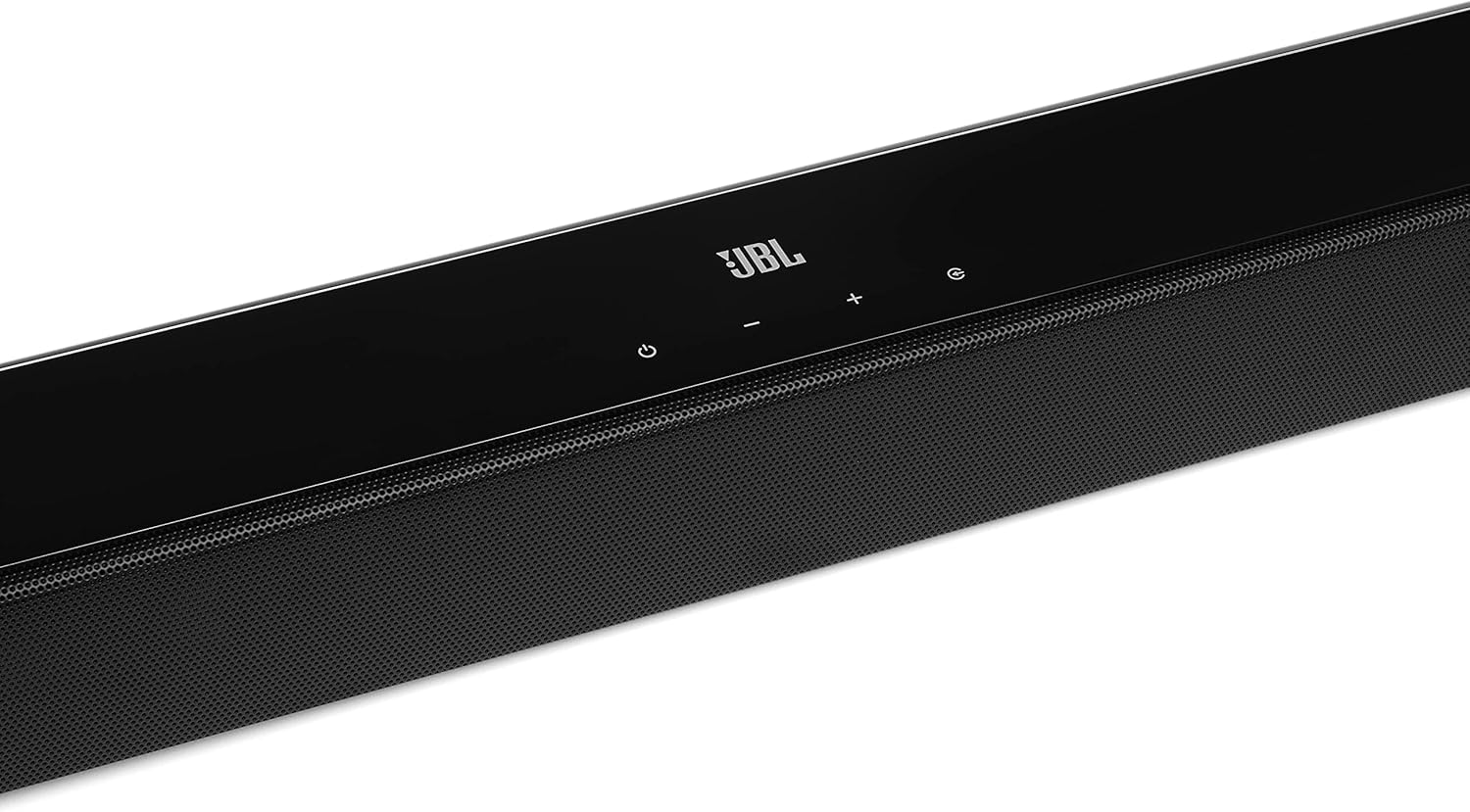
Image: Close-up of the top panel controls on the JBL Cinema SB190 Soundbar, including power, volume, and source selection buttons.
The soundbar features a minimalist design with essential controls located on the top panel for easy access. These include power, volume up/down, and input selection.
Soundbar Rear Panel Connections

Image: Rear panel of the JBL Cinema SB190 Soundbar, showing the power input, HDMI eARC, HDMI In, and Optical In ports.
The rear panel provides various connection options for your audio sources and TV, including HDMI eARC, HDMI In, and Optical In. A power input is also located here.
Subwufer Tanpa Wayar

Imej: Depan view of the JBL Cinema SB190 Wireless Subwoofer, featuring the JBL logo at the bottom.

Imej: Belakang view of the JBL Cinema SB190 Wireless Subwoofer, showing the power input and pairing button.
The wireless subwoofer provides deep bass and connects automatically to the soundbar. Its rear panel includes the power input and a pairing button if manual pairing is required.
Alat Kawalan Jauh
The included remote control allows full command over your soundbar system, including power, volume, input selection, sound modes (Music, Movie, News), Voice enhancement, and Bass level adjustment.
Persediaan
1. penempatan
Bar bunyi: Place the soundbar on a flat surface directly in front of your TV, centered. Ensure no objects obstruct the front of the soundbar. Alternatively, you can wall-mount the soundbar using the provided bracket kit.

Image: The JBL Cinema SB190 Soundbar positioned below a television, with the wireless subwoofer to the side.
subwufer: The wireless subwoofer can be placed anywhere in the room, ideally within 50 feet (15 meters) of the soundbar, for optimal bass distribution. Avoid placing it in a corner directly, as this can sometimes lead to boomy bass.
2. Sambungan
Choose one of the following connection methods to connect your soundbar to your TV:
- HDMI eARC (Disyorkan): For the highest quality audio, connect an HDMI cable (included) from the HDMI eARC port on your soundbar to the HDMI eARC port on your TV. This connection supports Virtual Dolby Atmos and allows for TV remote control of the soundbar volume.

Image: HDMI icon, representing the HDMI eARC connection.
- Optik Dalam: If your TV does not have an HDMI eARC port, connect an optical cable (not included) from the OPTICAL IN port on your soundbar to the optical output on your TV.

Image: TV icon, indicating connection to a television.
- HDMI Dalam: You can also connect an external device (e.g., Blu-ray player, game console) directly to the HDMI IN port on the soundbar. The video signal will pass through to your TV via the HDMI eARC/ARC connection.
3. Sambungan Kuasa
- Connect the power cords to the soundbar and subwoofer.
- Plug the power cords into an AC outlet.
- The soundbar and subwoofer will automatically power on and attempt to pair. The subwoofer's LED indicator will turn solid white once successfully paired.
Mengendalikan Soundbar Anda
Hidupkan/Mati Kuasa
Tekan ke kuasa butang pada bar bunyi atau alat kawalan jauh untuk menghidupkan atau mematikan sistem.
Kawalan Kelantangan
Gunakan Jilid + or Isipadu - buttons on the soundbar or remote control to adjust the volume level.
Pemilihan Input
Tekan ke Sumber button on the soundbar or the dedicated input buttons (HDMI IN, HDMI ARC, OPT, BT) on the remote control to switch between audio sources.
Mod Bunyi
The remote control features dedicated buttons for optimizing audio for different content types:
- MUZIK: Meningkatkan audio untuk main balik muzik.
- PERGERAKAN: Optimizes sound for cinematic experiences, including Virtual Dolby Atmos effects.
- BERITA: Enhances vocal clarity for news and dialogue-heavy content.
Voice and Bass Adjustment
The remote control allows for fine-tuning of voice clarity and bass levels:
- SUARA: Press the VOICE button repeatedly to cycle through different levels of voice enhancement. This helps make dialogue clearer.
- ASAS: Press the BASS button repeatedly to adjust the subwoofer's bass output level.
Berpasangan Bluetooth
Untuk menstrim audio secara wayarles daripada peranti mudah alih anda:
- Tekan ke BT button on the remote control or soundbar. The soundbar's indicator will flash, indicating pairing mode.
- On your mobile device, enable Bluetooth and select "JBL Cinema SB190" from the list of available devices.
- Once connected, the indicator on the soundbar will turn solid. You can now stream audio from your device.

Image: Bluetooth icon, representing wireless audio streaming.
Penyelenggaraan
To ensure the longevity and optimal performance of your JBL Cinema SB190 Soundbar:
- Pembersihan: Gunakan kain lembut dan kering untuk membersihkan permukaan soundbar dan subwoofer. Jangan gunakan pembersih cecair atau bahan kasar, kerana ia boleh merosakkan kemasannya.
- Pengudaraan: Ensure that the ventilation openings on the soundbar and subwoofer are not blocked to prevent overheating.
- Storan: Jika menyimpan unit untuk tempoh yang lama, cabut palamnya dari salur keluar kuasa dan simpan di tempat yang sejuk dan kering.
Menyelesaikan masalah
Jika anda menghadapi masalah dengan bar bunyi anda, rujuk masalah dan penyelesaian biasa berikut:
Tiada Bunyi daripada Soundbar
- Pastikan bar bunyi dihidupkan dan kelantangan tidak disenyapkan atau ditetapkan terlalu rendah.
- Verify that the correct input source is selected on the soundbar (e.g., HDMI ARC, Optical, Bluetooth).
- Check all cable connections (HDMI, Optical) between the soundbar and your TV/source device. Ensure they are securely plugged in.
- If using HDMI ARC/eARC, ensure your TV's HDMI ARC/eARC feature is enabled in its settings.
- Try restarting both the soundbar and your TV.
Tiada Bunyi daripada Subwufer
- Ensure the subwoofer is plugged into a power outlet and powered on.
- Check the LED indicator on the subwoofer. If it's not solid white, it may not be paired with the soundbar.
- To manually pair the subwoofer:
- Press and hold the pairing button on the back of the subwoofer until the LED flashes rapidly.
- On the soundbar, press and hold the kuasa button for 5 seconds. The soundbar will enter pairing mode.
- Once paired, the LED on the subwoofer will turn solid white.
Audio/Video Sync Issues
- If using HDMI eARC, this feature is designed to minimize sync issues. Ensure your TV's firmware is up to date.
- Some TVs have an audio delay setting (lip-sync) that can be adjusted. Consult your TV's manual.
- If connecting via Optical, audio lag can sometimes occur. Try connecting via HDMI eARC if available.
Masalah Sambungan Bluetooth
- Ensure Bluetooth is enabled on your mobile device and the soundbar is in pairing mode.
- Gerakkan peranti anda lebih dekat ke bar bunyi.
- Kosongkan senarai pasangan Bluetooth pada peranti anda dan cuba pasangkan lagi.
- Pastikan tiada peranti Bluetooth lain yang mengganggu.
Spesifikasi
| Ciri | Perincian |
|---|---|
| Nama Model | Pawagam SB190 |
| Jenis Pembesar Suara | Bar bunyi |
| Konfigurasi Saluran Bunyi Sekeliling | 2.1 |
| Total Speaker Power Output | 380 Watt |
| Diameter Subwoofer | 6.5 Inci |
| Ciri Khas | Bluetooth 5.1 streaming, Dedicated sound mode to enhance voice clarity, HDMI In and Optical In connection, HDMI eARC capable, Virtual Dolby Atmos technology |
| Teknologi Ketersambungan | Bluetooth, Wired (HDMI, Optical) |
| Kaedah Kawalan | Jauh |
| Dimensi Produk (Bar Bunyi) | 89.9L x 6.2D x 6.6T Sentimeter |
| Berat Barang | 7.5 Kilograms (Total system) |
| bahan | plastik |
| warna | Hitam |
| Komponen yang Disertakan | Soundbar, Wireless subwoofer, Remote control with batteries, Power cords, HDMI cable, Wall-mount bracket kit with screws, Quick start guide, Warranty card, Safety sheet |
Waranti dan Sokongan
For detailed warranty information, please refer to the warranty card included in your product package. For technical support, product registration, or further assistance, please visit the official JBL support webtapak atau hubungi perkhidmatan pelanggan mereka.
Anda boleh mendapatkan lebih banyak maklumat dan sumber sokongan di Kedai JBL di Amazon.


