1. Pengenalan
Thank you for choosing the havit KB488L USB Wired Keyboard. This manual provides essential information for setting up, operating, and maintaining your keyboard. Please read it carefully to ensure optimal performance and longevity of your device.
The havit KB488L is designed for both office and gaming use, featuring a quiet typing experience, ergonomic wrist rest, and vibrant rainbow LED backlighting. It offers a 105-key UK layout for comfortable and efficient input.

Image 1.1: The havit KB488L keyboard, highlighting its quiet operation and integrated wrist rest.
2. Ciri-ciri Produk
- Operasi senyap: Designed for smooth and silent typing, suitable for office and home environments.
- Reka bentuk ergonomik: Features a 15° tilt capability and an integrated wrist rest to reduce fatigue during extended use.
- Lampu Belakang LED Pelangi: Enhances visibility in low-light conditions and provides an aesthetic appeal. The backlight can be toggled on/off.
- 12 Kekunci Pintasan Multimedia: Provides quick access to common functions for entertainment and productivity.
- Pembinaan Tahan Lama: Keys tested for 5 million clicks, ensuring long-term reliability.
- Kesambungan Berwayar: Reliable USB connection for consistent performance.
- Keserasian Luas: Supports Windows 2000/XP/Vista/7/8/10, Mac, and Linux operating systems. (Note: Multimedia keys function only on Windows).

Image 2.1: The integrated wrist rest of the havit KB488L keyboard, designed for ergonomic comfort.
3. Kandungan Pakej
- havit KB488L USB Wired Keyboard with integrated wrist rest
- Manual Pengguna (dokumen ini)
4. Arahan Persediaan
- Buka pek Papan Kekunci: Tanggalkan papan kekunci dari pembungkusannya dengan berhati-hati.
- Sambung ke Komputer: Plug the USB connector of the keyboard into an available USB port on your computer (desktop PC or laptop).
- Pemasangan Pemandu: The keyboard is plug-and-play. Your operating system will automatically detect and install the necessary drivers. No additional software installation is required.
- Adjust Tilt (Optional): Flip out the adjustable feet on the underside of the keyboard to set your preferred typing angle.

Image 4.1: The havit KB488L keyboard set up and connected to a computer.
5. Arahan Operasi
5.1 Fungsi Papan Kekunci Asas
The havit KB488L functions as a standard 105-key UK layout keyboard. All standard alphanumeric keys, function keys (F1-F12), navigation keys, and numeric keypad operate as expected.
5.2 Kekunci Pintasan Multimedia
The keyboard features 12 multimedia shortcut keys accessible by pressing the Fn key in combination with the corresponding F1-F12 keys. These shortcuts are designed to enhance productivity and entertainment. Note: Multimedia keys are ONLY functional on Windows operating systems.
| Gabungan Kunci | Fungsi |
|---|---|
| Fn + F1 | Pemain Muzik |
| Fn + F2 | Kelantangan Kurang |
| Fn + F3 | Kelantangan Naik |
| Fn + F4 | bisu |
| Fn + F5 | Lagu Sebelumnya |
| Fn + F6 | Lagu Seterusnya |
| Fn + F7 | Main/Jeda |
| Fn + F8 | Berhenti |
| Fn + F9 | Web/ Rumah |
| Fn + F10 | E-mel |
| Fn + F11 | Komputer Saya |
| Fn + F12 | Kegemaran |
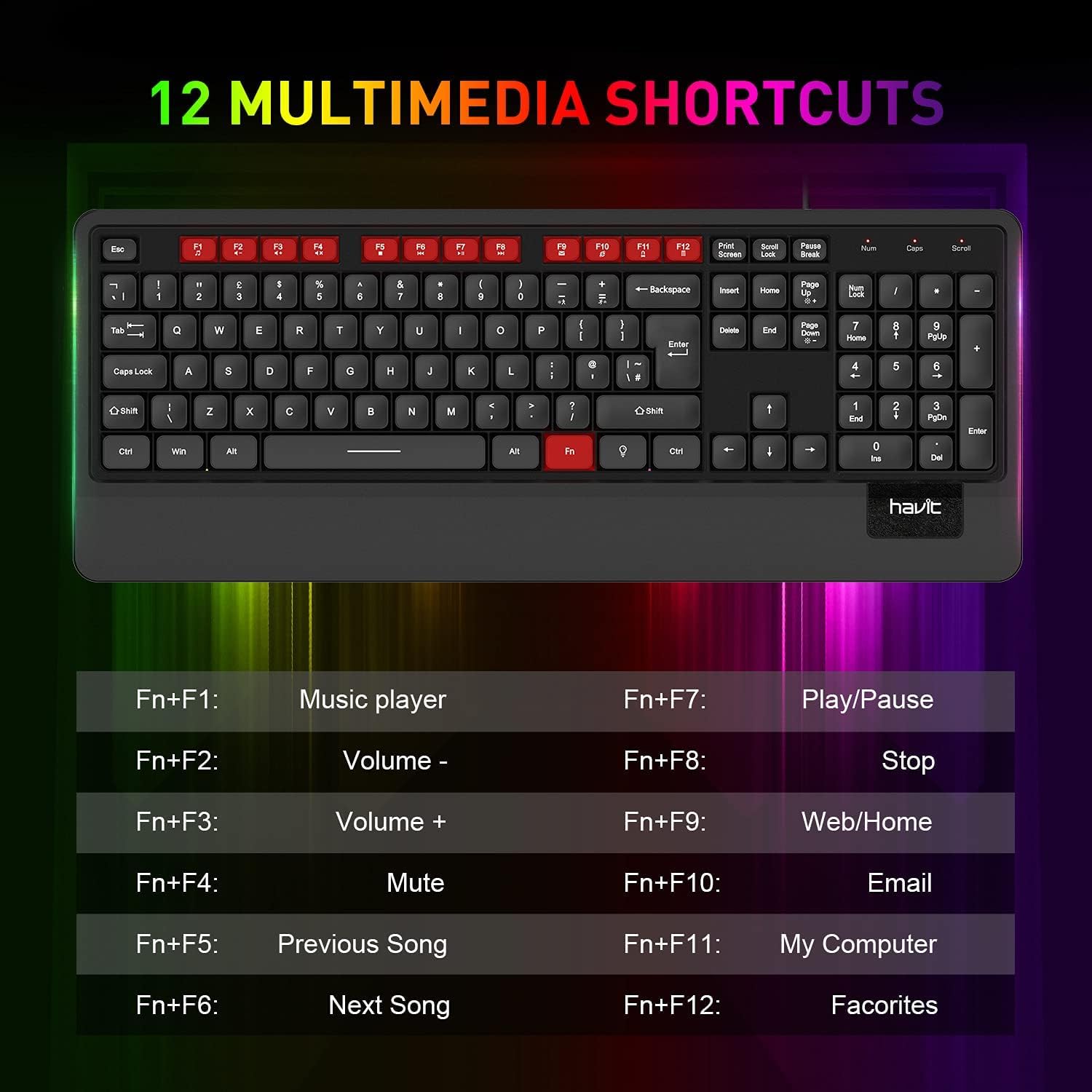
Imej 5.1: Selesaiview of the 12 multimedia shortcut keys and their functions.
5.3 Kawalan Lampu Latar
Papan kekunci mempunyai lampu latar LED pelangi. Untuk mengawal lampu latar:
- Hidupkan/Matikan: Tekan ke Kunci Tatal key to toggle the backlight on or off.

Image 5.2: The havit KB488L keyboard with its rainbow LED backlight active, illustrating key visibility in low light.
6. Penyelenggaraan
To ensure the longevity and proper functioning of your havit KB488L keyboard, follow these maintenance guidelines:
- Pembersihan: Gunakan kain lembut dan kering untuk mengelap permukaan papan kekunci. Untuk kotoran degil, gunakan sedikit kainamp cloth can be used, ensuring no liquid enters the keycaps or internal components. Avoid harsh chemicals or abrasive cleaners.
- Penyingkiran habuk: Gunakan udara termampat untuk mengeluarkan habuk dan serpihan dari antara kekunci.
- Elakkan Tumpahan: Keep liquids away from the keyboard to prevent damage. In case of a spill, immediately disconnect the keyboard from your computer and allow it to dry completely before reconnecting.
- Storan: Apabila tidak digunakan untuk tempoh yang lama, simpan papan kekunci di persekitaran yang bersih dan kering, jauh daripada cahaya matahari langsung dan suhu yang melampau.
7. Penyelesaian masalah
If you encounter issues with your havit KB488L keyboard, please refer to the following common solutions:
- Papan Kekunci Tidak Membalas:
- Pastikan kabel USB dipasang dengan selamat ke dalam port USB yang berfungsi pada komputer anda.
- Cuba pasangkan papan kekunci ke port USB yang berbeza.
- Mulakan semula komputer anda.
- Uji papan kekunci pada komputer lain untuk menentukan sama ada masalahnya adalah pada papan kekunci atau komputer.
- Lampu latar tidak berfungsi:
- Tekan ke Kunci Tatal key to ensure the backlight is toggled on.
- Pastikan papan kekunci disambungkan dengan betul dan menerima kuasa.
- Kekunci Multimedia Tidak Berfungsi:
- Remember that multimedia keys only work on Windows operating systems.
- Pastikan anda menekan butang Fn key simultaneously with the desired function key (F1-F12).
- Kekunci Terlekat atau Tidak Mendaftar:
- Bersihkan kekunci yang terjejas menggunakan udara termampat untuk membuang sebarang serpihan.
- Elakkan kekerasan yang berlebihan semasa menaip.
If these steps do not resolve your issue, please contact havit customer support for further assistance.
8. Spesifikasi
| Ciri | Perincian |
|---|---|
| Nombor Model | KB488L |
| Ketersambungan | USB berwayar |
| Reka Letak Kekunci | 105 Keys, UK Layout |
| Lampu latar | LED pelangi |
| Ciri Khas | Backlit, Ergonomic, Integrated Wrist Rest |
| Peranti Serasi | Komputer riba, PC |
| Keserasian Sistem Pengendalian | Windows 2000/XP/Vista/7/8/10, Mac, Linux |
| Dimensi Produk | 1.08 x 17.52 x 6.89 inci (27.5 x 445 x 175 mm) |
| Berat Barang | 1.63 paun (0.74 kg) |
| Pengeluar | mempunyai |

Image 8.1: Detailed dimensions of the havit KB488L keyboard.
9. Waranti dan Sokongan
havit products come with a standard manufacturer's warranty. For specific warranty details, terms, and conditions, please refer to the warranty card included with your purchase or visit the official havit webtapak.
For technical support, troubleshooting assistance, or any inquiries regarding your havit KB488L keyboard, please contact havit customer service through their official webtapak atau maklumat hubungan yang diberikan dalam pembungkusan produk anda.


