1. Produk Lebihview
The STMicroelectronics NUCLEO-64 boards offer an accessible and adaptable platform for developing and prototyping with STM32 microcontrollers. The NUCLEO-F446RE board features the STM32F446RET6 microcontroller, providing a balance of performance, power efficiency, and diverse functionalities. It supports Arduino Uno V3 connectivity and includes ST morpho headers for expanding its capabilities with various specialized shields.
This board integrates an ST-LINK/V2-1 debugger and programmer, eliminating the need for separate debugging tools. It comes with the comprehensive STM32 software HAL library, numerous software examples, and access to Arm Mbed online resources.
Ciri-ciri Utama:
- STM32F446RET6 microcontroller in LQFP64 package.
- High-performance ARM Cortex-M4 core with DSP and FPU, 512 Kbytes Flash, 180 MHz CPU.
- On-board ST-LINK/V2-1 debugger/programmer with SWD connector and USB re-enumeration (mass storage, Virtual COM port, debug port).
- Arduino Uno V3 connectivity support and ST morpho extension pin headers.
- Flexible power-supply options: ST-LINK USB VBUS or external sources.
- One user LED shared with Arduino, two additional LEDs, and two push-buttons (user and reset).
- 32.768 kHz LSE crystal oscillator.
- Perpustakaan perisian percuma yang komprehensif dan examples via STM32Cube MCU Package.
- Support for various Integrated Development Environments (IDEs) including IAR, Keil, GCC-based IDEs, and Arm Mbed.

Rajah 1: Depan view of the NUCLEO-F446RE Development Board, showing the microcontroller, connectors, and buttons.
2. Persediaan dan Konfigurasi Awal
Follow these steps to set up your NUCLEO-F446RE development board for the first time.
2.1. Bermula
- Periksa Kedudukan Pelompat: Ensure jumpers JP1 (off), JP5 (PWR) on U5V side, and JP6 (IDD) are correctly set on the board.
- Sambung ke PC: Connect the STM32 Nucleo board to a PC using a USB Type-A to Mini-B cable through connector CN1.
- Power-Up Indication: Upon successful connection, the red LEDs LD3 (PWR) and LD1 (COM) should light up, and the green LED LD2 will blink.
- User Button Test: Press the user button B1 (left button) and observe the blinking pattern of the green LED LD2. It should change according to the button press.
- Perisian Demo: The board comes with pre-loaded demo software. Explore its features to understand basic functionalities.
- Develop Applications: Begin developing your own applications using available examples and libraries.

Figure 2: Packaging detail showing initial setup instructions and system requirements.
2.2. Keperluan Sistem
- Sistem pengendalian: Windows® OS (7, 8 and 10), Linux® 64-bit, or macOS®.
- Wayar USB: USB Type-A to Mini-B cable for connection to PC.
2.3. Development Toolchains
The NUCLEO-F446RE board supports a wide range of development environments:
- Meja Kerja Terbenam IAR
- Keil MDK-ARM
- GCC-based IDEs (e.g., STM32CubeIDE)
- Arm Mbed online compiler (for compatible Nucleo part numbers)
3. Operasi
The NUCLEO-F446RE board is designed for flexible operation, supporting various programming and debugging methods.
3.1. Pengaturcaraan dan Nyahpepijat
The integrated ST-LINK/V2-1 debugger/programmer allows for easy code upload and debugging. When connected via USB, the ST-LINK/V2-1 enumerates as three different interfaces:
- Mass Storage Device: For drag-and-drop programming of binary files.
- Port COM Maya: For serial communication with the host PC.
- Port Nyahpepijat: For debugging applications using compatible IDEs.
3.2. Expanding Functionality
The board's functionality can be extended using its expansion connectors:
- Arduino Uno V3 Connectivity: Allows attachment of Arduino-compatible shields.
- ST Morpho Extension Headers: Provides full access to all STM32 I/Os for custom connections and shield development.
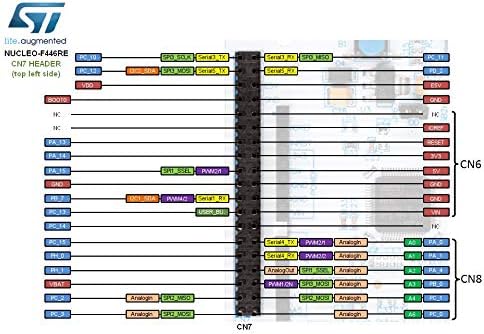
Figure 3: Pinout diagram illustrating the CN7 header connections for the NUCLEO-F446RE board.
4. Penyelenggaraan
To ensure the longevity and reliable operation of your NUCLEO-F446RE board, follow these general maintenance guidelines:
- Tangani dengan Berhati-hati: Avoid dropping or subjecting the board to physical shock.
- Pelepasan Statik: Always handle the board in an environment free of static electricity. Use an anti-static mat and wrist strap if possible.
- Persekitaran Bersih: Operate and store the board in a clean, dry, and dust-free environment.
- Pembersihan: If cleaning is necessary, use a soft, dry brush or compressed air to remove dust. Avoid liquid cleaners.
- Power Off Before Connecting/Disconnecting: Always disconnect power before connecting or disconnecting any shields, cables, or components to prevent damage.
5. Penyelesaian masalah
If you encounter issues with your NUCLEO-F446RE board, consider the following troubleshooting steps:
- No Power Indication (LEDs Off):
- Ensure the USB cable is securely connected to both the board (CN1) and the PC.
- Cuba port USB atau kabel lain.
- Verify that the PC's USB port is providing power.
- Check jumper settings, especially JP5 (PWR).
- ST-LINK/V2-1 Not Recognized by PC:
- Install the necessary ST-LINK drivers. These are usually part of the STM32CubeIDE or available on the STMicroelectronics webtapak.
- Cuba mulakan semula PC anda.
- Pastikan kabel USB berfungsi dengan betul.
- Application Not Running/Debugging Issues:
- Verify your development environment (IDE) is correctly configured for the STM32F446RET6 microcontroller.
- Check your code for errors and ensure it's compiled correctly.
- Ensure the debugger is connected and configured properly in your IDE.
- Reset the board using the reset button.
- Isu persisian:
- Double-check all wiring and connections to external components or shields.
- Verify that the correct pins are being used and initialized in your software.
- Consult the STM32F446RET6 datasheet and reference manual for peripheral configuration details.
6. Spesifikasi Teknikal
| Ciri | Perincian |
|---|---|
| Pengawal mikro | STM32F446RET6 (ARM Cortex-M4 with DSP and FPU) |
| Kelajuan CPU | 180 MHz |
| Memori Kilat | 512 KB |
| Penyahpepijat/Pengaturcara | On-board ST-LINK/V2-1 |
| Ketersambungan | USB (ST-LINK), Arduino Uno V3, ST Morpho headers |
| Antara Muka Pengguna | 1 user LED (shared with Arduino), 2 additional LEDs, 1 user button, 1 reset button |
| Pengayun | Kristal LSE 32.768 kHz |
| Bekalan Kuasa | ST-LINK USB VBUS or external sources |
| Berat Barang | 0.01 auns (lebih kurang) |
| Dimensi Pakej | 4.61 x 3.78 x 1.57 inci (lebih kurang) |
7. Waranti dan Sokongan
Specific warranty information for the STMicroelectronics NUCLEO-F446RE development board is typically provided at the point of purchase or on the official STMicroelectronics website. Please refer to the documentation included with your product or visit the manufacturer's webtapak untuk terma dan syarat jaminan terperinci.
For technical support, documentation, software downloads, and community forums, please visit the official STMicroelectronics support pages. These resources offer extensive information, FAQs, and assistance for developing with STM32 microcontrollers and Nucleo boards.
Official STMicroelectronics Webtapak: www.st.com/stm32nucleo