pengenalan
This manual provides instructions for the setup, operation, and maintenance of your Zelotes T20 Ergonomic Vertical Mouse. Please read this manual thoroughly before using the product to ensure proper function and longevity.
Produk Selesaiview
The Zelotes T20 is an ergonomic vertical mouse designed to promote a natural hand and wrist posture, reducing strain during extended use. It features adjustable DPI settings and multiple programmable buttons for enhanced control.

Figure 1: Zelotes T20 Ergonomic Vertical Mouse. This image displays the overall design of the mouse, highlighting its vertical orientation and LED lighting.
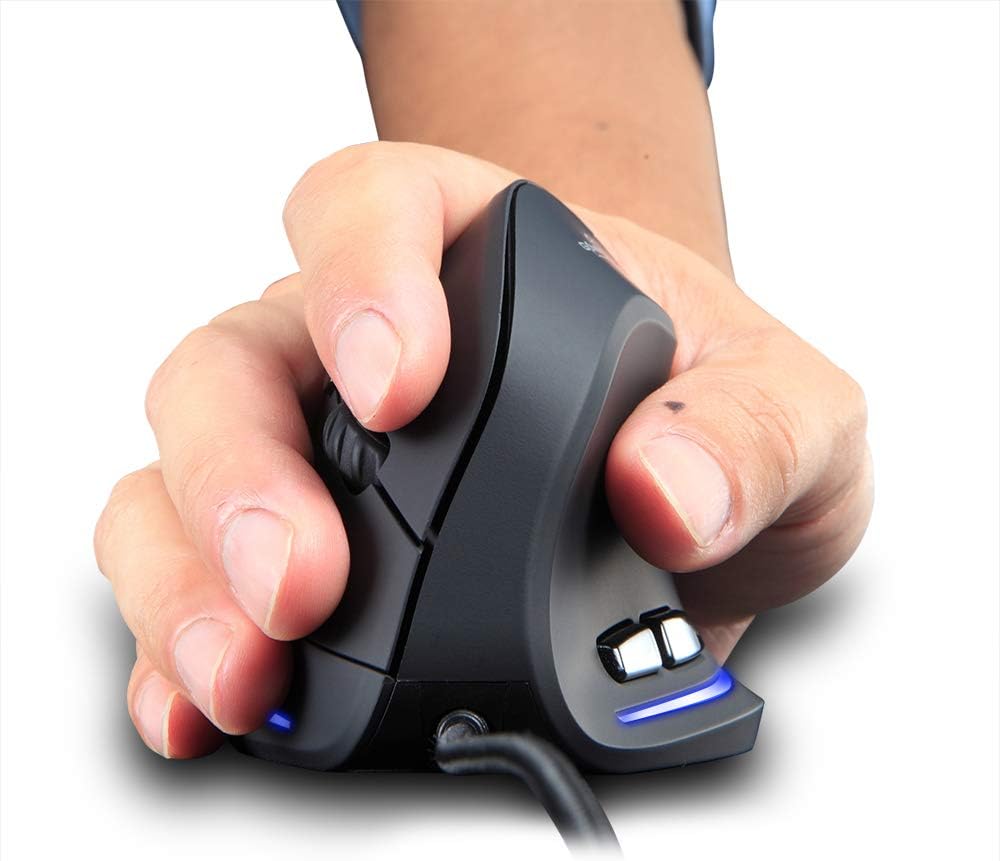
Figure 2: Proper hand placement on the Zelotes T20 mouse. This image illustrates how the vertical design allows for a natural handshake grip, intended to reduce wrist strain.

Figure 3: Ergonomic comparison. This diagram contrasts the natural wrist posture with a vertical mouse against the twisted posture often associated with traditional horizontal mice, emphasizing fatigue reduction.
Kandungan Pakej
Sahkan bahawa semua item terdapat dalam pakej:
- 1 x Zelotes Ergonomic Vertical Mouse
- 1 x Manual Arahan (dokumen ini)
Persediaan
- Sambungkan Tetikus: Plug the USB cable of the Zelotes T20 mouse into an available USB port on your computer.
- Pemasangan Pemandu: The mouse is plug-and-play. Your operating system should automatically detect and install the necessary drivers. No additional software installation is typically required.
- Keluarkan Filem Pelindung: Before use, locate and remove the protective film from the "Bigfoot pads" on the underside of the mouse for optimal gliding performance.

Figure 4: Underside of the mouse. This image shows the Teflon material pads and indicates the location of the protective film that should be removed before initial use.
Arahan Operasi
Fungsi Butang
The Zelotes T20 mouse features 6 buttons for various functions:
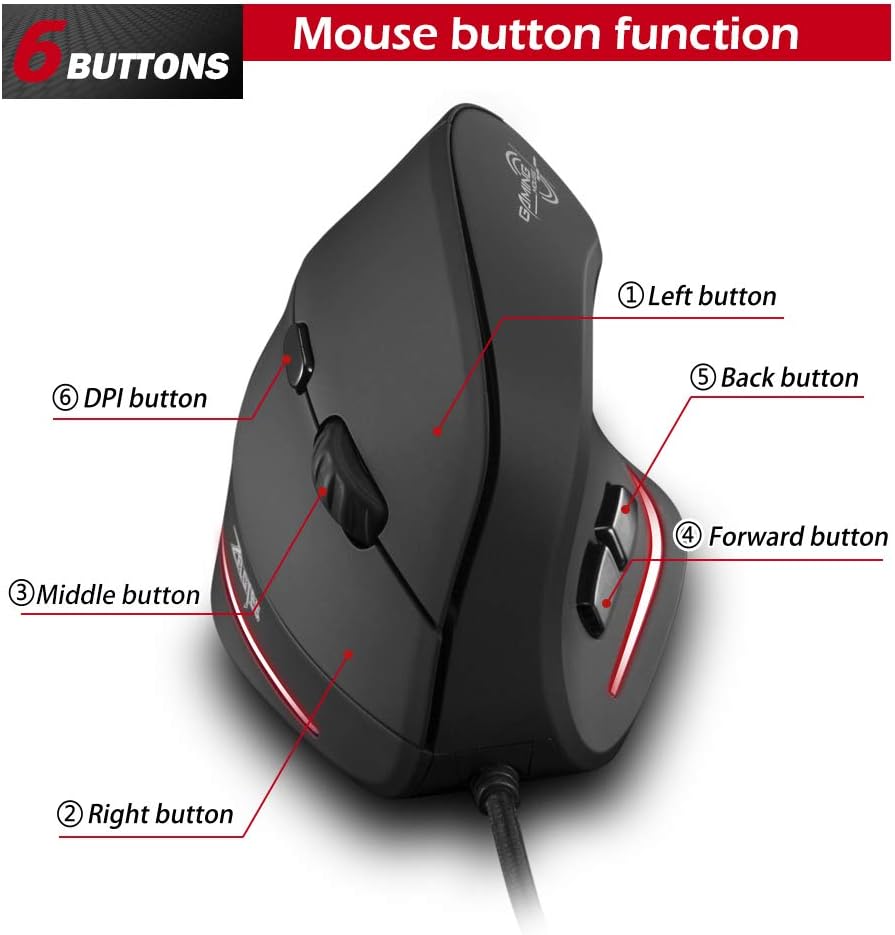
Figure 5: Mouse button layout. This diagram labels each of the six buttons: Left, Right, Middle (scroll wheel click), Forward, Back, and DPI adjustment button.
- Butang Kiri: Fungsi klik kiri standard.
- Butang Kanan: Fungsi klik kanan standard.
- Middle Button (Scroll Wheel): Clickable scroll wheel for middle-click functions.
- Butang ke hadapan: Navigasi ke hadapan web pelayar atau file penjelajah.
- Butang Belakang: Navigasi ke belakang web pelayar atau file penjelajah.
- Butang DPI: Melaraskan kepekaan tetikus (DPI).
Melaraskan DPI (Sensitiviti)
The mouse offers four adjustable DPI settings to suit different tasks and preferences. Press the DPI button (Button 6 in Figure 5) to cycle through the settings. Each DPI level is indicated by a specific LED light color:
- 1200 DPI: Blue light hint
- 1600 DPI: Dark purple light hint
- 2400 DPI: Red light hint
- 3200 DPI: Light purple light hint
The light will stay on for approximately 3 seconds when switching DPI settings to indicate the current level.

Figure 6: DPI adjustment and LED indicators. This image illustrates the DPI button and the color coding for each of the four sensitivity settings.
Using Forward/Back Keys
The dedicated Forward and Back buttons (Buttons 4 and 5 in Figure 5) provide quick navigation. These buttons are designed to streamline browsing through web pages or folders, reducing the need for on-screen clicks.

Figure 7: Forward and Back navigation buttons. This image highlights the placement of the forward and back buttons, designed for convenient web dan file navigasi.
Penyelenggaraan
- Pembersihan: Gunakan kain lembut dan kering untuk membersihkan permukaan tetikus. Untuk kotoran degil, gunakan sedikit kainamp cloth can be used, ensuring no liquid enters the mouse.
- Penyelenggaraan Sensor: Pastikan sensor optik di bahagian bawah tetikus bersih dan bebas daripada habuk atau serpihan untuk memastikan penjejakan yang tepat.
- Penjagaan Kabel: Elakkan selekoh tajam atau tarikan berlebihan pada kabel USB untuk mengelakkan kerosakan.

Figure 8: Mouse surface texture. This image provides a close-up view of the mouse's surface, described as smooth for comfortable handling.
Menyelesaikan masalah
- Tetikus Tidak Menjawab:
- Pastikan kabel USB dipasang dengan selamat ke dalam port USB yang berfungsi pada komputer anda.
- Cuba pasangkan tetikus ke port USB yang berbeza.
- Mulakan semula komputer anda.
- Penjejakan Tidak Tepat:
- Bersihkan sensor optik di bahagian bawah tetikus.
- Ensure you are using the mouse on a suitable surface (e.g., a mouse pad). Highly reflective or transparent surfaces may cause issues.
- Laraskan tetapan DPI menggunakan butang DPI.
- Buttons Not Functioning Correctly:
- Sahkan bahawa tetikus telah disambungkan dengan betul.
- Uji tetikus pada komputer lain untuk menentukan sama ada masalahnya adalah pada tetikus atau tetapan komputer.
Spesifikasi
| Ciri | Perincian |
|---|---|
| Model | T20 |
| Nombor Butang | 6 butang |
| Sistem Penjejakan | Optik |
| Panjang Kabel USB | 1.8m |
| Bekerja Voltage / Semasa | 5V/100mA |
| Hidup Butang | 5 juta kali |
| Roller Life | 1.2 million turns |
| Dimensi Produk (L x W x H) | 110 x 72 x 75 mm (4.33 x 2.83 x 2.95 inci) |
| Berat Produk | 160 ± 5g (5.6 auns) |
| Resolusi (DPI) | 1200-1600-2400-3200 |
| Rate of Return (Polling Rate) | 125Hz |
| Keserasian | Windows 2000/ME/XP (x64)/Vista/7/8/10, Mac OS X (over V10.4), Linux |

Figure 9: Product dimensions. This image provides detailed measurements of the mouse from various angles.
Waranti dan Sokongan
Untuk maklumat jaminan atau sokongan teknikal, sila rujuk kepada pihak berkuasa rasmi pengeluar webtapak atau hubungi bahagian perkhidmatan pelanggan mereka. Simpan resit pembelian anda sebagai bukti pembelian.


