1. Pengenalan
The Denver MRD-51 is a versatile multi-function music system designed to play various audio formats. It integrates a record player, DAB+ and FM/AM radio tuner, CD player, and cassette deck into a single unit. Additionally, it features a USB port for digitizing audio from CDs, records, or cassettes, and an AUX input for connecting external devices. The system includes two integrated stereo speakers for a complete audio experience.
2. Arahan Keselamatan
- Baca semua arahan dengan teliti sebelum mengendalikan peranti.
- Simpan manual ini untuk rujukan masa hadapan.
- Jangan dedahkan unit kepada hujan atau lembapan untuk mengelakkan kebakaran atau kejutan elektrik.
- Pastikan pengudaraan yang betul; jangan sekat sebarang bukaan pengudaraan.
- Letakkan unit pada permukaan yang stabil dan rata.
- Disconnect the power plug from the wall outlet if the unit is not in use for a long period.
- Jangan cuba servis unit sendiri. Rujuk semua servis kepada kakitangan perkhidmatan yang berkelayakan.
3. Kandungan Pakej
Sahkan bahawa semua item ada semasa membongkar:
- Denver MRD-51 Multi-Function Music System
- Kabel Kuasa
- Alat Kawalan Jauh
- Manual Pengguna
4. Produk Lebihview

Rajah 4.1: Denver MRD-51 Multi-Function Music System with turntable open. This image displays the Denver MRD-51 music system from a front-top perspective, with the turntable lid open and a vinyl record placed on the platter. The control panel, including the LCD display, knobs, and buttons, is visible below the turntable.

Rajah 4.2: Denver MRD-51 Multi-Function Music System, front view. A front view of the Denver MRD-51 music system with the turntable lid closed. This image highlights the integrated stereo speakers on the sides and the central control panel, emphasizing its classic design.
4.1 Kawalan Panel Hadapan
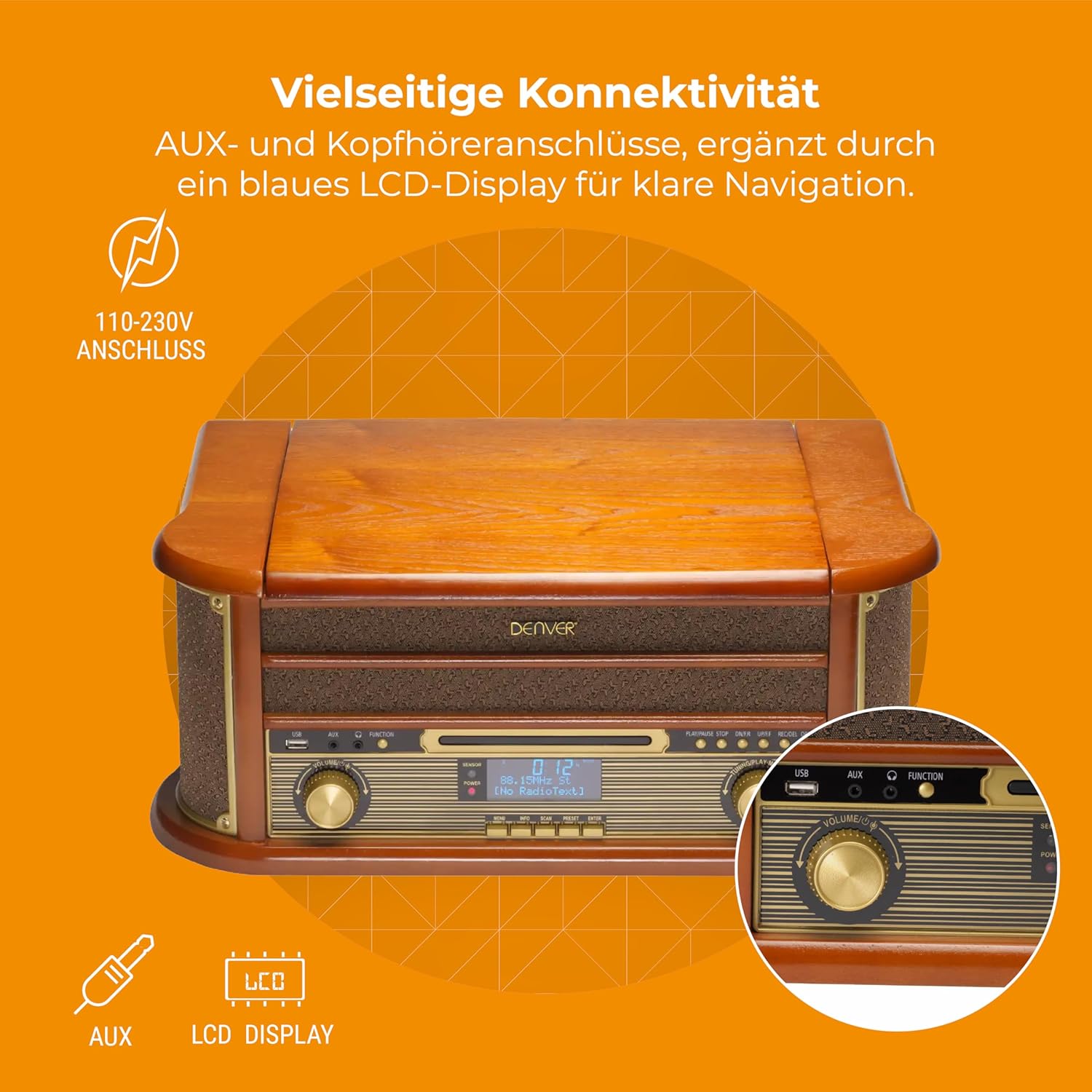
Rajah 4.3: Denver MRD-51 front panel with USB, AUX, and LCD display. A close-up of the Denver MRD-51's front control panel, showcasing the USB port, AUX input, and the blue LCD display for clear navigation. This view details the various connectivity options available.
- Butang kuasa: Menghidupkan atau mematikan unit.
- Butang FUNGSI: Selects between Turntable, CD, Cassette, DAB+, FM, AM, AUX, and USB modes.
- Port USB: For connecting USB storage devices for playback or recording.
- Input AUX: Bicu 3.5mm untuk menyambungkan sumber audio luaran.
- Paparan LCD: Shows current mode, track information, radio frequency, and other system status.
- Butang PLAY/PAUSE: Starts or pauses playback for CD, Cassette, or USB.
- Butang STOP: Menghentikan main balik.
- Butang LANGKAU (◀◀ / ▶▶): Melangkau trek atau maju pantas/putar balik.
- Butang REKOD: Initiates recording to USB.
- Tombol VOLUME: Melaraskan volum keluaran keseluruhan.
- Tombol PENALAAN: Adjusts radio frequency in FM/AM mode or navigates menus in DAB+ mode.
4.2 Turntable and Cassette Deck

Rajah 4.4: Denver MRD-51 showing open turntable and cassette deck. This image illustrates the versatility of the Denver MRD-51, featuring the open turntable with a record and an arrow pointing to the cassette deck slot on the side, indicating its multi-format playback capabilities.
- Pinggan Meja Putar: For playing vinyl records.
- Tone Arm with Stylus: Reads the grooves of vinyl records.
- Pemilih Kelajuan: Allows selection of 33, 45, or 78 RPM.
- Cassette Deck Slot: Untuk memasukkan kaset audio.
4.3 Pemain CD

Rajah 4.5: Denver MRD-51 with CD tray open and remote control. This image shows the Denver MRD-51 with its CD tray open, ready for disc insertion. A remote control is also pictured, indicating convenient operation of the system's functions.
- Dulang CD: Untuk memasukkan cakera padat.
- Butang BUKA/TUTUP: Opens and closes the CD tray.
5. Persediaan
5.1 Membongkar dan Meletakkan
- Keluarkan unit dengan berhati-hati dari pembungkusannya.
- Place the unit on a flat, stable surface away from direct sunlight, heat sources, and excessive dust or moisture.
- Pastikan terdapat ruang yang mencukupi di sekeliling unit untuk pengudaraan.
5.2 Sambungan Kuasa
- Connect the power cable to the AC IN socket on the rear of the unit.
- Plug the other end of the power cable into a standard wall outlet (110-230V).
5.3 Sambungan Antena
For optimal radio reception, extend the telescopic antenna fully for FM/DAB+ or adjust its position for AM.
6. Arahan Operasi
6.1 Operasi Am
- Tekan ke KUASA butang untuk menghidupkan unit.
- Tekan ke FUNGSI button repeatedly to cycle through available modes: Turntable, CD, Cassette, DAB+, FM, AM, AUX, USB.
- Laraskan JILID tombol ke tahap pendengaran yang anda inginkan.
6.2 Operasi Meja Putar
- Select the 'Turntable' function.
- Open the turntable lid.
- Letakkan rekod vinil di atas pinggan.
- Set the speed selector to match the record's speed (33, 45, or 78 RPM). For 45 RPM records, use the included adapter if necessary.
- Gently lift the tone arm and position the stylus over the desired track on the record.
- Turunkan lengan nada perlahan-lahan ke atas rekod. Main balik akan bermula.
- At the end of the record, the tone arm may automatically return to its rest, or you may need to manually lift and return it.
6.3 Operasi Pemain CD
- Select the 'CD' function.
- Tekan ke BUKA/TUTUP butang untuk membuka dulang CD.
- Place a CD (CD/CD-R/CD-RW compatible) with the label side facing up into the tray.
- Tekan ke BUKA/TUTUP button again to close the tray. The unit will read the disc.
- Tekan MAIN/JEDA untuk memulakan main balik.
- Gunakan SKIP butang (◀◀ / ▶▶) untuk menavigasi antara trek.
- Tekan BERHENTI untuk menamatkan main balik.
6.4 Operasi Pemain Kaset
- Select the 'Cassette' function.
- Insert an audio cassette into the cassette deck slot until it clicks into place.
- Tekan ke BERMAIN button (often integrated with the cassette mechanism) to start playback.
- Gunakan BERHENTI button to end playback. Fast forward and rewind functions are typically available via dedicated buttons on the cassette deck.
6.5 Radio Operation (DAB+/FM/AM)
- Select the desired radio function (DAB+, FM, or AM).
- For DAB+ Radio: The unit will typically perform an automatic scan for available stations upon first use. Use the MENALA tombol atau SKIP buttons to navigate through the list of stations.
- For FM/AM Radio: Gunakan MENALA knob to manually tune to a station. The frequency will be displayed on the LCD.
6.6 Rakaman USB
The MRD-51 allows you to digitize audio from your records, CDs, or cassettes directly to a USB storage device.
- Masukkan pemacu kilat USB ke dalam Port USB.
- Select the source function you wish to record from (Turntable, CD, or Cassette).
- Start playback of the audio source (e.g., play a record, CD, or cassette).
- Tekan ke REKOD button. The recording indicator on the display will illuminate, and recording will begin.
- Tekan ke REKOD butang sekali lagi atau BERHENTI button to end the recording. The recorded file akan disimpan pada pemacu USB.
6.7 Input AUX
- Sambungkan peranti audio luaran (cth., telefon pintar, pemain MP3) ke Input AUX menggunakan kabel audio 3.5mm.
- Select the 'AUX' function.
- Start playback on your external device. The audio will be played through the MRD-51's speakers.
7. Penyelenggaraan
7.1 Membersihkan Unit
- Sentiasa cabut plag unit daripada salur keluar kuasa sebelum membersihkan.
- Gunakan kain lembut dan kering untuk mengelap permukaan luar.
- Jangan gunakan pembersih yang melelas, lilin atau pelarut.
7.2 Turntable Stylus Care
- Gently clean the stylus regularly with a soft brush, brushing from back to front.
- Elakkan daripada menyentuh stylus dengan jari anda.
- Replace the stylus when sound quality deteriorates or if it is visibly damaged.
7.3 CD/Cassette Player Care
- Handle CDs and cassettes by their edges to avoid fingerprints and scratches.
- Keep the CD tray and cassette deck free of dust and debris.
8. Penyelesaian masalah
| Masalah | Kemungkinan Punca | Penyelesaian |
|---|---|---|
| Tiada kuasa | Power cable not connected; Wall outlet not active | Ensure power cable is securely connected; Try a different outlet |
| Tiada bunyi | Volume too low; Incorrect function selected; External device not playing | Increase volume; Select correct function; Ensure external device is playing and connected properly |
| Turntable not spinning or poor sound | Speed setting incorrect; Stylus dirty or damaged; Record dirty | Adjust speed selector; Clean or replace stylus; Clean record |
| CD tidak dimainkan | CD inserted incorrectly; CD scratched or dirty; CD format not supported | Reinsert CD correctly; Clean or replace CD; Ensure CD is CD/CD-R/CD-RW format |
| Penerimaan radio yang lemah | Antena tidak dipanjangkan/diletakkan dengan betul; Isyarat lemah | Extend and adjust antenna; Try repositioning the unit |
| Rakaman USB tidak berfungsi | USB drive full or incompatible; Source not playing | Use a different USB drive or clear space; Ensure audio source is playing during recording |
9. Spesifikasi
| Ciri | Spesifikasi |
|---|---|
| Dimensi Produk | 20.08 x 13.39 x 8.46 inci |
| Berat Barang | 15.18 paun (6.9 Kilogram) |
| Nombor Model | MRD-51 (Internal: 111201210000) |
| Jenama | Denver |
| Kelajuan Putaran Maksimum | 78 RPM (supports 33, 45, 78 RPM) |
| Komponen yang Disertakan | MRD-51 unit |
| Ciri Khas | Adjustable Speed, Digital Recorder, Integrated Speakers |
| bahan | Aluminum (internal components), Wood (housing) |
| warna | kayu |
| Peranti Serasi | Personal Computer (for USB transfer) |
| Penala Radio | DAB+, FM, AM |
| Pemain CD | Supports CD/CD-R/CD-RW |
| Output Audio | Pembesar suara Stereo 2 x 2.5W |
10. Waranti dan Sokongan
For warranty information and technical support, please refer to the documentation provided with your purchase or contact Denver customer service through their official webtapak. Simpan bukti pembelian anda untuk sebarang tuntutan waranti.


