1. Pengenalan dan Lebihview
The DJI Mavic Air is a compact, foldable drone designed for portability and advanced aerial photography. It features a 3-axis gimbal with a 4K camera, 32 MP sphere panoramas, and intelligent flight modes for an enhanced user experience. This manual provides essential information for setting up, operating, and maintaining your Mavic Air drone.

Figure 1: DJI Mavic Air drone in Arctic White.
2. Kandungan Pakej
The DJI Mavic Air Fly More Combo package includes the following items:
- MAVIC AIR Aircraft
- MAVIC AIR Remote Controller
- Three Intelligent Flight Batteries
- MAVIC AIR Gimbal Protector
- Six pairs of Quick-Release Propellers
- Two Control Sticks
- MAVIC AIR Carrying Case
- Propeller Guards (set)
- MAVIC AIR Travel Bag
- MAVIC AIR Battery Charging Hub
- MAVIC AIR Battery to Power Bank Adapter
- Kabel RC (penyambung kilat)
- Kabel RC (Penyambung Micro USB Standard)
- Kabel RC (penyambung USB Type-C)
- Communication Cable (USB 3.0 Type-C)
- Penyesuai USB
- Two RC Cable Sliders (large)
- Two RC Cable Sliders (small)
- Aksesori lain
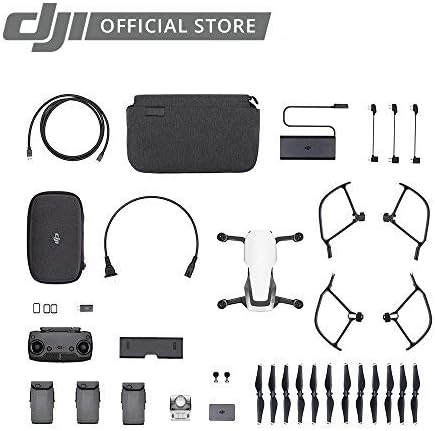
Figure 2: Contents of the DJI Mavic Air Fly More Combo.
3. Persediaan
3.1 Membuka Lipatan Pesawat
- Gently unfold the front arms of the drone.
- Unfold the rear arms. Ensure all arms click into place securely.
Video 1: Demonstrating the folding and unfolding of the DJI Mavic Air drone arms.
3.2 Pemasangan Bateri
- Pastikan Bateri Penerbangan Pintar dicas sepenuhnya.
- Slide the battery into the battery compartment on the top of the aircraft until it clicks into place.
3.3 Persediaan Alat Kawalan Jauh
- Buka lipatan peranti mudah alih clamps pada alat kawalan jauh.
- Attach your smartphone to the remote controller using the appropriate RC cable (Lightning, Micro USB, or USB Type-C).
- Ensure the control sticks are securely screwed into place.
Video 2: Attaching a smartphone to the DJI Mavic Air remote controller.
3.4 DJI GO 4 App
Download and install the DJI GO 4 app on your mobile device. This app is essential for controlling the drone, accessing flight modes, and viewsuapan kamera.
4. Arahan Operasi
4.1 Menghidupkan/Mematikan
- To power on the aircraft and remote controller, press the power button once, then press and hold it for two seconds.
- To power off, repeat the same procedure.
4.2 Berlepas dan Mendarat
- Pelepasan Automatik: In the DJI GO 4 app, tap the auto-takeoff icon and confirm. The drone will ascend to a preset height.
- Berlepas Manual: Push both control sticks to the bottom inner or outer corners to start the motors. Then, push the left stick up to ascend.
- Pendaratan Automatik: In the DJI GO 4 app, tap the auto-landing icon and confirm. The drone will descend and land automatically.
- Pendaratan Manual: Pull the left control stick down slowly to descend. Once landed, hold the stick down for a few seconds to stop the motors.
4.3 Mod Penerbangan
The Mavic Air offers various flight modes:
- P-Mode (Positioning): Provides GPS and vision positioning for stable flight and obstacle avoidance.
- S-Mode (Sport): Increases flight speed and agility, disabling obstacle avoidance. Use with caution.
- T-Mode (Tripod): Limits flight speed for precise control and stable shots.
4.4 Mod Penerbangan Pintar
Access these modes via the DJI GO 4 app:
- QuickShots: Pre-programmed flight paths for cinematic shots (Rocket, Dronie, Circle, Helix, Asteroid, Boomerang).
- ActiveTrack: Follows a selected subject automatically.
- TapFly: Tap a point on your screen, and the drone will fly to it while avoiding obstacles.
- SmartCapture: Control the drone with hand gestures for intuitive photo and video capture.
5. Ciri-ciri
- 32 MP Sphere Panoramas: Stitches 25 photos in eight seconds for crystal clear sphere panoramas.
- Lightweight and Compact Foldable Design: Mudah diangkut dan disimpan.
- 3-Axis Gimbal & 4K Camera: Supports 4K video at 30 fps and 12 MP stills with Adobe DNG RAW support. The gimbal stabilizes the camera for smooth footage.
- Julat Kawalan Lanjutan: Control your drone from up to 6562 feet away.
- Bateri Penerbangan Pintar: Provides up to 21 minutes of flight time per charge.
- Dedicated Remote Controller: Features a foldable, ergonomic design with detachable control sticks.
- 3-Directional Environment Sensing: Equipped with five vision sensors, GPS, GLONASS, ultrasonic range finders, and redundant sensors for safe flight and obstacle avoidance.
- Storan Dalaman 8GB: Allows for direct storage of photos and videos, expandable via microSD card.

Figure 3: The DJI Mavic Air in its folded, compact state.
Video 3: Selesaiview of the DJI Mavic Air drone's features, including its compact size and camera capabilities.
6. Penyelenggaraan
6.1 Penjagaan Baling-Baling
- Regularly inspect propellers for cracks, bends, or damage. Replace damaged propellers immediately.
- Pastikan kipas dipasang dengan selamat sebelum setiap penerbangan.
6.2 Penyelenggaraan Bateri
- Simpan bateri di tempat yang sejuk dan kering.
- Jangan cas berlebihan atau terlalu nyahcas bateri.
- Jika menyimpan untuk tempoh yang lama, nyahcas bateri sehingga kapasiti 50-60%.
6.3 Perlindungan Gimbal
Always attach the gimbal protector when transporting the drone to prevent damage to the camera and gimbal system.
Video 4: Demonstrating the installation and removal of the gimbal protector on the DJI Mavic Air drone.
7. Penyelesaian masalah
- Tiada Isyarat GPS: Ensure you are flying in an open area away from tall buildings or interference.
- Pemutusan Sambungan Apl: Check the connection cable between your smartphone and the remote controller. Restart the app or drone if necessary.
- Penghindaran Halangan Tidak Berfungsi: Ensure vision sensors are clean and unobstructed. Obstacle avoidance may be limited in certain lighting conditions or flight modes (e.g., Sport Mode).
- Masa Penerbangan Singkat: Ensure batteries are fully charged. Cold weather can reduce battery performance.
8. Spesifikasi
| Ciri | Spesifikasi |
|---|---|
| Jenama | DJI |
| Nama Model | Mavic Air |
| warna | putih |
| Resolusi Tangkapan Video | 1080p (up to 4K at 30 fps) |
| Resolusi Pegun Berkesan | 12 MP |
| Teknologi Ketersambungan | USB 3.0 Type-C port, Wi-Fi |
| Berat Barang | 15.2 auns (0.95 paun) |
| Format Tangkapan Video | MP4/MOV (H.264/MPEG-4 AVC) |
| Julat Maksimum | 6562 Kaki |
| Komposisi Sel Bateri | Litium Ion |
| Bateri Diperlukan | 3 bateri Litium Polimer (termasuk) |
| Dimensi Produk | 6.5 x 1.57 x 3.24 inci |
9. Waranti dan Sokongan
Untuk maklumat jaminan terperinci dan sokongan teknikal, sila rujuk kepada DJI rasmi webtapak atau hubungi perkhidmatan pelanggan DJI. Simpan bukti pembelian anda untuk tuntutan waranti.
Video 5: Demonstrating the DJI Mavic Air carrying case, highlighting its hard shell for protection during travel.
Video 6: Demonstrating the DJI Mavic Air shoulder bag, showing its compartments for accessories and drone storage.


