pengenalan
The KLIM Pulse Bluetooth 4.1 In-Ear Earphones are designed to provide a high-quality audio experience with wireless convenience. Featuring Bluetooth 4.1 connectivity, noise insulation, and a comfortable fit, these earphones are suitable for various activities including sports, music listening, and making calls. The magnetic tips offer easy storage, and the included memory foam ear tips ensure a secure and comfortable fit for extended use.

Image: The KLIM Pulse Bluetooth 4.1 In-Ear Earphones, showcasing their sleek black design and magnetic earbud feature.
Kandungan Pakej
Upon opening your KLIM Pulse earphone package, you should find the following items:
- KLIM Pulse Bluetooth 4.1 In-Ear Earphones
- Kabel Pengecas USB
- Manual Pengguna
- Various sizes and types of ear tips (including memory foam), totaling 12 pieces.
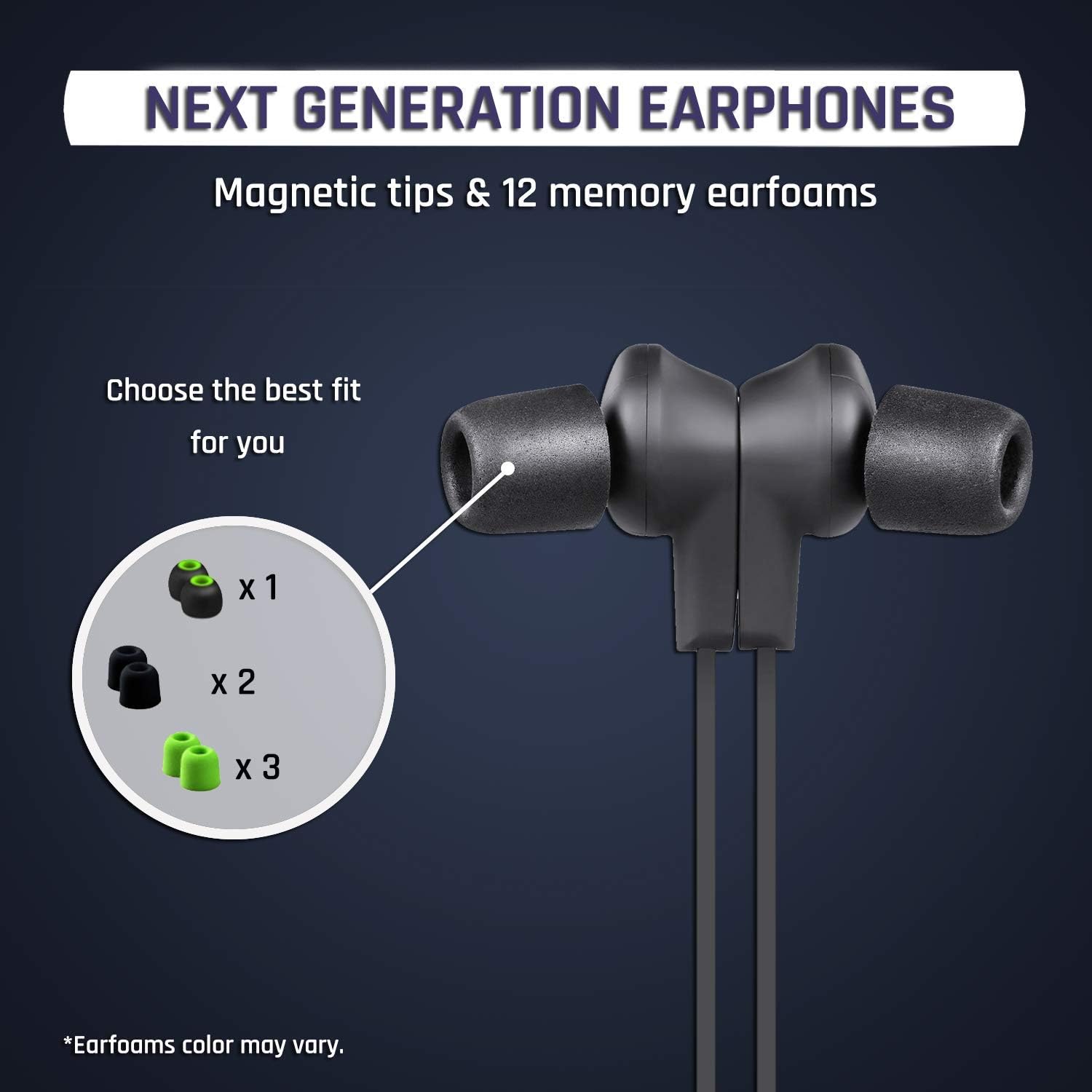
Imej: Dari dekat view of the KLIM Pulse earphones with various ear tip options, highlighting the magnetic tips and different earfoam colors.
Persediaan
1. Mengecas Fon Telinga
Before initial use, fully charge your KLIM Pulse earphones. A full charge typically takes approximately 2 hours and provides up to 6 hours of uninterrupted listening time.
- Connect the micro-USB end of the charging cable to the charging port on the earphone control unit.
- Connect the USB-A end of the charging cable to a compatible USB power source (e.g., computer USB port, USB wall adapter).
- The LED indicator on the control unit will illuminate during charging and change color or turn off when charging is complete.

Image: The KLIM Pulse earphones with glowing blue circles, illustrating the charging process and battery life.
2. Memilih Hujung Telinga
The KLIM Pulse earphones come with 12 different ear tips, including memory foam options, to ensure a comfortable and secure fit. Experiment with different sizes and materials to find the best fit for your ears. A proper fit is crucial for optimal sound quality and noise insulation.
- Tanggalkan hujung telinga yang telah dipasang dengan perlahan.
- Pilih sepasang hujung telinga yang terasa selesa dan ciptakan kedap yang baik pada saluran telinga anda.
- Attach the chosen ear tips firmly to the earphone nozzles.
3. Berpasangan Bluetooth
The KLIM Pulse earphones are compatible with all Bluetooth-enabled devices (phones, laptops, tablets, etc.).
- Ensure the earphones are charged and turned off.
- Press and hold the multi-function button (usually the power button) on the control unit until the LED indicator flashes red and blue, indicating pairing mode.
- Pada peranti anda, dayakan Bluetooth dan cari peranti yang tersedia.
- Select "KLIM Pulse" from the list of found devices.
- Setelah dipasangkan, penunjuk LED biasanya akan berkelip biru perlahan atau bertukar menjadi biru pekat.

Image: The KLIM Pulse earphones alongside icons for a laptop, phone, and tablet, illustrating their broad compatibility with Bluetooth devices.
Arahan Operasi
Kawalan Asas
The control unit on your KLIM Pulse earphones allows for easy management of audio playback and calls.
| Butang/Tindakan | Fungsi |
|---|---|
| Butang Kuasa (Berbilang fungsi) |
|
| Kelantangan Naik (+) |
|
| Perlahankan suara (-) |
|
Membuat dan Menerima Panggilan
- Menjawab Panggilan: Tekan Butang Kuasa sekali.
- Menamatkan Panggilan: Press the Power Button once during a call.
- Menolak Panggilan: Tekan dan tahan Butang Kuasa selama 2 saat.
- Dail semula: Double-press the Power Button to redial the last number.
Ciri Magnet
The KLIM Pulse earphones feature magnetic tips. When not in use, you can snap the earbuds together around your neck to prevent them from falling off and for convenient storage.

Image: A woman wearing KLIM Pulse earphones, demonstrating their comfortable fit and suitability for active use.
Penyelenggaraan
To ensure the longevity and optimal performance of your KLIM Pulse earphones, follow these maintenance guidelines:
- Pembersihan: Regularly wipe the earphones and ear tips with a soft, dry, lint-free cloth. For ear tips, you can gently clean them with a damp kain dan sabun lembut, pastikan ia kering sepenuhnya sebelum dilekatkan semula.
- Storan: When not in use, store the earphones in a clean, dry place, away from extreme temperatures and direct sunlight. The magnetic tips help keep them tangle-free.
- Elakkan Kelembapan: While the earphones have some water resistance, avoid submerging them in water or exposing them to heavy rain.
- Tangani dengan Berhati-hati: Do not pull on the cable excessively or apply undue force to the earbuds or control unit.
Menyelesaikan masalah
If you encounter issues with your KLIM Pulse earphones, refer to the following common solutions:
| Masalah | Penyelesaian yang Mungkin |
|---|---|
| Fon telinga tidak dihidupkan. | Pastikan fon telinga dicas sepenuhnya. Sambungkannya ke sumber kuasa dan periksa penunjuk pengecasan. |
| Tidak boleh berpasangan dengan peranti. |
|
| Tiada bunyi atau kualiti bunyi yang buruk. |
|
| Earphones keep disconnecting. |
|
Spesifikasi
| Ciri | Perincian |
|---|---|
| Nama Model | KLPB |
| Jenama | Klim |
| Teknologi Ketersambungan | Wayarles (Bluetooth 4.1) |
| Faktor Bentuk | Di Telinga |
| warna | Hitam |
| bahan | Memory Foam (ear tips) |
| Berat Barang | 18.1 g (0.04 Paun) |
| Dimensi Produk | 60 x 1.9 x 2.3 cm |
| Julat Kekerapan | 20 Hz - 20,000 Hz |
| Hayat Bateri | Sehingga 6 jam (lebih kurang) |
| Masa Mengecas | lebih kurang 2 jam |
| Peranti Serasi | Mobile Phones, Laptops, Tablets, Smart Speakers, TVs, Car Audio Systems, Game Consoles, Music Production Equipment, Motorcycles |

Image: An infographic displaying various features of the KLIM Pulse earphones, including Bluetooth dual connectivity, magnetic design, voice calls, Hi-Fi sound quality, and compatibility with multiple operating systems.
Maklumat Waranti
The KLIM Pulse earphones come with a Waranti 2 tahun dari tarikh pembelian. Waranti ini meliputi kecacatan pembuatan dan memastikan prestasi yang boleh dipercayai. Sila simpan bukti pembelian anda untuk tuntutan waranti.
For any warranty-related inquiries or issues, please contact KLIM customer support.
Sokongan Pelanggan
If you require further assistance or have questions not covered in this manual, please contact KLIM customer support. Our European team aims to provide a response within 24 hours.
- e-mel: contact@klimtechs.com
- Webtapak: www.klimtechs.com


