pengenalan
This manual provides detailed instructions for the setup, operation, and maintenance of your Acer R271 bid 27-inch IPS Full HD (1920 x 1080) Display. Please read this manual thoroughly before using your monitor to ensure proper functionality and to maximize your viewpengalaman dalam.

Depan view of the Acer R271 bid 27-inch IPS Full HD Display.
Persediaan
Kandungan Pakej
Sahkan bahawa semua komponen terdapat dalam pakej:
- Acer R271 bid 27-inch Display
- Papan Monitor
- Kord Kuasa
- Kabel HDMI (mungkin berbeza mengikut wilayah)
- Kabel VGA (mungkin berbeza mengikut wilayah)
Perhimpunan Pantau
To assemble the monitor, carefully attach the stand to the back of the display panel. Ensure it clicks securely into place. Place the monitor on a stable, flat surface.
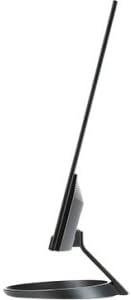
sebelah view illustrating the slim design of the Acer R271 bid monitor.
Menyambung Monitor
The Acer R271 bid monitor supports multiple input options. Connect the appropriate cable from your computer or device to the corresponding port on the monitor.
- HDMI: Untuk video dan audio digital definisi tinggi.
- DVI (w/HDCP): For digital video connection.
- VGA: Untuk sambungan video analog.
Selepas menyambungkan kabel video, sambungkan kord kuasa ke monitor dan kemudian ke soket kuasa.
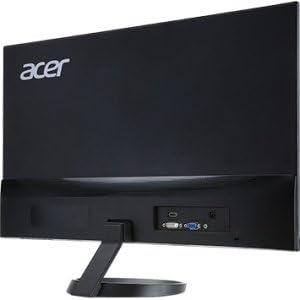
belakang view of the Acer R271 bid monitor, highlighting the HDMI, DVI, and VGA input ports.
Menghidupkan
Press the power button, usually located on the bottom right side of the monitor, to turn on the display. The monitor will automatically detect the active input source.
Arahan Operasi
Fungsi Asas
Use the buttons located on the bottom bezel of the monitor to navigate the On-Screen Display (OSD) menu. These buttons typically allow you to:
- Power On/Off the monitor.
- Select input source (HDMI, DVI, VGA).
- Adjust volume (if applicable).
- Access the OSD menu for advanced settings.
Tetapan Paparan
The OSD menu provides options to customize your display. Common adjustments include:
- Kecerahan: Laraskan kecerahan keseluruhan skrin.
- Kontras: Modify the difference between light and dark areas.
- Tetapan Warna: Tala halus suhu warna, gamma dan tahap RGB individu.
- Mod Gambar: Select preset modes for different content types (e.g., Standard, Movie, Game).
Ciri-ciri Utama
The Acer R271 bid monitor incorporates several features designed to enhance your viewpengalaman:
- Teknologi IPS: Provides clear and bright colors from wide viewing angles (up to 178 degrees).
- Reka Bentuk ZeroFrame: An edge-to-edge display that minimizes bezels, ideal for multi-monitor setups.
- Teknologi Pelindung Mata: Includes features like Blue Light Filter, Flicker-less, and ComfyView untuk mengurangkan ketegangan mata semasa penggunaan berpanjangan.
Tayangan video produk rasmicasing the Acer R1 Series monitor's features, including ZeroFrame design, Full HD resolution, IPS technology for wide viewing angles, and Eye Protect technology for user comfort.
Penyelenggaraan dan Penjagaan
Membersihkan Monitor
Untuk membersihkan skrin, lap perlahan-lahan dengan kain lembut yang tidak berbulu. Untuk tanda degil, dampen the cloth with a mild, non-abrasive screen cleaner. Avoid using alcohol-based cleaners or spraying liquid directly onto the screen.
Penjagaan Am
Keep the monitor away from direct sunlight, excessive heat, and moisture. Do not block the ventilation openings. Avoid placing heavy objects on the monitor or its cables.
Menyelesaikan masalah
No Display or "No Signal" Message
- Pastikan kabel kuasa disambungkan dengan selamat ke kedua-dua monitor dan salur keluar kuasa.
- Verify that the video cable (HDMI, DVI, or VGA) is firmly connected to both the monitor and your computer.
- Periksa sama ada sumber input yang betul dipilih pada monitor menggunakan menu OSD.
- Sahkan bahawa komputer anda telah dihidupkan dan bukan dalam mod tidur.
Kualiti Imej Lemah
- Adjust the brightness, contrast, and color settings through the OSD menu.
- Pastikan resolusi paparan komputer anda ditetapkan kepada resolusi asli monitor (1920 x 1080).
- Check for any physical damage to the video cable or ports.
Spesifikasi
| Ciri | Spesifikasi |
|---|---|
| Saiz Skrin | 27 Inci |
| Resolusi Skrin | 1920 x 1080 (HD Penuh) |
| Jenis Panel | IPS |
| Masa Tindak Balas | 4ms |
| Pitch Piksel | 0.311mm |
| Kecerahan | 250 nit |
| Input Isyarat | 1 x HDMI, 1 x DVI (w/HDCP), 1 x VGA |
| Nisbah Aspek | 16:9 |
| Berat Barang | 8.05 paun |
| Dimensi Produk (LxWxH) | 24.8 x 18.1 x 9.4 inci |
| warna | Hitam |

Detailed dimensions of the Acer R271 bid monitor.
Maklumat Waranti
The Acer R271 bid monitor typically comes with a 3-year limited warranty. Please refer to the warranty card included with your product or visit the official Acer website for specific terms and conditions, as warranty details may vary by region and retailer.
Sokongan Pelanggan
Untuk bantuan lanjut, sokongan teknikal atau untuk memuat turun pemacu dan perisian terkini, sila lawati sokongan rasmi Acer. webtapak:
You may also contact Acer customer service directly for personalized support.


