1. Pengenalan
This manual provides essential information for the safe and efficient use of your Somfy Universal RTS Interface II (URTS II). Please read these instructions carefully before installation and operation. Keep this manual for future reference.
The Somfy Universal RTS Interface II is designed to integrate Somfy RTS (Radio Technology Somfy) motorized products with third-party control systems, offering 16 channels of control. It allows for seamless automation and enhanced control over your motorized window coverings, awnings, and other RTS-enabled devices.
2. Produk Lebihview
The Somfy Universal RTS Interface II (URTS II) acts as a bridge between your Somfy RTS motors and various home automation systems. It receives commands from a third-party controller (e.g., RS232, RS485, or contact closure) and translates them into RTS radio signals to operate your Somfy motorized products.

Figure 2.1: Somfy Universal RTS Interface II (URTS II) device. This image shows the compact white rectangular unit with the Somfy logo.
Ciri-ciri Utama:
- 16 independent RTS channels for controlling multiple devices or groups.
- Multiple input options for integration with various control systems.
- Reka bentuk padat untuk pemasangan mudah.
- Enables advanced automation scenarios when paired with a compatible home automation hub.
3. Persediaan & Pemasangan
Pemasangan yang betul adalah penting untuk prestasi optimum. Adalah disyorkan agar pemasangan dilakukan oleh profesional yang berkelayakan.
3.1. Kandungan Pakej
- Somfy Universal RTS Interface II (URTS II) unit
- Power Adapter (if included with your model)
- Perkakasan pemasangan
- Manual arahan ini
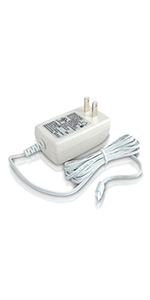
Gambar 3.1: Cthample of a Somfy power adapter. Ensure you use the correct power supply for your device.
3.2. Mounting the Interface
- Choose a suitable location for the interface, ideally centrally located within the range of your RTS devices and near your control system.
- Ensure the location is dry, protected from extreme temperatures, and away from potential sources of radio interference.
- Use the provided mounting hardware to securely attach the interface to a wall or other stable surface.
3.3. Pendawaian dan Sambungan
- Sambungan Kuasa: Connect the power adapter to the interface and plug it into a standard electrical outlet.
- Control System Connection: Connect your third-party control system to the appropriate input ports on the URTS II (e.g., RS232, RS485, or contact closure terminals). Refer to your control system's manual for specific wiring diagrams.
- Antena: Ensure the RTS antenna is properly positioned for optimal signal transmission. Avoid coiling the antenna or placing it near large metal objects.
3.4. Programming RTS Motors
The URTS II must be programmed to control your RTS motors. This typically involves putting the motor into programming mode and then sending a programming command from the URTS II or a connected control system. Consult the specific programming instructions for your Somfy RTS motor and your third-party control system.
For programming with the TaHoma switch, refer to the following video tutorial:
Video 3.1: How to Program the TaHoma Switch with Somfy RTS Motors. This video demonstrates the step-by-step process of connecting and programming Somfy RTS motors using the TaHoma switch application. It covers initial setup, device detection, and naming devices within the app.
4. Operasi
Once the Somfy Universal RTS Interface II is properly installed and programmed, operation is typically managed through your connected third-party control system. The URTS II translates commands from your control system into RTS signals to operate your motorized products.
- Menghantar Perintah: Use your home automation system's interface (e.g., touchscreen, app, voice command) to send commands (Open, Close, My/Stop) to the specific RTS channels linked to your motors.
- Kawalan Saluran: Each of the 16 channels on the URTS II can control an individual RTS motor or a group of RTS motors that have been programmed to that channel.
- "My" Position: The "My" button on RTS controls allows you to set a favorite intermediate position. This position can also be triggered via the URTS II if supported by your control system.
5. Penyelenggaraan
The Somfy Universal RTS Interface II is designed for minimal maintenance. Follow these guidelines to ensure its longevity:
- Pembersihan: Bersihkan bahagian luar unit dengan kain lembut dan kering. Jangan gunakan pembersih atau pelarut yang kasar.
- Persekitaran: Ensure the unit remains in a dry environment, free from excessive dust, moisture, and extreme temperatures.
- Kemas kini Firmware: Periodically check the Somfy website or your control system's documentation for any available firmware updates for the URTS II. Follow the instructions provided for updating.
6. Penyelesaian masalah
If you experience issues with your Somfy Universal RTS Interface II, consult the following common troubleshooting steps:
| Masalah | Kemungkinan Punca | Penyelesaian |
|---|---|---|
| Motor not responding to commands. |
|
|
| Interface LED not illuminating. |
|
|
| Kawalan sekejap-sekejap. |
|
|
If problems persist after attempting these steps, contact Somfy technical support or your installer.
7. Spesifikasi
- model: URTS II (Universal RTS Interface II)
- Nombor Bahagian: 1810872
- Saluran Kawalan: 16 RTS Channels
- Dimensi: 3 x 1.75 x 4 inci (anggaran)
- Berat Barang: 0.01 auns (anggaran)
- Frekuensi radio: RTS (Teknologi Radio Somfy)
- Input Voltage: (Specific voltage not provided, typically low voltage DC via adapter)
- Ketersambungan: RS232, RS485, Contact Closure (check specific model for all available inputs)
- Suhu Operasi: (Not provided, typically indoor residential range)
Note: Specifications are subject to change without notice. Refer to the product packaging or Somfy's official weblaman web untuk maklumat terkini.
8. Waranti & Sokongan
Somfy products are designed and manufactured to the highest quality standards. For detailed warranty information, please refer to the warranty card included with your product or visit the official Somfy webtapak.
Sokongan Pelanggan:
If you require technical assistance, have questions about installation, or need to report a product issue, please contact Somfy customer support. Contact information can typically be found on the Somfy webtapak atau pada pembungkusan produk anda.
Sumber Dalam Talian:
- Lawati Somfy Store on Amazon untuk maklumat produk.
- Refer to the official Somfy website for comprehensive documentation, FAQs, and support articles.


